
Product Overview
The AutoBora integrated dash cam is designed to seamlessly blend with your vehicle's interior, offering a discreet recording solution. It captures clear videos at 2160P/30fps with an advanced CMOS sensor and f/1.6 large aperture lens, ensuring vivid detail. HDR technology provides optimal image performance in various lighting conditions, allowing clear readability of license plates and road signs.
This dash cam features built-in WiFi for easy management via the Viidure APP, enabling live preview and quick download of footage. It supports loop recording and includes a G-Sensor to automatically lock important video segments during collisions, safeguarding your recordings. Constructed from premium ABS+PC, it is designed for durability and reliable operation across a wide temperature range.
Compatibility
This dash cam is compatible with specific BMW models. Please verify your car's inside rearview mirror and installation area to ensure compatibility. The listed car models and years are for reference, as variations may exist between countries. If unsure, please provide photos of your rear mirror (left, right, and rear sides) for confirmation.
- For BMW 1 Series (E81/E82/E87/E88) 2004–2013
- For BMW 3 Series (E90/E91/E92/E93) 2005–2012
- For BMW 5 Series (E60/E61) 2003–2010
- For BMW 5 Series (F10/F11/F07) 2011–2013
What's in the Box
- Crowbar (Plastic pry bar)
- User Manual
- Dash Cam Unit (Front 4K)
- Rear Camera (1080P)
- Plug and Play Power Cable
Product Components

Overall view of the AutoBora Dash Cam system, including the main front camera unit, the rear camera, and the plug-and-play power cable.

Multiple views of the 'Model A' dash cam unit, showcasing its design and various angles.

Illustration of the main dash cam unit and included accessories: a plastic pry bar, the plug-and-play power cable, and the 1080P rear camera.
Installation Guide
The AutoBora dash cam is designed for easy, plug-and-play installation, requiring no complex wiring or splicing. It integrates discreetly, maintaining the original car aesthetic and not obstructing the driver's view.
Installation Steps

View of the car's rearview mirror area before installation, showing the original setup.

The dash cam seamlessly integrated behind the rearview mirror after installation, demonstrating its OEM-like appearance.
For a visual guide on installation, please refer to the video below:
Official installation guide for the AutoBora Dash Cam for BMW models. This video demonstrates the step-by-step process of installing the dash cam, including connecting the plug-and-play cable and securing the unit.
Cable Connection
The dash cam utilizes a plug-and-play cable for power. If 24-hour parking monitoring is required, an ACC fuse power cord may be needed. Please ensure you understand each cable's function before connecting.
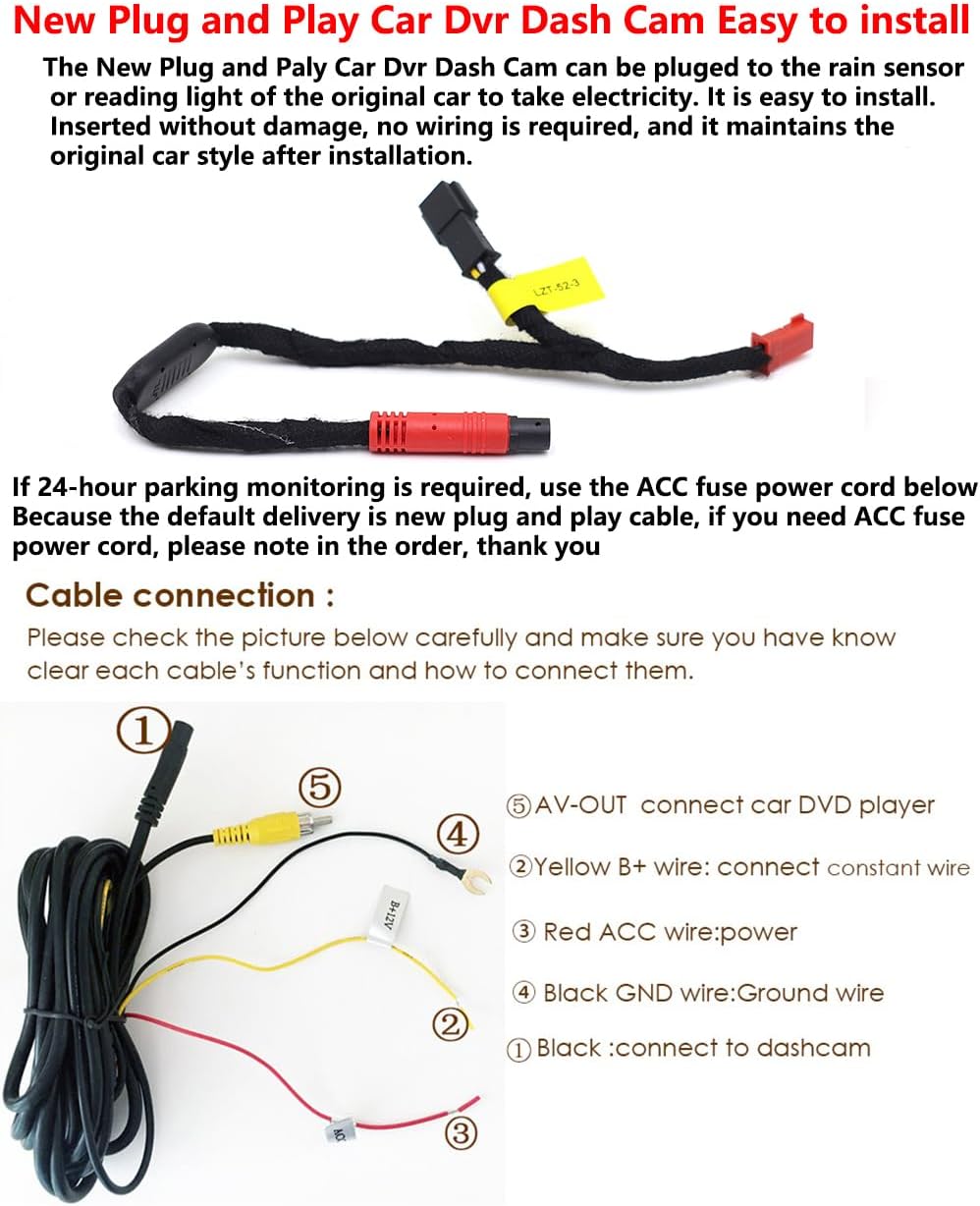
Diagram illustrating the various cable connections for the dash cam, including power (Red ACC), constant power (Yellow B+), ground (Black GND), and AV-OUT for connecting to a car DVD player.
Rear Camera Wiring and Mounting
The rear camera provides additional recording coverage. It can be mounted on the rear windshield or positioned to face the cabin.

Visual guide for routing the rear camera cable from the front cam to the rear, and examples of mounting the rear camera on the rear windshield or facing the vehicle's interior.
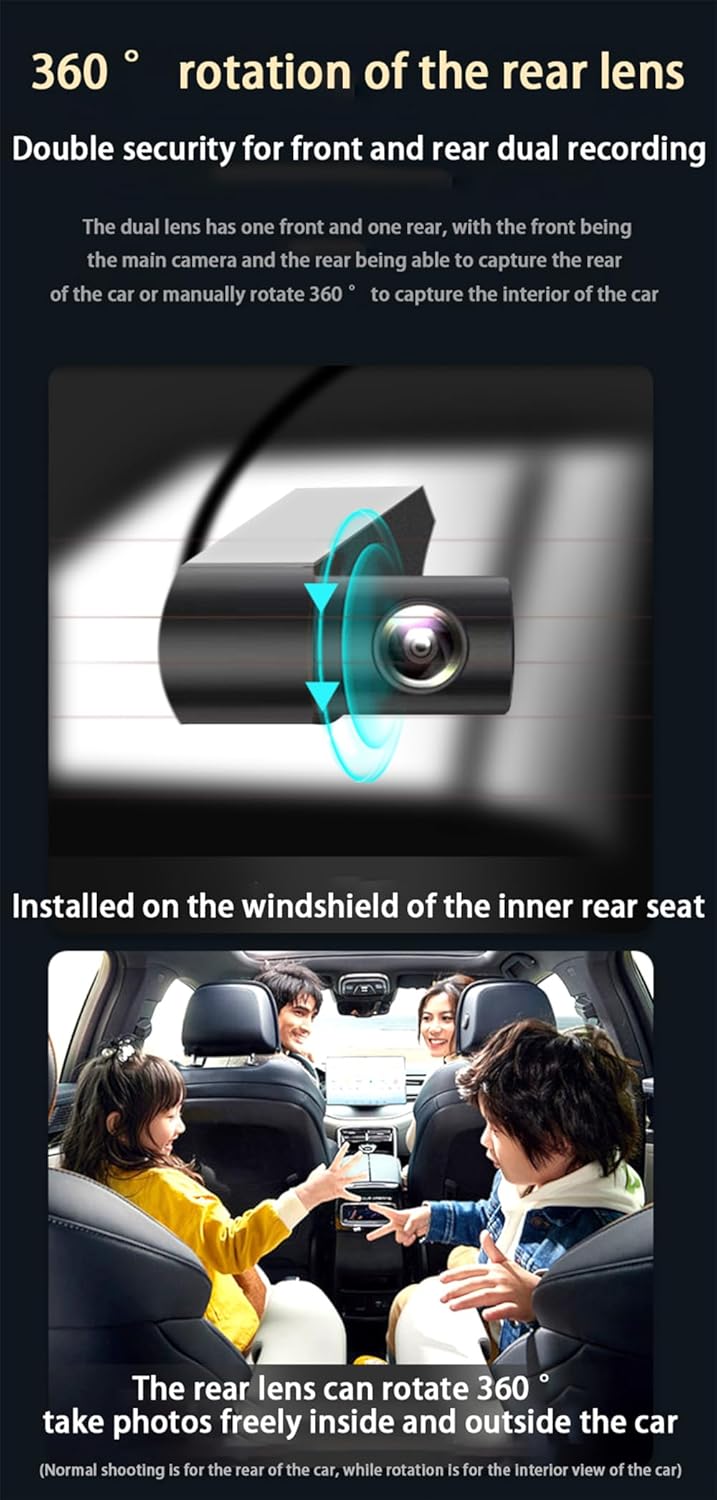
Demonstration of the rear camera's 360-degree rotation capability, allowing it to capture footage both outside the rear of the car and inside the cabin.
Operating Instructions
Initial Setup and App Connection
The dash cam is designed for ease of use. After installation, you can connect to the built-in WiFi and use the Viidure APP on your smartphone. This allows for live preview of recordings, management of video files, and quick downloads of important footage. It is not necessary to maintain a continuous WiFi connection after initial setup and configuration.
Recording Features
- Loop Recording: The camera automatically overwrites the oldest footage when the microSD card is full. It supports cards up to 256GB.
- G-Sensor: In the event of a sudden collision, the integrated G-Sensor will trigger the dash cam to automatically record and lock the current video. This prevents the footage from being overwritten, ensuring critical evidence is preserved.
- High-Quality Video: Records in 2160P/30fps, capturing clear and detailed video.
- Night Vision: Enhanced night vision capabilities ensure clear recordings even in low-light environments.
Viewing Footage
Footage can be viewed directly on your phone via the Viidure APP or by inserting the MicroSD card into a computer.
Maintenance
To ensure optimal performance and longevity of your AutoBora Dash Cam, follow these general maintenance guidelines:
- Regularly check that the dash cam is securely mounted and not obstructing your view.
- Keep the lens clean from dust and smudges using a soft, lint-free cloth.
- Periodically format the microSD card (at least once a month) to maintain its performance and prevent data corruption. Back up any important footage before formatting.
- Ensure the dash cam operates within its specified temperature range of -20°C to 85°C. Avoid prolonged exposure to extreme temperatures.
- Do not attempt to disassemble or repair the device yourself. Refer to qualified service personnel if issues arise.
Troubleshooting
If you encounter any issues with your AutoBora Dash Cam, please refer to the following common troubleshooting steps:
- Device not powering on: Ensure the power cable is securely connected to both the dash cam and the vehicle's power source. Check the vehicle's fuse box if necessary.
- Recording issues: Verify that a compatible microSD card is inserted correctly and has sufficient free space. Try formatting the card. If issues persist, try a different microSD card.
- Poor video quality: Clean the camera lens. Ensure the dash cam is securely mounted and not vibrating. Check settings in the Viidure APP to confirm resolution is set to 2160P.
- WiFi connection problems: Ensure the dash cam's WiFi is enabled. Restart both the dash cam and your smartphone. Try reconnecting through the Viidure APP.
- G-Sensor not triggering: Check the G-Sensor sensitivity settings in the app. Ensure the dash cam firmware is up to date.
For further assistance, please contact customer support.
Technical Specifications
| Feature | Specification |
|---|---|
| Product Dimensions | 8 x 8 x 8 inches |
| Connectivity Technologies | Wi-Fi |
| Special Features | Loop Recording, Built-In WiFi, G-Sensor, App Control, Built-In Microphone |
| Other Display Features | Wireless |
| Color | Model A |
| Manufacturer | AutoBora |
| Model Name | Dash Cam |
| Orientation | Front and Rear |
| Vehicle Service Type | Car |
| Video Capture Resolution | 2160p |
| Mounting Type | Rearview Mirror Mount |
| Operating Temperature | -20°C to 85°C |
Warranty and Support
AutoBora is committed to innovation and quality, providing reliable products for safe driving. We offer a one-year warranty on this product. For any queries or technical assistance, please do not hesitate to reach out to our customer service team, available 24/7.