
1. Introduction
The Sunorshop H95 Health Fitness Tracker Smart Watch is designed to assist you in monitoring your health and fitness activities. It features a 1.47-inch HD color display, 24/7 heart rate, blood pressure, and blood oxygen monitoring, over 120 sport modes, sleep tracking, and an IP68 waterproof rating. This manual provides detailed instructions for setting up, operating, maintaining, and troubleshooting your device.

Image 1.1: The Sunorshop H95 Health Fitness Tracker Smart Watch with its sleek design.
2. What's in the Box
Please verify that all items are present in the package:
- Smart Watch (1 unit)
- Charging Cable (1 unit)
- User Manual (1 unit)
3. Setup Guide
3.1 Initial Charging
Before first use, fully charge your smartwatch. Connect the provided charging cable to the charging port on the back of the watch and plug the USB end into a power adapter (not included) or a computer's USB port. A full charge typically takes approximately 1.5 hours.

Image 3.1: The smartwatch displaying battery information and charging details.
3.2 App Download and Pairing
- Download the Companion App: Search for the official companion app (refer to the packaging or quick start guide for the specific app name) on the Apple App Store (for iOS devices) or Google Play Store (for Android devices). The watch is compatible with smartphones running Android 5.0 or iOS 10.0 and above, featuring Bluetooth 5.0.
- Enable Bluetooth: Ensure Bluetooth is enabled on your smartphone.
- Open the App: Launch the companion app and follow the on-screen instructions to create an account and set up your profile.
- Pair the Device: Within the app, navigate to the device pairing section. Select your Sunorshop H95 from the list of available devices. Confirm the pairing request on both your smartphone and the smartwatch.
3.3 Watch Face Customization
After successful pairing, you can customize the watch face through the companion app. Choose from various pre-installed designs or create your own personalized display style.
4. Operating Instructions
4.1 Navigating the Display
The smartwatch features a responsive touchscreen display. Swipe left, right, up, or down to access different functions and information. Tap on icons to select options or view details.
4.2 Health Monitoring
The Sunorshop H95 provides comprehensive health monitoring features:
- Heart Rate: Monitors your heart rate continuously throughout the day. View real-time data and historical trends in the app.
- Blood Pressure: Measures your blood pressure. (Note: This device is for reference only and not intended for medical use.)
- Blood Oxygen (SpO2): Tracks your blood oxygen levels.
- Sleep Tracking: Automatically monitors your sleep patterns, including deep sleep, light sleep, and awake times. Access detailed sleep analysis in the app to help optimize your rest.
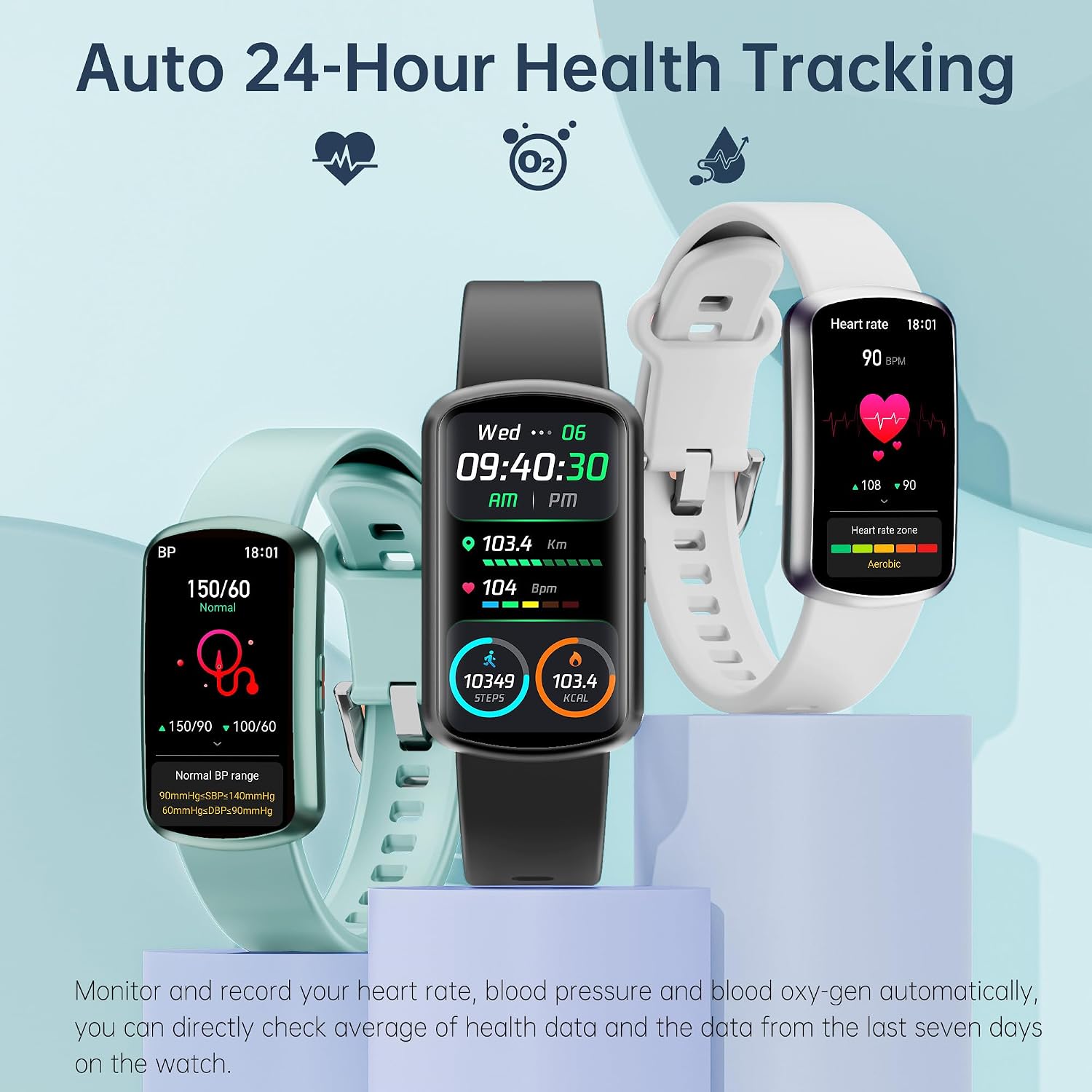
Image 4.1: The smartwatch interface showing 24-hour health tracking data.

Image 4.2: The smartwatch monitoring sleep status, showing deep and light sleep data.
4.3 Activity and Sport Modes
Track your daily activities such as steps taken, calories burned, and distance walked. The watch includes over 120 built-in sport modes to accurately record data for various exercises. Select the appropriate sport mode before starting your workout for precise tracking.

Image 4.3: The smartwatch highlighting its 120+ sport modes and activity tracking.
4.4 Smart Functions
The smartwatch offers various practical functions to enhance your daily life:
- Notifications: Receive instant alerts for incoming calls, text messages, and app notifications directly on your wrist.
- Weather Updates: Get current weather forecasts.
- Music Control: Control music playback on your connected smartphone.
- Alarm Clock: Set alarms for reminders.
- Shutter Control: Remotely control your smartphone camera.
- Reminders: Includes hydration alerts and sedentary reminders.
- Menstrual Cycle Tracking: Provides reminders and tracking for menstrual cycles.

Image 4.4: The smartwatch showing its menstrual cycle tracking feature.
5. Maintenance
5.1 Water Resistance
The Sunorshop H95 has an IP68 waterproof rating, meaning it can withstand water droplets, sweat, and can be used normally while swimming. Avoid prolonged submersion in hot water or exposure to high-pressure water streams.
5.2 Cleaning
To clean your smartwatch, gently wipe the screen and band with a soft, damp cloth. Avoid using harsh chemicals or abrasive materials that could damage the device.
5.3 Battery Life and Charging
The device offers approximately 5-7 days of battery life with typical usage and up to 15 days on standby. Charge the watch using the provided magnetic charging cable. Ensure the charging pins align correctly with the watch's charging contacts.
6. Troubleshooting
If you encounter issues with your Sunorshop H95 smartwatch, consider the following common solutions:
- Device Not Turning On: Ensure the watch is fully charged. Connect it to the charger for at least 30 minutes.
- Connectivity Issues: Verify that Bluetooth is enabled on your smartphone and the watch is within range. Try restarting both the watch and your phone. Ensure the companion app is updated to the latest version.
- Inaccurate Readings: Ensure the watch is worn snugly on your wrist, about one finger's width above the wrist bone. Clean the sensor on the back of the watch. Environmental factors and individual physiology can affect sensor accuracy.
- App Syncing Problems: Close and reopen the companion app. Check your phone's internet connection.
- Screen Unresponsive: Try restarting the watch by pressing and holding the side button (if available) or by connecting it to the charger.
If problems persist, refer to the support section or contact customer service.
7. Specifications
| Feature | Detail |
|---|---|
| Model Name | H95 |
| Screen Size | 1.47 Inches |
| Display Type | LED |
| Resolution | 320 x 320 or higher |
| Operating System | Android Wear 2.9, iOS Wear |
| Connectivity Technology | Bluetooth 5.0 |
| Battery Capacity | 200 Milliamp Hours |
| Battery Average Life | 5-7 days (usage dependent) |
| Battery Charge Time | 1.5 Hours |
| Water Resistance Level | IP68 Waterproof (1.5 Meters) |
| Memory Storage Capacity | 169 MB |
| Item Weight | 0.2 Pounds |
| Item Dimensions | 9.9 x 0.8 x 0.6 inches |
| Supported Application | Find My Phone, Fitness Tracker, Heart Rate, Blood Pressure, Blood Oxygen Monitor, Sleep Monitor |
| Sport Type | Multi-Sports (120+ modes) |
| GPS | GPS Via Smartphone |
8. Warranty and Support
8.1 Warranty Information
The Sunorshop H95 Health Fitness Tracker Smart Watch comes with a 1-Year Standard/Full Warranty. Please retain your proof of purchase for warranty claims.
8.2 Customer Support
For further assistance, technical support, or warranty inquiries, please refer to the contact information provided on the product packaging or the official Sunorshop website.