
sheeshay ZZSSXX0436
Power Supply Board Instruction Manual
Model: BN44-00427A / BN44-00427B
Introduction
This manual provides essential information for the proper installation, operation, and maintenance of your BN44-00427A / BN44-00427B Power Supply Board. This board is designed as a replacement component for specific television models, including UN40D6400UF, UN46D6400UF, and UN46D7000LF. Please read this manual thoroughly before attempting any installation or repair to ensure safety and optimal performance.
Safety Information
Working with electronic components, especially power supply units, can be hazardous. Always observe the following safety precautions:
- Disconnect Power: Always ensure the television is completely unplugged from the AC power outlet before beginning any work on the power supply board.
- Discharge Capacitors: Power supply boards contain large capacitors that can store dangerous electrical charges even after being unplugged. Allow sufficient time for capacitors to discharge or use appropriate tools to safely discharge them.
- Static Electricity: Use anti-static precautions (e.g., anti-static wrist strap, mat) to prevent damage to sensitive electronic components from electrostatic discharge (ESD).
- Professional Installation Recommended: If you are not experienced with electronics repair, it is highly recommended to seek assistance from a qualified technician.
- Inspect for Damage: Before installation, visually inspect the new board for any signs of physical damage.
Setup and Installation
This section outlines the general steps for replacing the power supply board. Specific disassembly and reassembly procedures for your TV model may vary. Refer to your television's service manual for detailed instructions.
Pre-installation Checks:
- Verify that the new power supply board (BN44-00427A / BN44-00427B) matches the original board in your television. Check model numbers and connector layouts.
- Ensure you have the necessary tools, including screwdrivers, anti-static wrist strap, and possibly a multimeter.
Installation Steps:
- Power Disconnection: Unplug the television from the wall outlet.
- Access Panel Removal: Carefully remove the back panel of the television to expose the internal components.
- Locate Old Board: Identify the existing power supply board. It is typically the largest board with numerous capacitors and transformers.
- Disconnect Cables: Gently disconnect all cables and connectors attached to the old power supply board. Take note of their positions or take photos for reassembly.
- Remove Old Board: Unscrew and carefully remove the old power supply board from the television chassis.
- Install New Board: Position the new BN44-00427A / BN44-00427B board in place and secure it with the screws.
- Reconnect Cables: Reconnect all cables and connectors to the new board, ensuring they are firmly seated. Double-check all connections.
- Test (Optional): Before reattaching the back panel, you may perform a preliminary power-on test. Be extremely cautious as internal components will be exposed.
- Reassemble: Carefully reattach the back panel of the television.
- Final Power-On: Plug the television back into the AC outlet and power it on to confirm proper operation.

Image 1: Top view of the BN44-00427A BN44-00427B Power Supply Board, showing its overall layout with various components like capacitors, transformers, and heatsinks. This is the main view of the replacement part.

Image 2: A close-up view of the power supply board, highlighting the label with "MODEL: PD46B2_BDY" and "CODE: BN44-00427B REV 1.4 2011.06.28". This label is crucial for verifying the correct board model.

Image 3: Detailed view of several multi-pin connectors on the power supply board, labeled with codes like CNL801B, CNL801A, JP871, and JP869. These connectors are where various cables from other TV components attach.
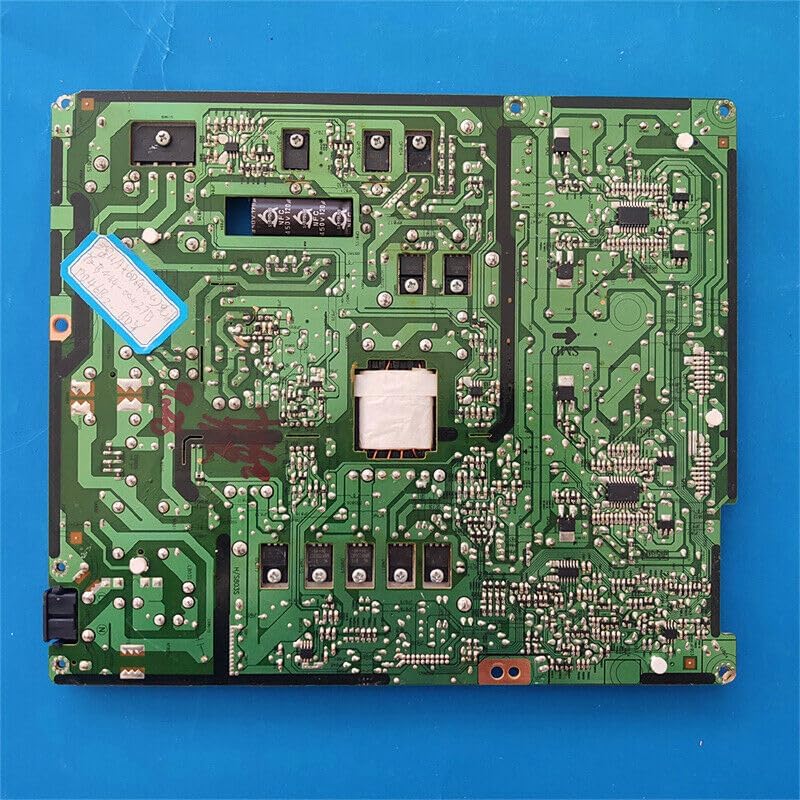
Image 4: The underside of the power supply board, revealing the intricate green circuit traces and solder points. This view shows the complexity of the board's internal wiring.
Operating
The BN44-00427A / BN44-00427B Power Supply Board is a critical component responsible for converting AC power from the wall outlet into the various DC voltages required by the television's internal circuits, including the main board, backlight, and audio components. Once properly installed, the board operates automatically when the television is connected to power and turned on.
Proper operation is indicated by the television powering on, displaying an image, and producing sound as expected. There are no user-adjustable settings on the power supply board itself.
Maintenance
The power supply board itself requires minimal maintenance. However, general care for your television can help prolong the life of all its components, including the power supply board.
- Dust Removal: Periodically clean the interior of the television (when unplugged and safely opened) to remove dust buildup, which can impede cooling and lead to overheating of components. Use compressed air or a soft brush.
- Ventilation: Ensure the television's ventilation openings are not blocked to allow for proper airflow and heat dissipation.
- Stable Power: Connect the television to a stable power source. Consider using a surge protector to guard against power fluctuations.
- Storage: If storing the television, ensure it is in a dry, temperature-controlled environment, away from extreme heat, cold, or humidity.
Troubleshooting
If your television experiences issues after replacing the power supply board, consider the following troubleshooting steps:
| Problem | Possible Cause | Solution |
|---|---|---|
| TV does not power on (no lights, no sound) | Loose power cable, faulty wall outlet, incorrect board installation, or other TV component failure. | Check power cable connection. Test wall outlet with another device. Re-check all cable connections on the new power supply board. Ensure all screws are tightened. |
| TV powers on but no picture/sound | Incorrect cable connections, faulty main board, or backlight issues (not directly power supply board). | Verify all ribbon cables and power cables are correctly and securely connected to the power supply board and other components. |
| Intermittent power or flickering | Loose connections, unstable power source, or a defect in the new board. | Ensure all connections are tight. Try a different power outlet. If issues persist, the board may be faulty. |
If troubleshooting steps do not resolve the issue, it is advisable to consult a professional electronics repair technician. Do not attempt further repairs if you are unsure, as this could cause further damage or personal injury.
Specifications
- Model Numbers: BN44-00427A, BN44-00427B
- Compatible TV Models: UN40D6400UF, UN46D6400UF, UN46D7000LF
- Manufacturer: sheeshay
- Part Number: ZZSSXX0436
- Type: Power Supply Board (PSU)
Warranty and Support
For information regarding warranty coverage, returns, or technical support for your BN44-00427A / BN44-00427B Power Supply Board, please refer to the documentation provided at the time of purchase or contact the seller directly. Keep your purchase receipt or order details handy when contacting support.