1. Introduction
This manual provides comprehensive instructions for the installation, operation, and maintenance of the Generic Tuya 8-in-1 AC Energy Meter, Model FHC 302L. This device is designed to monitor various electrical parameters including voltage, current, power, timing, electrical energy consumption, temperature, frequency, and power factor. It features a digital color display for clear data visualization and includes a relay breaker for protection functions. Please read this manual thoroughly before using the product to ensure safe and efficient operation.
2. Safety Information
Warning: Electrical installation should only be performed by qualified personnel. Disconnect all power before installation, wiring, or maintenance to prevent electric shock or damage to the device.
- Ensure the power supply is completely disconnected before handling the device.
- Verify all wiring connections are correct and secure according to the provided diagrams. Incorrect wiring can lead to device malfunction, fire, or electric shock.
- Do not exceed the specified voltage (170-270V) and current (63A) ratings to avoid damage to the meter and connected circuits.
- Install the device in a dry, well-ventilated area, away from direct sunlight, high temperatures, and corrosive gases.
- Do not disassemble or modify the device. Unauthorized modifications will void the warranty and may pose safety risks.
3. Product Overview
3.1. Features
- 8-in-1 Measurement: Monitors Voltage (V), Current (A), Power (kW), Timing (Hrs), Electrical Energy (Kwh), Temperature (℃), Frequency (Hz), and Power Factor (PF).
- Digital Color Display: High-definition interface for clear and precise data display.
- Relay Breaker Function: Integrated relay for automatic power cut-off based on configurable protection settings.
- Power Failure Memory: Retains data and settings even after a power outage.
- Protection Functions: Supports over-voltage, under-voltage, over-current, over-power, over-temperature, and timer power-off protections.
- DIN Rail Installation: Standard guide rail mounting for easy and secure installation without screws.
- No Wi-Fi Connectivity: This specific model (FHC 302L / KWS-302L) does not include Wi-Fi functionality or app control.
3.2. Components
The product consists of the main energy meter module, designed for DIN rail mounting.
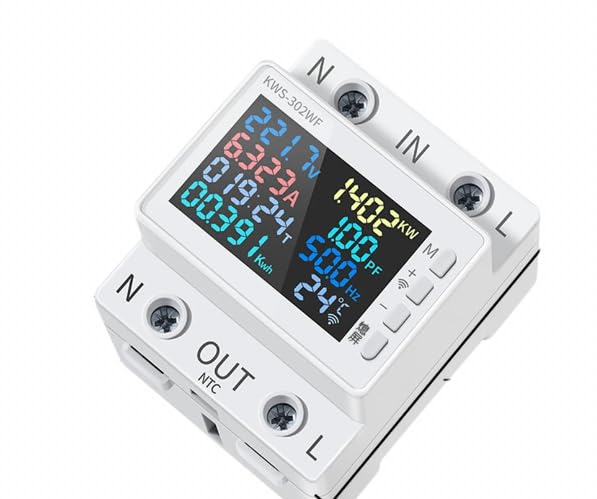
Image Description: Front view of the energy meter, showing the digital color display with various electrical parameters (voltage, current, power, energy, frequency, temperature, power factor) and input/output terminals labeled 'N' and 'L'. Note: This image may show the KWS-302WF model, but the FHC 302L (KWS-302L) shares the same physical appearance and dimensions, differing in Wi-Fi functionality.
4. Setup and Installation
4.1. Dimensions

Image Description: Diagram illustrating the physical dimensions of the energy meter in millimeters. The device measures approximately 65.6mm in width, 78.8mm in length, and 82mm in height (including terminals). These dimensions are standard for DIN rail mounting.
4.2. Mounting
The FHC 302L energy meter is designed for standard DIN rail installation. Simply clip the device onto a compatible DIN rail. No screws are required for mounting, making installation quick and easy.

Image Description: This image shows the standard DIN rail mounting process and a simplified wiring diagram. The top terminals are for input (N and L), and the bottom terminals are for output (N and L). The device securely clips onto the DIN rail.
4.3. Wiring
Follow these steps for safe and correct wiring:
- Disconnect Power: Ensure the main power supply to the circuit is completely turned off before starting any wiring.
- Input Connection: Connect the incoming Neutral (N) wire to the top-left terminal labeled 'N IN'. Connect the incoming Live (L) wire to the top-right terminal labeled 'L IN'.
- Output Connection: Connect the outgoing Neutral (N) wire to the bottom-left terminal labeled 'N OUT'. Connect the outgoing Live (L) wire to the bottom-right terminal labeled 'L OUT'.
- Secure Connections: Tighten all terminal screws firmly to ensure good electrical contact and prevent loose connections.
- Restore Power: Once all connections are secure and verified, restore power to the circuit. The meter's display should illuminate.
5. Operating Instructions
5.1. Display Information
The digital color display provides real-time readings of various electrical parameters:
- Voltage (V): Displays the current AC voltage.
- Current (A): Shows the current flowing through the circuit.
- Power (kW): Indicates the instantaneous active power consumption.
- Electrical Energy (Kwh): Accumulates total energy consumption. This value is retained even after power loss.
- Timing (Hrs): Measures the total operating time of the device.
- Temperature (℃): Displays the internal temperature of the device or ambient temperature.
- Frequency (Hz): Shows the AC power frequency.
- Power Factor (PF): Indicates the power factor of the load.
5.2. Button Functions
The device features two buttons on the right side of the display, typically used for navigation and setting parameters. The symbols '开' (Open) and '关' (Close) next to the buttons indicate their primary function for controlling the integrated relay.
- Short Press: Cycle through different display modes (e.g., voltage, current, power, etc.).
- Long Press: Enter settings mode for protection parameters or to reset accumulated data (refer to specific on-screen prompts).
- Relay Control: The buttons can manually open or close the relay, effectively turning the connected load on or off.
5.3. Protection Functions (Model FHC 302L / KWS-302L)
The FHC 302L model includes robust protection features that automatically trip the integrated relay to cut off power when abnormal conditions are detected. These settings are configurable via the device's buttons.

Image Description: A table detailing the features of the KWS-302L model (equivalent to FHC 302L). It confirms 'Yes' for Power failure memory, Under-voltage protection, and Over-voltage protection, and 'None' for Wi-Fi functionality.
- Over-voltage Protection: Automatically disconnects power if the voltage exceeds a set maximum threshold.
- Under-voltage Protection: Automatically disconnects power if the voltage drops below a set minimum threshold.
- Over-current Protection: Disconnects power if the current exceeds a set maximum limit.
- Over-power Protection: Disconnects power if the total power consumption exceeds a set maximum limit.
- Over-temperature Protection: Disconnects power if the device's internal temperature exceeds a safe operating limit.
- Timer Power-off Protection: Allows setting a timer for automatic power disconnection.
- Screen Hibernation: Configurable setting to dim or turn off the display after a period of inactivity to save energy.
6. Specifications

Image Description: A detailed table comparing the specifications of KWS-302WF, KWS-302L (FHC 302L), and KWS-302 models. The FHC 302L (KWS-302L) column highlights its specific parameters and features, including the absence of Wi-Fi.
| Parameter | Value (Model FHC 302L / KWS-302L) |
|---|---|
| Model Number | FHC 302L (KWS-302L) |
| Voltage Range | 170-270V AC |
| Current Range | 0-63A |
| Power Range | 0-17KW |
| Timing Range | 0-999 Hours |
| Electricity Measurement Range | 0-9999 Kwh |
| Temperature Range | -20 to 150 ℃ |
| Frequency Range | 50-60Hz |
| Power Factor | 0.00-1.00PF |
| Power Failure Memory | Yes |
| Under-voltage Protection | Yes |
| Over-voltage Protection | Yes |
| Wi-Fi Connectivity | No |
| Item Size | 66 x 66 x 82 mm (approx.) |
| Material | ABS + PC + VO |
7. Maintenance
The FHC 302L energy meter requires minimal maintenance. Follow these guidelines:
- Cleaning: Use a soft, dry cloth to clean the device's exterior. Do not use abrasive cleaners, solvents, or liquids that could damage the display or internal components.
- Inspection: Periodically check the wiring connections to ensure they remain tight and free from corrosion.
- Environment: Ensure the operating environment remains within the specified temperature and humidity ranges to prolong the device's lifespan.
8. Troubleshooting
If you encounter issues with your FHC 302L energy meter, refer to the following common problems and solutions:
- No Display:
- Check if the power supply is connected and active.
- Verify that the input 'N' and 'L' wires are correctly and securely connected.
- Incorrect Readings:
- Ensure the input and output wiring is correct and not reversed.
- Confirm the load is within the specified operating ranges (170-270V, 0-63A).
- Relay Trips Unexpectedly:
- Check if any of the protection thresholds (over-voltage, under-voltage, over-current, over-power, over-temperature) have been exceeded. Adjust settings if necessary.
- Verify the connected load is not faulty or drawing excessive power.
- Buttons Unresponsive:
- Ensure the device is powered on.
- If the screen is in hibernation mode, a short press might wake it up.
If the problem persists after attempting these solutions, please contact the seller or a qualified electrician for assistance.
9. Warranty and Support
This product is sold under the 'Generic' brand. Standard consumer warranty rights apply as per local regulations. For specific warranty details, technical support, or service inquiries, please contact your point of purchase or the seller directly. Keep your purchase receipt as proof of purchase.


