
TURBO CHALLENGE Elite Drone MKX (400318)
TURBO CHALLENGE Elite Drone MKX User Manual
Model: Elite Drone MKX (400318)
1. Product Overview
The TURBO CHALLENGE Elite Drone MKX is a compact, radio-controlled drone designed for recreational flight. It offers an engaging flying experience for users aged 8 and above, suitable for both indoor and outdoor environments.
This drone features a 2.4 GHz remote control with a range of up to 50 meters and can achieve speeds of up to 20 km/h. It is equipped with two 3.7V rechargeable batteries for extended flight time and includes a USB charger for convenient power replenishment.

Image 1.1: The Elite Drone MKX, its remote control, and a smartphone displaying the drone's camera feed.
2. Safety Information
Please read and understand all safety warnings before operating the drone to ensure safe use and prevent damage.
- Packaging: Remove all ties and packaging elements before giving the toy to a child.
- Battery Installation: Batteries must be installed and replaced by an adult. We recommend the use of alkaline batteries for the remote control.
- Battery Storage: Remove batteries from the toy if it will not be used for a long period.
- Battery Disposal: Do not dispose of batteries in fire.
- Charging: Connect the toy to the included USB cable for charging, then plug the other end into a USB output.
- Environment: Do not play in sand or water to protect circuits and prevent short-circuits, overheating, and device failure.
- Weather Conditions: Do not use the toy in adverse weather conditions (thunder, rain, snow, frost) or in extreme heat. Do not wet the toy.
- Antenna: Do not bend the antenna.
- Interference: Interference may be caused by the presence of another toy, remote control, high-voltage lines, TV or radio antennas, metal fences or barriers, or reinforced concrete buildings.
- Malfunction: In case of malfunction, do not disassemble or modify the toy.
3. Package Contents
Verify that all items listed below are included in your package:
- 1 x Elite Drone MKX (Model 400318)
- 1 x 2.4 GHz Remote Control
- 2 x 3.7V Rechargeable Drone Batteries
- 1 x USB Charging Cable
- Propeller Protections (if included, based on image)
- Transport Case (if included, based on image)
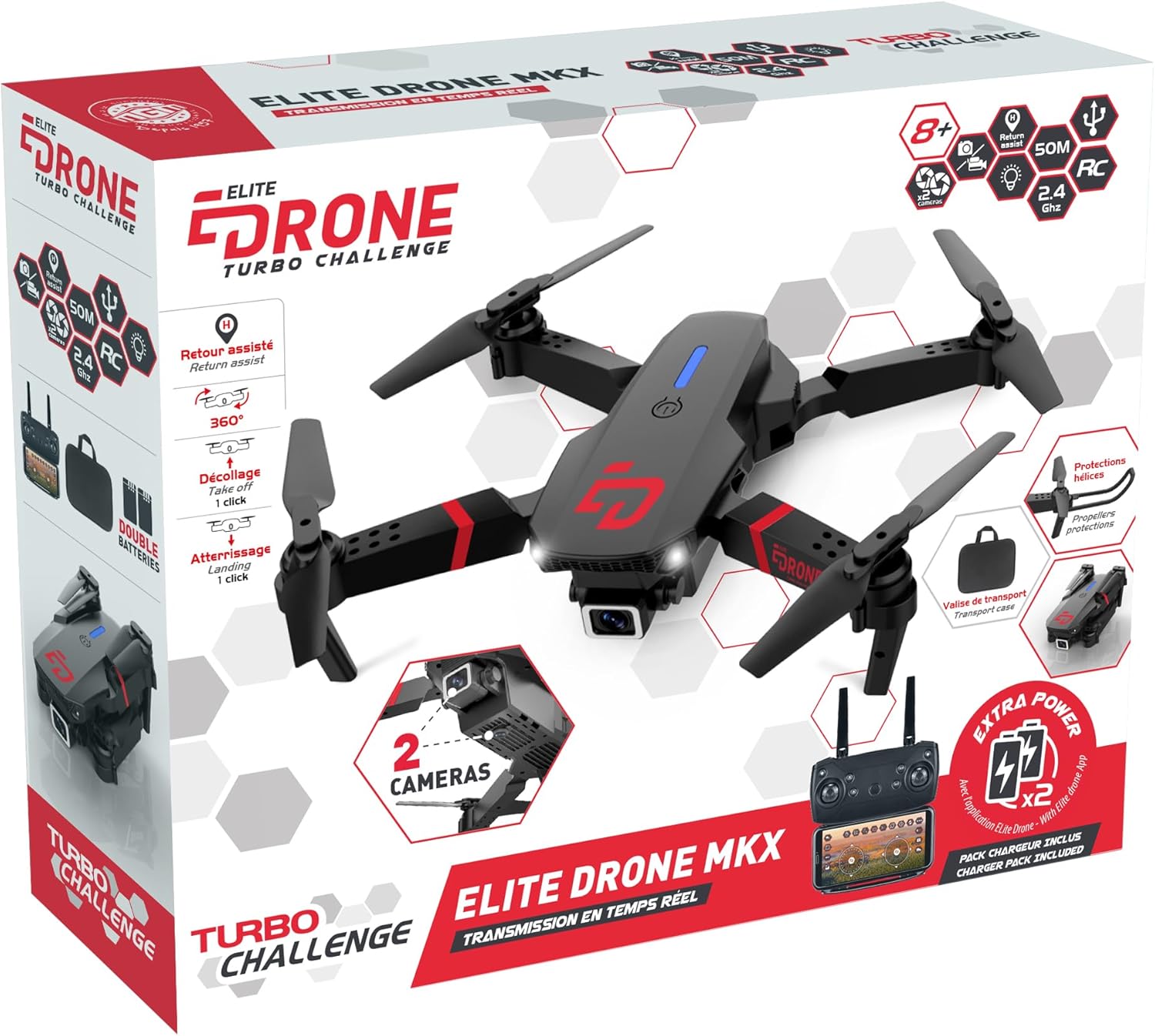
Image 3.1: The Elite Drone MKX and its included accessories as packaged.
4. Product Components
Familiarize yourself with the main parts of the drone and remote control.

Image 4.1: Key features and components of the Elite Drone MKX, including its dual cameras and flight assist functions.
Drone Components:
- Propellers: Four rotating blades for lift and propulsion.
- Motors: Drive the propellers.
- Cameras: Two integrated cameras for photo and video capture (0.3 MP resolution).
- Battery Compartment: Located on the underside for the drone's rechargeable battery.
- LED Lights: Indicate drone status and aid visibility.
- Propeller Protections: Optional guards to prevent damage to propellers.
Remote Control Components:
- Control Sticks: Left stick for throttle/yaw, right stick for pitch/roll.
- Power Button: To turn the remote on/off.
- Function Buttons: For features like one-key takeoff/landing, return assist, 360° flip, and camera controls.
- Smartphone Holder: To mount a smartphone for FPV (First Person View) via Wi-Fi.
- Battery Compartment: For AA batteries.
5. Setup
5.1. Charging the Drone Battery
- Locate the battery compartment on the underside of the drone.
- Carefully remove the drone battery.
- Connect the drone battery to the included USB charging cable.
- Plug the USB charging cable into a standard USB power source (e.g., computer USB port, USB wall adapter).
- The charging indicator light on the USB cable will show the charging status (e.g., red for charging, off/green for fully charged).
- A full charge takes approximately 60 minutes. Do not overcharge.
- Once fully charged, disconnect the battery and reinsert it into the drone's battery compartment, ensuring it is securely latched.

Image 5.1: Underside of the drone, indicating the battery compartment.
5.2. Installing Remote Control Batteries
- Open the battery compartment on the back of the remote control.
- Insert three (3) AA alkaline batteries (not included), ensuring correct polarity (+/-).
- Close the battery compartment securely.
5.3. Propeller Protection Installation (Optional)
For added safety and protection, you can attach the propeller guards.
- Identify the four propeller protection frames.
- Align each protection frame with the corresponding arm of the drone.
- Gently snap the protection frames into place until they are secure.
6. Operating Instructions
6.1. Pairing the Remote Control
- Place the drone on a flat, level surface.
- Turn on the drone by pressing its power button. The drone's lights will blink.
- Turn on the remote control.
- Push the left control stick (throttle) all the way up, then all the way down. The drone's lights will stop blinking and become solid, indicating successful pairing.
6.2. Takeoff and Landing
- One-Key Takeoff: After pairing, press the one-key takeoff button on the remote control. The drone will automatically ascend to a stable hovering height.
- Manual Takeoff: After pairing, slowly push the left control stick (throttle) upwards. The propellers will spin, and the drone will ascend.
- One-Key Landing: During flight, press the one-key landing button. The drone will automatically descend and land gently.
- Manual Landing: Slowly pull the left control stick (throttle) downwards. The drone will descend. Once it lands, release the stick.
6.3. Basic Flight Controls
- Ascend/Descend: Push the left control stick (throttle) up to ascend, pull down to descend.
- Turn Left/Right (Yaw): Push the left control stick left to turn left, push right to turn right.
- Forward/Backward (Pitch): Push the right control stick up to fly forward, pull down to fly backward.
- Left/Right Sideways (Roll): Push the right control stick left to fly left, push right to fly right.
Image 6.1: The remote control for the Elite Drone MKX, illustrating control stick positions.
6.4. Advanced Features
- 360° Flip: Press the 360° flip button, then push the right control stick in the desired direction (forward, backward, left, or right) to perform a flip.
- Return Assist: Press the return assist button. The drone will attempt to fly back towards its takeoff point. Note: This feature is not GPS-based and relies on the drone's last known orientation.
- Camera Operation (Photos/Videos):
- Download and install the dedicated app (refer to packaging or quick start guide for app name/QR code).
- Connect your smartphone to the drone's Wi-Fi network (usually named "Drone_XXXXXX").
- Open the app to view the live camera feed.
- Use the app or designated buttons on the remote to take photos or start/stop video recording.
7. Maintenance
- Cleaning: Use a soft, dry cloth to clean the drone and remote control. Do not use water or chemical cleaners.
- Propeller Inspection: Regularly check propellers for damage (bends, cracks). Replace any damaged propellers immediately to ensure stable flight.
- Storage: Store the drone and remote control in a cool, dry place, away from direct sunlight and extreme temperatures. Remove batteries from both the drone and remote if storing for extended periods.
8. Troubleshooting
| Problem | Possible Cause | Solution |
|---|---|---|
| Drone does not respond to remote. | Not paired; Low battery (drone or remote); Out of range; Interference. | Re-pair drone and remote; Charge drone battery, replace remote batteries; Fly within 50m range; Move to an area with less interference. |
| Drone flies erratically or drifts. | Not calibrated on a flat surface; Damaged propellers; Wind interference. | Ensure drone is placed on a flat surface before pairing; Check and replace damaged propellers; Fly in calm conditions. |
| Drone lights are blinking. | Not paired; Low battery. | Perform pairing procedure; Charge drone battery. |
| Camera feed is not working. | Not connected to drone's Wi-Fi; App not open or crashed. | Ensure smartphone is connected to the drone's Wi-Fi network; Restart the app and/or drone. |
9. Specifications
| Feature | Detail |
|---|---|
| Brand | TURBO CHALLENGE |
| Model Name | Elite Drone MKX |
| Model Number | 400318 |
| Dimensions (L x W x H) | 19 x 16 x 5 cm |
| Item Weight | 400 g |
| Drone Battery | 2 x 3.7V Rechargeable Batteries (included) |
| Remote Control Battery | 3 x AA Batteries (not included) |
| Charging Time | Approx. 60 minutes |
| Flight Time | Approx. 8 minutes |
| Control Frequency | 2.4 GHz |
| Control Range | Up to 50 meters |
| Max Speed | Up to 20 km/h |
| Camera Resolution | 0.3 MP (for photos and videos) |
| Connectivity | Wi-Fi (for FPV and app control) |
| Skill Level | Beginner |
| Recommended Age | 8 years and up |
10. Warranty and Support
This product is covered by a standard manufacturer's warranty against defects in materials and workmanship. Please retain your proof of purchase for warranty claims.
For technical support, troubleshooting assistance, or warranty inquiries, please contact the TURBO CHALLENGE customer service department. Contact information can typically be found on the product packaging or the manufacturer's official website.
Please note that damage caused by improper use, accidents, unauthorized modifications, or failure to follow the instructions in this manual may void the warranty.