Introduction
This manual provides comprehensive instructions for the AULCMEET BP59-00149A TM2261S Voice Smart Remote Control. This remote is designed as a replacement and is compatible with Samsung The Freestyle SP-LSP3BLAXZA Projector and Smart Theater models, including SP-LSP3BLA, LSP3B, and SPLSP3BLAXZA. Please read this manual carefully before use to ensure proper operation and to maximize your experience.
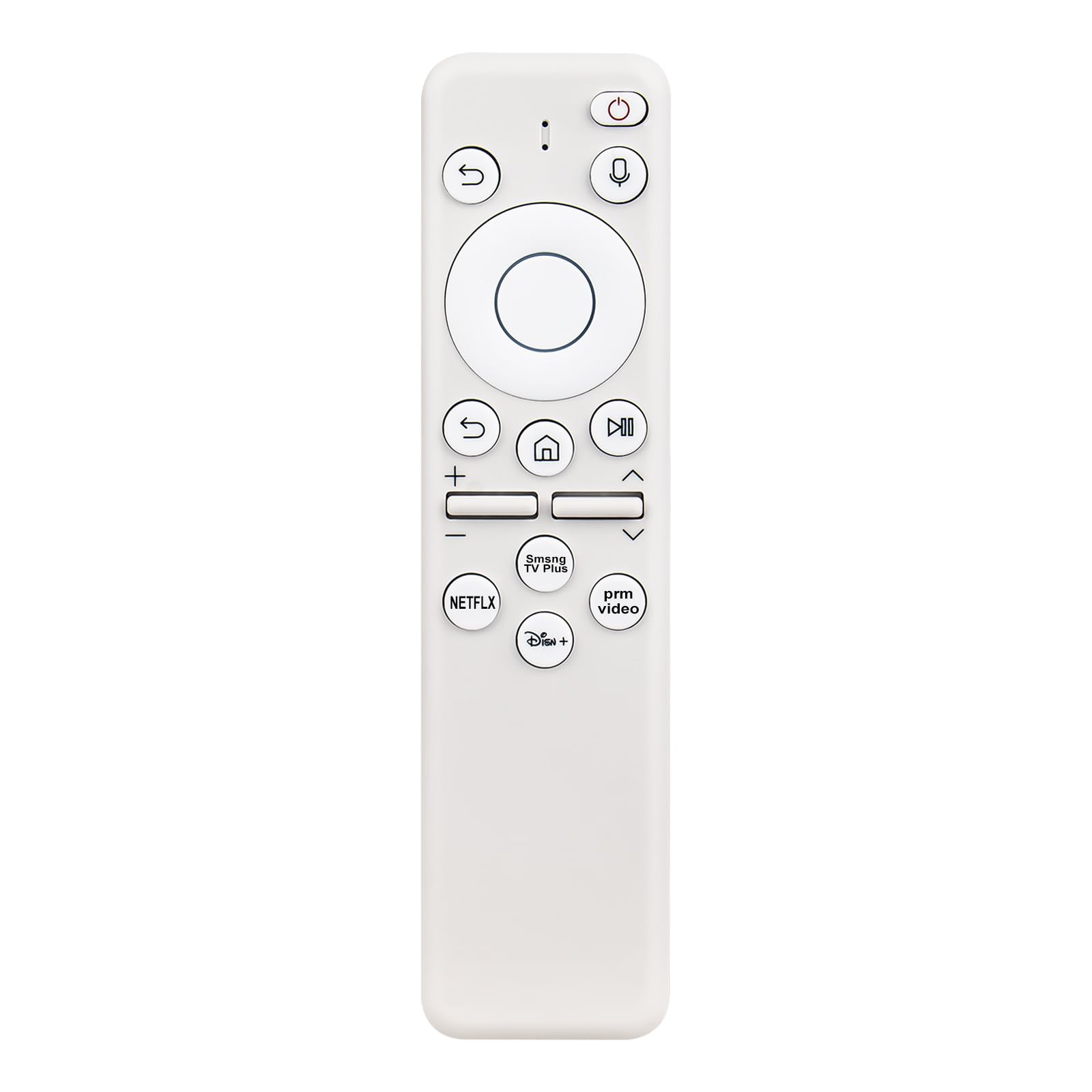
Image: Front view of the AULCMEET BP59-00149A TM2261S Voice Smart Remote Control, white in color, showing its ergonomic design and button layout.
Setup
1. Battery Installation
The remote control requires two AAA batteries (not included). To install the batteries:
- Locate the battery compartment cover on the back of the remote control.
- Slide the cover downwards to open the compartment.
- Insert two AAA batteries, ensuring that the positive (+) and negative (-) terminals align correctly with the indicators inside the compartment.
- Slide the battery cover back into place until it clicks securely.

Image: The back of the remote control with the battery compartment cover removed, showing the empty slots for two AAA batteries.
2. Pairing Instructions
Upon initial power-on of your Samsung The Freestyle Projector, the Smart Remote may pair automatically. If automatic pairing does not occur, or if you are pairing with a new device, follow these manual pairing steps:
- Ensure your Samsung The Freestyle Projector is powered on and in an active state.
- Point the remote control directly at the remote control sensor on your projector.
- Simultaneously press and hold the "Return" button (curved arrow) and the "Play/Pause" button (triangle and two vertical lines) for approximately 3 to 10 seconds.
- Release the buttons when a pairing confirmation message appears on your projector screen. The remote is now paired and ready for use.
Image: The front of the remote control with an overlay indicating to press and hold the Return and Play/Pause buttons for 3-10 seconds to enter pairing mode.
Operating Instructions
Basic Functions
Familiarize yourself with the buttons on your remote control for optimal use:
- Power Button: Turns the projector on or off.
- Voice Assistant Button: Activates the voice control feature (microphone icon).
- Return Button: Navigates back to the previous screen or menu.
- Home Button: Returns to the main home screen of the projector.
- Play/Pause Button: Controls media playback.
- Volume Up/Down: Adjusts the audio volume.
- Channel Up/Down: Changes channels (if applicable to your setup).
- Navigation Ring: Use the directional pad to move through menus and select items. The center button confirms selections.
Voice Control
To use the voice control feature:
- Press and hold the Voice Assistant button (microphone icon).
- Speak clearly into the remote control's microphone.
- Release the button when you have finished speaking. The projector will process your command.
Quick Access Buttons
The remote features dedicated buttons for popular streaming services, allowing for quick access:
- NETFLIX: Launches the Netflix application.
- Samsung TV Plus: Launches the Samsung TV Plus application.
- prm video (Prime Video): Launches the Amazon Prime Video application.
- Disney+: Launches the Disney+ application.

Image: The front of the remote control displaying its full button layout and physical dimensions (15.2 cm / 5.98 in length, 3.9 cm / 1.54 in width).
Maintenance
To ensure the longevity and optimal performance of your remote control:
- Keep the remote control clean by wiping it with a soft, dry cloth. Avoid using abrasive cleaners or solvents.
- Avoid exposing the remote to liquids, high humidity, extreme temperatures, or direct sunlight.
- Do not drop the remote control or subject it to strong impacts.
- If the remote will not be used for an extended period, remove the batteries to prevent potential leakage and damage.
Troubleshooting
- Remote not responding:
- Check if the batteries are installed correctly and have sufficient charge. Replace batteries if necessary.
- Ensure there are no obstructions between the remote control and the projector's sensor.
- Re-attempt the pairing process as described in the 'Pairing Instructions' section.
- Voice control not working:
- Verify that the remote control is properly paired with your projector.
- Speak clearly and directly into the remote's microphone. Minimize background noise.
- Check your projector's settings to ensure voice control is enabled.
Specifications
| Model Number | BP59-00149A TM2261S |
| Brand | AULCMEET |
| Compatible Devices | Samsung The Freestyle SP-LSP3BLAXZA Projector & Smart Theater (SP-LSP3BLA, LSP3B, SPLSP3BLAXZA) |
| Product Dimensions | 6 x 2 x 0.5 inches (15.2 x 5.1 x 1.3 cm) |
| Item Weight | 1.9 ounces (53.9 grams) |
| Color | White |
| Special Feature | Ergonomic, Voice Control |
| Max Number of Supported Devices | 1 |
Warranty and Support
For specific warranty information, return policies, or technical support, please refer to the documentation included with your purchase or contact the retailer or manufacturer directly. Keep your purchase receipt as proof of purchase.


