
1. Introduction
Thank you for choosing the Paddsun DA0137 5-in-1 Handheld Cordless Vacuum and Bug Catcher. This versatile device combines powerful suction and a blower function, making it suitable for various cleaning tasks in your home, car, office, or garden. It also functions as a safe and effective bug catcher. This manual provides essential information for the safe and efficient use of your new device. Please read it thoroughly before operation and retain it for future reference.
2. Safety Information
- Read all instructions before using the appliance.
- Do not use high-power adapters for charging. Use only the provided USB charging cable with a standard 5V USB power source.
- Keep the device away from water or other liquids. Do not immerse the device in water.
- This appliance is not intended for use by persons (including children) with reduced physical, sensory or mental capabilities, or lack of experience and knowledge, unless they have been given supervision or instruction concerning use of the appliance by a person responsible for their safety.
- Do not attempt to disassemble or repair the device yourself. Contact customer support for assistance.
- Ensure the filter is properly installed before use to prevent damage to the motor.
- Do not vacuum hot ashes, burning cigarettes, or sharp objects.
- Empty the dust cup regularly to maintain optimal suction power.
3. Package Contents
Verify that all items listed below are included in your package:
- 1 x Paddsun DA0137 Handheld Cordless Vacuum/Bug Catcher Unit
- 1 x Long Nozzle Attachment
- 1 x Brush Nozzle Attachment
- 1 x Blower Attachment
- 1 x HEPA Filter (pre-installed)
- 1 x USB Charging Cable
- 1 x User Manual

Image: The Paddsun DA0137 handheld cordless vacuum with its various attachments, including the long nozzle, brush nozzle, blower attachment, and USB charging cable.
4. Product Overview
The Paddsun DA0137 features a compact and ergonomic design for easy handling. Key components include:
- Main Unit: Contains the motor, battery, and control buttons.
- Dust Cup: Transparent container for collecting debris and insects.
- HEPA Filter: Located inside the dust cup, filters fine particles.
- Power Button: Activates the vacuum/blower function.
- Charging Port: USB-C port for recharging the device.
- Long Nozzle: For reaching tight spaces and bug catching.
- Brush Nozzle: For cleaning surfaces and dislodging stubborn dirt.
- Blower Attachment: Converts the vacuum into a powerful blower.
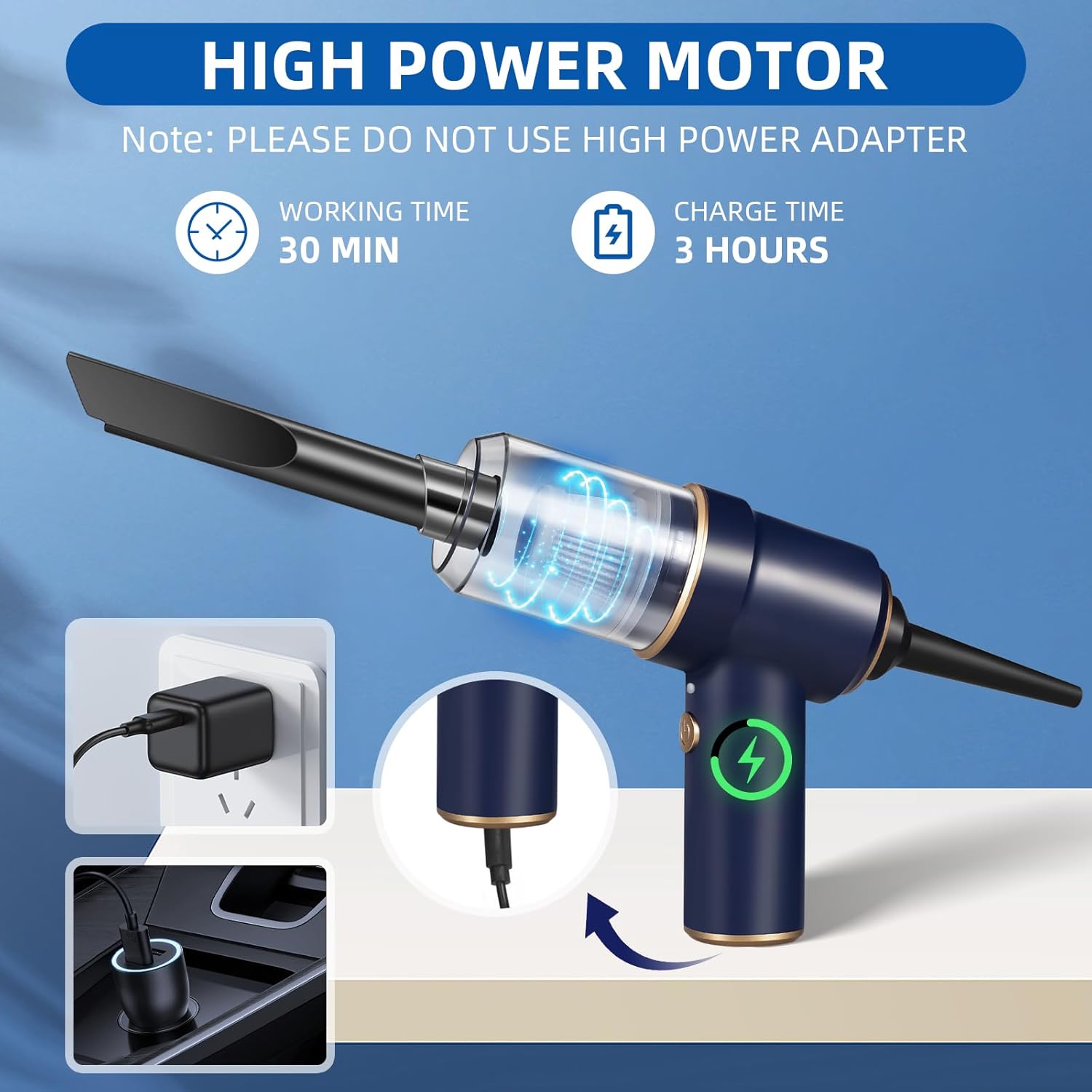
Image: A visual representation of the Paddsun DA0137 handheld cordless vacuum, highlighting its compact size and versatility for different cleaning tasks.
5. Setup
5.1 Initial Charging
Before first use, fully charge the device. The 4000mAh rechargeable battery provides up to 30 minutes of use on a single charge and requires approximately 3 hours for a full recharge.
- Connect the provided USB charging cable to the charging port on the device.
- Plug the other end of the USB cable into a standard 5V USB power source (e.g., computer, wall adapter, car charger).
- The indicator light will show charging status (e.g., red for charging, green/off for fully charged).

Image: The vacuum cleaner being charged via a wall adapter and a car charger, with indicators for 30 minutes working time and 3 hours charge time.
5.2 Attaching Accessories
To attach any accessory, align it with the suction/blower port and twist or push firmly until it clicks into place.
Video: This video demonstrates the assembly of the handheld vacuum cleaner and its various attachments, showcasing its use for car interior cleaning, inflating a balloon, and cleaning a keyboard.
6. Operating Instructions
6.1 Vacuum Function
Use the vacuum function for cleaning dust, debris, sand, and pet hair from various surfaces.
- Attach the desired nozzle (long nozzle for crevices, brush nozzle for surfaces).
- Press the power button to turn on the vacuum.
- Move the nozzle over the area to be cleaned.
- Press the power button again to turn off the vacuum.

Image: The handheld vacuum in action, illustrating its strong suction capability to pick up various types of debris including dust, sand, pet hair, and even insects.
6.2 Bug Catcher Function
Safely capture insects without direct contact.
- Attach the long nozzle to the vacuum unit.
- Aim the nozzle at the insect.
- Press the power button to activate suction and capture the insect.
- Once captured, turn off the vacuum.
- Remove the transparent dust cup.
- Take the dust cup outdoors and release the insect.

Image: A step-by-step guide demonstrating how to use the bug catcher feature, from aiming the nozzle to releasing the captured insect outdoors.
6.3 Blower Function
The device can also be used as a blower for inflating items or cleaning hard-to-reach areas by attaching the blower accessory to the exhaust port.

Image: The handheld device being used in blower mode, illustrating how it expels air to clean or inflate.
6.4 LED Light
The integrated LED light provides illumination for cleaning or bug catching in low-light conditions.

Image: The handheld vacuum with its LED light on, providing a clear view for use in dark environments.
7. Maintenance
Regular maintenance ensures optimal performance and extends the lifespan of your device.
7.1 Emptying the Dust Cup
- Ensure the device is turned off.
- Rotate the transparent dust cup counter-clockwise to detach it from the main unit.
- Empty the collected debris into a waste bin.
7.2 Cleaning the HEPA Filter
The reusable HEPA filter should be cleaned regularly to maintain strong suction.
- After emptying the dust cup, carefully remove the HEPA filter.
- Rinse the filter under running water until clean. Do not use detergents.
- Allow the filter to air dry completely before reinserting it into the dust cup. Ensure it is fully dry to prevent mold or damage to the motor.
- Reattach the dust cup to the main unit by rotating clockwise until secure.

Image: A visual guide showing the process of disassembling the dust cup and filter, cleaning them with water, and preparing them for reassembly.
8. Troubleshooting
If you encounter any issues with your Paddsun DA0137, please refer to the following troubleshooting guide:
| Problem | Possible Cause | Solution |
|---|---|---|
| Device does not turn on | Battery is depleted | Charge the device fully (refer to Section 5.1). |
| Weak suction power | Dust cup is full | Empty the dust cup (refer to Section 7.1). |
| Weak suction power | HEPA filter is clogged | Clean the HEPA filter (refer to Section 7.2). |
| Weak suction power | Nozzle or attachment is blocked | Remove the attachment and clear any blockages. |
| Device stops working during use | Battery is low | Recharge the device. |
9. Specifications
| Feature | Detail |
|---|---|
| Brand | Paddsun |
| Model Name | DA0137 |
| Wattage | 120 watts |
| Battery Life | Up to 30 minutes |
| Charging Time | 3 Hours |
| Filter Type | HEPA Filter |
| Capacity | 250 Milliliters |
| Product Dimensions | 7"L x 5"W x 3"H |
| Power Source | Battery Powered |
| Special Features | Cordless, HEPA, Lightweight, Portable, Blower Function, Bug Catcher |
10. Warranty and Support
Paddsun is committed to providing high-quality products and excellent customer service.
- Warranty: This product includes a 1-year free replacement warranty from the date of purchase.
- Return Policy: Enjoy a 30-day no-reason return policy.
- Customer Support: For any questions, concerns, or warranty claims, please contact our customer service team. We offer 24-hour quick response via phone or email.
- Seller Information: Sold by binweidianzi.
- Brand Store: Visit the Paddsun Store for more products and information.