
TWAHH (2Ram 64Rom)10th
TWAHH 9-Inch Car Radio Stereo System User Manual
Model: (2Ram 64Rom)10th for Dodge Ram 2013-2018 (Manual AC)
1. Introduction
This manual provides detailed instructions for the installation, operation, and maintenance of your TWAHH 9-inch Car Radio Stereo System. Please read this manual thoroughly before using the product to ensure proper function and safety. This system is designed to upgrade the in-car entertainment and navigation experience for compatible Dodge Ram vehicles.
2. Product Compatibility
This TWAHH Car Radio Stereo System is specifically designed for:
- Vehicle Models: Dodge Ram Pickup 1500, 2500, 3500
- Model Years: 2013, 2014, 2015, 2016, 2017, 2018
- AC Type: Only compatible with vehicles equipped with Manual AC. Please verify your vehicle's AC type before installation.

Image: Comparison of a Dodge Ram dashboard before and after installing the TWAHH car stereo, highlighting compatibility with manual AC controls. The image also shows examples of suitable and unsuitable dashboards based on AC control type.
3. What's in the Box
Please check the package contents upon receipt to ensure all items are present:

Image: An illustration detailing the contents of the TWAHH car stereo package, including the head unit, cables, and accessories.
- 1x Head Unit with Frame
- 1x User Guide
- 1x Power Cable (equipped with CANbus)
- 1x RCA Cable
- 1x Car Microphone
- 1x GPS Antenna
- 1x Radio Antenna Connector
- 1x Reversing Camera Input Cable (with WiFi/Bluetooth Antenna)
- 2x USB Cables
- 1x Frame Removal Tool
- 1x Factory USB Adapter Cable
4. Setup and Installation
Installation of the TWAHH Car Radio Stereo System is designed to be plug-and-play for compatible vehicles. Basic automotive electrical and trim removal skills are recommended. If you are unsure about any step, it is advisable to seek professional installation.
4.1 General Installation Steps
- Preparation: Disconnect the vehicle's battery to prevent electrical shorts.
- Remove Old Unit: Carefully remove the factory radio and trim using the provided frame removal tool.
- Connect Wiring: Connect the new power cable, RCA cable, USB cables, GPS antenna, and microphone to the TWAHH head unit. Ensure all connections are secure.
- Install Head Unit: Mount the new head unit into the dashboard opening.
- Test Functionality: Reconnect the battery and test all functions (radio, navigation, Bluetooth, cameras, etc.) before fully reassembling the dashboard.
- Reassemble: Securely reattach all trim pieces.
4.2 OEM Backup Camera Precautions
If your vehicle has an existing OEM backup camera, please note the following:
- If the OEM backup camera image was displayed on your original radio unit, it should also display on the TWAHH unit after proper connection.
- If the OEM backup camera image was displayed on the rearview mirror, the image will continue to be displayed on the rearview mirror. To prevent a 'No Signal' message on the TWAHH unit when reversing, follow these steps: Click 'Settings', click 'Factory', enter '123456', click 'Reverse mode', and select 'Prohibit reversing'.

Image: Visual guide explaining how OEM backup cameras integrate with the TWAHH system, showing scenarios for dashboard and rearview mirror displays.
5. Operating Instructions
5.1 System Overview
The TWAHH system operates on Android 13, offering a modern and responsive user interface. It includes an additional car system for enhanced navigation features. The display supports a split-screen function, allowing multiple applications to run simultaneously.

Image: A visual summary of the TWAHH system's core features, including Android 13, wireless CarPlay/Android Auto, 5G WiFi 6, Bluetooth 5.4, split screen, and Mirrorlink.
5.2 Connectivity
- 5G WiFi 6 (802.11ax): Provides high-speed internet access and greater capacity for multiple connected devices.
- Bluetooth 5.4: Offers faster speeds, lower power consumption, extended range, and improved stability for calls and audio streaming.
5.3 CarPlay & Android Auto
The system supports both wireless and wired Apple CarPlay and Android Auto for seamless smartphone integration. This allows access to navigation, music, calls, and messages directly from the car's display.

Image: Display of the CarPlay and Android Auto interfaces on the TWAHH unit, showing wireless connection capabilities and app integration.
5.4 Mirrorlink Function
The Mirrorlink function allows you to mirror your smartphone's screen (both iPhone and Android) onto the car stereo display, supporting both wireless and wired connections.

Image: A visual representation of the Mirrorlink feature, demonstrating how a smartphone's display can be wirelessly mirrored to the TWAHH car stereo.
5.5 Display Features
- QLED 1280*720 Ultra-Clear Screen: Provides a clear and vibrant visual experience.
- 2.5D Explosion-Proof Screen: Designed for durability and resilience.
- Day/Night Mode UI: The system supports automatic switching between day and night modes, or manual selection, for optimal visibility in varying light conditions.
- 18 Built-in UI Templates: Customize the look and feel of your interface.
- 7-Color Button Atmosphere Lighting: Personalize the physical button backlighting.

Image: Examples of the day and night mode user interfaces, along with a selection of 18 customizable themes for the TWAHH car stereo.

Image: A visual representation of the customizable colorful panel key lights, offering over 100 color options.
5.6 Audio Features
- FM and Broadcast Radio with RDS: Enhanced radio functionality with Radio Data System support.
- Audio Output Mode: Stereo.
5.7 Camera System
- AHD 1080P Reversing Camera: Supports both front and back 1080P cameras for clear views. Features include F1.4 aperture, angle adjustment, night vision, 140-degree wide angle, and IP69 waterproof rating.
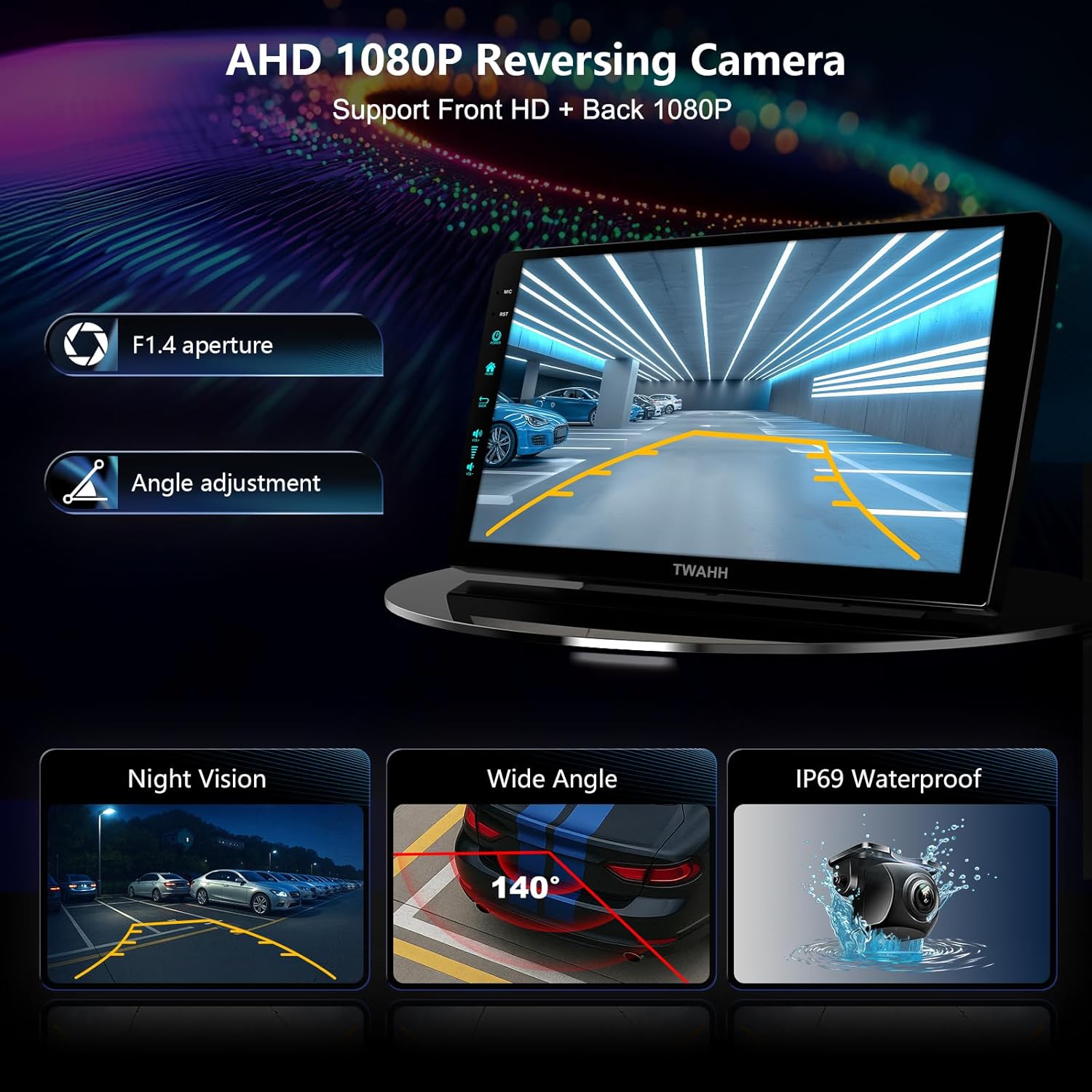
Image: An infographic detailing the features of the AHD 1080P reversing camera, including its aperture, night vision, wide-angle view, and waterproof design.
5.8 Voice Control
The system supports voice control through Apple Siri and Google Assistant, allowing for hands-free operation of various functions.

Image: A visual guide demonstrating the voice control capabilities, showing integration with Apple Siri and Google Assistant for hands-free commands.
6. Maintenance
To ensure the longevity and optimal performance of your TWAHH Car Radio Stereo System, follow these maintenance guidelines:
- Cleaning: Use a soft, dry cloth to clean the screen and exterior. Avoid abrasive cleaners or solvents.
- Software Updates: Periodically check for and install system software updates to ensure the latest features and security patches.
- Temperature: The unit is designed to operate within a temperature range of -4°F to 176°F. Avoid exposing the unit to extreme temperatures outside this range for extended periods.
- Connections: Ensure all cables and connections remain secure. Loose connections can lead to intermittent issues.
7. Troubleshooting
If you encounter issues with your TWAHH Car Radio Stereo System, refer to the following common troubleshooting steps:
- No Power: Check all power connections and ensure the vehicle's battery is properly connected. Verify the fuse for the radio circuit.
- No Sound: Check speaker connections, volume settings, and audio source selection. Ensure the mute function is not active.
- Touchscreen Unresponsive: Try restarting the unit. If the issue persists, a factory reset may be necessary (refer to system settings).
- Bluetooth Connection Issues: Ensure Bluetooth is enabled on both the stereo and your device. Delete previous pairings and attempt to re-pair.
- GPS Signal Loss: Ensure the GPS antenna is properly installed and has a clear view of the sky.
- Backup Camera Not Displaying: Verify camera connections. If using an OEM camera, review the 'OEM Backup Camera Precautions' section for specific settings.
- Microphone Issues (Poor Call Quality): Ensure the external microphone is connected and positioned correctly. If an integrated microphone is causing interference (e.g., from AC vents), consider adjusting its position or using only the external microphone if the system allows.
For persistent issues not resolved by these steps, please contact TWAHH customer support.
8. Specifications
| Feature | Specification |
|---|---|
| Model Name | (2Ram 64Rom)10th |
| Operating System | Android 13 |
| RAM | 2GB |
| Internal Storage (ROM) | 64GB |
| External Storage Expansion | Up to 128GB |
| Display Size | 9 Inches |
| Screen Resolution | QLED 1280*720 |
| Connectivity | 5G Wi-Fi 6 (802.11ax), Bluetooth 5.4, FM, AUX |
| Smartphone Integration | Wireless/Wired CarPlay, Wireless/Wired Android Auto, Mirrorlink (iPhone & Android) |
| Voice Command | Supports Apple Siri, Google Assistant |
| Camera Support | Front & Rear AHD 1080P Cameras, 140° Wide Angle, Night Vision, IP69 Waterproof |
| Audio Output Mode | Stereo |
| Operating Temperature | -4°F to 176°F (-20°C to 80°C) |
| Item Weight | 3.56 pounds |
| Package Dimensions | 13.3 x 11.54 x 3.98 inches |
| Certifications | US Federal Communications Commission (FCC), European CE Safety Certification |
9. Warranty and Support
TWAHH provides comprehensive support for your product:
- Standard Warranty: 12-month product care.
- Extended Warranty: An additional 6-month product care is available upon contacting TWAHH, extending the total to 18 months.
- Customer Service: 24-hour engineer service is available to assist with installation and operational queries. Please contact TWAHH customer support for assistance.
no relevant documents
Ask a question about this manual
Ask about setup, troubleshooting, compatibility, parts, safety, or missing instructions. Manuals+ will review the question and use this page’s manual context to help answer it.