
1. Safety Information
Always read and understand all safety warnings and instructions before operating this drain auger. Failure to follow the warnings and instructions may result in electric shock, fire, and/or serious injury.
- Personal Protective Equipment: Always wear appropriate protective gear, including safety glasses and gloves, when using the drain auger.
- Cable Awareness: Be cautious of the rotating cable to prevent injury. Keep the cable away from your body and avoid contact with the cable while it is in motion.
- Secure Grip: Maintain a firm grip on the tool during operation.
- Work Area: Ensure the work area is well-lit and clear of obstructions.
- Water and Electricity: Avoid operating the tool in standing water or excessively wet conditions. Ensure the battery and charger remain dry.
- Battery Safety: Use only Greenworks 24V batteries and chargers. Do not attempt to open or modify the battery pack.
Always follow the instructions provided in this user manual for safe operation.
2. Product Overview
The Greenworks 24V Cordless Drain Auger is designed for clearing clogs in various household drains, including sinks, shower drains, and toilets. Its cordless design offers portability and ease of use.

Image 2.1: Greenworks 24V Cordless Drain Auger Kit, including the tool, 2.0Ah battery, and charger.
Key Features:
- Cordless Operation: Powered by a 24V 2.0Ah lithium-ion battery for extended runtime and portability.
- Easy Operation: Features a powered forward or reverse feeding mechanism for automatic cable movement.
- Variable Speed Control: Adjustable speed up to 550 RPM to suit different drain cleaning tasks.
- Wide Application: Equipped with a 23ft flexible shaft suitable for 3/4" to 2" pipes, navigating 'S' and 'L' pipes.
- Water Drain Port: An on-board rear drain port prevents water buildup in the drum.
- Ergonomic Design: Rubberized grip handles provide comfort during use.
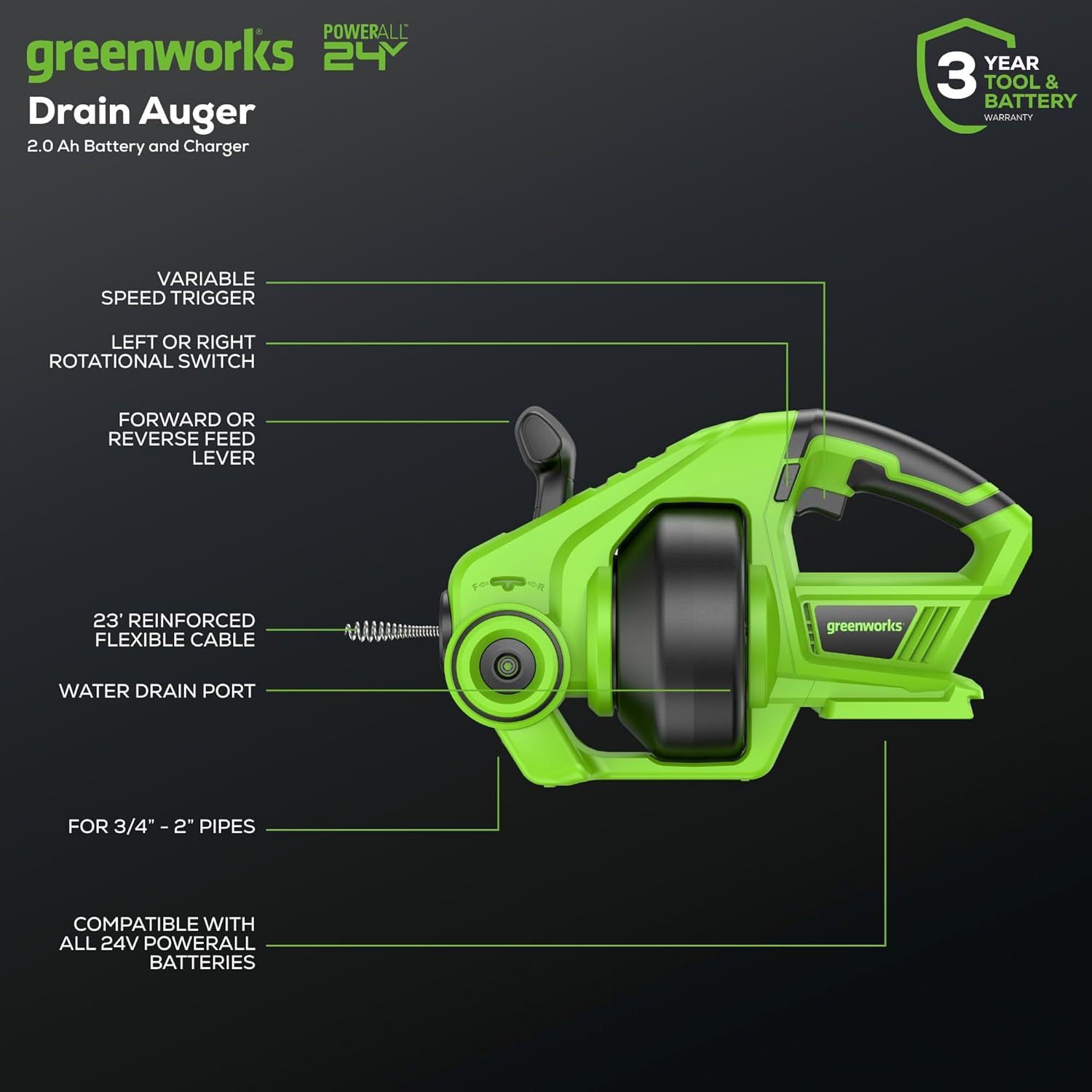
Image 2.2: Labeled diagram highlighting key components such as the variable speed trigger, rotational switch, feed lever, flexible cable, and water drain port.
3. Specifications
| Feature | Specification |
|---|---|
| Model Number | DA24B220 |
| Power Source | 24V Battery Powered |
| Battery Type | Lithium-Ion (2.0Ah included) |
| Max Speed | 550 RPM |
| Cable Length | 23 feet |
| Compatible Pipe Diameter | 3/4" - 2" |
| Item Weight | 7.7 pounds |
| Product Dimensions | 6.3"L x 9.5"W |
| Color | Green |
4. Setup
4.1 Battery Installation
- Ensure the drain auger is turned off and the trigger is locked.
- Align the battery pack with the battery port on the tool.
- Slide the battery pack into the tool until it clicks securely into place.
- To remove, press the battery release button and slide the battery out.
4.2 Cable Preparation
- Before starting, ensure the cable is fully retracted into the drum.
- Position the auger near the drain opening.
- Manually feed a short length of the cable into the drain opening to guide it.
5. Operating Instructions
5.1 Powering On/Off
The tool is activated by pressing the variable speed trigger. Release the trigger to turn off the tool.
5.2 Cable Feeding

Image 5.1: Demonstrates the use of the auto-feed lever for automatic cable advancement.
- Locate the forward/reverse feed lever on the tool.
- To feed the cable into the drain, push the lever forward. The cable will automatically extend as the drum rotates.
- To retract the cable, pull the lever backward. The cable will automatically retract into the drum.
- The cable lock setting holds the cable in place when the lever is in the neutral (middle) position, useful for removing tough clogs.
5.3 Variable Speed Control
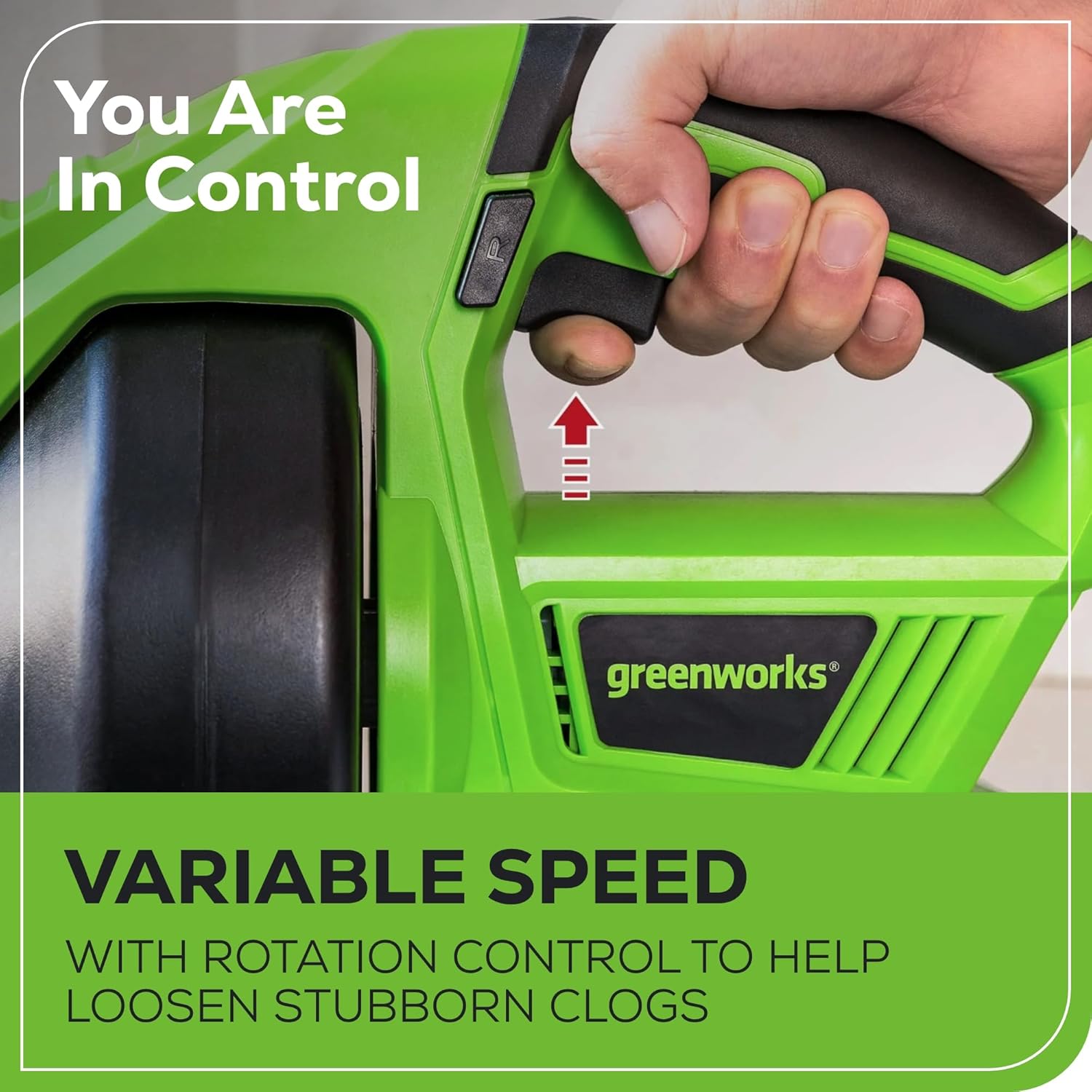
Image 5.2: Illustrates the variable speed trigger, allowing precise control over cable rotation speed.
The tool features a variable speed trigger. The speed of the cable rotation is controlled by the amount of pressure applied to the trigger. Pressing the trigger further increases the speed, up to 550 RPM.
5.4 Directional Control

Image 5.3: Shows the bidirectional rotation switch with settings for clockwise, locked, and counter-clockwise rotation.
A bidirectional rotation switch allows you to change the direction of the cable's rotation:
- Left Position: The cable rotates clockwise, typically used for advancing into clogs.
- Middle Position: Locks the trigger, preventing accidental operation.
- Right Position: The cable rotates counter-clockwise, useful for retracting the cable or dislodging stubborn clogs.
5.5 Clearing Clogs
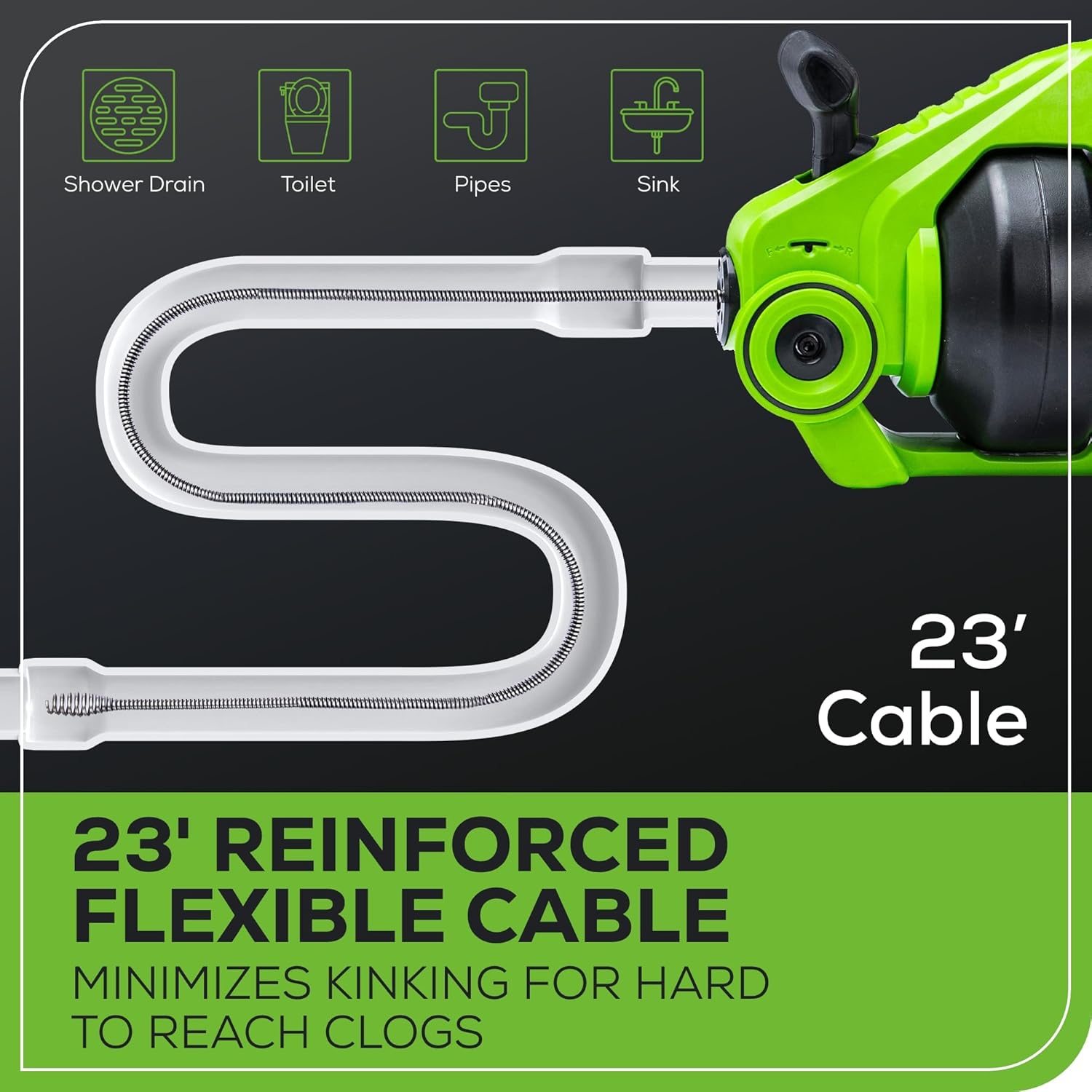
Image 5.4: Illustrates the 23-foot reinforced flexible cable designed to minimize kinking and reach hard-to-access clogs in various pipe configurations.
- Slowly feed the cable into the drain, allowing it to navigate bends.
- When resistance is met, indicating a clog, apply gentle pressure and use the variable speed trigger to work through the obstruction.
- If the cable gets stuck, reverse the rotation direction briefly to free it, then resume forward rotation.
- Once the clog is cleared, retract the cable slowly while running water to flush out debris.
6. Maintenance
6.1 Cleaning
- After each use, remove the battery pack.
- Wipe down the tool and cable with a damp cloth to remove any debris or residue.
- Ensure the cable is clean and free of kinks before retracting it fully into the drum.
6.2 Water Drain Port

Image 6.1: Detail of the water drain port on the auger drum, designed to prevent water accumulation.
The drain auger is equipped with a water drain port on the rear of the drum. After use, ensure this port is clear to allow any accumulated water to drain, preventing buildup and potential damage.
6.3 Storage
Store the drain auger in a dry, secure location out of reach of children. Ensure the battery is removed from the tool before storage. For long-term storage, charge the battery partially (around 50%) and store it in a cool, dry place.
7. Troubleshooting
If you encounter issues with your Greenworks 24V Cordless Drain Auger, refer to the following common troubleshooting steps:
- Tool Not Starting:
- Ensure the battery is fully charged and properly inserted.
- Check that the directional switch is not in the locked (middle) position.
- Verify the trigger is being pressed firmly.
- Cable Not Feeding/Retracting:
- Confirm the forward/reverse feed lever is correctly engaged.
- Check for any obstructions preventing cable movement within the drum or drain.
- Ensure the cable is not severely kinked.
- Cable Stuck in Drain:
- Reverse the rotation direction briefly to attempt to free the cable.
- Gently pull and push the cable while rotating to work it free.
- Do not force the cable, as this can cause damage.
If problems persist after attempting these steps, please contact Greenworks customer support.
8. Warranty and Support
8.1 Warranty Information
The Greenworks 24V Cordless Drain Auger comes with a 3-year tool and battery warranty. This warranty covers defects in materials and workmanship under normal use. Please retain your proof of purchase for warranty claims.
8.2 Customer Support
For technical assistance, warranty claims, or to purchase replacement parts, please contact Greenworks customer support. Refer to the Greenworks official website or product packaging for the most current contact information.