
1. Introduction
Thank you for choosing the Vinsetto Heated Reclining Computer Chair. This executive office chair is designed to provide enhanced comfort and support for extended periods of sitting, whether for work or relaxation. It features vibration massage, lumbar heating, adjustable height, and a reclining function with an integrated footrest. This manual provides essential information for assembly, operation, maintenance, and troubleshooting to ensure safe and optimal use of your new chair.
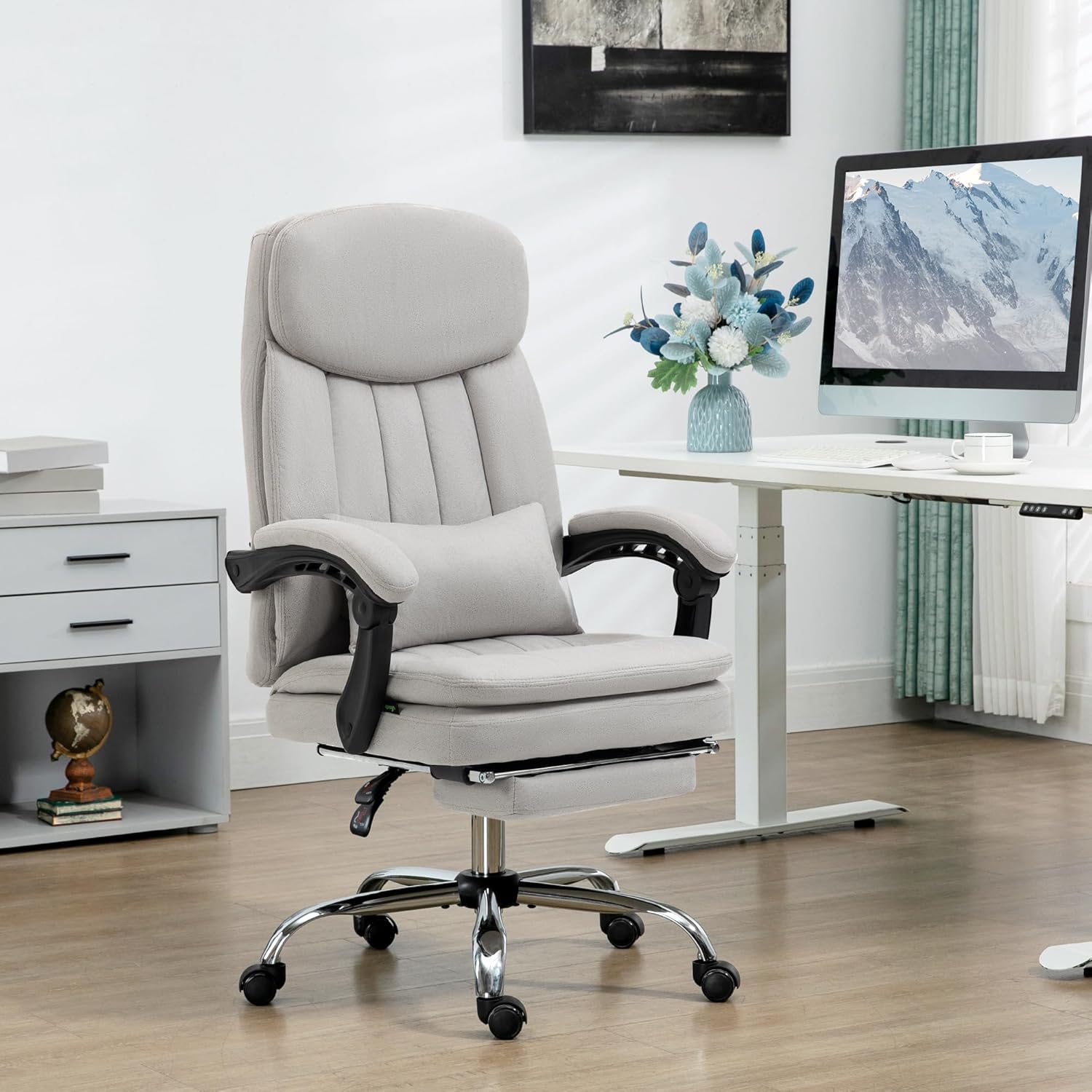
Image: The Vinsetto Heated Reclining Computer Chair positioned in a modern office environment, showcasing its design and presence.
2. Safety Information
Please read all safety warnings and instructions carefully before assembly and use. Failure to follow these instructions may result in injury or damage to the product.
- Assembly Required: This product requires assembly. Ensure all components are present and follow the assembly instructions precisely.
- Weight Limit: Do not exceed the maximum weight capacity of 265 lbs (120 kg).
- Stable Surface: Always use the chair on a stable, level surface.
- Children and Pets: Keep children and pets away from the assembly area. Small parts may pose a choking hazard.
- Electrical Safety: When using the massage and heating functions, ensure the power cord is not pinched or damaged. Disconnect from power when not in use or before cleaning.
- Maintenance: Regularly inspect the chair for loose parts or damage. Do not use if damaged.
3. Package Contents
Before beginning assembly, verify that all parts are included in the package:
- Chair Backrest
- Seat Base with integrated footrest
- Armrests (2)
- Gas Lift Cylinder
- Star Base
- Wheels (5)
- Lumbar Support Pillow
- Remote Control for massage/heating
- Assembly Hardware (screws, washers, tools)
- Instruction Manual
4. Assembly Instructions
Assembly is required. It is recommended to assemble the chair on a soft, clean surface to prevent scratches. Two people may be required for certain steps.
- Attach Wheels to Base: Insert the five wheels into the holes at the end of each leg of the star base until they click securely into place.
- Insert Gas Lift: Place the gas lift cylinder into the center hole of the star base. Ensure it is seated firmly.
- Attach Armrests to Seat: Secure the armrests to the underside of the seat base using the provided screws. Do not overtighten.
- Attach Backrest to Seat: Align the backrest with the mounting points on the seat base and armrests. Secure with screws.
- Connect Seat to Gas Lift: Carefully place the assembled seat and backrest onto the gas lift cylinder, ensuring the center mechanism aligns with the top of the gas lift. Press down firmly to secure.
- Attach Lumbar Pillow: Position the lumbar support pillow as desired.
- Connect Power: Plug the power cord for the massage and heating functions into a suitable power outlet.

Image: A detailed view of the chair's key components, highlighting the microfibre material, swivel design, thick padding, gas lift mechanism, and sturdy five-star base with wheels.
5. Operating Instructions
5.1. Height Adjustment
To adjust the chair's height, locate the lever on the right side, beneath the seat. While seated, pull the lever upwards to lower the chair. To raise the chair, stand up slightly and pull the lever upwards. Release the lever at the desired height to lock it in place.
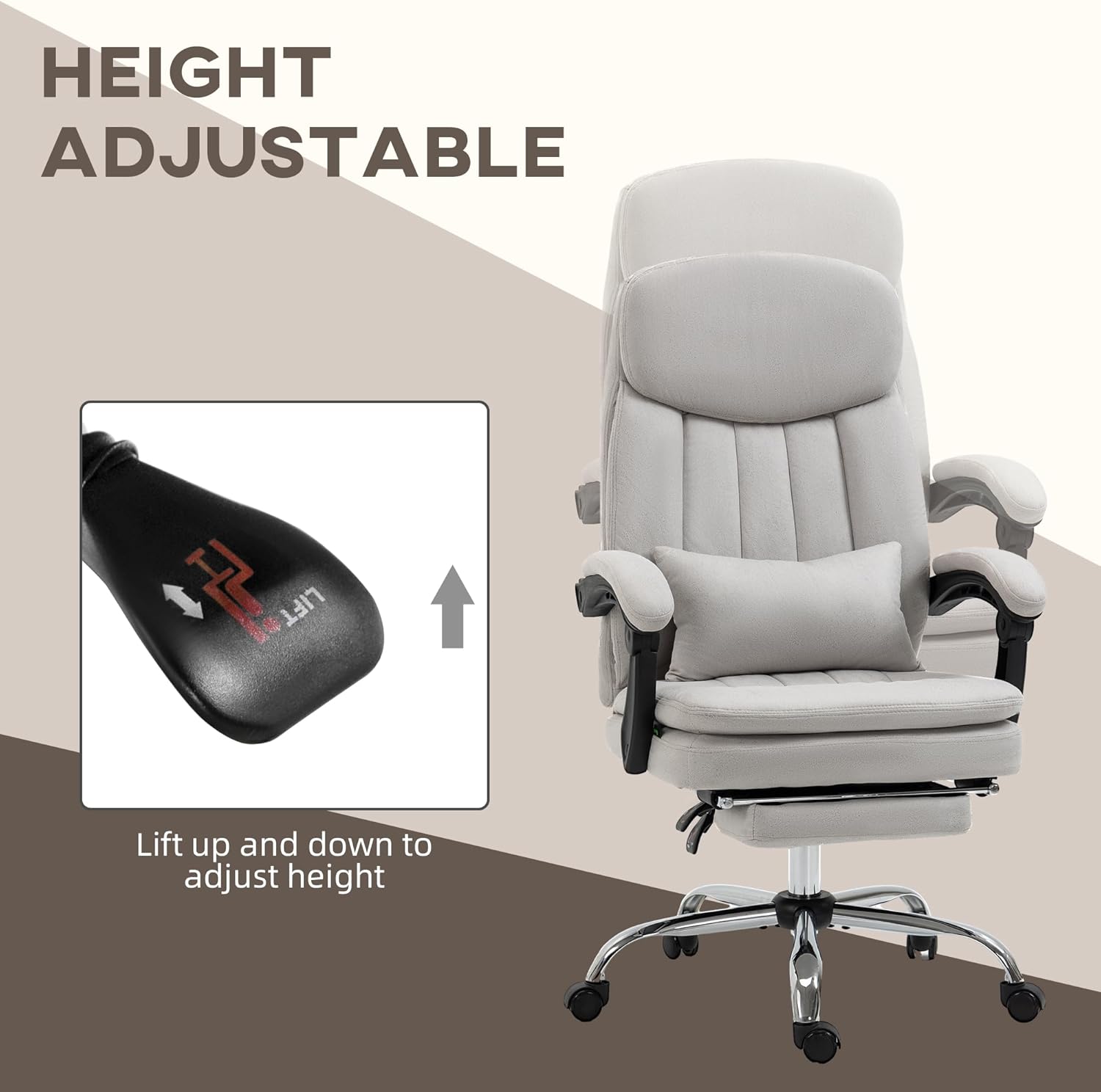
Image: A close-up of the chair's height adjustment lever, indicating the "Lift up and down to adjust height" function.
5.2. Reclining Function and Footrest
The chair can recline up to 155 degrees for various activities such as working, watching, or relaxing. To recline, locate the lever on the left side, beneath the seat. Pull the lever upwards and lean back to the desired angle. Release the lever to lock the recline position. To return to an upright position, pull the lever and lean forward.
The built-in footrest can be pulled out from beneath the seat for added leg support when reclining. Push it back in when not in use.

Image: The Vinsetto chair shown in various reclining positions, illustrating its 155-degree recline capability and the extendable footrest for working, watching, or relaxing.
5.3. Vibration Massage and Heating
The chair features vibration massage and lumbar heating options controlled by a wired remote. Ensure the chair is plugged into a power outlet before use.
- Power On/Off: Use the power button on the remote to turn the massage and heating functions on or off.
- Massage Modes (M1-M5): Select from five different massage modes (M1, M2, M3, M4, M5) to vary the vibration patterns.
- Intensity Adjustment: Adjust the intensity of the vibration massage using the dedicated intensity buttons.
- Heating Function: Activate the lumbar heating function using the heat button. The heat is concentrated in the lumbar area.
- Timer: Set the duration of the massage/heating session using the timer function on the remote.
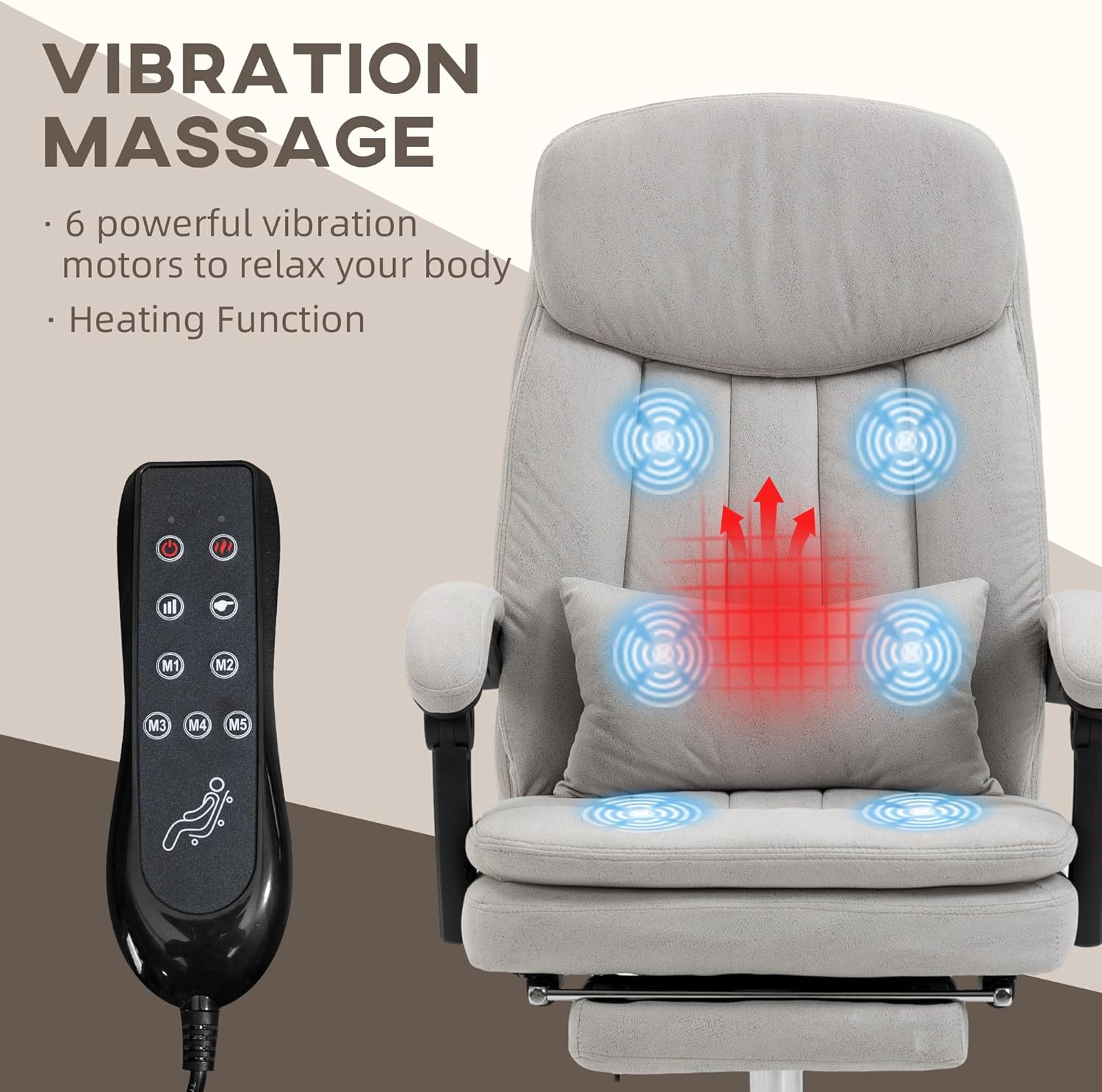
Image: The Vinsetto chair highlighting the six vibration massage points and the lumbar heating area, with the remote control visible for adjusting settings.
6. Care and Maintenance
Proper care will extend the life of your Vinsetto chair.
- Cleaning: Wipe clean with a damp cloth. Do not use harsh chemicals or abrasive cleaners. For spills, blot immediately with a clean, dry cloth.
- Inspection: Periodically check all screws and bolts to ensure they are tight. Retighten if necessary.
- Avoid Direct Sunlight: Prolonged exposure to direct sunlight may cause the fabric to fade.
- Storage: Store the chair in a cool, dry place when not in use for extended periods.
- Electrical Components: Ensure the power cord and remote control are not damaged. If damage occurs, discontinue use and contact customer support.
7. Troubleshooting
If you encounter issues with your chair, refer to the following common problems and solutions:
| Problem | Possible Cause | Solution |
|---|---|---|
| Chair does not adjust height. | Gas lift cylinder is faulty or lever is not fully engaged. | Ensure the height adjustment lever is fully pulled. If the issue persists, the gas lift may need replacement. |
| Massage/Heating function not working. | Not plugged in, power outlet issue, or remote/wiring damage. | Check if the power cord is securely plugged into a working outlet. Inspect the remote control and wiring for visible damage. |
| Chair wobbles or feels unstable. | Loose screws or uneven floor. | Tighten all assembly screws. Ensure the chair is on a flat, even surface. |
| Footrest does not extend/retract smoothly. | Mechanism obstruction or dirt. | Check for any obstructions. Clean the tracks of the footrest mechanism. |
8. Specifications
Detailed specifications for the Vinsetto Heated Reclining Computer Chair:
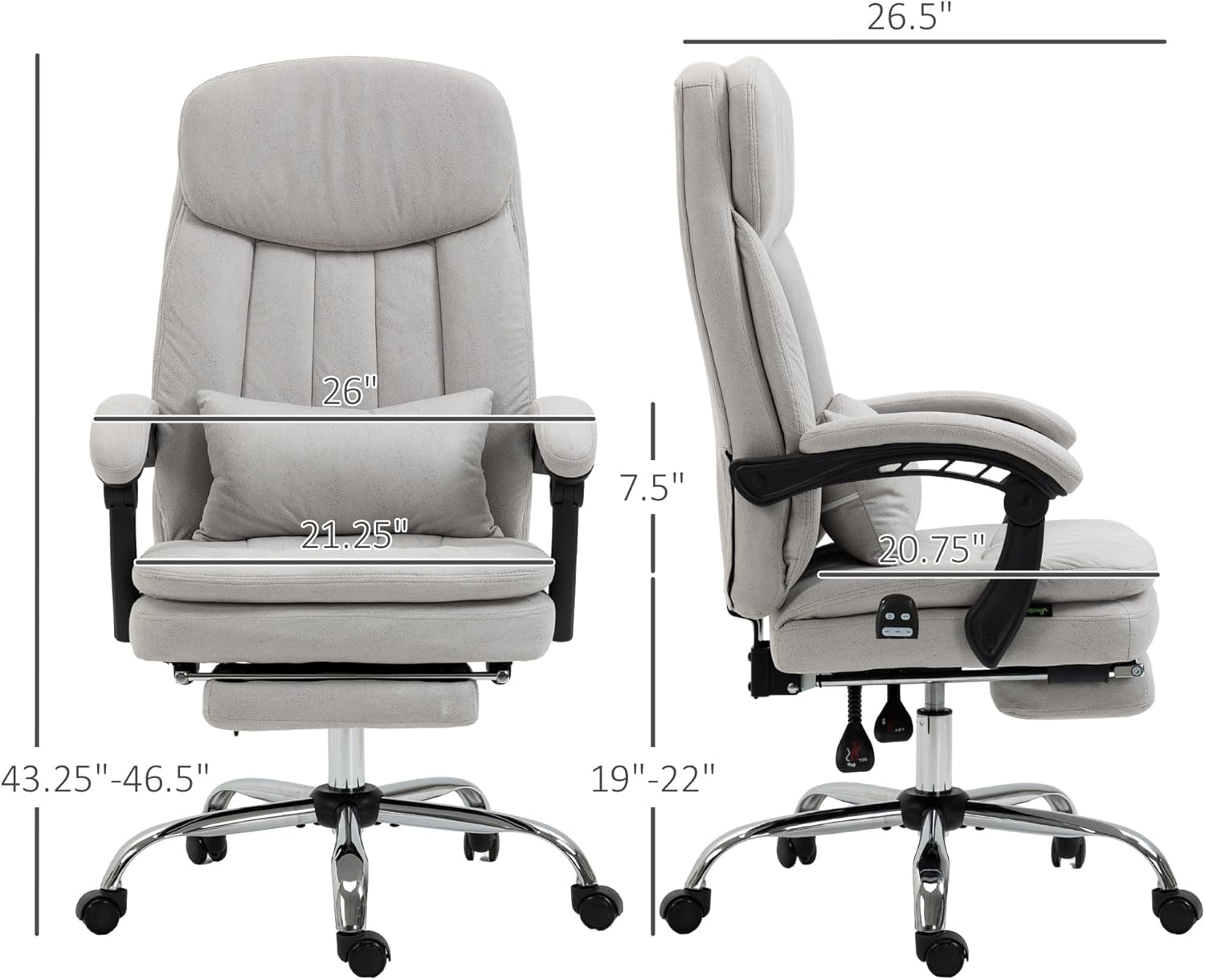
Image: A technical drawing of the chair with key dimensions labeled, including overall width (26"), depth (26.5"), height (43.25"-46.5"), seat height (19"-22"), seat depth (20.75"), seat length (21.25"), and arm height (7.5").
- Brand: Vinsetto
- Model Name: Massage Office Chair
- Model Number: 921-675V80LG
- Color: Light Gray
- Overall Dimensions: 26" W x 26.5" D x 43.25" - 46.5" H
- Seat Dimensions: 21.25" W x 20.75" D
- Seat Height Range: 19" - 22"
- Backrest Width: 21.75 Inches
- Backrest Interior Height: 28.25 Inches
- Arm Height: 7.5 Inches
- Maximum Weight Capacity: 265 lbs (120 kg)
- Material: Microfibre fabric, Foam fill, Electroplate finish
- Features: Vibration Massage, Lumbar Heating, 155° Reclining, Adjustable Height, Swivel Base, Retractable Footrest, Lumbar Pillow
- Item Weight: 42 pounds
- UPC: 196393042205
9. Warranty and Support
For any questions, concerns, or support regarding your Vinsetto Heated Reclining Computer Chair, please contact the manufacturer or retailer where the product was purchased. Keep your proof of purchase for any warranty claims. While specific warranty details are not provided in this manual, general product support can often be obtained through the seller.
For additional information or to explore other Vinsetto products, you may visit the Vinsetto Store on Amazon.