
1. Introduction
Thank you for choosing the AIRHOT 2-in-1 Under Desk Treadmill. This manual provides essential information for the safe and efficient use of your new fitness equipment. Please read this manual thoroughly before operation and retain it for future reference.

Image: The AIRHOT 2-in-1 Under Desk Treadmill in a home setting, demonstrating its compact design and usability.
2. Safety Information
To ensure your safety and prolong the life of your treadmill, please observe the following precautions:
- Always consult with a healthcare professional before starting any new exercise program.
- Place the treadmill on a flat, stable surface. Ensure there is adequate clear space around the treadmill for safe operation.
- Do not place any mats or objects directly under the front motor area of the treadmill during operation. This can obstruct heat dissipation, potentially causing motor damage and shortening the product's lifespan.
- Keep children and pets away from the treadmill during operation.
- Wear appropriate athletic footwear while using the treadmill.
- Do not use the treadmill if you feel dizzy, faint, or experience any pain. Stop exercising immediately.
- Ensure the power cord is not damaged and is properly plugged into a grounded outlet.
- The maximum user weight capacity for this treadmill is 120 kg (264 lbs). Do not exceed this limit.
3. Product Features
The AIRHOT 2-in-1 Under Desk Treadmill is designed for convenience and effective home fitness. Key features include:
- Compact and Space-Saving Design: With a thickness of only 12 cm, this treadmill is easy to store under desks, beds, or sofas. Integrated casters allow for effortless movement.
- Powerful and Quiet Motor: Equipped with a 2.5 HP motor, it supports users up to 120 kg. The noise level is below 45 dB, ensuring a quiet workout environment suitable for offices or homes.
- Advanced Shock Absorption System: Features a dual-structure belt with 10 shock absorbers and 4 rubber cushions to effectively reduce impact on joints and protect knees.
- Durable Running Belt: A 5-layer anti-slip, turf-textured running belt provides excellent grip and wear resistance, enhancing safety and extending the treadmill's lifespan. The running surface measures 94.5 cm x 39 cm.
- Accurate Fitness Data Tracking: A digital monitor and smart remote control allow easy tracking of calories burned, speed, time, and distance.

Image: An illustration highlighting the 2.5 HP quiet motor, capable of speeds from 1-6 km/h and supporting up to 120 kg.

Image: A cross-section diagram illustrating the five layers of the running belt, designed for anti-slip, shock absorption, and noise reduction.

Image: A transparent view of the treadmill base, showing the 14 shock absorption points designed to protect joints.
4. Setup
The AIRHOT treadmill is designed for easy setup. Follow these steps to prepare your treadmill for use:
- Unpacking: Carefully remove the treadmill and all components from the packaging.
- Placement: Place the treadmill on a firm, level surface. Ensure there is at least 0.6 meters (2 feet) of clear space behind the treadmill and 0.3 meters (1 foot) on each side.
- Power Connection: Plug the power cord into a standard grounded electrical outlet.
- Remote Control: Insert the included battery (CR2032) into the smart remote control.
- Lubrication: Apply a small amount of the provided lubricant under the running belt as instructed in the maintenance section before first use.

Image: The package contents including the treadmill, remote control, wrench, button battery, user manual, and lubricant.
5. Operating Instructions
Your AIRHOT treadmill offers various modes and speed adjustments for a customized workout.
5.1 Power On/Off
- To power on, ensure the treadmill is plugged in and press the power button on the remote control or the treadmill's display.
- To power off, press the power button again. The treadmill will gradually slow down and stop.
5.2 Speed Adjustment
- Use the '+' and '-' buttons on the remote control to adjust the speed.
- Speed can be adjusted from 1 km/h to 6 km/h in 0.1 km/h increments.
- This range supports various activities from walking to light jogging.
5.3 Digital Monitor
The integrated LED display shows real-time workout data:
- Time: Duration of your workout.
- Speed: Current speed in km/h.
- Distance: Total distance covered.
- Calories: Estimated calories burned.

Image: The LED multifunction display clearly showing speed, calories, distance, and time metrics.
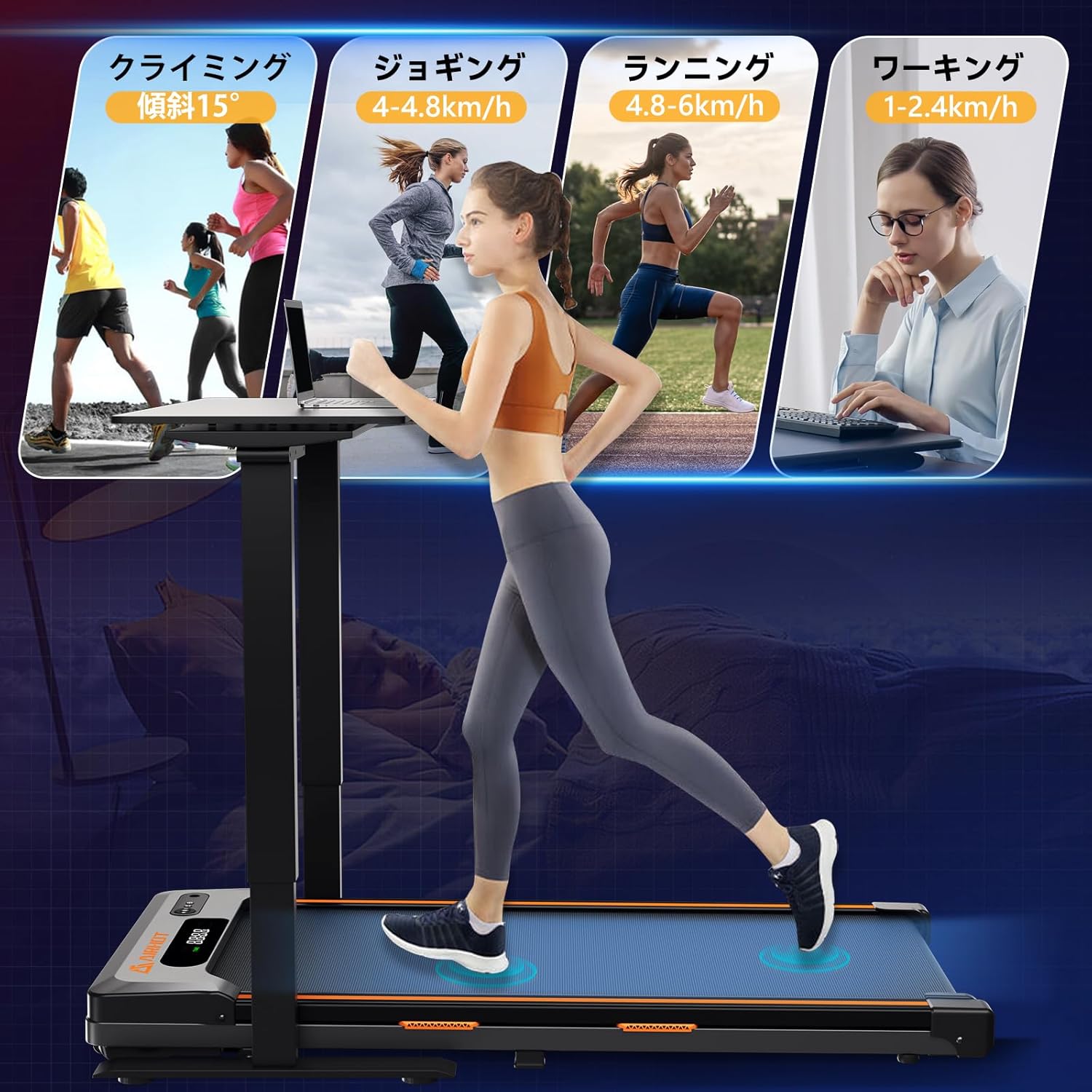
Image: Visual representation of various exercise modes supported by the treadmill, including walking (1-2.4 km/h), jogging (4-4.8 km/h), and running (4.8-6 km/h).
6. Maintenance
Regular maintenance ensures optimal performance and extends the lifespan of your treadmill.
6.1 Cleaning
- Always unplug the treadmill before cleaning.
- Wipe down the treadmill surface with a damp cloth after each use to remove sweat and dust.
- Avoid using abrasive cleaners or solvents that could damage the finish.
6.2 Lubrication
The running belt requires periodic lubrication to reduce friction and wear. Use the provided silicone oil.
- Unplug the treadmill.
- Loosen the belt tension by turning the rear roller bolts counter-clockwise with the included wrench.
- Lift the edge of the running belt and apply a small amount of silicone oil evenly onto the center of the running deck.
- Tighten the belt tension by turning the rear roller bolts clockwise until the belt is snug but not overly tight.
- Plug in the treadmill and run it at a low speed (e.g., 1 km/h) for 5 minutes to distribute the lubricant.
Frequency: Lubricate every 3 months or after 50 hours of use, whichever comes first.
6.3 Belt Adjustment
If the running belt shifts to one side or feels loose, adjust it using the rear roller bolts and the included wrench. Refer to the lubrication steps for adjusting belt tension.
7. Troubleshooting
If you encounter issues with your treadmill, refer to the following common problems and solutions:
| Problem | Possible Cause | Solution |
|---|---|---|
| Treadmill does not power on. | Power cord not plugged in; power switch off; circuit breaker tripped. | Check power connection; ensure power switch is on; reset circuit breaker. |
| Running belt slips or stops. | Belt too loose; insufficient lubrication; motor overload. | Adjust belt tension; lubricate the belt; reduce user weight or speed. |
| Unusual noise during operation. | Loose parts; belt misalignment; motor issue. | Check for loose screws and tighten; adjust belt alignment; contact customer support if motor noise persists. |
| Display not working correctly. | Loose connection; remote control battery low. | Check connections; replace remote control battery. |
If the problem persists after attempting these solutions, please contact AIRHOT customer support for assistance.
8. Specifications
| Feature | Detail |
|---|---|
| Model Number | TM400 |
| Brand | AIRHOT |
| Color | Black |
| Material | ABS+Q915 |
| Motor Power | 2.5 HP |
| Speed Range | 1 - 6 km/h |
| Max Load Capacity | 120 kg (264 lbs) |
| Noise Level | < 45 dB |
| Running Surface Dimensions | 94.5 cm x 39 cm |
| Product Dimensions (L x W x H) | 120 cm x 50 cm x 6 cm |
| Product Weight | 17.5 kg |
| Battery (Remote Control) | CR2032 (included) |
9. Warranty and Support
For warranty information and customer support, please refer to the documentation included with your purchase or contact AIRHOT directly through their official website or the retailer where the product was purchased. Please have your model number (TM400) and purchase date available when contacting support.