
YDuupxe WVC-600
YDuupxe WVC-600 600W Grid Tie Micro Inverter User Manual
Model: WVC-600
1. Introduction
This manual provides essential information for the safe and efficient operation of your YDuupxe WVC-600 600W Grid Tie Micro Inverter. Please read this manual thoroughly before installation and use, and retain it for future reference. This micro inverter is designed for grid-tied solar power systems, converting DC power from solar panels into AC power for direct use or feeding into the utility grid.
2. Key Features
- IP65 Design: Provides effective protection against rainwater erosion, ensuring durability in outdoor environments.
- Full Digital Control: Offers precise control and efficient operation.
- Reverse Power Function: Manages power flow effectively.
- Intelligent Monitoring and Management: Facilitates easy oversight and maintenance.
- 6-Level Power Search Function: Optimizes power output even in low light conditions, such as cloudy days, for continuous and stable performance.
- Dynamic Differential Pressure MPPT & APL Function: Automatically adjusts solar panel power to achieve maximum output.
- Direct Solar Panel Connection: Eliminates the need for batteries, simplifying system design.
- Aluminum Alloy Construction: Ensures robust and durable housing.
3. Technical Specifications
| Parameter | Value |
|---|---|
| Model | WVC-600 |
| Frequency | 50/60Hz |
| Maximum DC Short Circuit Current | 40A |
| Maximum Input Operating Current | 27.2A |
| Heat Dissipation | Self-cooling |
| Communication Mode | Power line carrier |
| Power Mode | Reverse, load first use |
| Enclosure Rating | IP65 |
| Material | Aluminum Alloy |
| Color | Blue |
| Package Dimensions | 13.39 x 9.84 x 4.72 inches |
| Item Weight | 5.7 pounds |
4. Package Contents
Verify that all items are present in the package:
- 1 x Micro Inverter (WVC-600)
- 1 x User Manual (this document)
- 1 x Mounting Bag (2pcs Screw, 2pcs Nut, 2pcs Gasket)
- 1 x AC Connection Cable
- 1 x Connector Cable

Image: Overview of the WVC-600 Micro Inverter and its included accessories, such as the AC connection cable, connector cable, and mounting hardware.

Image: Close-up of the mounting hardware, including a screw, a washer, and a lock washer, used for securing the inverter.
5. Setup and Installation
Important Safety Information:
- Installation must be performed by qualified personnel in accordance with local electrical codes and regulations.
- Ensure the main power supply is disconnected before any installation or maintenance work.
- Do not operate the inverter if it is damaged.
- The inverter can become hot during operation. Avoid touching it directly.
5.1 Mounting the Inverter
The WVC-600 Micro Inverter is designed for outdoor use with its IP65 rating. Choose a mounting location that is well-ventilated and provides adequate clearance for heat dissipation. Use the provided mounting hardware to secure the inverter firmly.

Image: Side view of the WVC-600 Micro Inverter, showing the integrated mounting bracket on the back for secure installation.

Image: Angled view of the WVC-600 Micro Inverter, highlighting the robust aluminum alloy casing and the design of the mounting bracket.
5.2 Electrical Connections
The WVC-600 is a grid-tie inverter and requires direct connection to solar panels and the utility grid. No batteries are required.
- DC Input (PV Connection): Connect the MC4 connectors from your solar panels to the corresponding PV input terminals on the inverter. Ensure correct polarity (+ to + and - to -). The inverter supports a maximum DC short circuit current of 40A and a maximum input operating current of 27.2A.
- AC Output (Grid Connection): Connect the AC connection cable from the inverter's AC output port to your household electrical system or utility grid connection point. Ensure proper grounding.

Image: Top view of the WVC-600 Micro Inverter, clearly showing the PV input terminals (MC4 connectors) on the right and the AC output port on the left, along with the "Q.C." sticker indicating quality control.
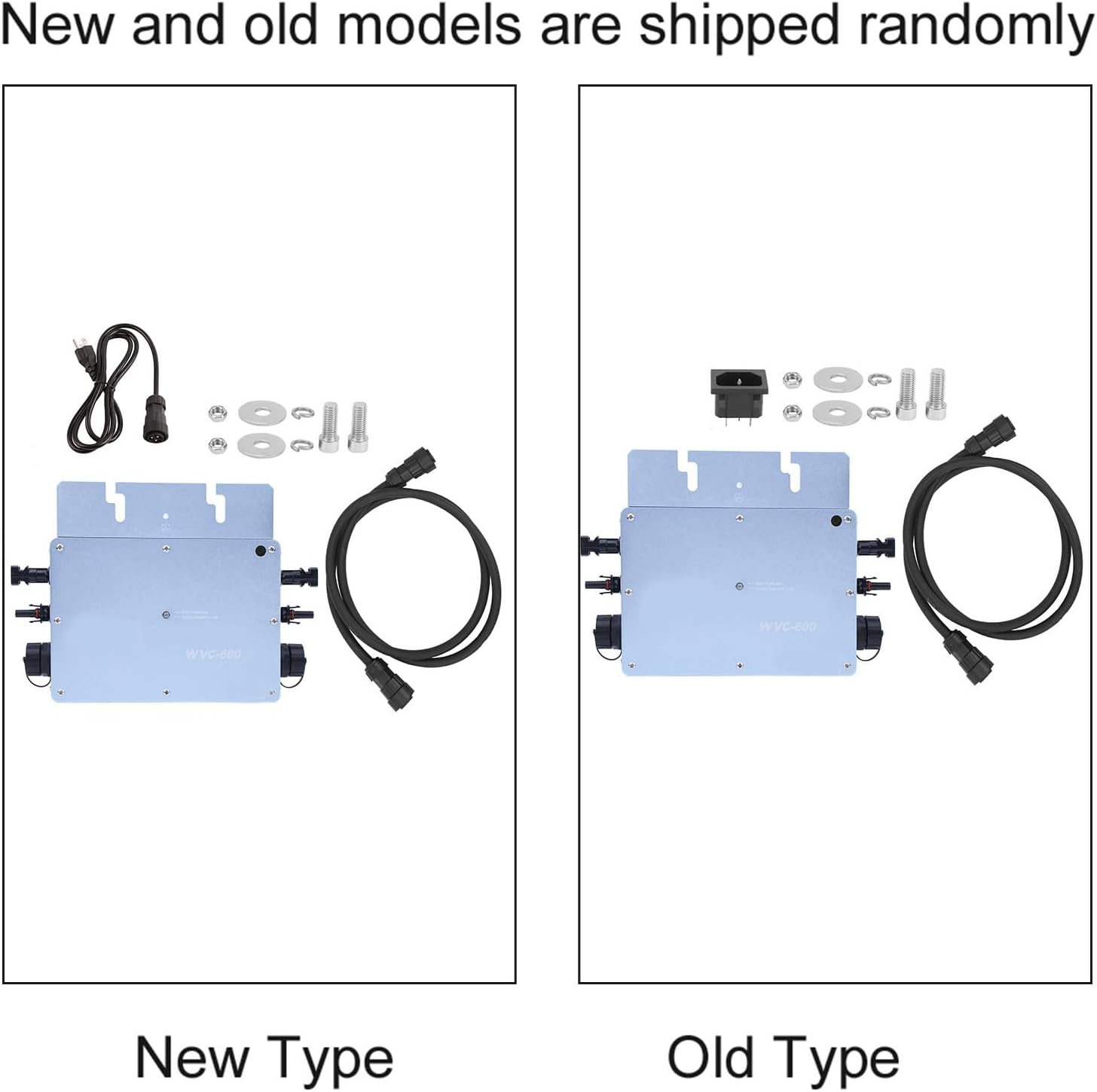
Image: Front view of the WVC-600 Micro Inverter, displaying the status indicators: "Red: Protection" and "Green: Search & Lock".
6. Operating Instructions
Once all connections are securely made and verified, the inverter will automatically begin operation when sufficient DC power is supplied from the solar panels and the grid connection is stable.
- Automatic Power Search: The inverter features a 6-level power search function. In conditions with low solar irradiance (e.g., cloudy days), this function ensures continuous, stable, and efficient power output by optimizing the power search.
- MPPT Function: The Dynamic Differential Pressure MPPT (Maximum Power Point Tracking) and APL (Automatic Power Limiting) functions automatically adjust the power of the solar panels to achieve maximum output, ensuring optimal energy harvesting.
- Status Indicators:
- Red LED: Indicates a protection state or fault.
- Green LED: Indicates normal operation, searching for maximum power point, or locked onto the grid.
7. Maintenance
The WVC-600 Micro Inverter is designed for low maintenance. However, regular checks can ensure optimal performance and longevity.
- Cleaning: Periodically clean the exterior of the inverter to remove dust, dirt, or debris that may accumulate. Use a soft, damp cloth. Do not use abrasive cleaners or solvents.
- Connection Checks: Annually inspect all electrical connections (DC and AC) to ensure they are secure and free from corrosion.
- Ventilation: Ensure that the area around the inverter remains clear to allow for proper self-cooling. Do not obstruct the heat dissipation fins.
- Temperature Monitoring: The product description notes that the shell temperature reaching 65 degrees Celsius will trigger a high-temperature state. If this occurs, ensure adequate ventilation. For prolonged high-power states, consider additional cooling if necessary, but exercise extreme caution and consult a professional.
8. Troubleshooting
This section provides solutions to common issues you might encounter.
| Problem | Possible Cause | Solution |
|---|---|---|
| Inverter not producing power / Green LED off | No DC input from solar panels; Insufficient solar irradiance; AC grid disconnected; Inverter fault. | Check solar panel connections and ensure adequate sunlight; Verify AC grid connection; If problem persists, contact support. |
| Red LED is illuminated | Over-temperature; Over-voltage/under-voltage; Grid fault; Internal fault. | Ensure proper ventilation and clear any obstructions; Check grid voltage stability; Disconnect and reconnect power; If fault persists, contact support. |
| Low power output | Partial shading on solar panels; Dirty solar panels; Suboptimal MPPT tracking; High ambient temperature. | Clear shading; Clean solar panels; Ensure proper ventilation; The 6-level power search function should optimize output in low light. |
| Inverter is hot to the touch | Normal operation at high power; Insufficient ventilation; High ambient temperature. | This is normal up to a point. Ensure adequate airflow around the unit. If temperature exceeds 65°C and causes issues, improve ventilation or reduce load if possible. Do not touch directly when hot. |
If you encounter issues not listed here or if the suggested solutions do not resolve the problem, please contact YDuupxe customer support.
9. Warranty and Support
For warranty information and technical support, please refer to the documentation provided with your purchase or contact YDuupxe customer service directly. Keep your purchase receipt as proof of purchase for warranty claims.
Manufacturer: YDuupxe
Item Model Number: YDuupxei13x0gfeq2-11
ASIN: B0D98M8CMK
Ask a question about this manual
Ask about setup, troubleshooting, compatibility, parts, safety, or missing instructions. Manuals+ will review the question and use this page’s manual context to help answer it.