
Gueray G-146-US
Gueray G-146-US Vintage CD Player
User Manual
Introduction
Thank you for purchasing the Gueray G-146-US Vintage CD Player. This device combines classic aesthetics with modern functionality, offering multiple playback options including CD, Bluetooth, FM radio, USB, and AUX. Please read this manual carefully before use to ensure proper operation and to maximize your listening experience.
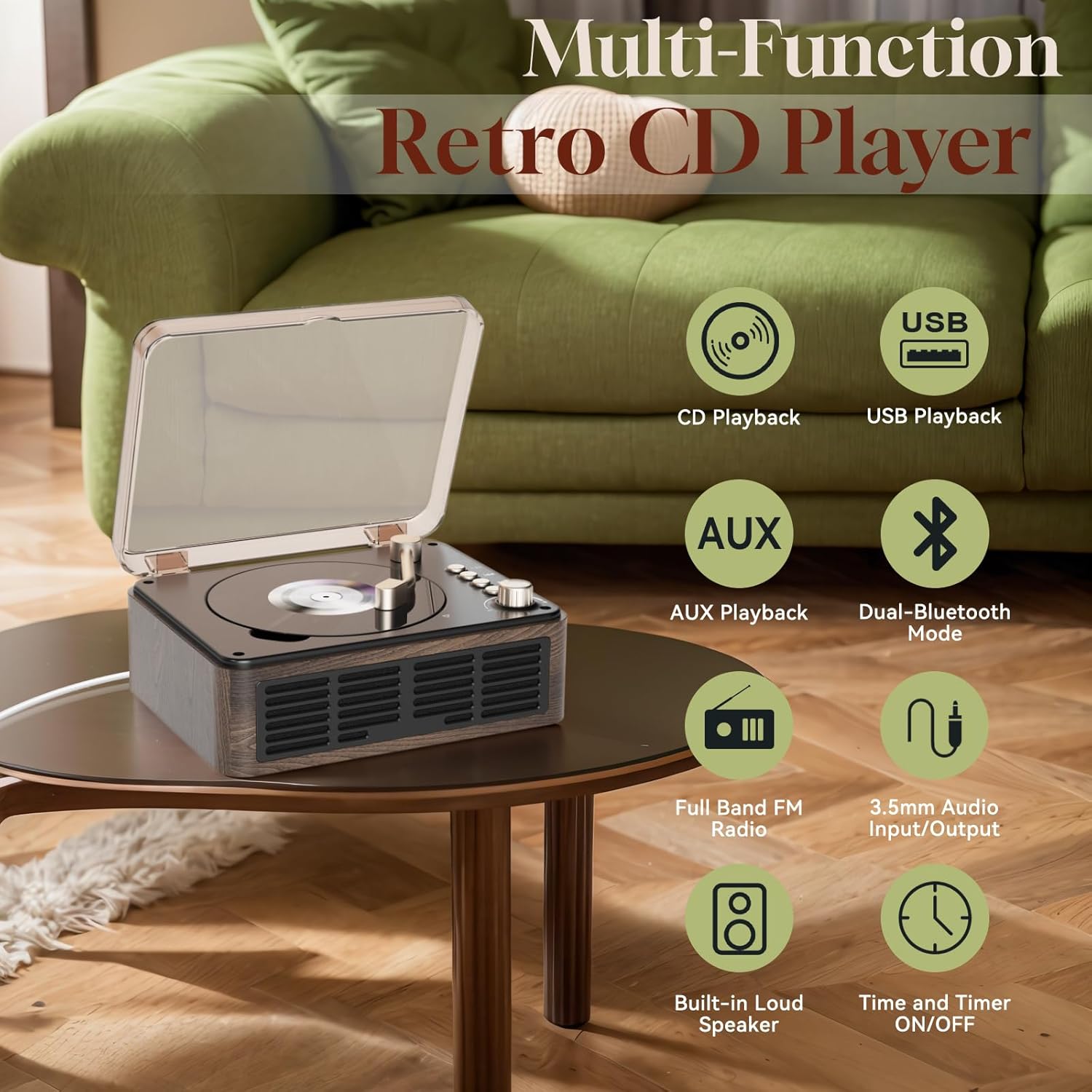
Image: The Gueray G-146-US CD player highlighting its various functions and connectivity options.
Package Contents
- Gueray G-146-US CD Player
- Remote Control (requires 2 AAA batteries, not included)
- User Manual
- Type-C Power Cable (1.5m)
- 5V-2A USB Adapter

Image: Contents of the package, including the CD player, remote, power cable, and adapter. Note that AAA batteries for the remote are not included.
Safety Information
- Do not expose the device to rain or moisture.
- Do not disassemble the unit. Refer all servicing to qualified personnel.
- Ensure proper ventilation around the unit.
- Use only the provided power adapter.
- Keep out of reach of children.
- Avoid placing the unit on unstable surfaces.
Product Overview and Controls
The Gueray G-146-US features a retro design with intuitive controls and multiple connectivity options.

Image: Detailed diagram showing the location of the laser, LED indicator, turntable arm switch, Bluetooth button, Previous/Next track buttons, Play/Pause button, Mode/Volume knob, Power switch, SPDIF port, Earphone socket, AUX socket, DC IN 5V port, and USB port.
Front/Top Panel Controls:
- Turntable Arm Switch: Used to activate/deactivate CD playback.
- Bluetooth Button: Press to enter Bluetooth pairing mode.
- Previous/Next Buttons: Navigate tracks or radio stations.
- Play/Pause Button: Control playback.
- Mode (Press Button)/Volume (Rotate Knob): Press to switch between modes (CD, FM, USB, AUX, Bluetooth Receiver, Bluetooth Transmitter). Rotate to adjust volume.
Rear Panel Interfaces:
- Power Switch: Turn the unit ON/OFF.
- SPDIF Port: Digital audio output.
- Earphone Socket: 3.5mm jack for headphones.
- AUX Socket: 3.5mm jack for external audio input.
- DC IN 5V: Power input port.
- USB Port: For USB drive playback.
Setup
1. Power Connection
- Connect the provided Type-C power cable to the "DC IN 5V" port on the rear of the CD player.
- Plug the USB adapter into a standard wall outlet.
- Ensure the power switch on the rear of the unit is in the OFF position before connecting.
- Once connected, switch the power ON.
Note: This CD player does not have a built-in battery and requires continuous external power to operate.
2. Remote Control Battery Installation
- Open the battery compartment on the back of the remote control.
- Insert two AAA batteries, ensuring correct polarity (+/-).
- Close the battery compartment securely.
Note: AAA batteries are not included in the package.
Operating Instructions
Switching Modes
Press the "Mode" button (the main knob) on the unit or the "MODE" button on the remote control to cycle through the available modes: CD, FM, USB, AUX, Bluetooth Receiver, Bluetooth Transmitter.
1. CD Playback Mode
- Ensure the unit is in CD mode.
- Gently lift the transparent cover.
- Place a CD (CD, CD-R, CD-RW, CD-G, MP3, WMA, WAV formats supported) onto the spindle, label side up.
- Close the transparent cover.
- Move the turntable arm switch to the "ON" position (towards the center). The CD will begin to spin and play automatically.
- Use the Play/Pause, Previous, and Next buttons on the unit or remote to control playback.
- Adjust volume by rotating the main knob or using the volume buttons on the remote.

Image: The Gueray G-146-US CD player with its lid open, showing a CD placed on the turntable, alongside its remote control.
2. Bluetooth Mode (Dual Bluetooth)
The player supports both Bluetooth Receiver and Bluetooth Transmitter functions.
Bluetooth Receiver Mode:
Allows the CD player to act as a Bluetooth speaker, receiving audio from your smartphone, tablet, or other Bluetooth-enabled devices.
- Switch the player to Bluetooth Receiver mode (indicated by "BLUE" or similar on the display/LED).
- On your external device, enable Bluetooth and search for "Gueray G-146-US" (or similar device name).
- Select the player to pair. Once connected, audio from your device will play through the CD player's speakers.
Bluetooth Transmitter Mode:
Allows the CD player to transmit audio (from CD, USB, AUX, FM) to Bluetooth headphones or external Bluetooth speakers.
- Switch the player to Bluetooth Transmitter mode.
- Ensure your Bluetooth headphones or speaker are in pairing mode.
- The CD player will automatically search for and connect to nearby Bluetooth audio devices.
- Once connected, audio from the CD player will be transmitted to your chosen Bluetooth device.

Image: Visual representation of the CD player acting as a Bluetooth receiver for smartphones/laptops and as a Bluetooth transmitter for headphones/external speakers.
3. FM Radio Mode
- Switch the player to FM Radio mode.
- Auto Search: Press and hold the Play/Pause button (or a dedicated scan button on the remote, if available) to automatically scan and save available FM stations.
- Manual Tuning: Use the Previous/Next buttons to manually tune to desired frequencies.
- Use the volume knob or remote to adjust the sound level.
The FM radio supports a full band range of 76MHz-108MHz.

Image: The Gueray CD player shown with its remote control, highlighting its FM radio capability and frequency range (76MHz-108MHz).
4. USB Playback Mode
- Insert a USB flash drive into the USB port on the rear of the player.
- Switch the player to USB mode.
- The player will automatically detect and begin playing audio files (MP3, WMA, WAV formats supported) from the USB drive.
- Use the Play/Pause, Previous, and Next buttons to control playback.
5. AUX Playback Mode
- Connect an external audio device (e.g., smartphone, MP3 player) to the AUX socket on the rear of the player using a 3.5mm audio cable (not included).
- Switch the player to AUX mode.
- Play audio from your external device. The sound will be amplified and played through the CD player's speakers.
6. Remote Control Functions
The remote control provides convenient access to all player functions from a distance.
- Power: Turn the unit ON/OFF.
- CD/FM/USB/AUX/Bluetooth Buttons: Directly select playback modes.
- Volume +/-: Adjust volume level.
- Play/Pause, Previous, Next: Control media playback.
- Repeat Mode: Cycle through repeat options (e.g., repeat one, repeat all).
- Sleep Mode: Set a timer for the player to turn off automatically.
- Numeric Buttons (0-9): For direct track selection in CD/USB mode or station selection in FM mode.
- BASS +/-: Adjust bass levels.
Maintenance
- Cleaning: Use a soft, dry cloth to clean the exterior of the unit. Do not use abrasive cleaners or solvents.
- CD Care: Handle CDs by the edges. Clean dirty CDs with a soft, lint-free cloth, wiping from the center outwards.
- Storage: When not in use for extended periods, unplug the power adapter and store the unit in a cool, dry place.
- Laser Lens: Do not touch the CD player's laser lens. If cleaning is necessary, use a specialized CD lens cleaner disc.
Troubleshooting
| Problem | Possible Cause | Solution |
|---|---|---|
| Unit does not power on. | Power cable not connected; Power switch OFF. | Ensure power cable is securely connected and power switch is ON. Verify wall outlet is functional. |
| CD does not play or skips. | CD is dirty, scratched, or inserted incorrectly; Turntable arm switch not engaged. | Clean or replace CD. Ensure CD is placed correctly. Move the turntable arm switch to the "ON" position. |
| No sound. | Volume too low; Incorrect mode selected; Headphones connected. | Increase volume. Verify correct playback mode. Disconnect headphones if sound is desired from speakers. |
| Remote control not working. | Batteries are dead or inserted incorrectly; Obstruction between remote and unit. | Replace AAA batteries, ensuring correct polarity. Remove any obstructions. Point remote directly at the unit. |
| Bluetooth pairing fails. | Incorrect Bluetooth mode; Device too far; Other devices interfering. | Ensure correct Bluetooth mode (Receiver/Transmitter). Move devices closer. Disconnect other Bluetooth devices. Try restarting both devices. |
| Voice prompts are too loud or cannot be adjusted. | System voice prompt volume is fixed. | This is a characteristic of the device. Adjust overall volume quickly after mode changes. |
| Volume resets to a high level upon power on. | Device does not retain last volume setting. | Always be prepared to adjust the volume immediately after powering on the unit. |
| FM radio reception is poor. | Weak signal; Interference. | Reposition the unit for better reception. Avoid placing near other electronic devices that may cause interference. |
Specifications
| Feature | Detail |
|---|---|
| Model Number | G-146-US |
| Brand | Gueray |
| Product Dimensions | 1.18 x 1.97 x 0.79 inches |
| Item Weight | 2.66 pounds |
| Connectivity Technology | Auxiliary, Bluetooth |
| Supported Disc Formats | CD, CD-R, CD-RW, CD-G |
| Supported Audio Formats (USB/CD) | MP3, WMA, WAV |
| FM Radio Frequency | 76MHz-108MHz |
| Speakers | Built-in Dual Hi-Fi Stereo Speakers |
| Power Supply | DC 5V (via Type-C cable and USB adapter) |
Warranty and Support
Gueray products are designed and manufactured to the highest quality standards. For warranty information or technical support, please refer to the contact details provided on the product packaging or visit the official Gueray website. Please retain your proof of purchase for warranty claims.
Related Documents - G-146-US
 |
AVT Manta Camera Controls - User Manual Explore the comprehensive controls for AVT Manta series digital cameras in this V4.1.0 manual. Learn about standard and advanced features, configuration parameters, and integration for machine vision applications. Includes details on GigE Vision, PvAPI, and supported platforms. |
 |
Grundig HIFI-Micro-System UMS 1 / UMS 2 Service Manual Umfassendes Service-Handbuch für das Grundig HIFI-Micro-System UMS 1 und UMS 2. Enthält detaillierte technische Daten, Schaltpläne, Ersatzteillisten, Demontageanleitungen und Reparaturhinweise für Servicetechniker. |
 |
Altair 3.5" Trimmed LED Downlight Specification Sheet Technical specifications and compatibility guide for the Goodlite Altair 3.5" Trimmed LED Downlight series, including dimming compatibility and accessory options. |
 |
Magnetek CDBR-D Dynamic Braking Unit Instruction Manual This manual provides detailed instructions for the installation, operation, and troubleshooting of the Magnetek CDBR-D Dynamic Braking Unit. It covers safety precautions, wiring procedures, configuration settings, and specifications for various models. |
 |
Altair 3.5" Triple Head Regress Gimbal Specification Sheet Technical specifications and compatibility guide for the Goodlite Altair 3.5" Triple Head Regress Gimbal, featuring selectable color temperatures, dimming options, and accessory details. |
 |
Miele Návod k obsluze: Bezpečné používání a údržba myčky nádobí Komplexní uživatelský manuál pro myčky nádobí Miele, obsahující pokyny k instalaci, bezpečnému provozu, čištění, údržbě a řešení problémů pro optimální výkon a dlouhou životnost vašeho spotřebiče. |
Ask a question about this manual
Ask about setup, troubleshooting, compatibility, parts, safety, or missing instructions. Manuals+ will review the question and use this page’s manual context to help answer it.