
1. Introduction
Thank you for choosing the SQUADO Portable Bluetooth Speaker. This speaker is designed to provide high-quality audio wherever you go. With its 20W powerful output, waterproof design, and integrated hands-free microphone, it is ideal for various indoor and outdoor activities. This manual will guide you through the setup, operation, and maintenance of your new speaker.
- Portable Bluetooth Speaker: Enjoy wireless audio connectivity for your favorite music.
- Waterproof (IPX6): Resistant to water splashes and jets, making it suitable for use by the pool or beach.
- 20W Powerful Sound: Delivers clear and robust audio for an immersive listening experience.
- Integrated Hands-Free: Built-in microphone allows you to answer calls directly from the speaker.
- USB Charging: Conveniently recharge your speaker via the USB port.
- 3.5mm Audio Input: Provides flexibility to connect non-Bluetooth devices.
2. Package Contents
Please check the package for the following items:
- SQUADO Portable Bluetooth Speaker
- Power Cable (USB charging cable)
- User Manual (this document)
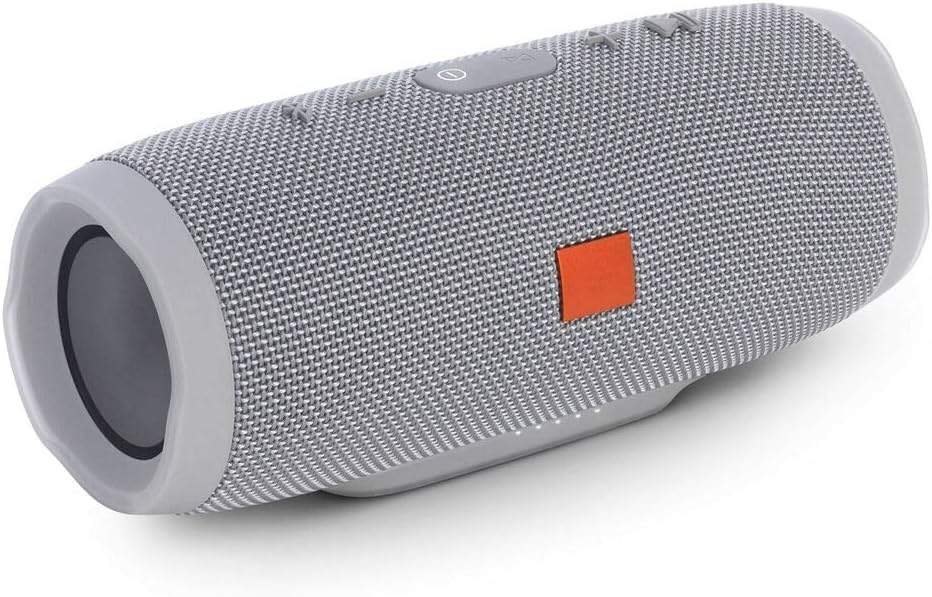
Image: SQUADO Portable Bluetooth Speaker in red, with other color options (black, blue, green, grey) and a charging cable displayed.
3. Product Overview
The SQUADO Portable Bluetooth Speaker features a robust design with intuitive controls. While specific button layouts may vary slightly by production batch, the core functionalities remain consistent.
Key Features:
- Power Button: Typically located on the top or side, used to turn the speaker ON/OFF.
- Volume Controls: Dedicated buttons (e.g., '+' and '-') or a multi-function button for adjusting audio volume.
- Play/Pause Button: For controlling music playback.
- Bluetooth Pairing Button: Initiates Bluetooth pairing mode.
- Microphone: Integrated for hands-free calling.
- USB Charging Port: For connecting the power cable to recharge the speaker.
- 3.5mm AUX Input: For wired audio connection.
- LED Indicator: Shows power status, charging status, and Bluetooth connection status.

Image: A black SQUADO Portable Bluetooth Speaker with its charging cable, displayed with other color variants.
4. Setup
4.1 Charging the Speaker
- Connect the provided USB charging cable to the speaker's USB charging port.
- Connect the other end of the USB cable to a USB power adapter (not included) or a computer's USB port.
- The LED indicator will illuminate to show that the speaker is charging. It will typically change color or turn off once fully charged.
- For optimal battery life, fully charge the speaker before first use.
4.2 Bluetooth Pairing
- Ensure the speaker is fully charged.
- Press and hold the Power button to turn ON the speaker. The LED indicator will flash, indicating it is in pairing mode.
- On your smartphone, tablet, or other Bluetooth-enabled device, go to the Bluetooth settings.
- Search for available devices. You should see "SQUADO Cassa Bluetooth" or a similar name in the list.
- Select the speaker from the list to initiate pairing.
- Once successfully paired, the LED indicator will stop flashing and remain solid, and you may hear an audible confirmation.
- The speaker will automatically reconnect to the last paired device when turned on, if the device's Bluetooth is active and within range.
4.3 AUX Connection
- Connect one end of a 3.5mm audio cable (not included) to the AUX input port on the speaker.
- Connect the other end of the 3.5mm audio cable to the audio output jack of your device (e.g., MP3 player, computer).
- The speaker will automatically switch to AUX mode, or you may need to press a mode button (if available).
5. Operating Instructions
5.1 Power ON/OFF
- To turn ON: Press and hold the Power button for approximately 3 seconds.
- To turn OFF: Press and hold the Power button for approximately 3 seconds.
5.2 Music Playback (Bluetooth Mode)
- Play/Pause: Press the Play/Pause button once.
- Volume Up: Press the '+' button.
- Volume Down: Press the '-' button.
- Next Track: Press and hold the '+' button (or a dedicated next track button).
- Previous Track: Press and hold the '-' button (or a dedicated previous track button).
Note: Track control functionality may vary depending on your connected device and music application.
5.3 Hands-Free Calling
- Answer Call: When a call comes in, press the Play/Pause button once to answer.
- End Call: During a call, press the Play/Pause button once to end the call.
- Reject Call: When a call comes in, press and hold the Play/Pause button for approximately 2 seconds to reject.
- Redial Last Number: In standby mode, double-press the Play/Pause button to redial the last number.
Note: Ensure your speaker is connected via Bluetooth to your phone for hands-free functionality.
6. Maintenance
- Cleaning: Wipe the speaker with a soft, damp cloth. Do not use abrasive cleaners or solvents.
- Water Resistance: While waterproof (IPX6), avoid submerging the speaker in water for extended periods. Ensure the charging port cover is securely closed when near water.
- Storage: Store the speaker in a cool, dry place away from direct sunlight and extreme temperatures.
- Battery Care: To prolong battery life, charge the speaker regularly, even if not in frequent use. Avoid fully discharging the battery for long periods.
- Avoid Impacts: Do not drop or subject the speaker to strong impacts, as this may damage internal components.
7. Troubleshooting
| Problem | Possible Cause | Solution |
|---|---|---|
| Speaker does not turn ON. | Battery is depleted. | Charge the speaker using the provided USB cable. |
| No sound. | Volume is too low or muted. Device not connected. | Increase speaker and device volume. Ensure Bluetooth is connected or AUX cable is properly inserted. |
| Cannot pair with Bluetooth device. | Speaker is not in pairing mode. Device Bluetooth is off. Too far from speaker. | Ensure speaker is in pairing mode (flashing LED). Turn ON Bluetooth on your device. Move device closer to speaker (within 10 meters). Forget previous pairings on your device and try again. |
| Sound distortion. | Volume too high. Low battery. Interference. | Reduce volume on both speaker and device. Charge the speaker. Move away from other wireless devices. |
| Hands-free calling not working. | Speaker not connected to phone via Bluetooth. | Ensure the speaker is successfully paired and connected to your phone. Check phone's audio output settings. |
8. Specifications
| Brand | SQUADO |
| Model Name | Cassa Bluetooth |
| Maximum Speaker Output Power | 20 Watts |
| Connectivity Technology | Bluetooth, AUX |
| Audio Output Mode | Stereo |
| Mounting Type | Tabletop Stand |
| Material | Plastic |
| Special Features | Waterproof, 20W Power, Integrated Hands-Free, USB Charging |
| Recommended Uses | For smartphones or tablets, For computers, For televisions, For outdoor use |
| Control Type | Touchpad / Touch |
| Color | Multicolor |
| Water Resistance Level | Waterproof (IPX6 implied from description) |
| Bluetooth Range | 10 Meters |
| Number of Microphones | 1 |
| Signal-to-Noise Ratio | 80 dB |
| Power Source | Battery Powered |
| Item Dimensions (D x W x H) | 9 cm x 18 cm x 9 cm (approximately) |
| Compatible Devices | Smartphones, Tablets, Laptops, Televisions, Headphones |
| ASIN | B0D98H9PY9 |
| GTIN/UPC | 724129567649 |

Image: A collection of SQUADO Portable Bluetooth Speakers showcasing different color options.
9. Warranty and Support
9.1 Product Warranty
The SQUADO Portable Bluetooth Speaker comes with a 2-year limited product warranty from the date of purchase. This warranty covers manufacturing defects and workmanship under normal use. It does not cover damage caused by misuse, accidents, unauthorized modifications, or normal wear and tear. Please retain your proof of purchase for warranty claims.
9.2 Customer Support
For any questions, technical assistance, or warranty claims, please contact SQUADO customer support through the retailer where you purchased the product. Please have your product model and purchase details ready when contacting support.