
XGFTHG 500721856
XGFTHG Acodo Wireless Android Auto Carplay Adapter User Manual
Model: 500721856 | Brand: XGFTHG
1. Introduction
The XGFTHG Acodo Wireless Android Auto Carplay Adapter is a compact and efficient device designed to upgrade your vehicle's wired Carplay or Android Auto system to a wireless experience. This 2-in-1 AI box allows seamless integration of your smartphone's features directly onto your car's display without the need for a physical cable connection. It is compatible with vehicles that come equipped with factory-installed wired Carplay or Android Auto.
This manual provides detailed instructions on how to set up, operate, and maintain your wireless adapter, ensuring optimal performance and a convenient driving experience.
2. Product Overview
The XGFTHG Acodo Wireless Adapter is designed for simplicity and functionality. Its small form factor allows it to be discreetly plugged into your car's USB port.

Figure 2.1: Top view of the XGFTHG Acodo Wireless Adapter.

Figure 2.2: The adapter's compact and elegant design.

Figure 2.3: Key features: 2-in-1 functionality, Plug and Play, Auto Connect.
3. Setup and Installation
The XGFTHG Acodo Wireless Adapter is designed for simple plug-and-play installation. Ensure your vehicle has a factory-installed wired Carplay or Android Auto system before proceeding.
3.1 Initial Connection
- Locate an available USB port in your car. This is typically found in the central console or armrest box.
- Insert the XGFTHG Acodo Wireless Adapter into the USB port.
- Once plugged in, the adapter will power on.

Figure 3.1: Plugging the adapter into the car's USB port.
3.2 Pairing with Your Smartphone
After the adapter is powered on, follow these steps to pair your smartphone:
- On your smartphone, enable Bluetooth.
- Search for available Bluetooth devices and select the device name corresponding to the XGFTHG Acodo Adapter.
- Confirm the pairing request on both your phone and the car's display if prompted.
- After successful connection, the device will automatically reset and restart. This process may take a few moments. Keep the device powered on during this time.
4. Operating Instructions
The XGFTHG Acodo Wireless Adapter allows you to enjoy wireless Carplay or Android Auto functionality, retaining your car's original control methods.
4.1 Wireless Carplay and Android Auto
This adapter supports both wireless Carplay and wireless Android Auto. The functionality will depend on your connected smartphone and your car's original wired system.
- If your car only has wired Carplay, the adapter will convert it to wireless Carplay.
- If your car only has wired Android Auto, the adapter will convert it to wireless Android Auto.
- If your car supports both wired Carplay and wired Android Auto, the adapter can convert to either wireless Carplay or wireless Android Auto based on the connected phone.

Figure 4.1: Support for 2-in-1 function: Wired to Wireless Carplay / Wired to Wireless Android Auto.
4.2 Switching Between Carplay and Android Auto
To switch between wireless Carplay and wireless Android Auto functionality (if your car supports both wired versions):
- Ensure the adapter is connected to your car's USB port.
- If you wish to use wireless Android Auto, connect your Android phone to the adapter's Bluetooth name. After the connection is successful, wait for the device to automatically reset and restart.
- If you wish to use wireless Carplay, connect your iPhone to the adapter's Bluetooth name. After the connection is successful, wait for the device to automatically reset and restart.
4.3 Supported Functions and Compatibility
Once connected, you can enjoy various functions on your car's display:
- Navigation: Use map applications for directions.
- Music: Stream audio from your favorite music apps.
- Split Screen: Utilize multiple applications simultaneously on the display.
- Voice Control: Access features using voice commands.
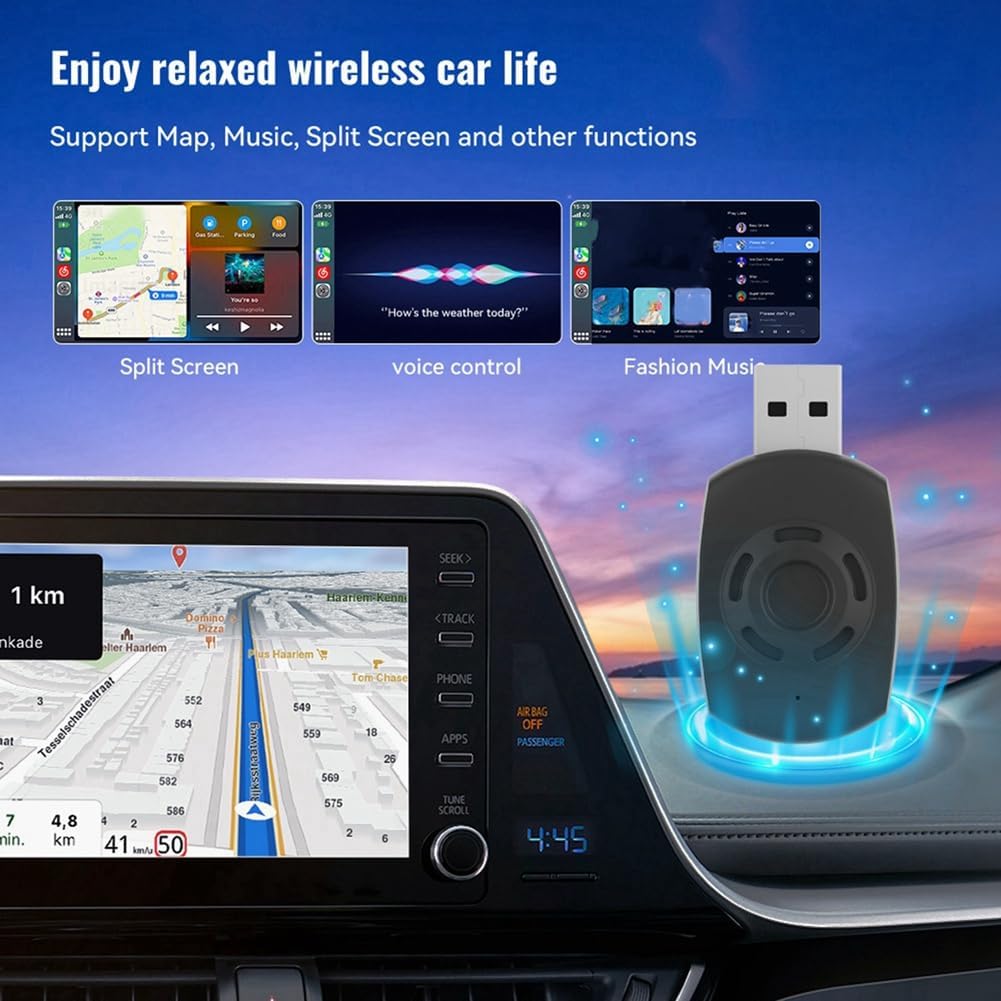
Figure 4.2: Enjoying relaxed wireless car life with map, music, split screen, and voice control.
Compatibility:
- For Wireless Carplay: Compatible with iPhones running iOS 10 and above.
- For Wireless Android Auto: Compatible with Android phones running Android 11 and above.

Figure 4.3: Compatible phone operating systems.
4.4 Retaining Original Car Controls
The adapter is designed to seamlessly integrate with your vehicle's existing control systems. You can continue to use:
- Voice control
- Knob controls
- Touch screen
- Steering wheel controls

Figure 4.4: Original car control functions are retained.
5. Maintenance
To ensure the longevity and optimal performance of your XGFTHG Acodo Wireless Adapter, follow these general maintenance guidelines:
- Keep Clean: Regularly wipe the adapter with a soft, dry cloth to remove dust and debris. Avoid using liquid cleaners or abrasive materials.
- Avoid Extreme Conditions: Do not expose the adapter to extreme temperatures (hot or cold), direct sunlight for prolonged periods, or high humidity.
- Handle with Care: Avoid dropping the device or subjecting it to strong impacts.
- Proper Storage: When not in use for extended periods, store the adapter in a cool, dry place.
6. Troubleshooting
If you encounter any issues with your XGFTHG Acodo Wireless Adapter, please refer to the following common troubleshooting tips:
- No Connection: Ensure the adapter is securely plugged into the car's USB port and that your phone's Bluetooth is enabled and paired with the adapter. Try unplugging and re-plugging the adapter.
- Intermittent Connection: Check for any interference from other wireless devices in the car. Ensure your phone's operating system is up to date.
- Device Not Responding: Disconnect the adapter from the USB port, wait for a few seconds, and then reconnect it. This will perform a soft reset.
- Display Issues: If the car's display shows an error or is unresponsive, try restarting your car's infotainment system if possible.
- Product Appearance: Please note that due to constant product updates and different manufacturing batches, the actual product may have slight differences or color variations from images. This does not affect its functionality or use.
If problems persist, please refer to the support information section.
7. Specifications
| Feature | Specification |
|---|---|
| Brand | XGFTHG |
| Model | 500721856 |
| Product Dimensions | 10 x 10 x 5 cm |
| Item Weight | 20 g |
| Colour | Black |
| Material | ABS |
| Power Input | USB 5V (5V+0.2V--1.0A) |
| Power Output | DC 5V+0.2V=-=1.0A |
| Compatible Models | Car comes with wired Carplay / Wired Android Auto |
| Wireless Carplay Compatibility | iPhone (iOS 10 and above) |
| Wireless Android Auto Compatibility | Android Phone (Android 11 and above) |
8. Warranty and Support
Specific warranty information for the XGFTHG Acodo Wireless Android Auto Carplay Adapter is not provided in the product details. For any warranty claims or technical support, please refer to the seller or manufacturer's contact information provided at the point of purchase.
Ask a question about this manual
Ask about setup, troubleshooting, compatibility, parts, safety, or missing instructions. Manuals+ will review the question and use this page’s manual context to help answer it.