
1. Introduction
This manual provides essential instructions for the safe and efficient operation, installation, and maintenance of your Evjuicion Wallbox 7.4 kW EV Charger Type 2. Please read this manual thoroughly before installation and use to ensure proper functionality and safety. Keep this manual for future reference.
2. Product Overview
2.1 Key Features
- Adjustable Charging Current: Offers flexible current settings from 8A, 10A, 13A, 16A, to 32A, providing a maximum power output of 7.4 kW. This allows optimization of charging speed and battery longevity.
- Dual Charging Modes: Supports both RFID card activation (two RFID cards included) and convenient Plug & Play operation.
- LED Display and Indicators: A clear LED screen displays real-time charging status, current, voltage, temperature, and other parameters.
- Integrated Cable Management: Features a dedicated cable holder to keep the charging cable organized and protected when not in use.
- Robust and Safe Design: Equipped with an IP65 protective housing, ensuring dust and fire resistance. The charging cable (Type 2) and plug are designed for safe operation within temperature ranges of -25°C to 50°C. Includes comprehensive protection against overcurrent, overvoltage, overtemperature, and lightning.
- Wide Compatibility: Compatible with 99% of electric vehicles (BEVs) and plug-in hybrid vehicles (PHEVs) that use the Type 2 (IEC 62196-2) charging standard across Europe.
2.2 What's in the Box
- Evjuicion Wallbox EV Charger
- Mounting Plate
- Cable Holder
- Charging Cable (5m, Type 2)
- User Manual
- Screw Set for Installation
- 2 x RFID Cards

Image 2.1: Evjuicion Wallbox EV Charger with included components: the charger unit, Type 2 charging cable, wall mounting bracket, and RFID cards.

Image 2.2: Detailed view of the package contents, including the wallbox, mounting accessories, cable, user manual, and RFID cards.
3. Setup and Installation
Installation of the Evjuicion Wallbox requires electrical knowledge. It is strongly recommended that all electrical connections be performed by a qualified professional to ensure safety and compliance with local regulations.
3.1 Mounting the Wallbox
- Select a suitable location for the wallbox, ensuring it is within reach of your vehicle and a power source.
- Use the provided mounting plate as a template to mark drilling points on the wall.
- Drill holes and insert the expansion screws.
- Secure the mounting plate to the wall.
- Attach the wallbox unit to the mounting plate.
- Install the cable holder next to the wallbox for convenient cable storage.
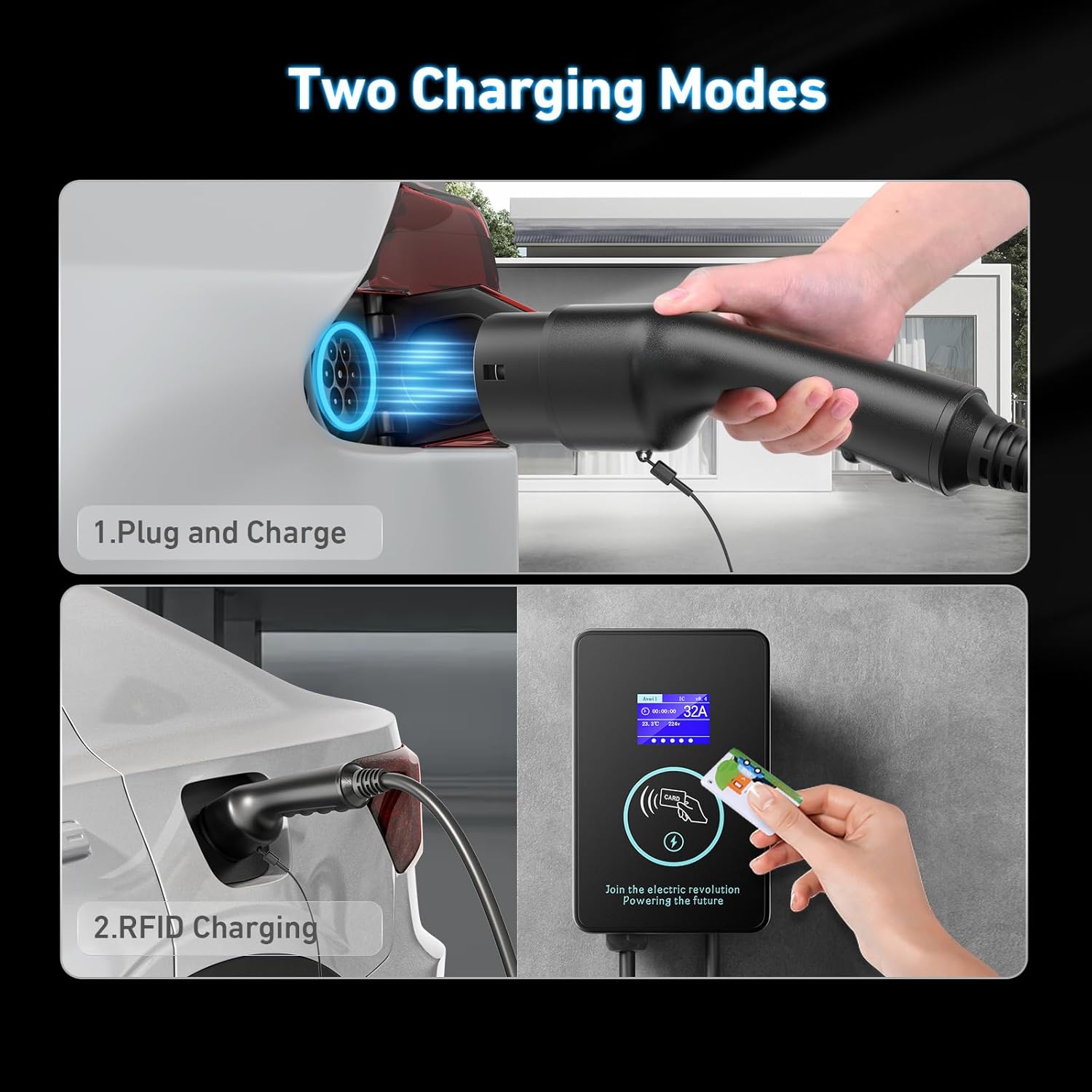
Image 3.1: Diagram illustrating the monophase electrical connections (L1, N, PE) for the wallbox. Professional installation is required.

Image 3.2: The compact dimensions of the wallbox, measuring approximately 23cm (9.05in) in height and 15cm (5.9in) in width.
4. Operating Instructions
4.1 LED Display Information
The integrated LED display provides real-time information about the charging process:
- Current (A): Displays the selected charging amperage.
- Voltage (V): Shows the real-time voltage.
- Charging Time: Indicates the duration of the current charging session.
- Temperature: Displays the internal operating temperature.
- Charging Status: Visual indicators for charging progress.

Image 4.1: Detailed view of the LED display showing charging current, voltage, time, and temperature.
4.2 Adjusting Charging Current
You can adjust the charging current to optimize charging speed or prolong battery life. The available current settings are 8A, 10A, 13A, 16A, and 32A. Use the setting button on the wallbox to cycle through these options.

Image 4.2: Illustration of adjustable current settings from 8A to 32A, allowing users to select optimal charging power.
4.3 Scheduled Charging
The wallbox supports scheduled charging, allowing you to delay the start of charging for 0, 2, 4, 6, or 8 hours. This feature can be used to take advantage of off-peak electricity rates.

Image 4.3: Graphic demonstrating the scheduled charging function, allowing users to set a delay for charging to begin.
4.4 Charging Modes
The Evjuicion Wallbox offers two distinct charging modes:
4.4.1 RFID Card Mode
- Adjust the desired current using the setting button.
- Connect the charging cable to your electric vehicle.
- Swipe one of the provided RFID cards over the card reader area on the wallbox to initiate charging.

Image 4.4: Visual guide for initiating charging using the RFID card mode: adjust current, connect to car, then swipe card.
4.4.2 Plug & Play Mode
To switch to Plug & Play mode, hold an RFID card over the scanning area for approximately 15 seconds until the indicator light changes. Once in Plug & Play mode, charging will start automatically upon connecting the cable to your vehicle.
- Ensure the wallbox is in Plug & Play mode (indicated by the display).
- Adjust the desired current using the setting button.
- Connect the charging cable to your electric vehicle. Charging will begin automatically.

Image 4.5: Illustration of the Plug & Play charging mode: adjust current, then simply connect the cable to the car to start charging.
5. Safety Information
Your Evjuicion Wallbox is designed with multiple safety features to protect both the charger and your vehicle.
- IP65 Protection: The charger unit is rated IP65 for protection against dust and water jets.
- IP67 Protection: The charging cable and plug are rated IP67 for enhanced protection against immersion in water.
- Temperature Resistance: The cable and plug are designed to operate safely in temperatures ranging from -25°C to 50°C.
- Integrated Protections: Includes safeguards against overcurrent, overvoltage, overtemperature, and lightning strikes.
- Emergency Stop: A prominent emergency stop button is located on the side of the unit for immediate power cut-off.

Image 5.1: Visual representation of the wallbox's resistance to extreme weather conditions, including waterproof, dustproof, cold, and heat resistance.

Image 5.2: Diagram illustrating the various protection features, including IP67 waterproof rating, overload, overcurrent, leakage, overtemperature, lightning, groundless, and CP protection.
6. Maintenance
Regular maintenance ensures the longevity and optimal performance of your Evjuicion Wallbox.
- Cleaning: Periodically wipe the exterior of the wallbox and the charging cable with a soft, damp cloth. Do not use abrasive cleaners or solvents.
- Inspection: Regularly inspect the charging cable and plug for any signs of damage, wear, or corrosion. If any damage is found, discontinue use and contact customer support.
- Cable Storage: Always use the provided cable holder to store the charging cable neatly and prevent it from being damaged or contaminated.
7. Troubleshooting
If you encounter issues with your Evjuicion Wallbox, refer to the following common troubleshooting steps:
- Charger Not Starting: Ensure the wallbox is properly connected to the power supply. Check if the circuit breaker has tripped. Verify that the charging cable is securely connected to both the wallbox and the vehicle. If using RFID mode, ensure the card is correctly swiped.
- No Power to Display: Check the main power supply to the wallbox. If the issue persists, contact a qualified electrician.
- Charging Interrupted: Check for any error messages on the LED display. Ensure the vehicle's charging port is clean and free of debris. Environmental factors like extreme temperatures can sometimes interrupt charging; allow the unit to return to normal operating temperature.
- RFID Card Lost: If you lose your RFID card, please contact customer service for assistance.
For persistent issues or error codes not listed, please contact Evjuicion customer support.
8. Specifications
| Feature | Specification |
|---|---|
| Brand | Evjuicion |
| Model Number | WALLBOX7KW1015 |
| Power Output | 7.4 kW (Max) |
| Adjustable Current | 8A, 10A, 13A, 16A, 32A |
| Charging Connector | Type 2 (IEC 62196-2) |
| Cable Length | 5 meters (16.4 ft) |
| Ingress Protection (Unit) | IP65 |
| Ingress Protection (Cable/Plug) | IP67 |
| Operating Temperature | -25°C to 50°C |
| Dimensions (Unit) | Approx. 38 x 32 x 12 cm |
| Weight | 3 Kilograms |
8.1 Compatibility
The Evjuicion Wallbox is compatible with electric vehicles and plug-in hybrid vehicles that utilize the Type 2 (IEC 62196-2) charging standard. This includes a wide range of models from manufacturers such as Audi, BMW, Ford, Mercedes-Benz, Kia, Tesla, Volvo, Honda, Hyundai, and others.

Image 8.1: Chart showing various car brands and models compatible with the Type 2 (IEC 62196-2) charging standard.
9. Warranty and Support
For any questions, technical assistance, or in case of loss of your RFID card, please contact Evjuicion customer service. Refer to the product packaging or the official Evjuicion website for contact details.


