
1. Introduction
Thank you for purchasing the DUPWAY 40000mAh Power Bank. This high-capacity portable charger (Model W3016) is designed to provide reliable and fast charging for your electronic devices on the go. To ensure safe and optimal performance, please read this instruction manual thoroughly before using the product.
What's in the Box:
- 1x DUPWAY 40000mAh Power Bank (Model W3016)
- 1x USB-A to USB-C Cable
- 1x User Manual
- 1x Carrying Pouch
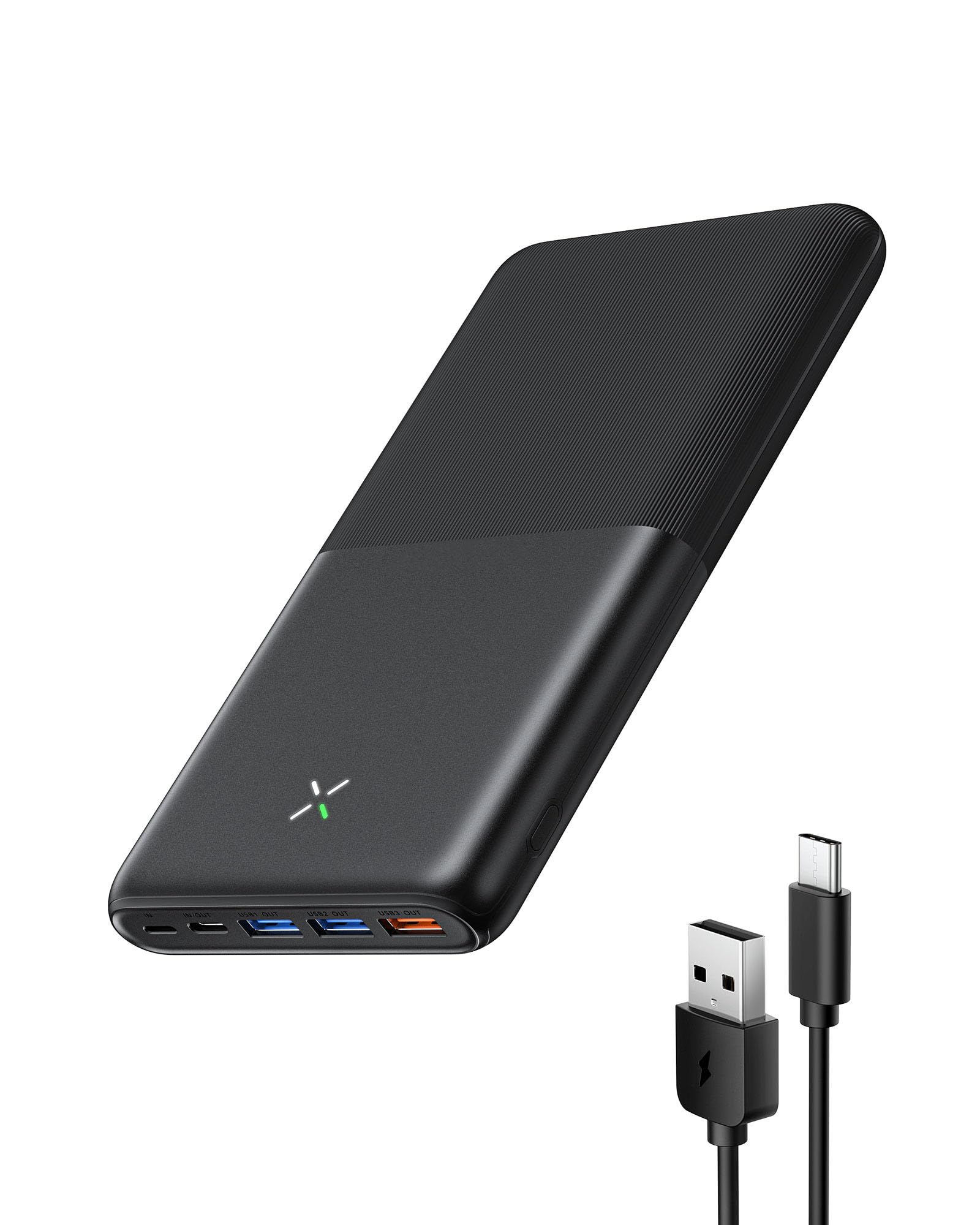
Image 1.1: Contents of the DUPWAY 40000mAh Power Bank package, including the power bank, USB-A to USB-C cable, user manual, and carrying pouch.
2. Product Overview
The DUPWAY 40000mAh Power Bank is equipped with advanced charging technology, offering 22.5W fast charging capabilities and multiple ports to charge various devices simultaneously. Its compact design makes it an ideal companion for travel, work, and daily use.
Key Features:
- Massive 40000mAh Capacity: Provides multiple charges for smartphones, tablets, and other USB-powered devices.
- 22.5W Fast Charging: Supports rapid charging for compatible devices, significantly reducing charging time.
- Multiple Ports: Features 4 output ports (USB1, USB2, USB3, USB-C) and 3 input ports (Micro, Lightning, USB-C) for versatile connectivity.
- Digital LED Display: Clearly shows the remaining battery percentage of the power bank.
- Compact & Portable Design: Despite its high capacity, the power bank is designed for easy portability.
Port Layout:
Image 2.1: Detailed view of the power bank's multiple ports, including USB-A outputs, USB-C input/output, Micro-USB input, and Lightning input.

Image 2.2: Illustration of the power bank's wide compatibility, showing it can charge smartphones, tablets, drones, and earphones.
3. Setup
Initial Charging of the Power Bank:
Before first use, it is recommended to fully charge your DUPWAY Power Bank. This ensures optimal battery performance and longevity.
- Connect the provided USB-A to USB-C cable to one of the power bank's input ports (Micro, Lightning, or USB-C).
- Plug the other end of the cable into a compatible USB wall adapter (not included) or a computer's USB port. For fastest charging, use a 9V-2.0A or 5V-3.0A adapter.
- The LED display on the power bank will show the charging progress, indicating the battery percentage.
- Once the display shows 100%, the power bank is fully charged and ready for use.

Image 3.1: A hand connecting a USB-C cable to the power bank, demonstrating how to charge the power bank itself.
4. Operating Instructions
The DUPWAY Power Bank can charge up to four devices simultaneously.
Charging Your Devices:
- Identify the correct charging cable for your device.
- Connect one end of the charging cable to an available output port on the power bank (USB1, USB2, USB3, or USB-C).
- Connect the other end of the cable to your device's charging port.
- The power bank will automatically begin charging your device. The LED display will show the power bank's remaining charge.
- To stop charging, simply disconnect your device from the power bank.

Image 4.1: A hand connecting a smartphone to the power bank using a charging cable.

Image 4.2: A hand connecting a tablet to the power bank using a charging cable.

Image 4.3: The power bank simultaneously charging multiple devices, including a tablet, smartphone, and drone.
LED Display:
The integrated LED display provides real-time information about the power bank's battery status. The percentage shown indicates the remaining charge.
5. Specifications
| Model Number | W3016 |
| Capacity | 40000mAh |
| Micro Input | 5V-2.0A / 9V-2.0A |
| Lightning Input | 5V-2.0A / 9V-2.0A |
| USB-C Input | 5V-3.0A / 9V-2.0A |
| USB-C Output | 5V-3.0A / 9V-2.22A / 12V-1.67A (22.5W Max) |
| USB1 & USB2 Outputs | 5V-3.0A |
| USB3 Output | 4.5V-5A / 5V-4.5A / 9V-2.0A / 12V-1.5A (22.5W Max) |
| Dimensions | 165.95 x 45 x 20.3 mm |
| Weight | 476g |
6. Maintenance
- Cleaning: Use a soft, dry cloth to clean the power bank. Do not use harsh chemicals or abrasive materials.
- Storage: Store the power bank in a cool, dry place away from direct sunlight, extreme temperatures, and humidity.
- Battery Care: To prolong battery life, fully charge the power bank at least once every three months if not in regular use. Avoid completely draining the battery frequently.
- Handling: Do not drop, disassemble, or attempt to repair the power bank yourself. This may cause damage and void the warranty.
7. Troubleshooting
Common Issues and Solutions:
- Power Bank Not Charging:
- Ensure the charging cable is securely connected to both the power bank's input port and the wall adapter/power source.
- Verify that the wall adapter/power source is functioning correctly.
- Try using a different charging cable or adapter.
- Device Not Charging from Power Bank:
- Ensure the power bank has sufficient charge (check the LED display).
- Verify that the charging cable is securely connected to both the power bank's output port and your device.
- Try using a different output port on the power bank.
- Ensure your device's charging port is clean and free of debris.
- Some devices may require specific cables or adapters for optimal charging.
- Slow Charging:
- Ensure you are using a fast-charging compatible cable and your device supports fast charging.
- Check the power bank's output specifications for the port you are using; some ports may offer different charging speeds.
- Avoid using your device heavily while charging, as this can slow down the process.
8. Warranty and Support
Your DUPWAY Power Bank is covered by a manufacturer's warranty. Please refer to the warranty card included in your package for specific terms and conditions. For technical support, customer service, or warranty claims, please contact DUPWAY customer support through the retailer where you purchased the product or visit the official DUPWAY website.
Please retain your proof of purchase for warranty purposes.