
1. Introduction
This manual provides comprehensive instructions for the GROPOW Automatic Solar-Powered Chicken Coop Door Opener, Model GP-CD-G01-TA. This device is designed to automate the opening and closing of your chicken coop door, enhancing the safety of your poultry and providing convenience for owners. It features anti-pinch protection, a large LCD display, and multiple programmable modes including timer and light sensor operation.
2. Important Safety Instructions
- Read all instructions before operating the device.
- Keep hands clear of the door path during operation to prevent injury. The anti-pinch feature is designed to protect poultry, but caution is always advised.
- Ensure proper installation to prevent the door from falling or malfunctioning.
- Do not attempt to modify the device. Unauthorized modifications may void the warranty and pose safety risks.
- Keep children and pets away from the operating door.
- Use only specified rechargeable batteries (4 AA NiMh) for solar charging.
- Operating Temperature Range: -40°C to 85°C (-40°F to 185°F).
3. Package Contents
Verify that all components are present in the package:
- Automatic Chicken Coop Door Opener Unit
- Solar Panel
- Solar Panel Mounting Bracket
- Remote Control
- Mounting Hardware (screws, anchors, etc.)
- User Manual (this document)
4. Product Features
- Solar-Powered Operation: Equipped with 4 AA NiMh rechargeable batteries and a high-efficiency solar panel for continuous power, eliminating the need for frequent battery replacement or charging.
- Anti-Pinch Protection: The door automatically stops and retracts if an obstruction (e.g., a chicken) is detected during closing, preventing injury.
- Large LCD Display: Features a simplified graphical interface for clear display of settings and operating status, making programming easy.
- Multiple Operating Modes:
- Timer Mode: Program specific opening and closing times.
- Light Sensor Mode: Automatically opens at dawn and closes at dusk based on ambient light.
- Manual Mode: Operate the door directly via the control panel.
- Remote Control: Open and close the door wirelessly from up to 50 meters (164 feet) in clear line of sight.
- Durable Construction: Made from Acrylonitrile Butadiene Styrene (ABS) material, designed to withstand extreme weather conditions (-40°C to 85°C / -40°F to 185°F), including snow, rain, and dust.
- Easy Installation: Quick and straightforward installation with included mounting accessories, requiring no complex wiring.
5. Setup and Installation
Follow these steps for proper installation of your GROPOW Automatic Chicken Coop Door Opener.
5.1 Mounting the Door Opener
- Choose a suitable location: Select a flat, vertical surface above the chicken coop door opening. Ensure there is enough clearance for the door to slide freely.
- Mark drilling points: Hold the door opener unit against the desired mounting surface and mark the positions for the mounting screws.
- Drill pilot holes: Use an appropriate drill bit to create pilot holes at the marked positions. If mounting into masonry, use wall anchors.
- Secure the unit: Attach the door opener unit securely to the surface using the provided screws. Ensure it is level and stable.
5.2 Installing the Solar Panel
- Select a sunny spot: Mount the solar panel in a location that receives maximum direct sunlight throughout the day. Avoid shaded areas.
- Attach mounting bracket: Secure the solar panel mounting bracket to a stable surface (e.g., coop roof, wall) using screws.
- Mount solar panel: Attach the solar panel to the bracket and adjust its angle to face the sun directly.
- Connect to door opener: Plug the solar panel cable into the designated port on the main door opener unit.
5.3 Initial Power-Up and Battery Charging
Upon initial installation, allow the solar panel to charge the internal batteries for at least 24 hours in direct sunlight before programming or extensive use. The LCD display will indicate battery status.
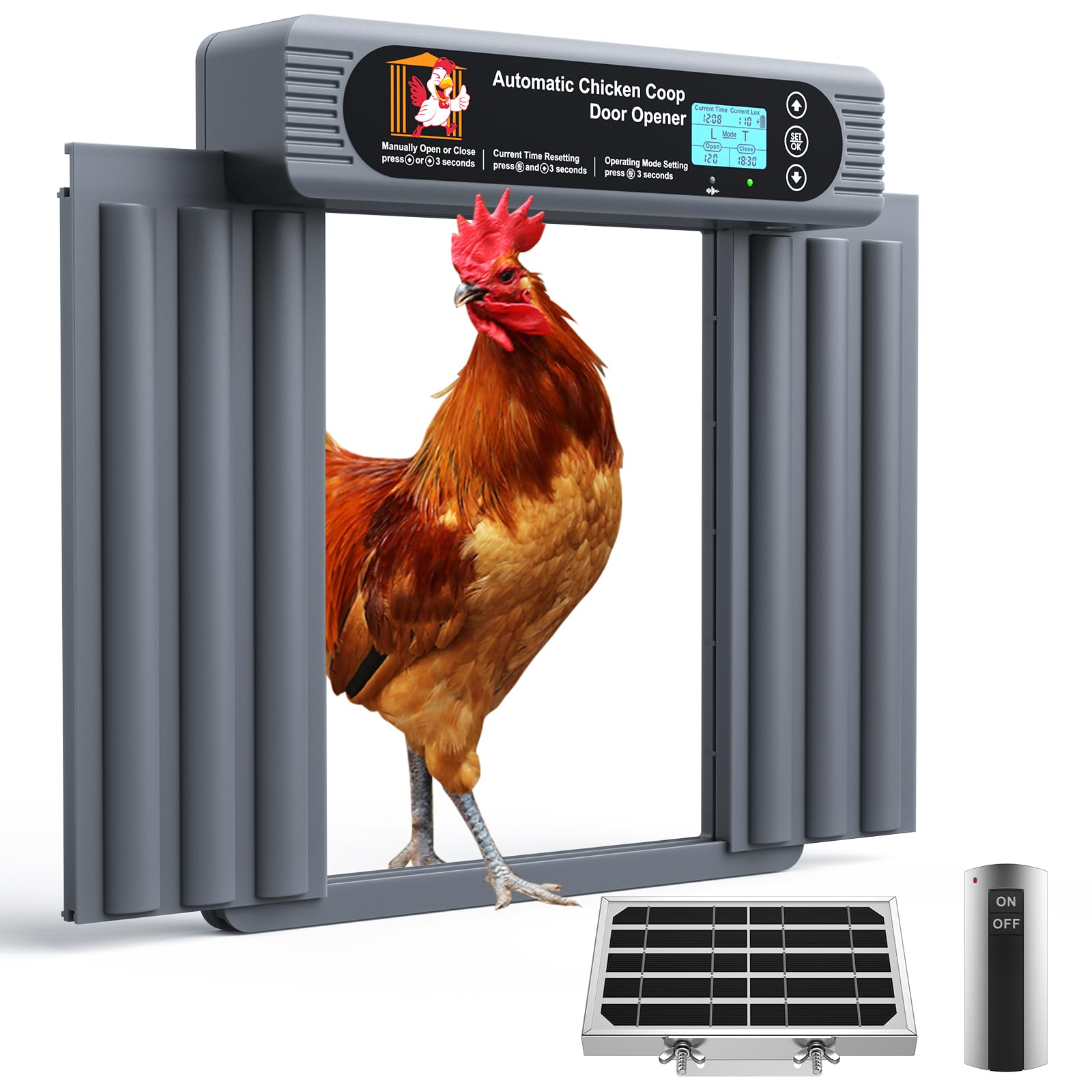
Figure 1: GROPOW Automatic Chicken Coop Door Opener with Solar Panel. This image shows the main unit with its LCD screen and the attached solar panel, illustrating the complete setup.
6. Operating Instructions
The GROPOW Automatic Chicken Coop Door Opener offers several operating modes for flexibility.
6.1 LCD Display Overview
The large LCD display provides real-time information and allows for easy programming. Familiarize yourself with the icons and menu structure.
- Battery Indicator: Shows current battery charge level.
- Mode Indicator: Displays the currently active operating mode (Timer, Light Sensor, Manual).
- Time/Light Intensity: Shows current time or detected light intensity depending on the mode.
- Door Status: Indicates if the door is open or closed.
6.2 Programming Operating Modes
Use the buttons on the control panel to navigate the menu and set your preferred mode.
6.2.1 Timer Mode (T-Mode)
In Timer Mode, you set specific times for the door to open and close.
- Press the "MODE" button until "T-Mode" is displayed.
- Use the "SET" button to enter time programming.
- Adjust the opening time (e.g., 06:00 AM) using the arrow buttons. Confirm with "SET".
- Adjust the closing time (e.g., 08:00 PM) using the arrow buttons. Confirm with "SET".
- The door will now operate according to the programmed schedule.
6.2.2 Light Sensor Mode (L-Mode)
In Light Sensor Mode, the door opens at dawn and closes at dusk based on ambient light levels.
- Press the "MODE" button until "L-Mode" is displayed.
- The device will automatically detect light levels. You may need to calibrate the sensitivity if the door opens/closes too early or too late. Refer to the advanced settings section in the full manual for calibration details.
- Important Note: As mentioned in the product description, "The door will open or close several times in L-mode when the light intensity of the installation location changes significantly up and down." This is normal behavior if light conditions fluctuate rapidly (e.g., passing clouds, shadows). Ensure the light sensor is not obstructed and is in a consistent light environment.
6.2.3 Manual Mode
Manual Mode allows you to open or close the door instantly using the control panel buttons.
- Press the "MODE" button until "Manual" is displayed.
- Use the "OPEN" button to open the door.
- Use the "CLOSE" button to close the door.
6.2.4 Remote Control Operation
The included remote control provides convenient wireless operation.
- Ensure the remote control has working batteries.
- Point the remote control towards the door opener unit.
- Press the "OPEN" button on the remote to open the door.
- Press the "CLOSE" button on the remote to close the door.
- The effective range is up to 50 meters (164 feet) without obstacles.
6.3 Anti-Pinch Protection
The anti-pinch safety feature is designed to protect your poultry. If the door encounters an obstruction during its closing cycle, it will immediately stop and retract to prevent injury. After retracting, it will attempt to close again. If the obstruction persists, it will retract again. Clear any obstructions to allow the door to close fully.
7. Maintenance
Regular maintenance ensures the longevity and optimal performance of your chicken coop door opener.
- Clean the Solar Panel: Periodically wipe the solar panel with a soft, damp cloth to remove dust, dirt, or debris that may reduce charging efficiency.
- Inspect Door Path: Ensure the door's track and path are free from obstructions (e.g., dirt, feathers, ice, snow) that could impede its movement.
- Check Batteries: While solar-powered, monitor the battery indicator on the LCD. If the unit consistently shows low battery despite adequate sunlight, the rechargeable NiMh batteries may need replacement after several years of use (rated up to 5 years).
- Lubrication: Do not apply lubricants to the door mechanism unless specifically instructed by the manufacturer.
- Weather Protection: Although designed for extreme weather, ensure the unit is securely mounted and protected from direct, prolonged exposure to heavy rain or snow accumulation where possible.
8. Troubleshooting
If you encounter issues with your GROPOW Automatic Chicken Coop Door Opener, refer to the following common problems and solutions.
| Problem | Possible Cause | Solution |
|---|---|---|
| Door opens/closes repeatedly in L-Mode. | Rapid fluctuations in light intensity (e.g., passing clouds, shadows, artificial lights). | Ensure the light sensor is not obstructed and is in a location with consistent ambient light. Consider switching to Timer Mode if light conditions are highly variable. |
| Door does not open or close. | Low battery, obstruction in door path, incorrect mode selected, remote control out of range or dead battery. | Check battery indicator; ensure solar panel is clean and receiving sunlight. Clear any obstructions. Verify correct operating mode. Replace remote control batteries or move closer. |
| Anti-pinch feature activates frequently. | Obstruction in the door path, or sensitive setting. | Inspect and clear the door path. If the issue persists without visible obstruction, consult customer support. |
| LCD display is blank or unreadable. | Low battery, extreme temperatures. | Charge batteries via solar panel. Ensure operating within specified temperature range. |
9. Specifications
| Feature | Detail |
|---|---|
| Brand | GROPOW |
| Model Number | GP-CD-G01-TA |
| Color | Dark Gray |
| Product Dimensions (L x W x H) | 32.51 x 12.7 x 35.05 cm (12.8 x 5 x 13.8 inches) |
| Weight | 2 kg (4.4 lbs) |
| Material | Acrylonitrile Butadiene Styrene (ABS) |
| Special Features | Anti-Pinch Protection, Heavy Duty, Waterproof and Weatherproof, Solar-Powered, Remote Control |
| Operating Temperature | -40°C to 85°C (-40°F to 185°F) |
| Included Components | Remote Control, Chicken Door Opener, Solar Panel, Solar Panel Mounting Bracket |
| Recommended for Breed | Large, All breed sizes |
10. Warranty and Customer Support
For warranty information or technical assistance, please contact GROPOW customer support. Details regarding warranty duration and terms are typically provided with your purchase documentation or on the manufacturer's official website.
Please have your model number (GP-CD-G01-TA) and purchase date available when contacting support.