
Philips BRI924/00 (S0458042)
Philips Lumea Advanced BRI924/00 IPL Hair Removal Device User Manual
Model: BRI924/00 (S0458042)
Introduction
Welcome to the user manual for your Philips Lumea Advanced BRI924/00 IPL Hair Removal Device. This device is designed to provide effective and convenient long-term hair reduction in the comfort of your home. Please read this manual carefully before first use and keep it for future reference. It contains important information regarding safety, usage, maintenance, and troubleshooting.
The Philips Lumea Advanced BRI924/00 utilizes Intense Pulsed Light (IPL) technology to target hair follicles, putting them into a resting phase and preventing regrowth. Regular use leads to significantly reduced hair growth.
Product Overview
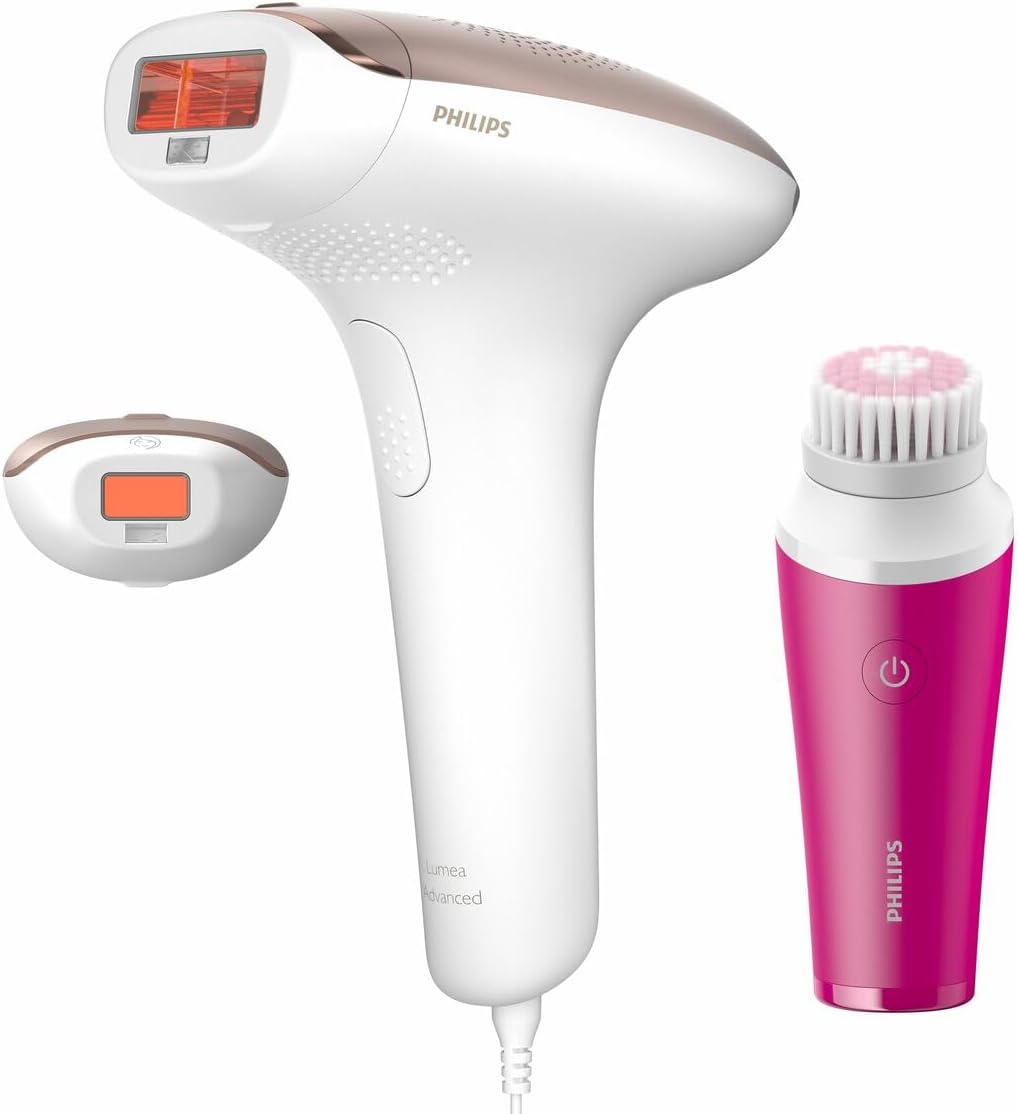
Figure 1: Philips Lumea Advanced BRI924/00 IPL device with its main body and a smaller precision attachment. The main device is white with rose gold accents, featuring a large treatment window. The precision attachment is also white with rose gold accents and a smaller treatment window. A pink facial cleansing brush is also shown, which may be included as an accessory.
The Philips Lumea Advanced BRI924/00 package typically includes:
- Philips Lumea Advanced IPL device (main unit)
- Precision attachment (for smaller, sensitive areas)
- Power adapter (EU plug type, 100-240V compatible)
- Storage pouch
- User manual
- (Optional) Facial cleansing brush (as seen in image)
The device features an integrated UV filter for skin protection and operates using Intense Pulsed Light technology.
Safety Information
Before using the Philips Lumea Advanced, it is crucial to read and understand all safety warnings and instructions. Failure to do so may result in injury or damage to the device.
Important Safety Precautions:
- Do not use on naturally dark skin tones (Fitzpatrick Skin Type VI).
- Do not use on tattoos, permanent makeup, dark brown or black spots (e.g., moles, freckles, birthmarks), or scars.
- Avoid direct eye exposure to the light flash. The device has an integrated safety system to prevent flashing when not in full contact with the skin.
- Consult a doctor before use if you have any medical conditions, are pregnant or breastfeeding, or are taking photosensitizing medications.
- Keep out of reach of children.
- Do not use on irritated, sunburned, or recently tanned skin.
- Ensure the treatment window is clean and free of debris before each use.
Setup
- Prepare the Skin: Ensure the skin area to be treated is clean, dry, and free of any lotions, creams, or deodorants. Shave the area thoroughly before treatment. Do not wax or epilate, as the hair follicle needs to be present for IPL to be effective.
- Connect the Device: Plug the power adapter into the device and then into a wall outlet (100-240V compatible). The power indicator light will illuminate.
- Select the Correct Attachment: For larger body areas (legs, arms, stomach), use the main body attachment. For smaller, more sensitive areas (face, bikini line, underarms), attach the precision attachment by clicking it into place.
- Perform a Skin Test: Before your first full treatment, perform a skin test on a small area of skin you intend to treat. Select a low intensity setting and flash once. Wait 24 hours to check for any adverse reactions (e.g., excessive redness, swelling, blistering). If no reaction occurs, proceed with the treatment at the highest comfortable setting.
Operating Instructions
Choosing the Right Intensity Setting:
The Philips Lumea Advanced has multiple intensity settings. It is crucial to select the appropriate setting for your skin tone and hair color. Refer to the skin tone/hair color chart provided in the full manual (not included here) or on the Philips website. Always start with a lower setting and gradually increase if comfortable.
Treatment Procedure:
- Power On: Press the power button to turn on the device. The fan will start, and the intensity indicator lights will illuminate.
- Adjust Intensity: Use the intensity adjustment buttons to select your desired setting.
- Position the Device: Place the treatment window firmly against your skin. The integrated safety system will prevent a flash if there is not full contact.
- Flash: Press the flash button. A bright flash of light will be emitted.
- Glide or Stamp:
- Glide Method: For larger areas, hold the flash button down and slowly glide the device over your skin, ensuring continuous contact. The device will flash automatically at regular intervals.
- Stamp Method: For smaller or curved areas, place the device, flash, lift, and then move to the next adjacent area.
- Avoid Overlapping: Ensure you treat each area only once per session to avoid skin irritation.
- Treatment Schedule: For optimal results, follow the recommended treatment schedule, typically once every two weeks for the first 4-5 sessions, then touch-ups as needed.
Maintenance
Proper maintenance ensures the longevity and effective performance of your Philips Lumea Advanced device.
- Cleaning the Treatment Window: After each use, ensure the device is unplugged and cooled down. Gently wipe the treatment window with a soft, dry, lint-free cloth. Do not use abrasive cleaners or solvents.
- Cleaning the Device Body: Wipe the main body of the device with a damp cloth.
- Storage: Store the device and its attachments in the provided pouch in a cool, dry place, away from direct sunlight and moisture.
- Lamp Lifetime: The lamp in your Philips Lumea Advanced is designed for a long lifetime and does not require replacement.
Troubleshooting
| Problem | Possible Cause | Solution |
|---|---|---|
| Device does not turn on. | Not properly plugged in; power outlet issue. | Ensure the power adapter is securely connected to both the device and a working wall outlet. Try a different outlet. |
| Device does not flash. | Treatment window not in full contact with skin; skin tone too dark; safety lock engaged. | Ensure the treatment window is pressed firmly and completely against the skin. Check your skin tone against the recommended chart. If the device overheats, allow it to cool down. |
| Skin irritation after use. | Intensity setting too high; skin not properly prepared; overlapping flashes. | Reduce the intensity setting. Ensure skin is clean and shaved. Avoid flashing the same area multiple times in one session. Apply a cool compress if irritation persists. |
| No hair reduction observed. | Inconsistent use; incorrect intensity setting; hair color not suitable for IPL. | Follow the recommended treatment schedule consistently. Ensure you are using the highest comfortable intensity setting. IPL is most effective on darker hair colors and lighter skin tones. |
Specifications
- Model: BRI924/00 (S0458042)
- Technology: Intense Pulsed Light (IPL)
- Voltage: 100 - 240 V
- Filter: Integrated UV filter
- Dimensions: Approximately 22.6 x 22.44 x 16.91 cm (as per product description)
- Color: Multicolour (predominantly white with rose gold accents and pink accessory)
Warranty and Support
Philips offers a standard manufacturer's warranty for the Lumea Advanced BRI924/00. Please refer to the warranty card included in your product packaging for specific terms and conditions, including warranty duration and coverage.
For technical support, product registration, or to find authorized service centers, please visit the official Philips support website or contact their customer service. Keep your proof of purchase for warranty claims.
Philips Official Website: www.philips.com
Related documentsBRI924/00 (S0458042)


Ask a question about this manual
Ask about setup, troubleshooting, compatibility, parts, safety, or missing instructions. Manuals+ will review the question and use this page’s manual context to help answer it.