
Introduction
Thank you for choosing the Pawfly 33W Aquarium LED Light. This manual provides essential information for the safe and efficient operation of your new aquarium light. Please read these instructions carefully before installation and use, and keep them for future reference.
Product Overview
The Pawfly 33W Aquarium LED Light is designed to provide full spectrum lighting for 48 to 54 inch fish tanks. It features extendable brackets, adjustable timer functions, and multiple lighting modes to create an optimal environment for your aquatic life.
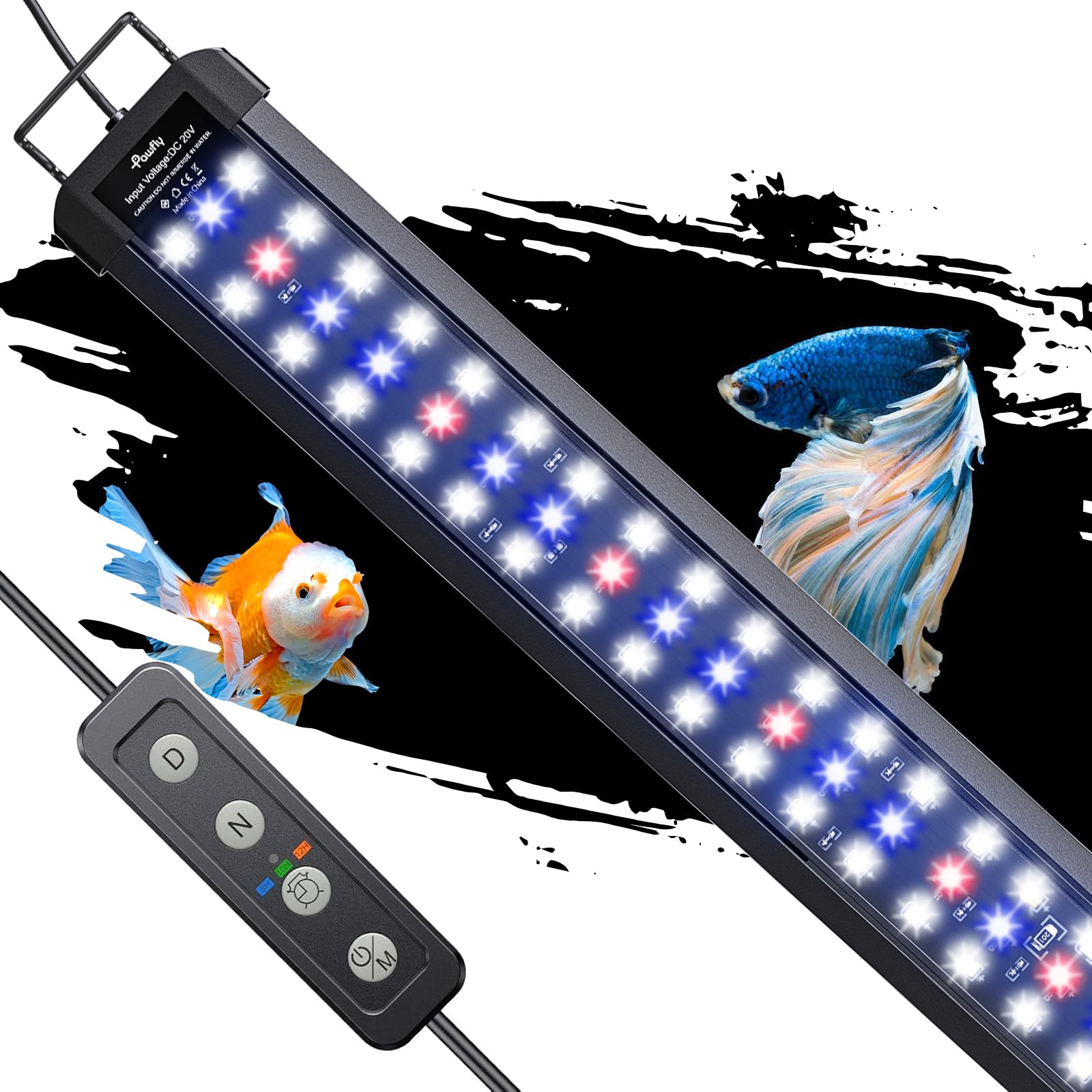
Figure 1: Pawfly 33W Aquarium LED Light with extendable brackets.
Key Features:
- Full Spectrum: Contains 6500 K white light, 450 nm blue light, and 660 nm red light. LUX: 2500; PAR: 55; CRI: 90.
- 2 Lighting Modes: Easily switch between daytime and night modes.
- 6 Intensity Levels: Adjust brightness for white, red, and blue lights independently.
- Auto On/Off Timer: Built-in timer with 3 optional lighting durations: 8 h, 10 h, and 12 h.
- Extendable Brackets: Fits tanks from 48 to 54 inches (min length: 46"; max length: 68.7").
Setup
Package Contents:
- 1 x Pawfly 33W Aquarium LED Light
- 2 x Extendable Brackets
- 1 x Power Cable with Timer Controller
Installation Steps:
- Carefully remove all components from the packaging.
- Attach the two extendable brackets to each end of the LED light fixture. Ensure they are securely fastened.
- Place the assembled light fixture on top of your aquarium. Adjust the extendable brackets to fit the length of your tank (48 to 54 inches). The brackets are designed to keep the light steady.
- Connect the power cable to the light fixture and then plug the power adapter into a suitable electrical outlet.

Figure 2: The sturdy metal brackets provide stable support for the light fixture on the aquarium.

Figure 3: The extendable design allows the light to fit various tank sizes from 48 to 54 inches.
Operating Instructions
Control Panel Overview:
The light is controlled via an inline timer controller on the power cable. This controller features buttons for mode selection (M), brightness adjustment (D for white/red, N for blue), and timer settings.

Figure 4: The inline controller for setting timer and adjusting light modes.
Setting the Timer (Auto On/Off):
The built-in timer allows you to set automatic lighting durations. Choose from 8, 10, or 12 hours.
- Ensure the light is powered on.
- Press the timer button (often indicated by a clock icon) on the controller.
- Repeatedly press the timer button to cycle through the available durations: 8H, 10H, 12H.
- Select your desired duration. The light will then operate for that period within a 24-hour cycle, simulating natural day/night.
Adjusting Light Modes and Intensity:
The light offers two main modes and six intensity levels for customization.

Figure 5: Switch between Daytime Mode (full spectrum) and Night Mode (blue light only).
- Switching Modes: Short press the 'M' button repeatedly to switch between Daytime Mode (all lights on) and Night Mode (only blue light on).
- Turning Off All Lights: Hold the 'M' button for 3 seconds to turn all lights off.
- Adjusting Daytime Mode Intensity:
- Press the 'D' button to control the brightness of the white and red lights.
- Press the 'N' button to control the brightness of the blue light.
- Adjusting Night Mode Intensity: (Only blue light is on)
- Press the 'N' button to adjust the luminance of the blue light.

Figure 6: Adjust light intensity for both daytime and night modes.
Full Spectrum Lighting:
The light provides a full spectrum of colors to enhance the natural appearance of your aquarium and support plant growth.

Figure 7: The full spectrum light enhances the colors of your aquatic environment.
Maintenance
Cleaning:
- Always unplug the light from the power outlet before cleaning.
- Wipe the light fixture with a soft, damp cloth. Do not use harsh chemicals or abrasive cleaners.
- The light is IP67 waterproof, meaning it is protected against water splashes and dust. However, do not submerge it in water.

Figure 8: The IP67 waterproof rating protects against splashes, but the light should not be submerged.
Storage:
When not in use for an extended period, store the light in a cool, dry place away from direct sunlight and extreme temperatures.
Troubleshooting
- Light not turning on: Check if the power adapter is securely plugged into both the light fixture and the electrical outlet. Ensure the power button on the controller is pressed.
- Timer not working correctly: Verify that the desired timer duration (8H, 10H, or 12H) is selected. If issues persist, try unplugging and re-plugging the power to reset the controller.
- Lights too dim or too bright: Use the 'D' and 'N' buttons on the controller to adjust the brightness levels in both daytime and night modes.
- Inconsistent light output: Ensure the light fixture is clean and free from water spots or debris that might obstruct light emission.
If you encounter any issues not covered here, please refer to the customer support section.
Specifications
| Feature | Detail |
|---|---|
| Product Dimensions | 116 x 8.2 x 7.3 cm; 1.24 kg |
| Item Model Number | AL2515 |
| Light Source Type | LED (6500 K white, 450 nm blue, 660 nm red) |
| Power | 33W |
| Mounting Type | Table Mount (Extendable Brackets) |
| Water Resistance | IP67 |
| Included Components | Power Cable, Timer |
Warranty Information
This Pawfly Aquarium LED Light comes with a 1-year manufacturer's warranty. Please retain your proof of purchase for any warranty claims. The warranty covers defects in materials and workmanship under normal use.
Customer Support
For further assistance, technical support, or warranty inquiries, please contact Pawfly customer service through the retailer where you purchased the product or visit the official Pawfly website for contact information.