
Atlantic Technology Atlantic Technology Nexa 1
Nexa 1 Portable Bluetooth Speaker User Manual
Model: Atlantic Technology Nexa 1
Manufactured by Atlantic Technology
Introduction
Thank you for choosing the Nexa 1 Portable Bluetooth Speaker. This manual provides detailed instructions for setting up, operating, and maintaining your speaker to ensure optimal performance and longevity. The Nexa 1 is designed for both indoor and outdoor use, featuring IPX5 water resistance, powerful 60W sound with enhanced bass, and a long-lasting 15-hour battery.
Package Contents
Please verify that all items are present in your package:
- Nexa 1 Portable Bluetooth Speaker
- Quick Start Guide
- Charging Cable (USB-C)
- Auxiliary Audio Cable (3.5mm)
- Wrist Strap
- Carrying Bag
Product Overview
Familiarize yourself with the physical components and design of your Nexa 1 speaker.

Figure 1: Front view of the Nexa 1 Portable Bluetooth Speaker, showcasing its minimalist design and fabric grille.

Figure 2: Rear view of the Nexa 1 speaker, showing the protective flap covering the charging, SD card, and AUX input ports.
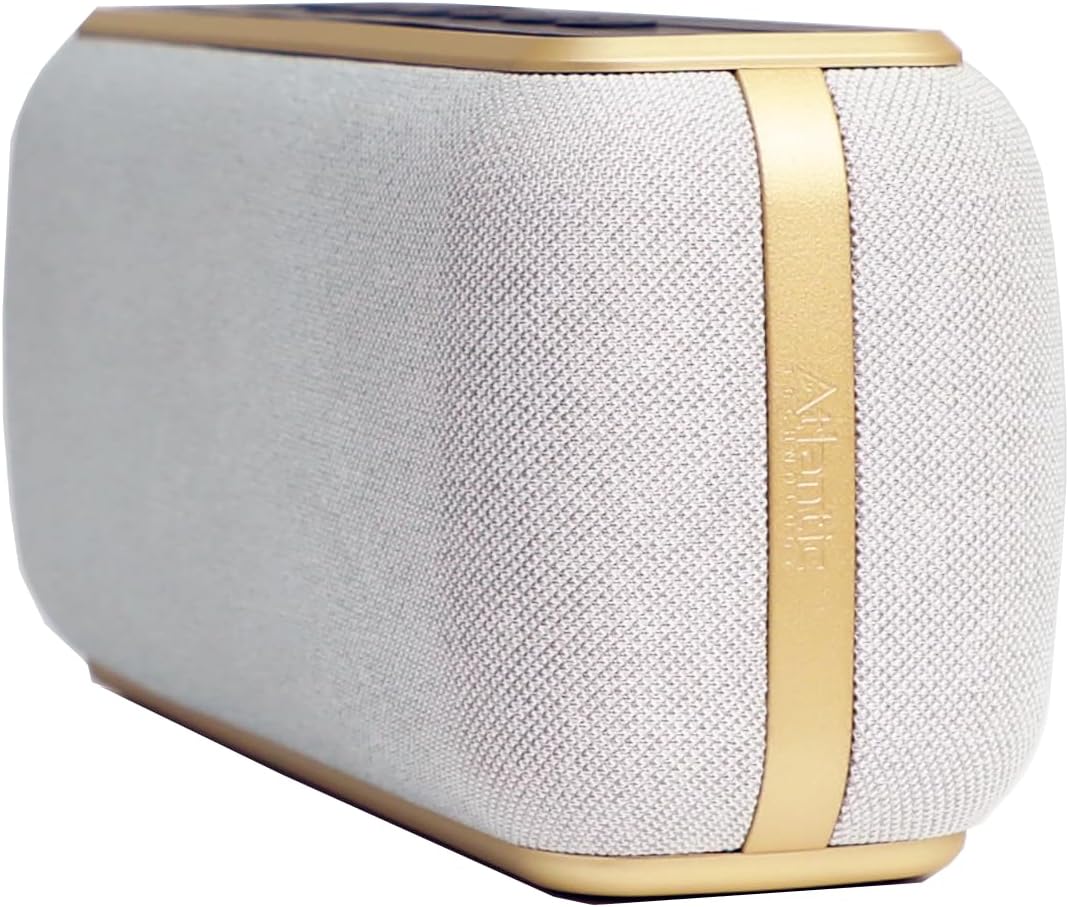
Figure 3: Side view of the Nexa 1 speaker, highlighting the Atlantic Technology branding and the gold accent trim.

Figure 4: The Nexa 1 speaker positioned on a sandy beach, demonstrating its portability and suitability for outdoor environments.
Controls and Indicators
The top panel of the Nexa 1 speaker features intuitive controls for easy operation.

Figure 5: Top view of the Nexa 1 speaker's control panel, showing the power, mode, playback, volume, and voice assistant buttons.
| Button/Port | Function |
|---|---|
| Power Button (Power Symbol) | Press and hold to power on/off. Short press to play/pause. |
| Mode Button (M) | Short press to switch between Bluetooth, AUX, and SD card modes. |
| Previous Track / Volume Down (Left Arrow / Minus Symbol) | Short press for previous track. Press and hold to decrease volume. |
| Next Track / Volume Up (Right Arrow / Plus Symbol) | Short press for next track. Press and hold to increase volume. |
| Voice Assistant Button (Microphone Symbol) | Short press to activate your device's voice assistant. |
| Charging Port (USB-C) | Connect the provided USB-C cable for charging. |
| AUX Input (3.5mm) | Connect external audio devices using the 3.5mm auxiliary cable. |
| SD Card Slot | Insert a microSD card with audio files for direct playback. |
Setup
- Initial Charge: Before first use, fully charge the Nexa 1 speaker. Connect the USB-C charging cable to the speaker's charging port and a compatible USB power adapter (not included). The charging indicator light will show charging status. A full charge takes approximately 3.5 hours.
- Power On: Press and hold the Power Button for 2-3 seconds until you hear an audible prompt and the indicator light illuminates.
Operating Instructions
Bluetooth Pairing
- Ensure the speaker is powered on and in Bluetooth mode (indicated by a flashing blue light). If not, short press the Mode button to switch.
- On your device (smartphone, tablet, etc.), enable Bluetooth and search for available devices.
- Select "Nexa 1" from the list of devices.
- Once paired, the indicator light will turn solid blue, and you will hear a confirmation sound.
- The speaker will automatically reconnect to the last paired device when powered on, if the device is within range (up to 328 ft / 100 meters).
Auxiliary Input (AUX)
- Connect one end of the 3.5mm auxiliary cable to the AUX input port on the Nexa 1 speaker.
- Connect the other end of the cable to the audio output jack of your external device.
- The speaker will automatically switch to AUX mode, or you can manually select it by pressing the Mode button.
SD Card Playback
- Insert a microSD card (with supported audio files) into the SD card slot on the speaker.
- The speaker will automatically switch to SD card mode and begin playing audio, or you can manually select it by pressing the Mode button.
Charging the Speaker
- Connect the provided USB-C cable to the speaker's charging port.
- Connect the other end of the USB-C cable to a USB power source (e.g., wall adapter, computer USB port).
- The charging indicator will show red while charging and turn off when fully charged.
- Battery life is up to 15 hours, depending on volume level and content.
Maintenance
- Cleaning: Use a soft, dry cloth to clean the speaker's exterior. Do not use abrasive cleaners or solvents.
- Water Resistance: The Nexa 1 has an IPX5 water resistance rating, meaning it can withstand splashes and light rain. Do not submerge the speaker in water. Ensure the port cover is securely closed when near water.
- Storage: Store the speaker in a cool, dry place away from direct sunlight and extreme temperatures. If storing for an extended period, charge the battery to about 50% every few months to preserve battery health.
Troubleshooting
| Problem | Possible Solution |
|---|---|
| Speaker does not power on. | Ensure the battery is charged. Connect the speaker to a power source and try again. |
| Cannot pair via Bluetooth. |
|
| No sound from speaker. |
|
| Sound distortion. | Reduce the volume on both the speaker and your device. Ensure the audio source is not distorted. |
| Short battery life. | Ensure the speaker is fully charged. High volume levels can reduce battery life. |
Specifications
| Feature | Detail |
|---|---|
| Brand | Atlantic Technology |
| Model Name | Atlantic Technology Nexa 1 |
| Speaker Type | Portable |
| Output Power | 60 Watts |
| Frequency Range | 20Hz–20kHz |
| Connectivity | Bluetooth 5.3, 3.5mm Aux In, SD card slot |
| Bluetooth Range | Up to 328 ft (100 meters) |
| Water Resistance | IPX5 |
| Battery Life | Up to 15 hours |
| Charging Time | 3.5 hours |
| Product Dimensions | 2.8"D x 8.7"W x 3.75"H |
| Item Weight | 2.65 pounds |
| Material | Aluminum |
| UPC | 748607801759 |
Warranty and Support
For warranty information and technical support, please contact Atlantic Technology directly. Details regarding specific warranty periods and service procedures can typically be found on the manufacturer's official website or by contacting their customer service department. Please retain your proof of purchase for warranty claims.
Manufacturer: Atlantic Technology
Website: www.atlantictechnology.com (Note: This is a placeholder URL, please refer to the official product packaging or manufacturer's documentation for the correct support website.)
Related documentsAtlantic Technology Nexa 1

Ask a question about this manual
Ask about setup, troubleshooting, compatibility, parts, safety, or missing instructions. Manuals+ will review the question and use this page’s manual context to help answer it.