
Introduction
The UTTASU Tuya Smart Key is a versatile device designed to enhance your smart home experience by combining wireless scene control and dimming functionalities. This manual provides comprehensive instructions for setting up, operating, and maintaining your device, ensuring seamless integration with your Tuya smart ecosystem.

Image: Front view of the UTTASU Tuya Smart Key Wireless Scene and Dimmer. The device is white, square-shaped with rounded corners, and features a circular button in the center.
Product Overview
The Tuya Smart Key offers intuitive control over your smart devices. Key features include:
- Wireless Scene and Dimmer: This device functions as both a wireless scene switch and a dimmer. It allows you to create and activate various smart scenes for your Tuya smart devices within the Smart Life application with a single click.
- Remote Dimmer Control: By adding this smart button to your Tuya smart system and connecting it to a smart bulb in the application, you can wirelessly control the brightness of your lights from any location.
- Multi-Scene Situation Switch: Designed to support multiple scenes, enabling effortless customization and switching between different ambient settings.
- Enhanced Smart Experience: Provides seamless control and automation of your Tuya smart devices, contributing to convenience, comfort, and energy efficiency in your daily life.

Image: A composite image displaying three different views of the UTTASU Tuya Smart Key. The left image shows a side view, the middle image shows a front view with the circular button, and the right image shows a top-down angled view.
Setup and Installation
Setting up your UTTASU Tuya Smart Key is a quick and straightforward process. Follow these steps to connect it to your smart home system:
- Download the Smart Life App: Ensure you have the latest version of the Smart Life application installed on your smartphone or tablet. This app is available on both iOS and Android app stores.
- Add the Smart Key: Open the Smart Life app and follow the in-app instructions to add a new device. Select the appropriate device type (e.g., "Wireless Switch" or "Scene Switch").
- Pairing Mode: Follow the app's instructions to put the Smart Key into pairing mode. This usually involves pressing and holding the main button for a few seconds until an indicator light blinks.
- Connect to Tuya Devices: Once paired, you can link the Smart Key to your existing Tuya smart devices (e.g., smart lights, smart plugs) within the Smart Life app.
- Create Scenes: Utilize the "Scene" or "Automation" section in the Smart Life app to create custom scenes. Assign specific actions to single clicks, double clicks, or long presses of the Smart Key button. For example, a single click could turn on all living room lights, while a double click could activate a "movie night" scene.
Operating Instructions
Once configured, the UTTASU Tuya Smart Key provides convenient control:
- Scene Activation: Press the button according to the scene configuration you set in the Smart Life app (e.g., single press, double press, long press) to activate the corresponding smart scene.
- Dimming Control: If configured as a dimmer for a smart bulb, a long press or specific sequence of presses may adjust the brightness. Refer to your Smart Life app settings for the exact dimming control method.
- Multi-Scene Switching: Easily switch between different pre-set scenes to adjust the ambiance of your room or home.
Maintenance
To ensure the longevity and optimal performance of your UTTASU Tuya Smart Key, follow these simple maintenance guidelines:
- Cleaning: Wipe the device with a soft, dry cloth. Do not use abrasive cleaners, solvents, or harsh chemicals, as these can damage the surface.
- Battery Replacement: The device is battery-powered. If the device becomes unresponsive or the indicator light does not illuminate, the battery may need replacement. Refer to the device's back cover for battery type and replacement instructions.
- Storage: Store the device in a cool, dry place away from direct sunlight and extreme temperatures when not in use for extended periods.
Troubleshooting
If you encounter issues with your UTTASU Tuya Smart Key, try the following troubleshooting steps:
- Device Not Responding:
- Check the battery. Replace if necessary.
- Ensure the device is within range of your Tuya gateway or Wi-Fi network (if directly connected).
- Verify that the device is still paired in the Smart Life app. If not, re-pair it.
- Scenes Not Activating:
- Confirm that the scenes are correctly configured in the Smart Life app.
- Ensure the linked smart devices are online and functioning correctly.
- Dimming Not Working:
- Verify that the smart bulb or dimmable device is compatible and correctly linked to the Smart Key in the app.
- Check the dimming settings within the Smart Life app for the specific device.
- Unable to Pair:
- Ensure your Wi-Fi network is 2.4GHz (most smart devices do not support 5GHz).
- Reset the device to factory settings (refer to specific device instructions, usually a long press of the button).
- Move the device closer to your Wi-Fi router during the pairing process.
Specifications
| Attribute | Detail |
|---|---|
| Brand | UTTASU |
| Model Number | A204DI94847X71W674PL |
| Color | See image (White) |
| Product Dimensions (L x W x H) | 5 x 5 x 3.5 cm |
| Item Weight | 44 grams |
| Manufacturer | UTTASU |
| Date First Available on Amazon.com.be | July 9, 2024 |
| ASIN | B0D949FVPY |
| Spare Parts Availability | Information unavailable on spare parts |
Regulatory Information and Support
This section provides important regulatory details and information on where to seek support.
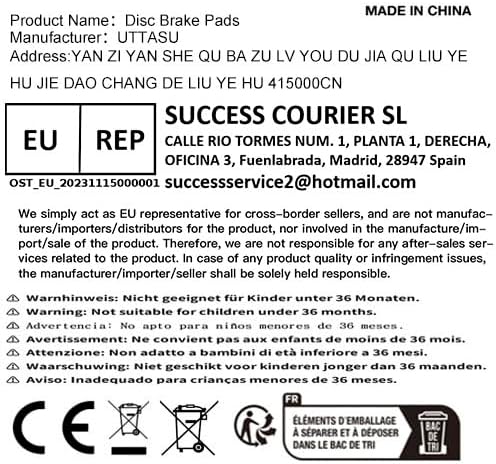
Image: A label showing product information including manufacturer, EU Representative details, and various warnings in multiple languages regarding suitability for children under 36 months. It also displays CE and WEEE disposal symbols.
EU Representative Information:
For cross-border sellers, the EU Representative is:
- Company: SUCCESS COURIER SL
- Address: CALLE RIO TORMES NUM. 1, PLANTA 1, DERECHA, OFICINA 3, Fuenlabrada, Madrid, 28947 Spain
- Email: successservice2@hotmail.com
The manufacturer/importer/seller is solely responsible for product quality or infringement issues.
Safety Warnings:
- Warning: Not suitable for children under 36 months.
- Disposal: This product should not be disposed of with household waste. Please dispose of it at an appropriate collection point for the recycling of electrical and electronic equipment.