
1. Introduction
The PKPower 9V AC/DC Adapter is designed to provide reliable power to compatible Plantronics charging bases and other devices requiring a 9V DC 500mA power supply. This manual provides essential information for the proper setup, operation, maintenance, and troubleshooting of your adapter.
2. Product Features
- Input Voltage: 100-240V AC, 50/60Hz, suitable for global use.
- Output Voltage: 9V DC, 500mA.
- Cable Length: Equipped with a 6.6-foot (approximately 2 meters) charging cable for flexible placement.
- Safety Protections: Built-in safeguards against short-circuiting, overvoltage, overcurrent, overcharge, and internal overheating.
- Certifications: FCC certified, ensuring high safety and quality standards.
- Compact Design: Small and lightweight for portability and easy storage.

Figure 2.1: Built-in Safety Protections. This image displays the adapter alongside icons representing its safety features: Over Charge Protection, Over Voltage Protection, Short-circuit Protection, Over Current Protection, and Over Temp Protection.
3. Compatibility
This 9V AC/DC Adapter is compatible with various Plantronics charging bases and devices, including but not limited to:
- Plantronics WO2 W02 Charging Base DECT 6.0
- Plantronics 64401-01
- Plantronics 510S
- Plantronics CS60
- Plantronics CS70
- Plantronics CS55H
- Plantronics CS251N
- Plantronics 83648-02
- SSA-5W 090050
It is designed for devices requiring 9.0V DC at 500mA.
4. Setup and Connection
Follow these steps to set up your PKPower AC/DC Adapter:
- Inspect the Adapter: Before use, visually inspect the adapter and its cable for any signs of damage. Do not use if damaged.
- Connect to Device: Insert the DC output plug of the adapter firmly into the power input port of your compatible Plantronics charging base or device. Ensure a secure connection.
- Connect to Power Outlet: Plug the AC input prongs of the adapter into a standard 100-240V AC wall outlet.
- Verify Operation: Once connected, your device should power on or begin charging, indicating a successful connection.

Figure 4.1: PKPower 9V AC/DC Adapter. This image shows the black adapter unit with its attached power cord, ready for connection.
5. Operating Instructions
The PKPower 9V AC/DC Adapter operates as a simple plug-and-play device. Once correctly connected to a compatible device and a power outlet, it will automatically supply the necessary power. No additional user interaction or configuration is required for its basic function.
6. Maintenance and Care
To ensure the longevity and optimal performance of your adapter, follow these maintenance guidelines:
- Cleaning: Disconnect the adapter from the power outlet and the device before cleaning. Use a soft, dry cloth to wipe the surface. Do not use liquid cleaners or abrasive materials.
- Storage: When not in use, store the adapter in a cool, dry place away from direct sunlight and extreme temperatures. Avoid tightly winding the cable to prevent damage.
- Handling: Do not drop, disassemble, or attempt to repair the adapter. Avoid exposing it to water or high humidity.
- Cable Protection: Do not place heavy objects on the cable or allow it to be pinched. Regularly check the cable for fraying or damage.
7. Troubleshooting
If you encounter issues with your PKPower AC/DC Adapter, refer to the following common problems and solutions:
| Problem | Possible Cause | Solution |
|---|---|---|
| Device not powering on/charging. | Loose connection, faulty outlet, incompatible device, damaged adapter. | Ensure all connections are secure. Test the outlet with another device. Verify device compatibility (9V DC, 500mA). Inspect adapter and cable for damage. |
| Adapter feels excessively hot. | Overload, poor ventilation, internal fault. | Disconnect immediately. Ensure the device's power requirements do not exceed the adapter's output. Ensure adapter is in a well-ventilated area. If problem persists, discontinue use. |
| Flickering power/intermittent connection. | Loose cable, damaged connector, internal wiring issue. | Check cable and connector for damage. Ensure firm connection. If problem persists, the adapter may be faulty. |
If troubleshooting steps do not resolve the issue, please contact customer support.
8. Technical Specifications
| Specification | Value |
|---|---|
| Product Dimensions | 5 x 2.5 x 1.2 inches (12.7 x 6.35 x 3.05 cm) |
| Item Weight | 3 ounces (85 grams) |
| Input Voltage | 100-240 Volts AC |
| Output Voltage | 9.0 Volts DC |
| Output Current | 500mA |
| Power Source | Corded Electric |
| Connector Type | Auxiliary (DC Barrel Plug) |
| Brand | PKPOWER |
| Manufacturer | Shenzhen AiNaU Technology Co.,Ltd |
| Date First Available | July 9, 2024 |
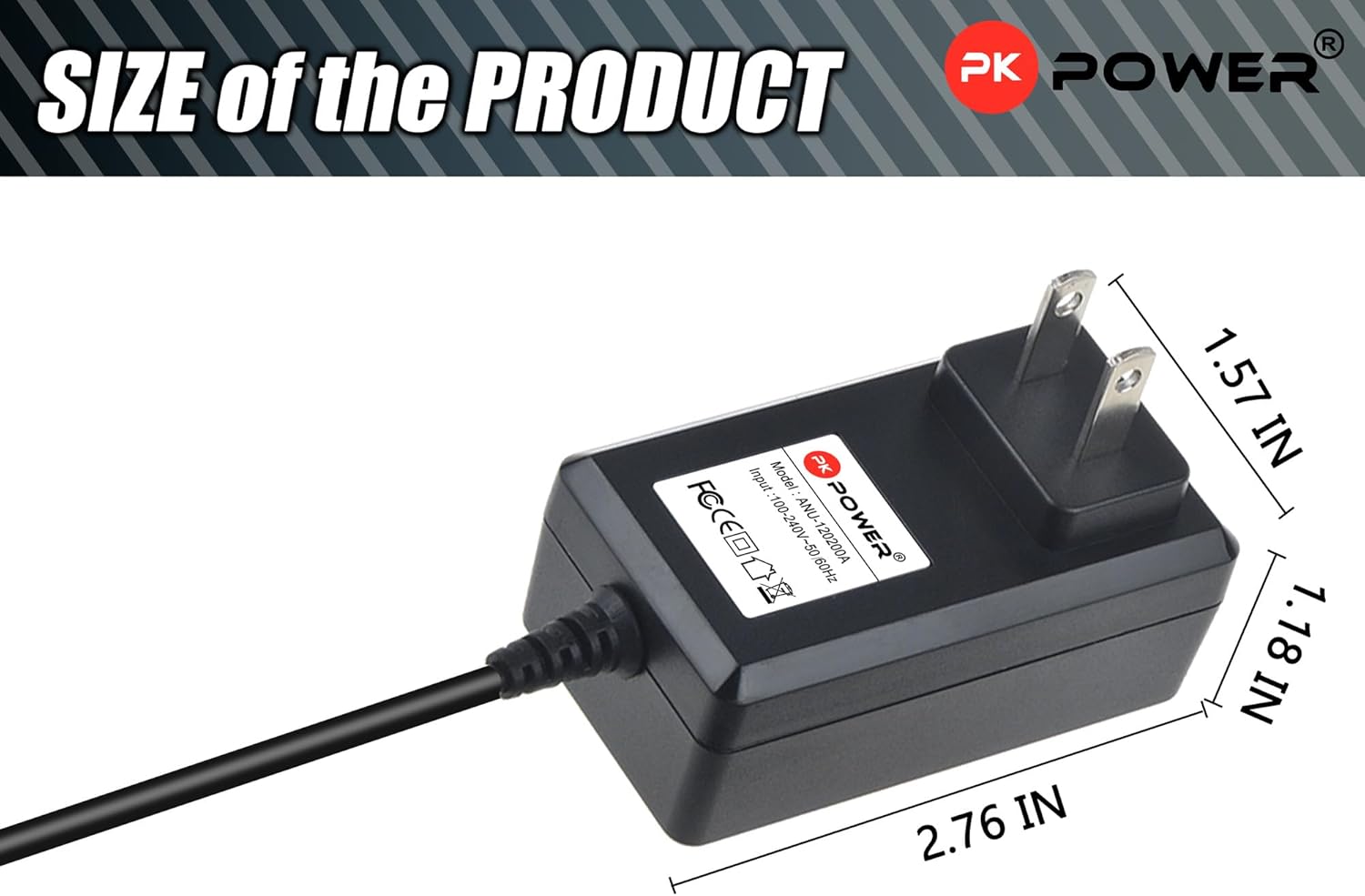
Figure 8.1: Product Dimensions. This image illustrates the physical size of the adapter, with measurements indicating its length (2.76 inches), width (1.18 inches), and height (1.57 inches).
9. Warranty Information
The PKPower AC/DC Adapter comes with a 12-month warranty from the date of purchase. This warranty covers manufacturing defects and ensures reliable operation under normal use. Please retain your proof of purchase for warranty claims.
10. Customer Support
If you have any questions, require assistance, or experience issues not covered in this manual, please do not hesitate to contact our customer support team. We are committed to providing quality service and support for your PKPower product.
For support inquiries, please refer to the contact information provided with your purchase or visit the official PKPOWER store page.