
M10
Wireless Earbuds User Manual
Model: M10 | Brand: Generic
Introduction
Thank you for choosing the M10 Wireless Earbuds. This manual provides essential information for setting up, operating, and maintaining your new earbuds. Please read it thoroughly before use to ensure optimal performance and longevity of the product.
What's in the Box
- Wireless Earbuds (x2)
- Portable Charging Case (x1)
- USB Charging Cable (x1)
- User Manual (x1)
Product Overview
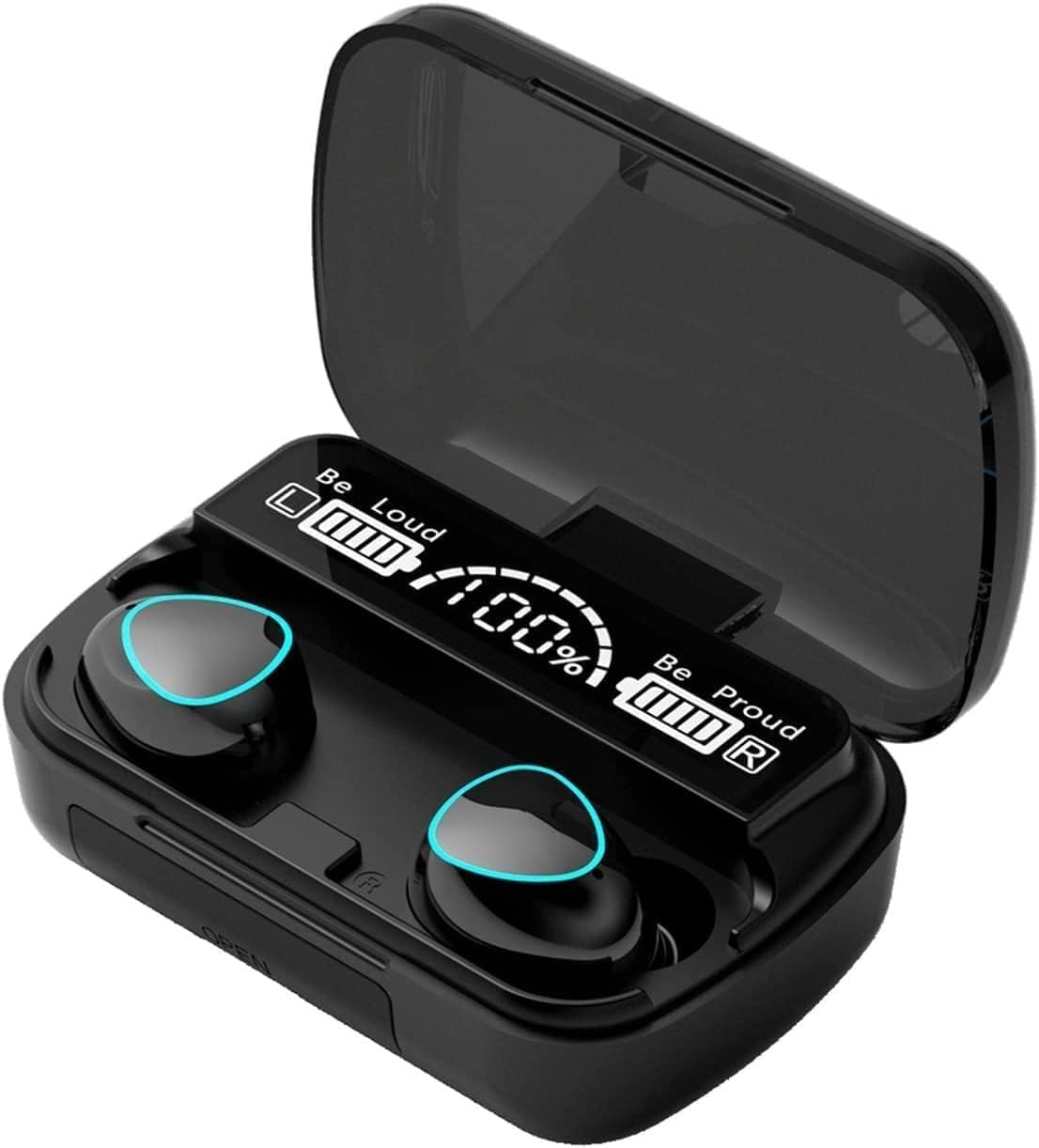
The M10 Wireless Earbuds are housed in a sleek, black magnetic charging case. The case features an LED power display indicating the charge level of both the case and individual earbuds.

Another view of the M10 Wireless Earbuds within their charging case, highlighting the compact design and the blue accents on the earbuds.
Key Features
- Auto Pairing & Smart Touch Control: Earbuds automatically connect to your device upon removal from the charging case. Intuitive touch controls allow for easy operation.
- Noise Cancellation: Features CVC 8.0 noise cancellation technology to reduce ambient noise and echo for clear audio.
- High-Quality Audio: Built-in high-quality audio chip delivers rich sound with crisp treble and proper bass.
- Built-in Microphone: Enables clear communication for calls.
- IPX7 Waterproof Rating: Protects earbuds from intense sweat, suitable for sports and workouts (not for swimming).
- Ergonomic & Lightweight Design: Each earbud weighs approximately 3.5g, ensuring a comfortable and stable fit.
- LED Power Display: Charging case features an LED display for easy monitoring of battery levels.
- Bluetooth 5.3 Technology: Provides fast and stable transmission with a range of 33-50 feet.

The earphone features a built-in high-sensitivity touch panel, intelligently recognizing intentions for various operations.

The lightweight and ergonomic design ensures a comfortable and stable fit for extended wear.
Setup & Pairing
Initial Pairing:
- Ensure Bluetooth is enabled on your device (phone, tablet, PC).
- Take both earbuds out of the charging case. They will automatically power on and flash red and blue lights.
- Wait approximately 5 seconds for the lights to turn off, indicating the earbuds have connected to each other.
- On your device, search for Bluetooth devices and select "M10" (or similar name) from the list to connect.
- Once connected, the earbuds will indicate successful pairing.
Troubleshooting Pairing Issues:
If one earbud stops working or you encounter language issues:
- Turn off Bluetooth on your phone.
- Remove both earbuds from the charging case.
- Double-click the touch point of each earbud simultaneously.
- Turn on Bluetooth on your phone and attempt to pair again.
Operating Instructions (Touch Controls)
The M10 earbuds feature intuitive touch controls for various functions:

Detailed diagram illustrating the touch control functions for music playback, call management, and voice assistant activation.
- Play/Pause: Single tap on either earbud.
- Next Song: Double tap on the right earbud.
- Previous Song: Double tap on the left earbud.
- Answer/Hang Up Call: Single tap on either earbud.
- Reject Call: Press and hold on either earbud.
- Activate Voice Assistant (Siri/Google Assistant): Triple tap on either earbud.
- Volume Up: Press and hold the right earbud.
- Volume Down: Press and hold the left earbud.
Battery & Charging
The M10 earbuds offer extended battery life for prolonged listening.

This graphic illustrates the impressive battery life, including cumulative call time, play time, and charging cycles provided by the large capacity charging cabin.
- Earbud Playback: Up to 5 hours of high-quality sound output on a single charge.
- Charging Case: Provides an additional 5-6 charges for the earbuds.
- Total Playtime: Up to 30 hours with the charging case.
- Charging Time: Approximately 1 hour for a full charge.
Charging the Earbuds and Case:
- Place the earbuds into the charging case. Ensure they are properly seated to initiate charging.
- Connect the provided USB cable to the charging port on the case and to a compatible USB power source.
- The LED display on the case will indicate charging status and battery level.
Care & Maintenance
- Keep the earbuds and charging case clean and dry.
- Use a soft, dry cloth to wipe down the surfaces. Do not use harsh chemicals or abrasive materials.
- Avoid exposing the product to extreme temperatures, humidity, or direct sunlight.
- Store the earbuds in their charging case when not in use to protect them and keep them charged.
- While IPX7 waterproof, avoid submerging the earbuds in water or exposing them to heavy rain.
Troubleshooting
| Problem | Solution |
|---|---|
| Earbuds not pairing with device |
|
| Only one earbud working |
|
| Low volume or poor sound quality |
|
| Charging case not charging |
|
Specifications
| Feature | Detail |
|---|---|
| Model Name | M10 |
| Connectivity Technology | Wireless (Bluetooth 5.3) |
| Bluetooth Range | 33-50 feet (10-15 meters) |
| Noise Control | Active Noise Cancellation (CVC 8.0) |
| Water Resistance Level | IPX7 Water Resistant |
| Earbud Weight | Approx. 3.5g per earbud |
| Charging Case Dimensions | 4.41 x 3.98 x 1.65 inches |
| Item Weight (Total) | 3.2 ounces |
| Battery Life (Earbuds) | Up to 5 hours playback |
| Total Playtime (with Case) | Up to 30 hours |
| Charging Time | 1 hour |
| Compatible Devices | iPhone/iOS, Samsung, Huawei, Android smartphones, PC, Mac |
| Control Type | Touch Control |
| Frequency Range | 20 Hz - 20,000 Hz |
Official Product Video
This official video provides a visual overview of the M10 Wireless Earbuds, demonstrating key features and design aspects.
Warranty & Support
For warranty information or technical support, please refer to the product's original packaging or contact the seller directly through the platform where the purchase was made. Keep your purchase receipt as proof of purchase.
For further information, visit the product detail page on Amazon.com.
Ask a question about this manual
Ask about setup, troubleshooting, compatibility, parts, safety, or missing instructions. Manuals+ will review the question and use this page’s manual context to help answer it.