
Introduction
This manual provides essential instructions for the safe and effective use of your Wishouse M9 rechargeable two-way radios. Please read this guide thoroughly before operating the devices to ensure optimal performance and user safety.
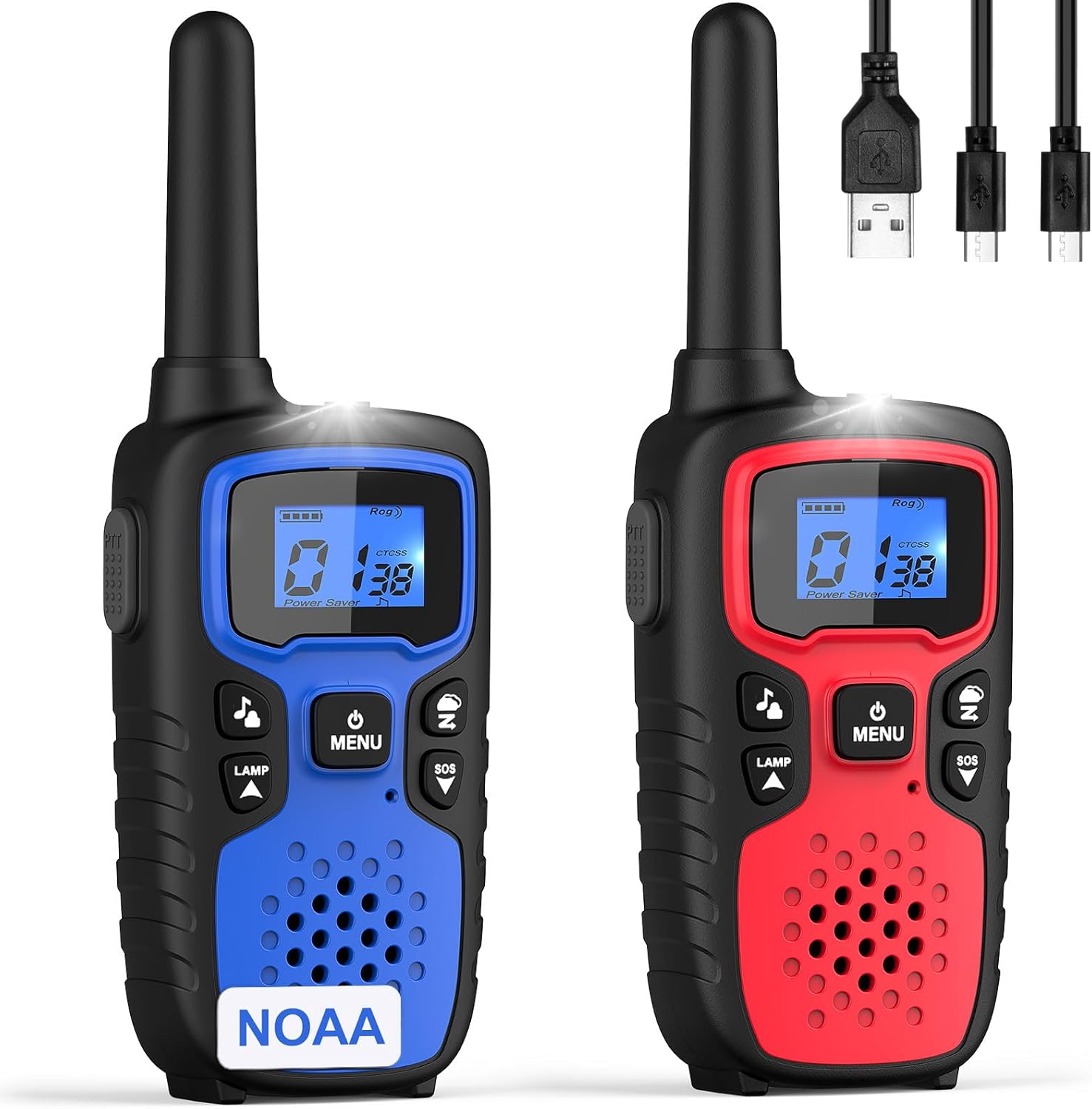
Image: Two Wishouse M9 two-way radios in red and blue, showcasing their design and included charging cables.
What's in the Box
Your Wishouse M9 package includes the following items:
- 2 x Wishouse M9 Two-Way Radios
- 2 x Belt Clips
- 6 x 1000mAh AA Rechargeable Batteries
- 1 x 1-to-2 USB Charging Cable
- 2 x Wearable Lanyards
- 1 x User Manual (this document)
Product Overview
Familiarize yourself with the components and controls of your Wishouse M9 radio.

Image: A user holding a Wishouse M9 radio, highlighting its compact design and ease of handling.
Key Features:
- Multi-Channel Communication: 22 FRS channels for versatile use.
- NOAA Weather Alert: Receive emergency weather broadcasts.
- VOX (Voice Operated Transmission): Hands-free communication with adjustable sensitivity.
- Built-in Flashlight: For illumination in low-light conditions.
- SOS Siren: Emergency alert function.
- Rechargeable Batteries: Environmentally friendly and cost-effective.
- Long Range: Up to 5 miles in open areas.
Setup
1. Battery Installation
The Wishouse M9 radios use 3 AA rechargeable batteries per unit. To install:
- Locate the battery compartment cover on the back of the radio.
- Slide the cover downwards to open.
- Insert the 3 AA rechargeable batteries, ensuring correct polarity (+/-).
- Replace the battery compartment cover and slide it upwards until it clicks into place.
2. Charging the Batteries
Use the provided 1-to-2 USB charging cable to charge the radios. The radios support micro USB charging.
- Connect the micro USB end of the cable to the charging port on the side of each radio.
- Connect the USB-A end of the cable to a compatible USB power source (e.g., wall adapter, power bank, computer USB port).
- The battery indicator on the display will show charging status. Charge until the indicator shows full.
Video: Demonstrates the simple setup and rechargeable nature of the Wishouse M9 radios, ideal for families.
Operating Instructions
1. Power On/Off
Press and hold the MENU/Power button until the display lights up to turn the radio on. Repeat to turn off.
2. Channel Selection
Your radios have 22 available channels. To select a channel:
- Press the MENU button once. The channel number will flash.
- Use the Up or Down buttons to select your desired channel.
- Press the MENU button again or wait a few seconds for the setting to save.
3. Privacy Codes (CTCSS/DCS)
Privacy codes help reduce interference from other users on the same channel. To set a privacy code:
- Press the MENU button twice (for CTCSS) or three times (for DCS). The privacy code will flash.
- Use the Up or Down buttons to select your desired code.
- Press the MENU button again or wait a few seconds for the setting to save.
Note: Both radios must be on the same channel and privacy code to communicate.
4. Transmitting and Receiving
To transmit, press and hold the PTT (Push-to-Talk) button on the side of the radio and speak clearly into the microphone. Release the PTT button to listen for a response.
Video: Highlights the clear sound, long range, and NOAA weather alert features of the Wishouse M9 radios.
5. VOX (Voice Operated Transmission)
VOX allows for hands-free communication. To activate VOX:
- Press the MENU button four times. The VOX icon and sensitivity level will flash.
- Use the Up or Down buttons to select a sensitivity level (1-3, with 3 being most sensitive).
- Press the MENU button again or wait a few seconds to save.

Image: Illustrates the convenience of VOX hands-free communication during family outdoor activities.
6. Flashlight and SOS Siren
The radio includes a built-in flashlight and an SOS siren for emergencies.
- To activate the flashlight, press and hold the LAMP button. Release to turn off.
- To activate the SOS siren, press and hold the SOS button. Release to turn off.

Image: The flashlight feature of the Wishouse M9 radio, useful for nighttime visibility during camping.
7. NOAA Weather Alert
Stay informed about severe weather conditions with the NOAA Weather Alert feature.
- Press the Weather button (often indicated by a cloud icon).
- The radio will scan for local NOAA weather channels and broadcast alerts.
Video: Demonstrates the NOAA Weather Alert function, providing crucial safety information during outdoor activities.
Maintenance
- Keep the radios dry. Do not expose to water or moisture.
- Clean the radio with a soft, damp cloth. Do not use harsh chemicals or abrasive cleaners.
- Store the radios in a cool, dry place when not in use.
- If not using for extended periods, remove the batteries to prevent leakage.
Troubleshooting
| Problem | Possible Solution |
|---|---|
| No power | Check battery installation and charge level. Ensure batteries are correctly inserted. |
| Cannot communicate with other radios | Ensure all radios are on the same channel and privacy code. Check range and obstructions. |
| Poor sound quality | Adjust volume. Check for obstructions between radios. Ensure microphone is not covered during transmission. |
| NOAA Weather Alert not working | Ensure you are in an area with NOAA coverage. Try scanning for channels again. |
Specifications
- Product Dimensions: 1.7 x 2.5 x 6.7 inches
- Item Weight: 15.8 ounces
- Number of Channels: 22 FRS Channels
- Frequency Range: 462.5500-462.7250 MHz, 467.5625-467.7125 MHz
- Talking Range Maximum: 5 Miles (in open areas)
- Batteries: 6 AA rechargeable batteries required (3 per radio, included)
- Voltage: 3.6 Volts
- Water Resistance Level: Not Water Resistant
- Special Features: Long Range, Rechargeable, SOS Emergency Alarm, Voice Operated Transmission (VOX), Weather Alert (NOAA)

Image: Demonstrates the compatibility of Wishouse M9 radios with other brands on the same channels, suitable for various outdoor activities.
Warranty and Support
Wishouse M9 walkie-talkies come with an extended 3-year warranty, providing a worry-free experience. For support or warranty claims, please refer to the contact information provided in your product packaging or visit the official Wishouse website.
Image: Highlights the 3-year warranty offered with the Wishouse M9 radios, ensuring customer satisfaction.