
Introduction
Thank you for choosing the superallure FC-168 12000mAh Magnetic Wireless Power Bank. This device is designed to provide convenient and versatile charging for your mobile devices, featuring MagSafe compatibility, built-in charging cables, and multiple output ports. Please read this manual thoroughly before use to ensure optimal performance and safety.
Product Overview
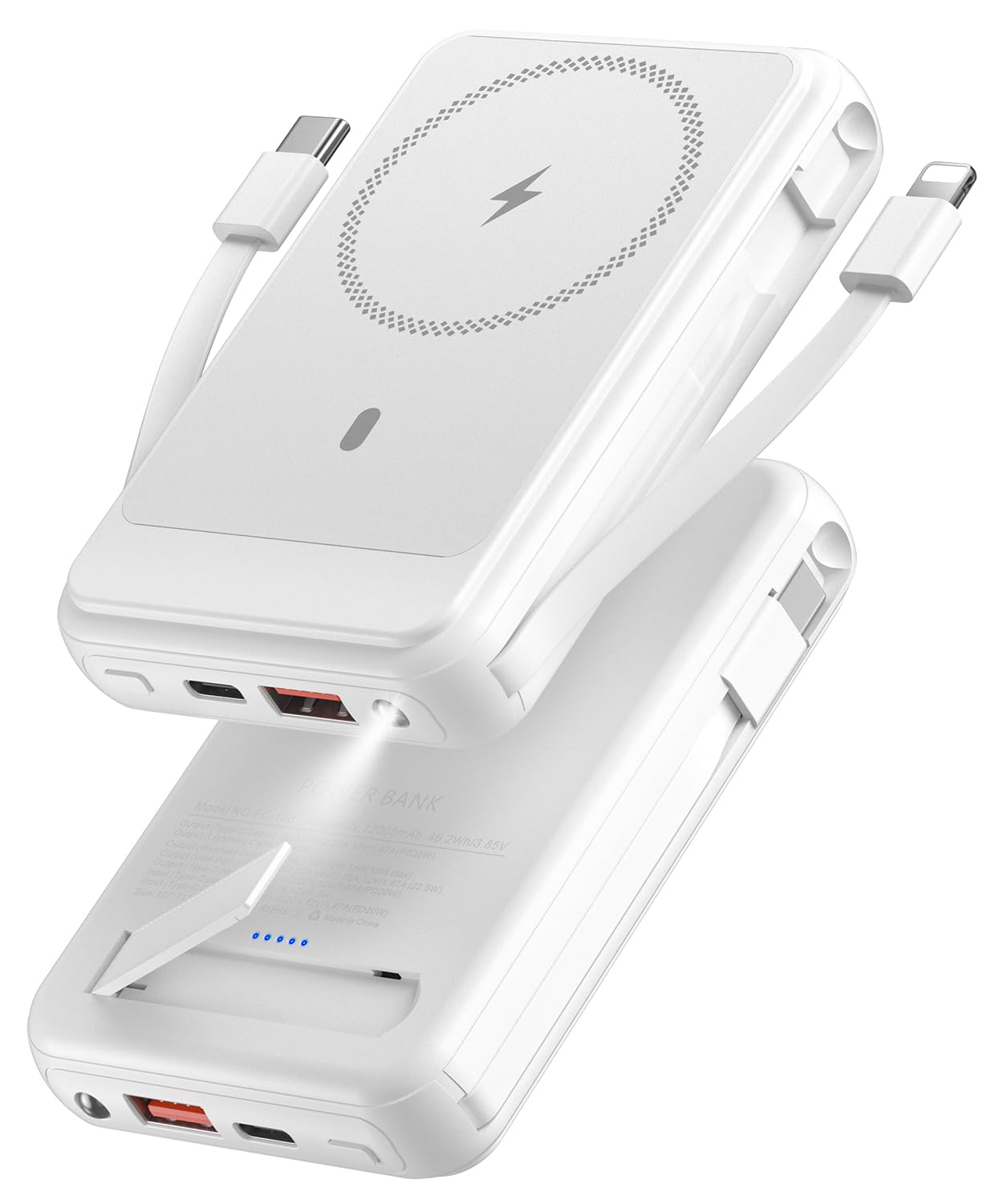
The superallure FC-168 is a compact and powerful portable charger equipped with a 12000mAh battery. It supports various charging methods to meet your needs:
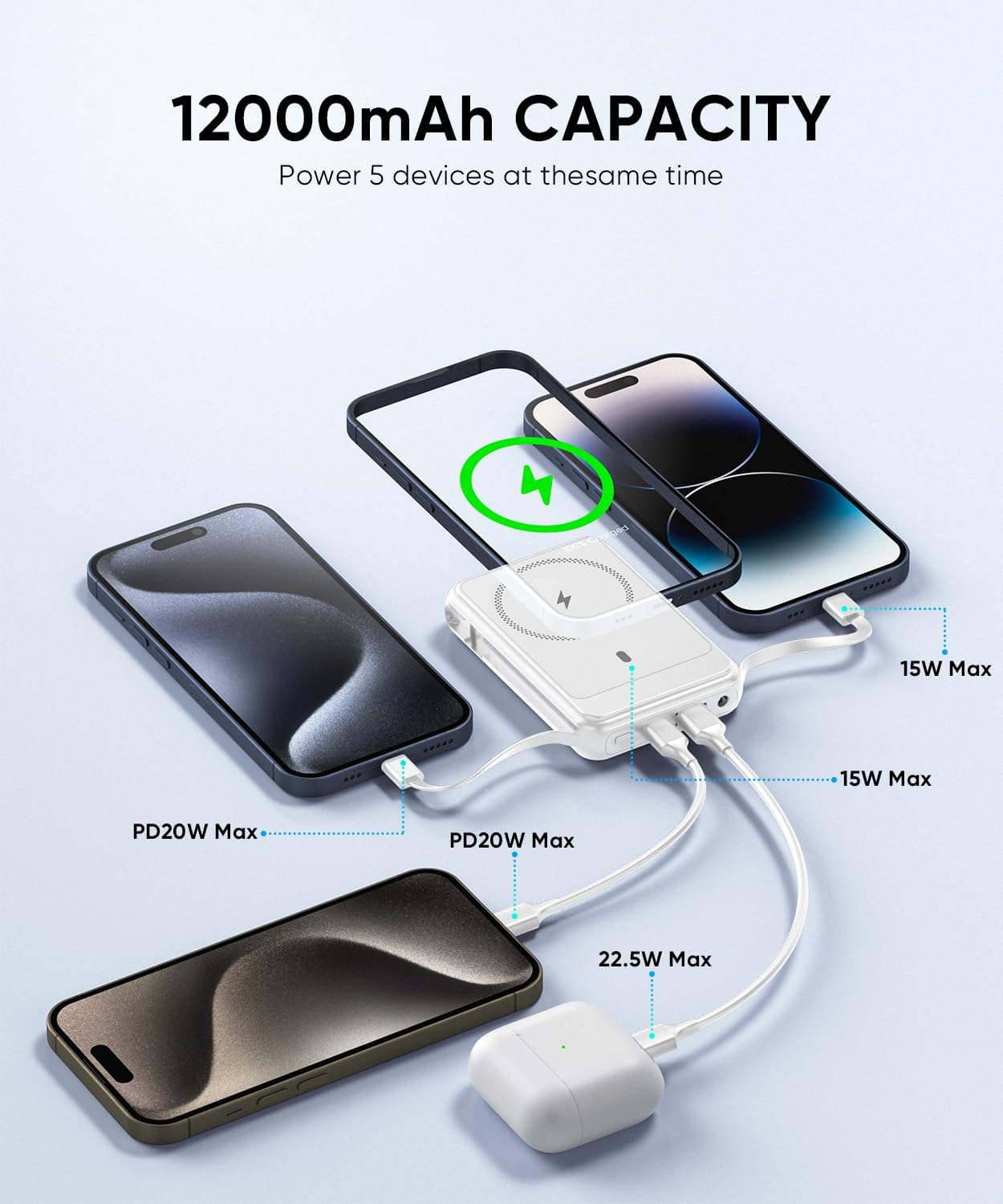
- Magnetic Wireless Charging: Up to 15W for MagSafe-compatible devices.
- Built-in Cables: Integrated Type-C and iOS (Lightning) cables for direct wired charging.
- USB-C Port: PD 20W input/output for fast charging.
- USB-A Port: 22.5W output for standard USB charging.
- Additional Features: Foldable kickstand and an integrated LED flashlight.
Setup: Charging the Power Bank
Before first use, fully charge your superallure FC-168 Power Bank. This ensures optimal battery performance.
- Using the Built-in Type-C Cable: Extend the built-in Type-C cable from the side of the power bank. Connect the Type-C end to a compatible USB-A power adapter (not included).
- Using the USB-C Port: Alternatively, use an external USB-C to USB-C cable (not included) and connect it to the power bank's USB-C IN/OUT port and a PD 20W or higher power adapter.
- Charging Indication: The LED display on the power bank will show the charging progress. Once 100% is displayed, the power bank is fully charged.

Operating Instructions
1. Magnetic Wireless Charging (MagSafe Compatible)
This power bank is designed for seamless magnetic attachment and wireless charging with iPhone 12/13/14/15/16 series and MagSafe-compatible cases.
- Ensure your device is MagSafe compatible or has a MagSafe-compatible case.
- Align the power bank with the back of your iPhone. The strong magnets will snap it into place.
- Press the power button on the power bank to initiate wireless charging. The charging indicator on your iPhone will confirm charging status.


2. Wired Charging (Built-in Cables & Ports)
The power bank offers multiple wired charging options:
- Built-in iOS (Lightning) Cable: Extend the built-in iOS cable and connect it to your iPhone or other Lightning-compatible device.
- Built-in Type-C Cable: Extend the built-in Type-C cable and connect it to your Android phone or other Type-C compatible device.
- USB-C IN/OUT Port: Use an external USB-C cable to charge devices requiring PD 20W fast charging. This port also functions as an input for recharging the power bank.
- USB-A Output Port: Use an external USB-A cable to charge various devices at up to 22.5W.
The power bank can charge up to 5 devices simultaneously (1 wireless, 2 built-in cables, 2 external ports).
3. Using the Foldable Kickstand
The integrated foldable kickstand allows you to prop up your phone for hands-free viewing while charging.
- Gently pull out the kickstand from the back of the power bank.
- Place the power bank on a flat surface with the kickstand extended.
- Attach your MagSafe-compatible phone to the power bank for charging and viewing.

4. Using the LED Flashlight
The power bank includes a built-in LED flashlight for convenience in low-light conditions.
- To turn on the flashlight, press and hold the power button for a few seconds.
- To turn off the flashlight, press and hold the power button again.

Maintenance
- Keep the power bank away from water, fire, and extreme temperatures.
- Avoid dropping or subjecting the device to strong impacts.
- Clean the surface with a soft, dry cloth. Do not use harsh chemicals or abrasive materials.
- Store the power bank in a cool, dry place when not in use.
Troubleshooting
| Problem | Possible Solution |
|---|---|
| Device not charging wirelessly. |
|
| Device not charging via built-in cables or USB ports. |
|
| Power bank not recharging. |
|
| Flashlight not working. |
|
Safety Information
The superallure FC-168 Power Bank is equipped with a comprehensive multi-protection safety system to protect your devices:
- Short circuit protection
- Overcharge protection
- Temperature protection
- Recovery protection
- Overcurrent protection
- Overvoltage protection
- Electromagnetic field protection
- Over-discharge protection
- Over-power protection
To ensure your safety and the longevity of the product, please observe the following:
- Do not disassemble, modify, or repair the device.
- Do not expose to extreme temperatures (above 45°C or below 0°C).
- Do not expose to water or high humidity.
- Keep out of reach of children.
- Dispose of the product responsibly according to local regulations.

Specifications
| Feature | Detail |
|---|---|
| Model Number | FC-168 |
| Battery Capacity | 12000 Milliamp Hours (Lithium Polymer) |
| Wireless Charging Output | 7.5W / 10W / 15W Max |
| USB-C Input/Output | PD 20W Max |
| USB-A Output | 22.5W Max |
| Built-in Cables | Type-C (PD 20W Output), iOS (Lightning) (5V3A Output) |
| Product Dimensions | 3.9 x 2.7 x 0.7 inches |
| Item Weight | 8.1 ounces |
| Color | White |
| Manufacturer | Shenzhen SYJ Gift Co., Ltd |
Product Videos
Magnetic Power Bank with Built-in Charging Cable and Holder
Video: This video demonstrates the superallure magnetic power bank, highlighting its built-in charging cables (Type-C and Lightning) and the convenient holder feature. It shows how to access and use these integrated cables for various devices.
Super Convenient to Have
Video: A short video showcasing the overall convenience and portability of the superallure power bank, including its magnetic attachment for wireless charging and compact design for everyday use.
Warranty and Support
For warranty information or technical support, please refer to the product packaging or contact superallure customer service directly. Keep your purchase receipt as proof of purchase.