
1. Overview
This manual provides essential instructions for the YEJMKJ ESP32 S3 N16R8 Development Board. This board is a versatile microcontroller unit (MCU) module featuring the ESP32-S3 chip, integrating Wi-Fi and Bluetooth Low Energy (BLE) functions. It is designed for various applications, including smart home devices, industrial automation, and wearable technology.
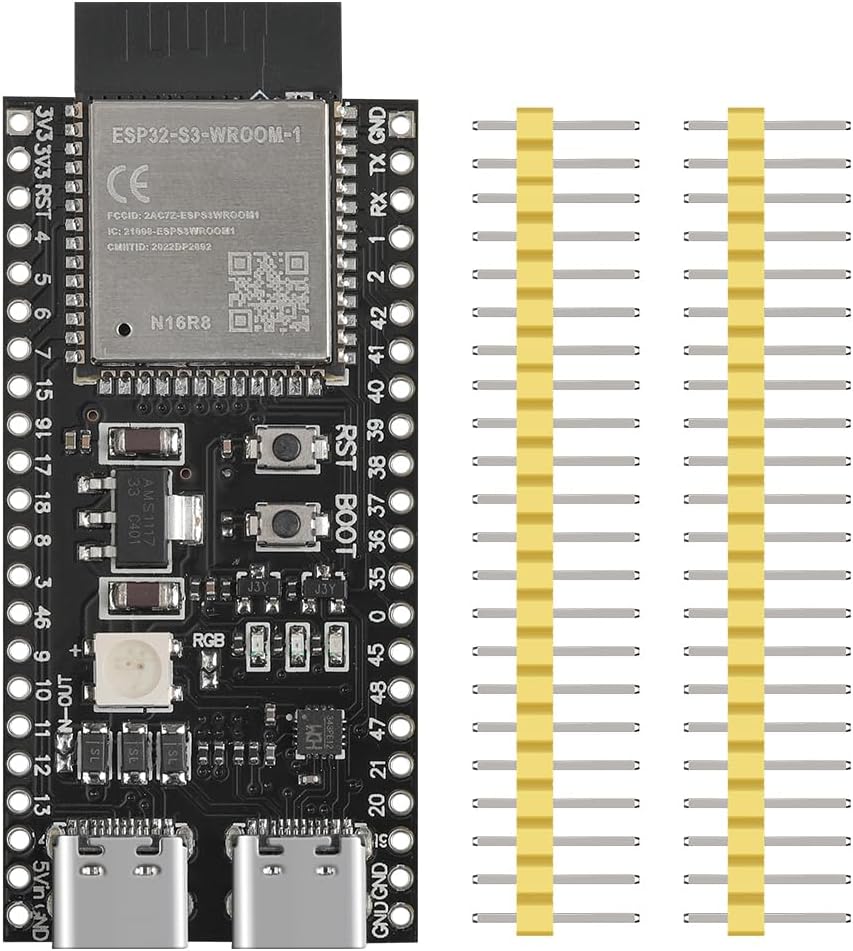
Image 1.1: YEJMKJ ESP32 S3 N16R8 Development Board with included pin headers.
The board offers dual Type-C USB ports for power and data, AI IoT capabilities, and W2812B RGB lighting. Its compact design and compatibility with popular development tools like Arduino IDE make it suitable for both beginners and experienced developers.
Video 1.1: An overview of the ESP32-S3 N16R8 Development Board, showcasing its physical appearance and key components.
2. Key Features
The YEJMKJ ESP32 S3 N16R8 Development Board is equipped with a range of features to support diverse embedded projects:
- ESP32-S3-WROOM-1 Module: Integrated Wi-Fi and Bluetooth 5.0 (BLE) for seamless wireless connectivity.
- Dual Type-C USB Ports: Provides flexible power and data communication options.
- AI IoT Functionality: Supports advanced artificial intelligence and Internet of Things applications.
- W2812B RGB Lighting: Integrated RGB LED for visual feedback and creative projects.
- Memory: Features 16MB Flash (Quad SPI) and 8MB PSRAM (Octal SPI).
- GPIO Pins: Offers 31 programmable input/output pins.
- Peripherals: Includes ADC, DAC, I2C, SPI, UART, and USB OTG.
- Development Environment Compatibility: Programmed using environments such as Arduino IDE, MicroPython, and ESP-IDF.

Image 2.1: The board's functionality, including Wi-Fi, BLE5.0, dual Type-C USB, AI IoT, and W2812B RGB lighting.

Image 2.2: Detailed features and technical specifications of the ESP32-S3 development board.
3. Setup Guide
Follow these steps to set up your YEJMKJ ESP32 S3 N16R8 Development Board:
- Attach Pin Headers: If not pre-soldered, carefully solder the included pin headers to the board. Ensure correct orientation.
- Connect to Computer: Use a Type-C USB cable to connect one of the board's USB ports to your computer. The board should power on.
- Install Drivers: Your operating system may automatically install necessary USB-to-serial drivers. If not, you may need to manually install drivers for the USB-to-serial chip (e.g., CP210x or CH340, depending on the board revision).
- Install Development Environment: Download and install your preferred Integrated Development Environment (IDE), such as Arduino IDE or Visual Studio Code with ESP-IDF extension.
- Configure IDE: Add the ESP32 board support package to your IDE. For Arduino IDE, this typically involves adding the ESP32 board manager URL in preferences and then installing the ESP32 boards.
- Select Board and Port: In your IDE, select the correct ESP32-S3 board model and the serial port corresponding to your connected development board.

Image 3.1: The development board ready for programming, compatible with various IDEs.

Image 3.2: Pinout diagram for the ESP32-S3 development board, useful for wiring and programming.
4. Operating Instructions
Once your development environment is set up, you can begin programming and operating your ESP32 S3 N16R8 board:
- Programming: Write your code in C++, MicroPython, or other supported languages within your chosen IDE.
- Uploading Code: Compile your code and upload it to the ESP32-S3 board via the USB connection. Ensure the correct board and port are selected.
- Wi-Fi Connectivity: Utilize the ESP32-S3's integrated Wi-Fi to connect to local networks, access the internet, or create an access point for other devices.
- Bluetooth Connectivity: Use the BLE 5.0 capabilities to communicate with other Bluetooth-enabled devices, such as sensors or mobile phones.
- GPIO Usage: Connect external components like sensors, LEDs, and actuators to the GPIO pins to expand the board's functionality. Refer to the pinout diagram for specific pin functions.
- Power Supply: The board can be powered via the Type-C USB port. Ensure a stable 5V power supply.
5. Maintenance
To ensure the longevity and optimal performance of your ESP32 S3 N16R8 Development Board, consider the following maintenance guidelines:
- Handle with Care: Avoid dropping the board or subjecting it to physical shock.
- Keep Dry: Protect the board from moisture and liquids, as these can cause short circuits and damage components.
- Clean Gently: If necessary, clean the board with a soft, dry brush or compressed air to remove dust. Avoid using liquid cleaners.
- Static Discharge: Take precautions against electrostatic discharge (ESD) when handling the board, as sensitive electronic components can be damaged by static electricity.
- Proper Storage: Store the board in an anti-static bag or a protective enclosure when not in use.
6. Troubleshooting
If you encounter issues with your ESP32 S3 N16R8 Development Board, refer to the following common problems and solutions:
- Board Not Recognized by Computer:
- Ensure the Type-C USB cable is fully inserted and functional. Try a different cable.
- Verify that the correct USB-to-serial drivers are installed on your computer. Check Device Manager (Windows) or `ls /dev/tty*` (Linux/macOS) for the serial port.
- Restart your computer and try reconnecting.
- Code Fails to Upload:
- Confirm that the correct board model and serial port are selected in your IDE.
- Check for compilation errors in your code.
- Ensure the board is in programming mode (sometimes requires holding down the BOOT button while pressing and releasing the RST button).
- Verify power supply is stable.
- Wi-Fi/Bluetooth Not Working:
- Double-check your code for correct Wi-Fi/Bluetooth initialization and credentials.
- Ensure antennas (if external) are properly connected.
- Check for interference from other wireless devices.
- Unexpected Behavior:
- Review your code for logical errors.
- Check all external wiring and connections for shorts or loose contacts.
- Ensure adequate power supply for the board and any connected peripherals.
7. Technical Specifications
Below are the detailed technical specifications for the YEJMKJ ESP32 S3 N16R8 Development Board:
| Feature | Specification |
|---|---|
| Model Name | ESP32 S3 Development Board N16R8 |
| Processor | Espressif ESP32-S3 |
| Wireless Connectivity | Wi-Fi, Bluetooth 5.0 (BLE) |
| RAM | 8MB PSRAM (Octal SPI) |
| Flash Memory | 16MB (Quad SPI) |
| Operating Voltage | 3.3V |
| Digital I/O Pins | 31 |
| Clock Speed | 240MHz |
| USB Ports | Dual Type-C (OTG, UART) |
| Product Dimensions | 3.55 x 3.55 x 0.63 inches (approx. 90 x 90 x 16 mm) |
| Item Weight | 0.8 ounces (approx. 22.7 grams) |
| Operating System Compatibility | Linux (and other OS with appropriate drivers) |

Image 7.1: Product dimensions of the ESP32-S3 development board.
8. Warranty and Support
For specific warranty information and technical support regarding your YEJMKJ ESP32 S3 N16R8 Development Board, please refer to the documentation provided with your purchase or contact the seller directly. You can also visit the official YEJMKJ store on Amazon for additional product information and support resources: