
1. Introduction
Thank you for choosing the Blackstar Polar 4 audio interface. This manual provides essential information for setting up, operating, and maintaining your device. The Polar 4 is a versatile 4-channel, 4-in/8-out USB-C audio interface designed for musicians, producers, and content creators, offering high-quality audio capture with advanced features like FET inputs, phantom power, and the unique "Enhance" switch for guitarists.
What's in the Box
- Blackstar Polar 4 Audio Interface
- USB-C to USB-A Cable
- Quick Start Guide
- Software Download Card (for St. James Plugin Suite and other bundled software)
2. Safety Information
Please read and understand all safety instructions before using the Blackstar Polar 4. Keep this manual for future reference.
General Precautions
- Do not expose the unit to rain, moisture, or extreme temperatures.
- Avoid placing the unit near heat sources or in direct sunlight.
- Do not open the casing; there are no user-serviceable parts inside. Refer all servicing to qualified personnel.
- Use only the specified power supply (USB 2.0 bus power or external DC 5V 2A adapter if required for phantom power or standalone operation).
- Ensure proper ventilation around the unit.
Electrical Safety
- Always connect the unit to a grounded power outlet.
- Do not operate the unit if the power cable is damaged.
- Disconnect power during lightning storms or when unused for long periods.
3. Key Features
- Four High Headroom FET Input Channels: Provides versatile connectivity for microphones and instruments.
- Two High-Output Headphone Outputs: Allows for private monitoring sessions.
- +48V Phantom Power: Essential for condenser microphones, switchable per channel pair.
- Balanced Outputs: Ensures professional-level monitoring and signal integrity.
- Visual Level Meters: Offers precise control over input and output levels.
- Proprietary "Enhance" Switch: Replicates the feel and response of classic guitar amplifiers, preventing digital clipping for instrument inputs and adding clarity to vocals/acoustics.
- USB 2.0 Bus Power: Convenient power directly from your computer.
- Bundled Software: Includes St. James Plugin Suite and other studio software for immediate music creation.
4. Controls and Connections
4.1 Front Panel

Image: Front view of the Blackstar Polar 4 audio interface, showing four combo XLR/TRS inputs, four gain knobs, two headphone outputs with individual volume controls, and a +48V phantom power switch.
- Input 1-4 (Combo XLR/TRS): Connect microphones (XLR) or instruments/line-level sources (TRS).
- Gain Knobs 1-4: Adjust the input level for each corresponding channel.
- Inst/Line Switches: Toggle between instrument (high impedance) and line-level (low impedance) input for channels 1-4.
- Enhance Switches: Activates the proprietary "Enhance" feature for guitar inputs or adds clarity to vocals/acoustics.
- +48V Phantom Power Switch: Engages phantom power for condenser microphones on channels 1-4.
- Monitor Knob: Controls the overall output level to your studio monitors.
- Headphone Outputs 1 & 2: Two independent 1/4" stereo headphone jacks.
- Headphone Volume Knobs 1 & 2: Adjust the volume for each headphone output.
4.2 Rear Panel
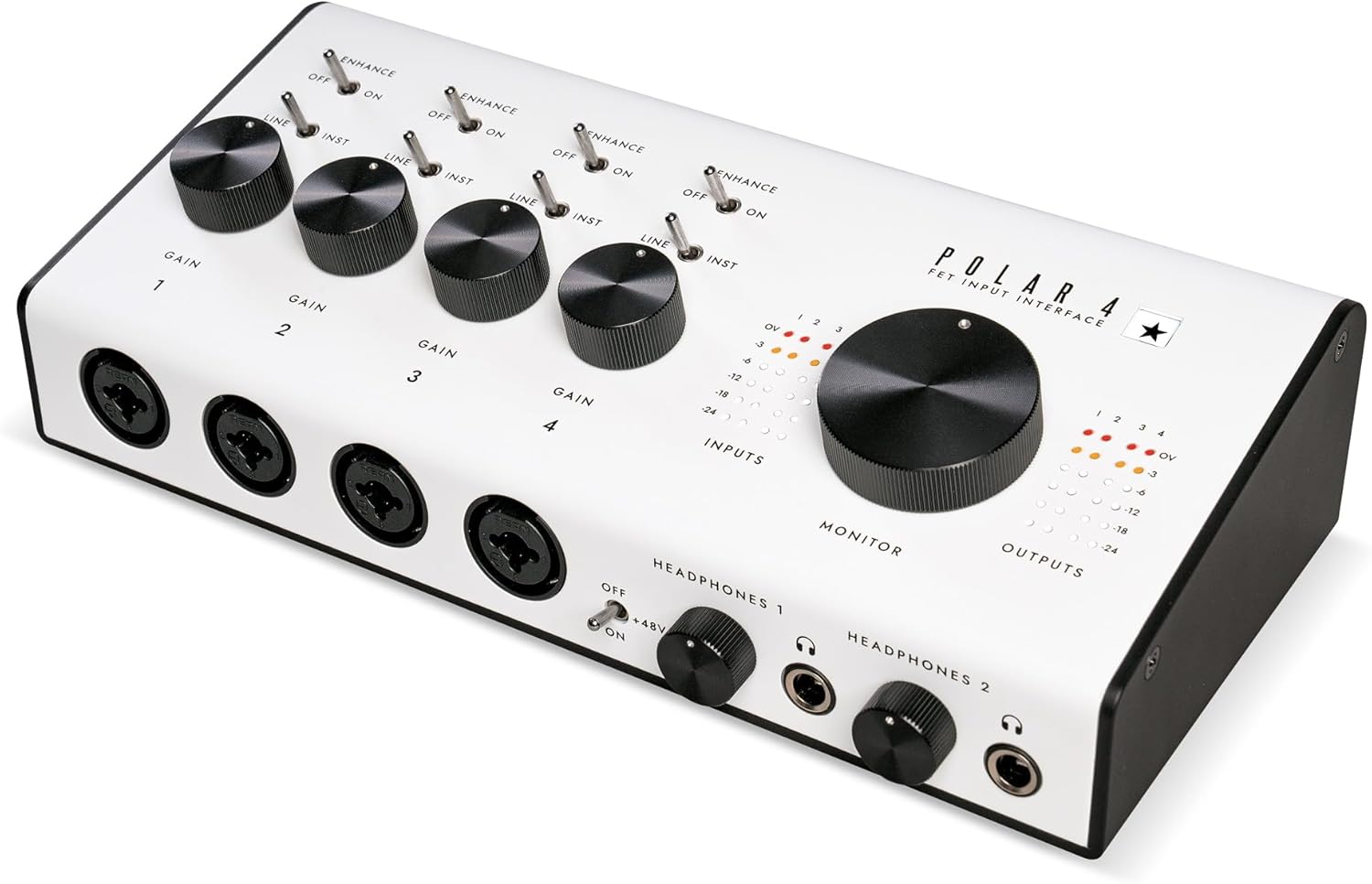
Image: Rear view of the Blackstar Polar 4 audio interface, showing balanced outputs, MIDI In/Out, DC 5V power input, and a USB-C port.
- Outputs 1/L, 2/R, 3, 4 (Balanced TRS): Connect to studio monitors or other line-level equipment.
- MIDI In/Out: Connect MIDI devices for control and sequencing.
- DC 5V 2A: Optional external power input for standalone operation or when bus power is insufficient.
- USB-C Port: Connects the interface to your computer for audio, MIDI, and bus power.
5. Setup Guide
5.1 Connecting to Your Computer
- Connect one end of the supplied USB-C cable to the USB-C port on the rear panel of the Polar 4.
- Connect the other end of the USB-C cable to an available USB port on your computer. The Polar 4 is bus-powered and should power on automatically.
- For optimal performance, especially when using +48V phantom power with multiple microphones, ensure your computer's USB port provides sufficient power. If not, an optional DC 5V 2A power adapter can be connected to the DC 5V input.
5.2 Driver Installation
The Blackstar Polar 4 is a class-compliant USB-C device, meaning it typically does not require special drivers for basic functionality on most modern operating systems (Windows, macOS). Your computer should automatically recognize the device. However, for advanced features and optimal performance, it is recommended to visit the Blackstar website to download and install any dedicated drivers or control software for your specific operating system.
5.3 Software Bundle
Your Polar 4 includes a valuable software bundle, including the St. James Plugin Suite and other studio software. Follow the instructions on the included download card to register your product and access these software titles. These tools will enhance your recording and production capabilities.
6. Operating Instructions
6.1 Input Gain Adjustment
Connect your microphone, instrument, or line-level source to the desired input (1-4) on the front panel. Use the corresponding Gain knob to adjust the input level. The visual level meters will help you set an appropriate level, aiming for the green segment during normal operation and avoiding the red segment to prevent clipping.
6.2 Using Phantom Power (+48V)
If you are using a condenser microphone, press the +48V Phantom Power switch to supply power to the microphone. Ensure dynamic microphones or ribbon microphones do not receive phantom power unless specifically designed to do so, as this can cause damage.
6.3 "Enhance" Feature
The "Enhance" switch is a unique feature designed to optimize your sound. When engaged for guitar inputs, it replicates the feel and response of a real valve guitar amplifier, preventing digital clipping and providing a more dynamic playing experience. For vocal and acoustic guitar performances, it adds natural clarity and 'air' to the sound.
6.4 Headphone Monitoring
Plug your headphones into either of the two 1/4" Headphone Outputs. Adjust the individual Headphone Volume knobs to your preferred listening level. This allows for independent monitoring for two users.
6.5 Balanced Outputs
Connect your studio monitors or other audio equipment to the balanced TRS Outputs on the rear panel. Use the Monitor knob on the front panel to control the overall output volume to these devices.
7. Product Videos
Blackstar Polar Go USB-C Mobile Audio Interface Overview
This video provides an overview of the Blackstar Polar Go, a mobile audio interface in the same series. While specific to the 'Go' model, it demonstrates general features and connectivity concepts applicable to the Polar series.
Blackstar Polar 2 USB Audio Interface Quick Look
A quick overview of the Blackstar Polar 2 USB audio interface, demonstrating its features and connectivity. While this video features the 'Polar 2' model, many operational aspects are shared across the Polar series, including the Polar 4.
8. Maintenance
8.1 Cleaning
To clean the unit, use a soft, dry cloth. Do not use abrasive cleaners, waxes, or solvents, as these can damage the finish and internal components.
8.2 Storage
When not in use, store the Polar 4 in a cool, dry place away from direct sunlight and extreme temperatures. Disconnect all cables before storing.
9. Troubleshooting
- No Power: Ensure the USB-C cable is securely connected to both the interface and your computer. If using an external power adapter, verify it is correctly plugged in and functioning.
- No Sound Output: Check all cable connections (inputs, outputs, headphones). Verify that the Monitor and Headphone Volume knobs are turned up. Ensure the Polar 4 is selected as the audio output device in your computer's sound settings and your DAW.
- Input Signal Too Low/High: Adjust the corresponding Gain knob. Use the visual level meters to ensure the signal is strong but not clipping.
- Microphone Not Working (Condenser): Ensure +48V Phantom Power is engaged. Check microphone cable connections.
- Software Not Recognizing Interface: Verify drivers are installed (if necessary) and the Polar 4 is selected as the audio input/output device in your software's preferences.
10. Specifications
| Model Number | Polar 4 |
| Item Weight | 2.05 pounds |
| Product Dimensions | 9.05 x 2.51 x 4.52 inches |
| Number of Channels | 4-in/8-out (4 input, 8 output) |
| Connectivity Technology | USB-C (USB 2.0) |
| Compatible Devices | Guitar, Microphones, Line-level sources |
| Supported Software | Ableton Live Lite, St. James Plugin Suite, other bundled studio software |
| Operating System | Windows (macOS compatible, class-compliant) |
| Phantom Power | +48V |
11. Warranty and Support
For warranty information and technical support, please visit the official Blackstar website or refer to the documentation included with your product. You can also find additional resources and FAQs on the Blackstar Store on Amazon.


