
Product Overview
The Giantex White Computer Desk with Hutch is designed for home office and study environments, offering a functional workspace with integrated power solutions and storage. This desk features a spacious tabletop, an upper hutch with shelves, a pull-out drawer, and a lower open shelf. It also includes built-in AC outlets, USB ports, and a Type-C port for convenient device charging.

Image: The Giantex White Computer Desk with Hutch, showcasing its design and functionality in a home office setting.
Safety Information
Please read and understand all safety instructions before assembly and use of this product. Failure to follow these instructions may result in injury or damage to the product.
- Always assemble the desk according to the provided instructions.
- Ensure the desk is properly anchored to the floor to prevent tipping, especially when heavy objects are placed on it.
- Do not exceed the weight limits specified for each component of the desk to maintain its stability and safety.
- Keep all electrical connections dry and away from liquids.
- Do not overload the power outlets.
Setup and Assembly
This desk requires assembly. Please follow the detailed assembly instructions provided in the separate user manual included with your purchase. Ensure all parts are present before beginning assembly.
Key Assembly Considerations:
- Unpacking: Carefully unpack all components and verify against the parts list in your assembly guide.
- Tools: Ensure you have the necessary tools as specified in the assembly guide (e.g., screwdriver, hammer).
- Step-by-Step: Follow the numbered steps sequentially. Do not skip steps.
- Hardware: Use the correct screws and fasteners for each step. Do not overtighten screws.
- Stability: Once assembled, ensure all connections are secure and the desk is stable.
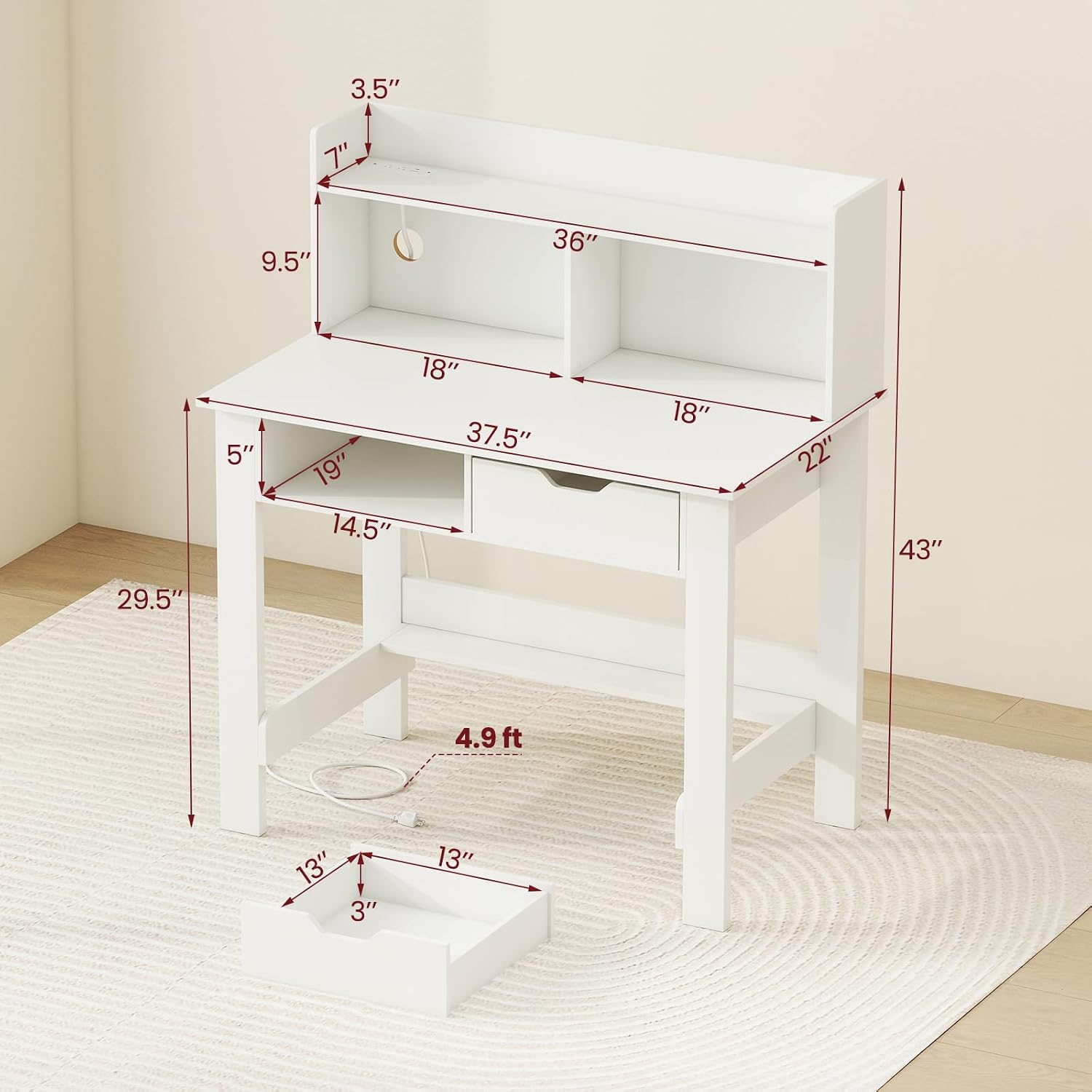
Image: Dimensional diagram of the desk, illustrating key measurements for setup planning.
Operating Instructions
Using the Integrated Charging Station:
The desk is equipped with a built-in power strip for convenient charging of your electronic devices.
- Power Connection: Connect the desk's main power cord (4.9 ft) to a standard wall outlet.
- AC Outlets: Two 125V/12A AC outlets are available for laptops, lamps, or other AC-powered devices.
- USB Ports: One 5V/2.4A USB port is provided for charging smartphones, tablets, and other USB-powered devices.
- Type-C Port: One 5V/2.4A Type-C port is available for compatible devices.
- Cable Management: Utilize the cable management hole to route power cords neatly, preventing clutter.

Image: Detail of the integrated charging station with AC, USB, and Type-C ports.
Storage Features:
- Hutch: The 2-tier open hutch provides elevated storage for books, decor, or small office supplies. Raised baffles help prevent items from falling.
- Drawer: A pull-out drawer offers concealed storage for stationery, documents, or personal items.
- Open Compartment: An additional open compartment below the tabletop provides easy access storage.
- Lower Open Shelf: A shelf near the base of the desk offers extra storage space for larger items or decorative elements.

Image: Overview of the desk's storage features, including the hutch, drawer, and open shelves.
Maintenance
Proper care and maintenance will extend the life and appearance of your Giantex computer desk.
- Cleaning: Wipe surfaces with a soft, damp cloth. Avoid abrasive cleaners or harsh chemicals that may damage the finish.
- Spills: Clean up spills immediately to prevent staining or damage to the engineered wood.
- Heat and Moisture: Avoid placing hot items directly on the desk surface. Use coasters for drinks to prevent water rings.
- Fasteners: Periodically check all screws and fasteners to ensure they are tight. Retighten if necessary to maintain stability.
- Electrical Components: Ensure the power outlets and ports are free from dust and debris. Do not attempt to repair electrical components yourself.
Troubleshooting
Power Outlets Not Working:
- Check Main Power: Ensure the desk's power cord is securely plugged into a functional wall outlet.
- Circuit Breaker: Verify that the wall outlet's circuit breaker has not tripped.
- Overload: Unplug some devices to check if the outlets were overloaded.
- Cable Connection: Ensure internal wiring for the power strip is correctly connected during assembly.
Desk Instability:
- Tighten Fasteners: Recheck and tighten all assembly screws and bolts.
- Level Surface: Ensure the desk is placed on a flat, level surface.
- Foot Pads: Verify that the non-slip foot pads are correctly installed and making full contact with the floor.

Image: Details of structural elements like cable management, reinforced bars, and anti-slip foot pads, which are important for stability and functionality.
Specifications
| Feature | Detail |
|---|---|
| Brand | Giantex |
| Model Number | GT10698US-WH-BC |
| Product Dimensions | 22"D x 37.5"W x 43"H |
| Color | White |
| Style | Modern |
| Material | Engineered Wood |
| Special Features | Built-In USB Outlet, Compact, Hutch |
| Power Outlets | 2 AC Outlets (125V/12A) |
| USB Ports | 1 USB Port (5V/2.4A) |
| Type-C Ports | 1 Type-C Port (5V/2.4A) |
| Power Cord Length | 4.9 ft |
| Number of Drawers | 1 |
| Number of Shelves | 2 (Hutch) + 1 (Lower Open Shelf) |
| Item Weight | 57.5 pounds |
| Maximum Weight Recommendation | 200 pounds |
Warranty and Support
This product comes with a Limited Warranty. Please refer to the warranty documentation included with your purchase for specific terms and conditions.
For customer support, assembly assistance, or to report missing/damaged parts, please contact Giantex customer service through their official website or the retailer where the product was purchased.
Online Resources: For additional information and support, visit the Giantex Store on Amazon.