
HRVEOCEI Platform Bed Frame
HRVEOCEI Twin Bed Frame User Manual
Model: Platform Bed Frame
Introduction
Thank you for choosing the HRVEOCEI Twin Bed Frame. This manual provides essential information for the safe assembly, operation, and maintenance of your new bed frame. Please read all instructions carefully before beginning assembly and retain this manual for future reference.
Important Safety Warnings
- The maximum weight capacity for this twin bed frame is 400 lbs. Do not exceed this limit to prevent damage or injury.
- Ensure all components are properly assembled and tightened before use. Regularly check and re-tighten fasteners as needed.
- This bed frame does not require a box spring. Using a box spring may affect stability and mattress support.
- Keep small parts and packaging materials away from children during assembly.
- Do not stand or jump on the bed frame.
Package Contents
Please verify that all parts are present before beginning assembly. If any parts are missing or damaged, contact customer support.
- Headboard with integrated charging station and storage shelf
- Metal frame components (side rails, support legs)
- Metal slats for mattress support
- Assembly hardware (screws, bolts, washers, nuts)
- Assembly tools (Allen wrench, etc.)
Assembly Instructions
Assembly is straightforward and can typically be completed by one person. Follow the numbered steps provided in the included instruction manual for detailed diagrams.
- Unpack and Identify Parts: Carefully unpack all components and lay them out on a clean, soft surface to prevent scratches. Identify each part using the provided parts list.
- Assemble the Headboard: Attach the headboard frame components together, ensuring the charging station and storage shelf are correctly oriented.
- Connect Side Rails: Attach the side rails to the assembled headboard and footboard (if separate). Ensure all connections are secure but do not fully tighten bolts until the frame is fully assembled.
- Install Center Support Legs: Securely attach any center support legs to the frame as indicated in the instructions.
- Place Metal Slats: Lay the metal slats across the frame, ensuring they fit into the designated slots or attach securely to the side rails. Distribute them evenly for optimal mattress support.
- Final Tightening: Once all components are in place and aligned, fully tighten all bolts and screws using the provided tools. Do not overtighten.
- Inspect Assembly: Verify that the bed frame is stable and all connections are secure before placing a mattress on it.

Image: The assembled bed frame structure, showing the headboard, side rails, and metal slats before a mattress is placed. This illustrates the robust construction and slat system.

Image: An aerial view of the bed frame, highlighting the evenly spaced metal slats that provide strong support for the mattress without the need for a box spring.
Product Features
The HRVEOCEI Twin Bed Frame is designed with user convenience and durability in mind:
- Built-in Charging Station: The upholstered headboard features 2 standard outlets and 2 USB ports, allowing you to conveniently charge your electronic devices directly from your bed.
- Rugged Construction: Constructed with 11 thickened metal slats, this platform bed frame supports up to 400 pounds, ensuring exceptional stability and durability for long-term use.
- Spacious Underbed Storage: With 10.4 inches of clearance beneath the bed, there is ample space for storing luggage, storage bins, or other items, helping to keep your room tidy. This clearance also facilitates easy cleaning under the bed.
- Headboard Storage Shelf: A practical shelf integrated into the headboard provides a convenient spot for keeping nightly essentials such as cell phones, alarm clocks, books, or decorative items within easy reach.

Image: A complete view of the HRVEOCEI Twin Bed Frame, showcasing its black metal frame, upholstered headboard, and the integrated charging station with a tablet and phone placed on the shelf.

Image: A close-up composite image highlighting the key features: the charging station with outlets and USB ports, the convenient storage shelf on the headboard, and the generous 10.4-inch under-bed clearance for storage.
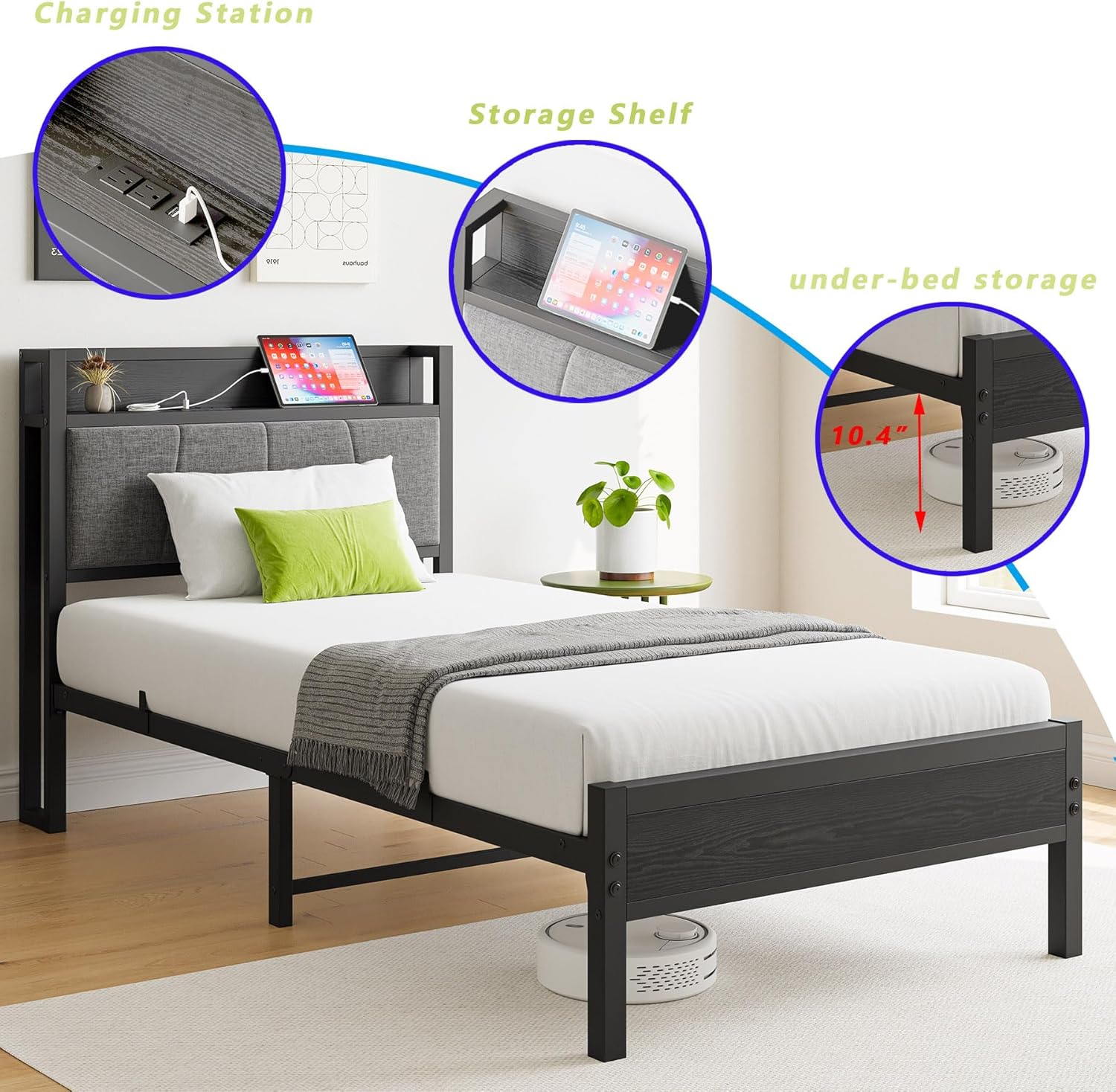
Image: A detailed view showing the breathable flax fabric of the upholstered headboard and a close-up of the sturdy metal slat structure, emphasizing the quality of materials and construction.
Specifications
| Attribute | Detail |
|---|---|
| Brand | HRVEOCEI |
| Model Number | Platform Bed Frame |
| Size | Twin |
| Product Dimensions (L x W x H) | 81.18" x 39.29" x 38.78" |
| Weight | 45 pounds |
| Material | Metal and Wood (Upholstered Headboard) |
| Color | Black |
| Finish Type | Powder Coated |
| Under-bed Clearance | 10.4 inches (Ground To Item Distance: 10.63 Inches) |
| Weight Capacity | 400 lbs |
| Mattress Requirements | No box spring needed |
| Assembly Required | Yes |

Image: A diagram illustrating the key dimensions of the twin bed frame, including length, width, height, and under-bed clearance, providing precise measurements for planning.
Maintenance
- Cleaning: Wipe the metal frame with a soft, damp cloth. For the upholstered headboard, use a mild fabric cleaner or a damp cloth to spot clean. Avoid harsh chemicals or abrasive cleaners.
- Fastener Check: Periodically check all bolts and screws to ensure they remain tight. Re-tighten if necessary to maintain stability and prevent squeaking.
- Charging Station Care: Keep the charging ports free of dust and debris. Do not expose the charging station to liquids.
Troubleshooting
- Bed Frame is Wobbly/Squeaky:
- Ensure all bolts and screws are fully tightened. Check that the bed frame is on a level surface. If the floor is uneven, consider using furniture pads under the legs.
- Charging Station Not Working:
- Verify that the power cord for the charging station is securely plugged into a functional wall outlet. Check if the outlet itself is receiving power. Ensure devices are properly connected to the USB ports or outlets.
- Parts Missing or Damaged:
- Refer to the package contents list. If any parts are missing or damaged upon arrival, do not proceed with assembly. Contact HRVEOCEI customer support immediately for assistance.
Warranty and Support
For any questions, concerns, or to report missing/damaged parts, please contact HRVEOCEI customer support. Refer to your purchase documentation for specific warranty details and contact information. Always provide your product model number (Platform Bed Frame) and ASIN (B0D923NFVX) when contacting support for faster service.
You can visit the official HRVEOCEI store on Amazon for more information: HRVEOCEI Store
Ask a question about this manual
Ask about setup, troubleshooting, compatibility, parts, safety, or missing instructions. Manuals+ will review the question and use this page’s manual context to help answer it.