
Tenda OS3 AC867 2Pack
Tenda OS3 Wireless Bridge Instruction Manual
Model: OS3 AC867 2Pack | Brand: Tenda
1. Introduction
The Tenda OS3 Wireless Bridge is a high-performance outdoor CPE (Customer Premises Equipment) designed for long-distance wireless data transmission. This 5.8GHz AC867 device, available in a 2-pack, features 12dBi directional antennas and supports Point-to-Point (PtP) and Point-to-MultiPoint (PtMP) wireless connections over distances up to 5km. Its IP65 weatherproof design ensures reliable operation in various outdoor conditions. The OS3 is ideal for extending network connectivity to remote locations, such as between buildings, for CCTV installations, or for providing wireless internet access.
2. Package Contents
Before beginning installation, please verify that all items are present and in good condition.
- Tenda OS3 Wireless Bridge Unit (2 units for 2-pack)
- Power Adapter (12V 1A Passive PoE or 12V 1A DC input)
- Mounting Kits (for pole and wall mounting)
- Quick Installation Guide
Note: Ethernet cables are not included and must be acquired separately for setup.
3. Key Features
- Long-Distance Signal Transmission: Equipped with a 12dBi directional antenna and internal power amplifier, providing stable wireless connectivity over distances up to 5km.

Figure 3.1: Long-distance wireless data transmission capability.
- Advanced TD-MAX Technology: Utilizes Tenda's proprietary TDMA protocol to enhance performance and capacity in Point-to-Point (PtP) and Point-to-MultiPoint (PtMP) outdoor network scenarios.
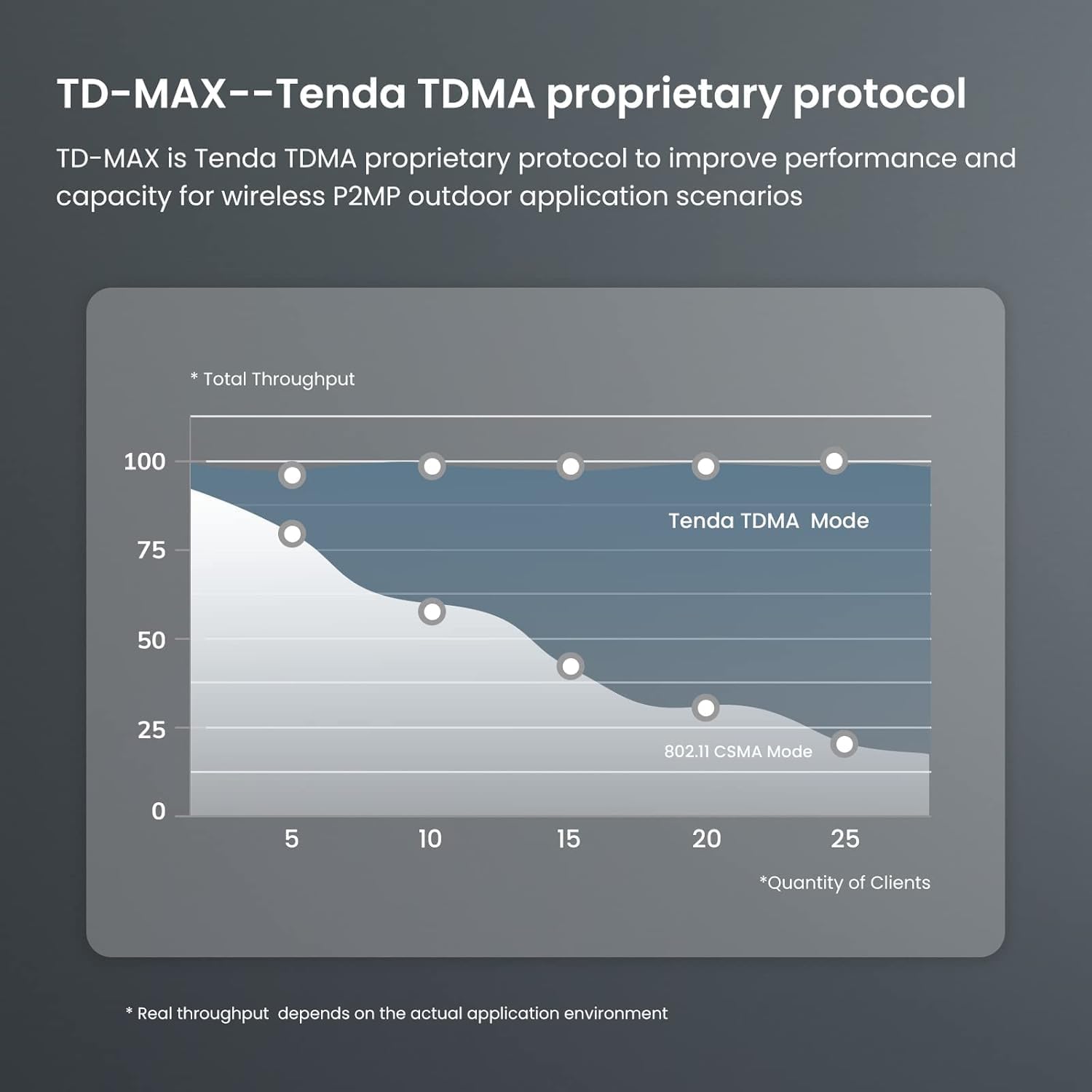
Figure 3.2: Performance comparison of TD-MAX protocol.
- Auto-Bridge Technology: Simplifies setup by automatically connecting devices out of the box, making it suitable for users with limited network expertise, especially in CCTV installations.

Figure 3.3: Auto-bridge functionality for easy pairing.
- Professional Outdoor Design: Built with an IP65 waterproof enclosure and durable hardware, ensuring reliable performance in harsh weather conditions, including extreme temperatures (-30°C to 60°C).
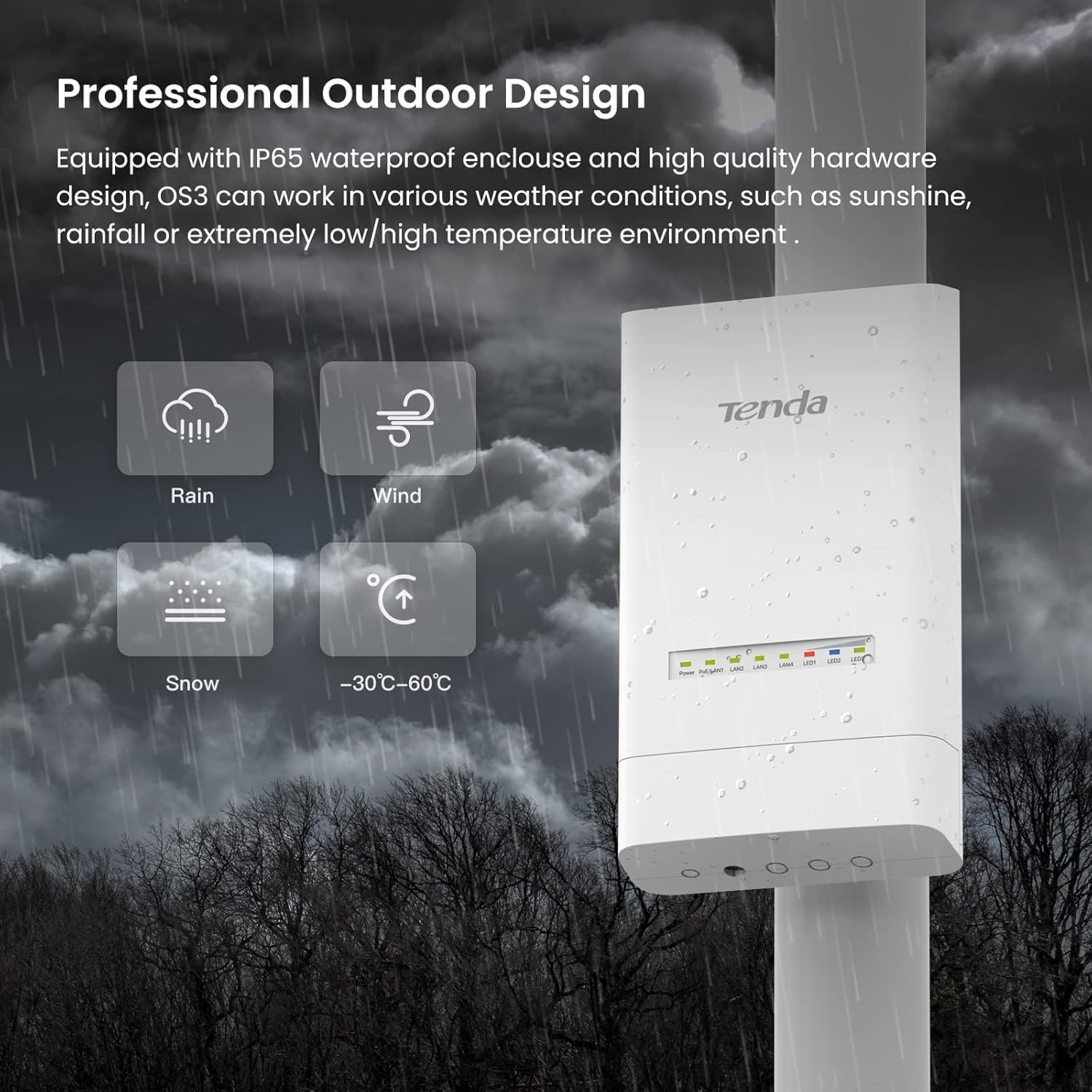
Figure 3.4: IP65 weatherproof design for outdoor durability.
- Flexible Power Supply Options: Supports both 12V 1A Passive PoE and 12V 1A DC input, enabling versatile and convenient deployment in various environments.

Figure 3.5: Dual power supply modes for installation flexibility.
- Easy Setup and Management: Includes PC-based CPE Assistant software, allowing easy configuration and management of multiple devices within a network.

Figure 3.6: CPE Assistant software for simplified management.
- High-Speed Wireless Performance: Features 11AC technology with a maximum wireless rate of 867Mbps, ensuring fast and reliable wireless connections for demanding applications.

Figure 3.7: High-speed wireless performance.
- Smart Signal Indicator LED: Three signal LED lights represent the current signal strength received from the peer device, aiding in finding the optimal deployment location for better performance.

Figure 3.8: Smart LED indicators for signal strength.
- Versatile Outdoor Mounting: Mounting kits provide flexible installation options, supporting both pole and wall mounting.

Figure 3.9: Pole and wall mounting options.
4. Setup Guide
The Tenda OS3 Wireless Bridge is designed for easy setup with its auto-bridge technology. For initial configuration, follow these general steps:
- Unpack and Identify Devices: Each OS3 unit has a label on the back with its default IP address. It is crucial to identify which unit will serve as the Access Point (AP) and which as the Client/Station.
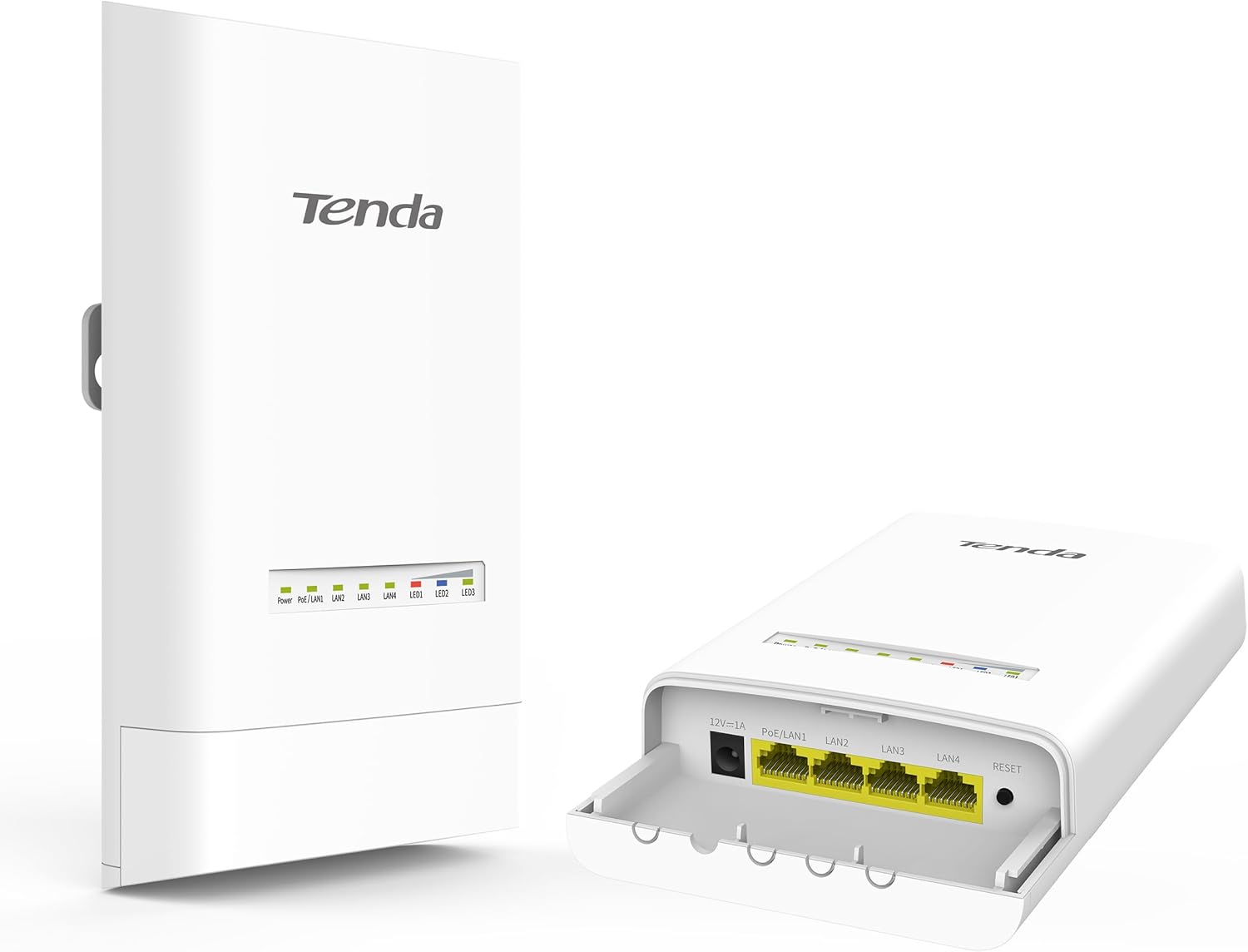
Figure 4.1: Tenda OS3 device overview.
- Initial Power-Up (AP Unit First): For optimal setup, power up only the unit designated as the Access Point (AP) first. Connect the power adapter to the unit.
- Connect to PC: Connect your computer to one of the LAN ports on the AP unit using an Ethernet cable (not included). Ensure your computer's IP address is in the same subnet as the OS3's default IP (e.g., if OS3 is 192.168.2.1, set your PC to 192.168.2.X, where X is not 1).
- Access Web Interface: Open a web browser and enter the default IP address of the AP unit (e.g., 192.168.2.1) to access its configuration interface.
- Configure AP Settings: Follow the on-screen prompts to configure the AP unit. This may include setting the operating mode (AP), wireless channel, and security settings.
- Power Up Client Unit: Once the AP is configured, power up the second unit (Client/Station). Due to auto-bridge technology, these units are designed to connect automatically when powered on face-to-face.
- Verify Connection: Observe the signal indicator LEDs on both devices. A strong signal indication confirms a successful wireless bridge connection. You can also use the PC-based CPE Assistant software for centralized management and verification.
- Mounting: Utilize the provided mounting kits for secure outdoor installation. Ensure a clear line of sight between the two units for optimal performance.
For detailed configuration, refer to the full user manual available on the Tenda support website or through the CPE Assistant software.
5. Operation
The Tenda OS3 Wireless Bridge operates primarily in two modes: Point-to-Point (PtP) and Point-to-MultiPoint (PtMP).
- Point-to-Point (PtP) Connection: In this mode, one OS3 unit acts as an Access Point (AP) and the other as a Station (Client). This creates a dedicated wireless link between two locations, commonly used for extending a network to another building or for video surveillance systems.

Figure 5.1: Example of a PtP connection for video surveillance.
- Point-to-MultiPoint (PtMP) Connection: One OS3 unit can function as an AP, bridging up to 15 other CPEs (Client devices). This is useful for distributing network access to multiple remote locations from a central point.

Figure 5.2: Example of a PtMP connection.
- Signal Strength Monitoring: The LED indicators on the device provide real-time feedback on signal strength. Aim for the highest number of illuminated LEDs for optimal performance.
6. Maintenance
The Tenda OS3 is designed for minimal maintenance due to its robust IP65 weatherproof construction. However, regular checks can ensure long-term reliability:
- Physical Inspection: Periodically inspect the device and its mounting for any signs of physical damage, loose connections, or obstructions that might block the line of sight.
- Cleaning: If necessary, gently wipe the exterior of the device with a soft, damp cloth. Do not use harsh chemicals or abrasive cleaners. Ensure all ports are free from debris.
- Firmware Updates: Check the Tenda official website periodically for firmware updates. Keeping the firmware updated can improve performance, stability, and security.
7. Troubleshooting
If you encounter issues with your Tenda OS3 Wireless Bridge, consider the following common solutions:
- No Connection/Poor Signal:
- Ensure a clear line of sight between the two bridge units. Obstacles like trees or buildings can significantly degrade signal quality.
- Check the signal indicator LEDs on both devices. Adjust alignment if necessary to achieve maximum signal strength.
- Verify that both units are powered on correctly.
- Configuration Issues (IP Address Conflicts):
- Pay close attention to the default IP addresses labeled on each unit. Ensure you are logging into the correct device's web interface.
- If configuration becomes problematic, perform a factory reset using the pushbutton on the device. This will revert settings to default, allowing you to start the setup process fresh.
- Ensure your computer's IP address is correctly configured to access the device's subnet during initial setup.
- Slow Speeds/Inconsistent Performance:
- While the device supports high speeds, actual throughput depends on environmental factors and the number of connected clients.
- Ensure there are no other strong 5GHz wireless signals interfering with your bridge.
- Check the quality of your Ethernet cables. Using high-quality CAT5e/CAT6 cables is recommended.
- CPE Assistant Software Issues:
- Ensure you have the latest version of the CPE Assistant software installed from the official Tenda website.
- Verify that your firewall or antivirus software is not blocking the software's communication with the devices.
If these steps do not resolve the issue, please contact Tenda technical support for further assistance.
8. Specifications
| Feature | Detail |
|---|---|
| Model Name | OS3 AC867 2Pack |
| Brand | Tenda |
| Connectivity Technology | Wi-Fi |
| Wireless Communication Standard | 802.11ac |
| Frequency Band Class | Single-Band (5.8 GHz) |
| Antenna Gain | 12dBi Directional |
| Max Wireless Rate | 867Mbps |
| LAN Ports | 4 Fast Ethernet |
| Power Supply | 12V 1A Passive PoE / 12V 1A DC Input |
| Weatherproof Rating | IP65 |
| Operating Temperature | -30°C to 60°C |
| Item Weight | 2.2 pounds |
| Package Dimensions | 11.18 x 9.33 x 4.09 inches |
9. Warranty and Support
The Tenda OS3 Wireless Bridge comes with a 3-year warranty. Tenda also provides lifetime dedicated technical support for this product. For assistance, please reach out via phone or email. Contact information can be found on the official Tenda website.
For the latest drivers, firmware, and detailed user manuals, please visit the Tenda Official Website.
Related Documents - OS3 AC867 2Pack
 |
Tenda Long Range Outdoor Point to Point CPE User Manual (O1/O3) This user manual guides users through the setup and configuration of Tenda's Long Range Outdoor Point to Point CPE devices (models O1 and O3). Learn to establish robust, long-distance wireless connections for WISP, surveillance, and network extension, featuring 12dBi antennas, 5km+ range, PoE, and IP64 weatherproof design. Covers installation, operating modes, network settings, and troubleshooting. |
 |
Tenda Quick Installation Guide for Wireless Access Points Comprehensive installation guide for Tenda wireless access points, detailing setup for CCTV surveillance, point-to-point data transmission, and wireless ISP hotspots. Includes safety precautions and compliance information. |
 |
Tenda OS3 Quick Installation Guide A concise guide to installing the Tenda OS3 Outdoor CPE, covering peer-to-peer bridging and manual bridging configurations. Includes troubleshooting tips and an appendix FAQ. |
 |
KuWfi Outdoor CPE Quick Installation Guide A comprehensive guide for installing and configuring KuWfi Outdoor CPE wireless bridges, detailing setup, specifications, modes, IP configuration, and field applications for long-range wireless transmission up to 5KM. |
 |
Tenda AC1200 Access Point & O3 Outdoor CPE | Wireless Network Solutions Comprehensive information on Tenda's AC1200 Dual Band Gigabit Wireless Access Point and O3 Outdoor CPE, designed for robust indoor and long-range wireless connectivity. Includes installation guidance and product specifications. |
 |
WeLink PTP 3Gbps V2 User Guide - Stand Alone Operation Comprehensive user guide for the WeLink PTP 3Gbps V2 Radio Head, covering installation, configuration, WebUI management, and regulatory compliance. |
Ask a question about this manual
Ask about setup, troubleshooting, compatibility, parts, safety, or missing instructions. Manuals+ will review the question and use this page’s manual context to help answer it.