
Introduction
Thank you for choosing the YenLove Mini Karaoke Machine Y6. This manual provides essential information for the safe and effective operation, maintenance, and troubleshooting of your device. Please read it thoroughly before use and retain it for future reference.
What's in the Box
- Mini Karaoke Machine (Speaker Unit)
- 2 Wireless Microphones
- Charging Cable (USB Type C)
- User Manual
Product Overview

Image: The YenLove Mini Karaoke Machine Y6 speaker unit and two wireless microphones.
Speaker Unit Controls:
- Power Button: Press and hold to turn on/off.
- Mode Button (M): Short press to switch between modes (e.g., Bluetooth, AUX). Double click to cycle through LED light effects.
- Volume Up (+): Increase speaker volume.
- Volume Down (-): Decrease speaker volume.
- Play/Pause Button: Play or pause audio.
Microphone Controls:
- Power Button: Press and hold to turn on/off.
- Volume/Echo Control: Adjust microphone volume and echo effect.
- Voice Changer Button: Cycle through different vocal effects.
Setup
Charging the Device:
Before first use, fully charge the karaoke machine and both wireless microphones. Connect the provided USB Type C charging cable to the charging port on the speaker unit and microphones, then connect the other end to a compatible USB power adapter (not included).
- The charging indicator light will illuminate during charging and turn off when fully charged.
- A full charge provides approximately 7-10 hours of playback, depending on volume and light usage.
Power On/Off:
- Speaker Unit: Press and hold the power button on the speaker unit until the indicator light turns on.
- Microphones: Press and hold the power button on each microphone until its indicator light turns on. The microphones will automatically pair with the speaker unit.
- To power off, press and hold the respective power buttons until the indicator lights turn off.
Operating Instructions
Bluetooth Connection:
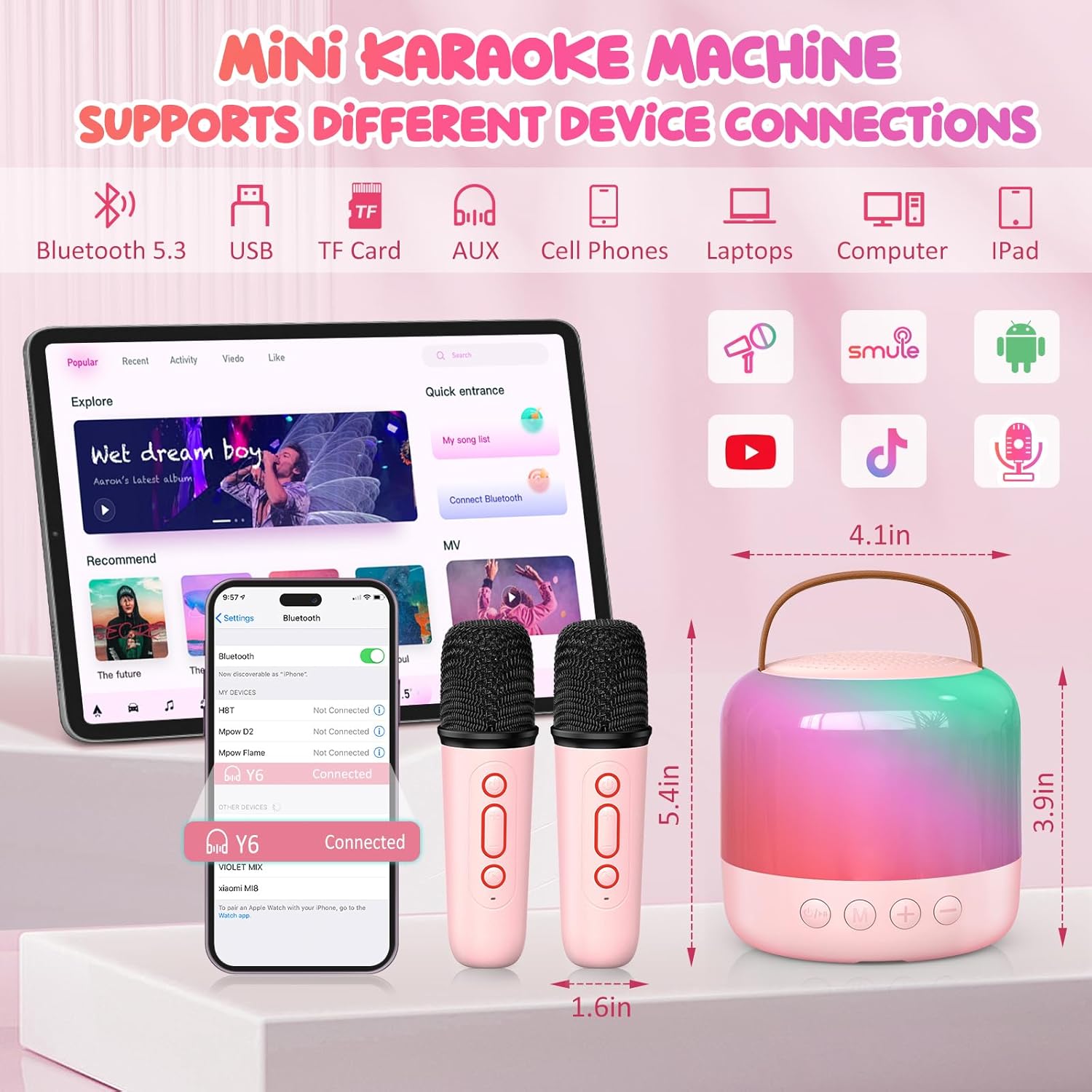
Image: The karaoke machine supports Bluetooth 5.3 for connection to phones, tablets, and laptops.
- Ensure the karaoke machine is powered on and in Bluetooth mode (indicated by a flashing blue light).
- On your device (smartphone, tablet, laptop), enable Bluetooth and search for available devices.
- Select "Y6" from the list of devices to pair.
- Once connected, the Bluetooth indicator light on the speaker will become solid blue, and you can play audio from your device through the karaoke machine.
The device utilizes Bluetooth 5.3 technology for stable connections up to 33 feet.
Microphone Usage:
After powering on the microphones, they will automatically connect to the speaker unit. Adjust the microphone volume and echo effect using the controls on the microphone itself.
Voice Changing Effects:

Image: The microphone offers five distinct vocal effects for varied sound output.
Each wireless microphone features a voice changer button. Press this button to cycle through 5 different vocal effects: Male, Female, Baby, Monster, and Acoustic. This allows for varied vocal performances.
Lighting Modes:

Image: The speaker unit showcasing six dynamic LED light effect modes.
The speaker unit features 6 upgraded LED light effects. Double-click the 'M' (Mode) button on the speaker unit to cycle through these lighting modes, creating a dynamic visual experience.
Accompaniment Mode:
The accompaniment mode can eliminate the lead vocals from a song, allowing you to sing along to the instrumental track. Refer to the specific instructions for activating this mode, typically by a dedicated button or a long press on a function button.
Night Light Mode:

Image: The karaoke machine can be used as a soft night light, providing gentle illumination.
The device includes a night light mode, providing soft illumination. This mode can also play sleep-aiding music. The night light can remain active while the device is charging.
Maintenance
- Clean the device with a soft, dry cloth. Do not use abrasive cleaners or solvents.
- Avoid exposing the device to water, moisture, or extreme temperatures.
- Store the device in a cool, dry place when not in use.
- Ensure charging ports are free from dust and debris.
Troubleshooting
| Problem | Possible Solution |
|---|---|
| Device does not power on. | Ensure the device is fully charged. Connect to a power source and try again. |
| Microphones not connecting. | Ensure microphones are charged and powered on. Power cycle both the speaker and microphones. |
| No sound from speaker. | Check speaker volume and connected device volume. Ensure Bluetooth is properly paired. |
| Poor sound quality/distortion. | Reduce volume on both the speaker and connected device. Ensure no obstructions between device and speaker. |
| Bluetooth connection unstable. | Move the connected device closer to the karaoke machine. Avoid interference from other wireless devices. |
Specifications
| Feature | Detail |
|---|---|
| Brand | YenLove |
| Model Number | Y6 |
| Product Dimensions | 3.9 x 3.9 x 4.1 inches |
| Item Weight | 1.85 pounds |
| Power Source | Battery Powered (1 Lithium Ion battery included) |
| Connector Type | USB Type C |
| Connectivity Technology | Bluetooth 5.3 |
| Audio Input | Bluetooth, Wireless Microphone |
| Number of Channels | 2 |
| Mounting Type | Tabletop |
| Color | Pink |
Warranty and Support
For warranty information and customer support, please refer to the contact details provided with your purchase or visit the official YenLove website. Keep your proof of purchase for any warranty claims.