
1. Introduction
Thank you for choosing the Voirrow Chunghop L208 Universal Remote Control. This remote is designed to simplify your home entertainment experience by controlling up to three different devices: your Television (TV), Digital Video Broadcasting - Terrestrial (DVB-T) receiver, and Satellite (SAT) receiver. This manual provides detailed instructions for setup, operation, maintenance, and troubleshooting to ensure optimal performance.
2. Setup Guide
2.1 Battery Installation
Before using the remote control, you need to install batteries. Open the battery compartment cover on the back of the remote. Insert two AAA batteries, ensuring the polarity (+ and -) matches the diagram inside the compartment. Close the cover securely.
2.2 Programming the Remote Control
The L208 remote control can be programmed using a 4-digit code specific to your device's brand. Follow these steps to program your remote:
- Locate the 4-digit code for your device's brand in the provided code list (refer to the image below).
- Press and hold the desired device button (TV, SAT, or DVB-T) continuously.
- Release the device button (TV, SAT, or DVB-T) once the red indicator light on the remote turns on.
- Immediately after, release both keys simultaneously and test the selected code by trying to operate your device.
- Check if other functions work normally. If the remote does not set up or perform correctly, please repeat steps 2-4 with a different code for your device brand, if available.

Image: Back of the remote control with programming instructions.

Image: Example of a code list for various device brands.
3. Operating Instructions
Once programmed, your L208 remote control is ready for use. The remote features a standard layout for easy navigation and control of your devices.
3.1 Button Functions Overview
- Device Selection Buttons (TV, DVB-T, SAT): Use these buttons to select which device you want to control. The remote will operate the last selected device.
- Power Button (POTENCIA): Turns the selected device on or off.
- Number Buttons (0-9): For direct channel input.
- Volume Control (VOL +, VOL -): Adjusts the volume of the selected device.
- Channel Control (CH +, CH -): Changes channels on the selected device.
- Mute Button (S): Mutes or unmutes the audio.
- Info Button (INFO): Displays information about the current program or input.
- Input/Source Button (TV/AV): Switches between different input sources (e.g., HDMI 1, AV).
- Page Up/Down (PG +, PG -): For navigating through menus or program guides.
- Colored Buttons (Red, Green, Yellow, Blue): These buttons often correspond to specific functions within menus or interactive services, depending on the device.

Image: Front view of the remote control, highlighting button layout.
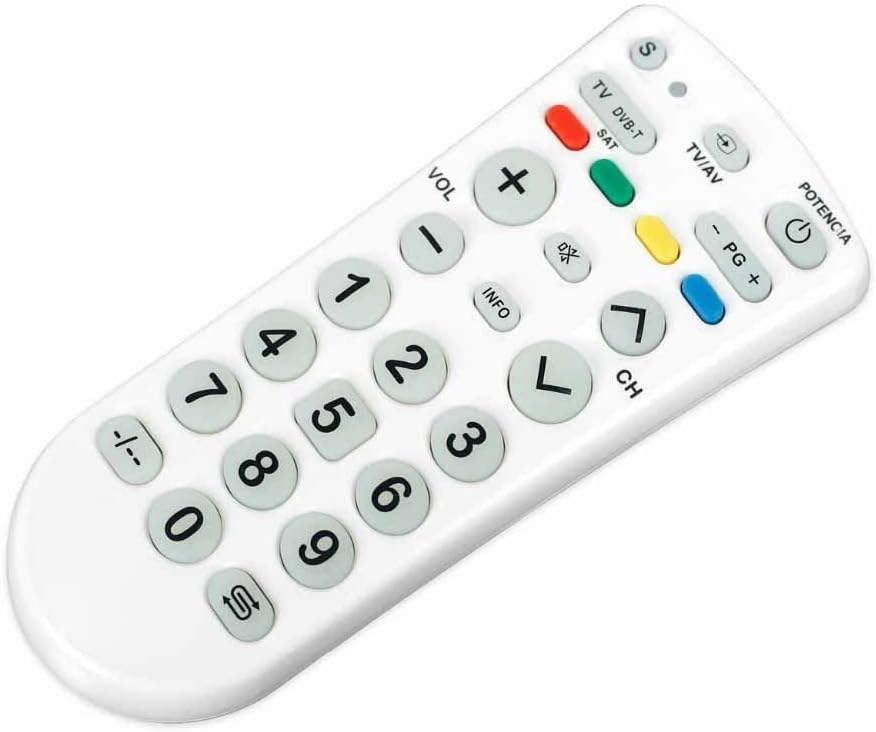
Image: Alternate front view of the remote control.
4. Maintenance
4.1 Cleaning
To clean your remote control, use a soft, dry cloth. For stubborn dirt, slightly dampen the cloth with water or a mild, non-abrasive cleaner. Do not use harsh chemicals or immerse the remote in water.
4.2 Battery Replacement
Replace batteries when the remote's response becomes sluggish or the indicator light does not illuminate. Always replace both batteries at the same time with new AAA batteries. Dispose of old batteries responsibly according to local regulations.

Image: Side view of the remote control.
5. Troubleshooting
- Remote not responding:
- Check if the batteries are correctly installed and not depleted. Replace if necessary.
- Ensure there are no obstructions between the remote and the device.
- Verify that the correct device button (TV, DVB-T, or SAT) is selected.
- Device not pairing/responding after programming:
- Re-attempt the programming steps (Section 2.2).
- Try a different 4-digit code for your device's brand from the code list.
- Ensure the device you are trying to control is powered on.
- Some functions not working:
- Not all functions of your original remote may be supported by the universal remote.
- Ensure the remote is pointed directly at the device's IR receiver.
6. Specifications
| Brand | Voirrow |
| Model | Chunghop L208 |
| Supported Devices | 3 (TV, DVB-T, SAT) |
| Color | One Color |
| Dimensions (L x W x H) | 1 x 1 x 1 cm (approximately) |
| Weight | 50 g (approximately) |
| Power Source | 2 x AAA Batteries (not included) |
7. Warranty and Support
Specific warranty information for the Voirrow Chunghop L208 Universal Remote Control is not provided in the product details. For any warranty claims, technical support, or further assistance, please contact the seller or retailer from whom you purchased the product. They will be able to provide the most accurate and up-to-date information regarding product support and service.