1. Introduction
This manual provides essential information for the safe and efficient operation of your Generic RGBW 4in1 LED Moving Head Light. Please read this manual thoroughly before installation, operation, or maintenance to ensure proper use and to prevent damage to the unit or injury to personnel.
1.1 Safety Information
- Always connect the unit to a grounded circuit to avoid the risk of electrocution.
- Ensure the power supply voltage matches the voltage specified on the unit.
- Do not open the housing; there are no user-serviceable parts inside. Refer all servicing to qualified personnel.
- Avoid direct eye exposure to the light source.
- Ensure adequate ventilation around the unit to prevent overheating.
- Mount the unit securely using appropriate clamps and safety cables.
2. Product Overview
The Generic RGBW 4in1 LED Moving Head Light is a versatile stage lighting fixture designed for dynamic visual effects. It features powerful RGBW LEDs, flexible movement, and multiple control modes.
2.1 Key Features
- High Efficiency Optical Lens for 20% Increased Brightness.
- Powerful 7x8W RGBW LEDs with a Broad Spectrum of Colors.
- Extensive Lighting Range up to 17 feet with a 36-Degree Beam Angle.
- Flexible Movement with 540° X-Axis (Pan) and 180° Y-Axis (Tilt) Rotation.
- Over 50,000 Hours of LED Lifespan.
2.2 Components
The image below illustrates the main components of the moving head light, including the LED head, base, and control panel.

Figure 1: Front view of the RGBW 4in1 LED Moving Head Light, showing the LED array and control panel.
3. Setup Instructions
3.1 Unpacking
Carefully remove the fixture from its packaging. Inspect the unit for any damage that may have occurred during transit. If damage is found, contact your supplier immediately.
3.2 Mounting
The fixture can be mounted in various positions (e.g., truss, floor) using the included mounting bracket. Ensure the mounting surface or structure can support the weight of the fixture. Always use a safety cable as a secondary attachment.

Figure 2: Illustration of the mounting bracket and design for secure installation.
3.3 Power Connection
Connect the provided power cable to the power input on the rear of the unit and then to a suitable AC power outlet. Ensure the power source is stable and within the specified voltage range.
3.4 DMX Connection
For DMX control, connect a DMX cable from your DMX controller's output to the DMX IN port on the fixture. If linking multiple fixtures, connect from the DMX OUT of the first fixture to the DMX IN of the next, and so on. The fixture supports 540 degrees of pan (X-axis) and 180 degrees of tilt (Y-axis) movement.

Figure 3: Diagram showing the 540-degree X-axis (Pan) and 180-degree Y-axis (Tilt) movement capabilities.
4. Operating Modes
The fixture offers four primary control modes: DMX512, Auto, Sound Activated, and Master-Slave. These modes are selected via the control panel.

Figure 4: Overview of the control panel and rear input/output connections, illustrating the four control modes.
4.1 DMX512 Mode
This mode allows professional control over all functions of the fixture using an external DMX controller. Set the DMX address using the control panel to match your DMX system configuration.
4.2 Auto Mode
In Auto Mode, the fixture runs through pre-programmed light shows automatically. Various auto programs may be available for selection via the control panel.
4.3 Sound Activated Mode
The fixture's internal microphone detects ambient sound, and the light show synchronizes with the beat of the music. Sensitivity can often be adjusted.
4.4 Master-Slave Mode
Connect multiple fixtures via DMX cables. Set one fixture as the 'Master' and the others as 'Slave'. The slave units will mimic the master unit's movements and light patterns, ideal for synchronized shows without a DMX controller.
5. Control Panel
The control panel, located on the front of the base, features a digital display and four buttons for navigation and setting adjustments.
5.1 Digital Display
The 4-digit digital display shows the current mode, DMX address, or parameter values. Refer to Figure 4 for its location.
5.2 Button Functions
- MODE/ESC: Press to cycle through main menus or exit the current menu/setting without saving changes.
- UP: Increases the value of a selected parameter or navigates upwards through menu options.
- DOWN: Decreases the value of a selected parameter or navigates downwards through menu options.
- ENTER: Confirms a selection, saves a setting, or enters a submenu.
6. Maintenance
6.1 Cleaning
Regular cleaning of the optical lenses and the exterior housing is recommended to maintain optimal light output and appearance. Use a soft, lint-free cloth and a mild glass cleaner. Ensure the unit is powered off and disconnected before cleaning.
6.2 Cooling System
The fixture is equipped with a built-in cooling fan to ensure efficient operation and longevity of the LEDs. Periodically check that the fan vents are clear of dust and debris to prevent overheating.

Figure 5: View of the cooling fan and overall dimensions of the fixture (295mm height, 225mm width).
6.3 Storage
When not in use, store the fixture in a dry, dust-free environment, preferably in its original packaging or a protective case.
7. Troubleshooting
This section addresses common issues you might encounter with your moving head light.
| Problem | Possible Cause | Solution |
|---|---|---|
| No power | Power cable disconnected, faulty outlet, blown fuse. | Check power cable connection, test outlet, replace fuse (if accessible and safe to do so). |
| Light not responding to DMX | Incorrect DMX address, faulty DMX cable, DMX controller issue. | Verify DMX address, check DMX cable connections, test with another DMX controller. |
| Movement erratic or stuck | Obstruction, internal error. | Ensure no physical obstructions. Power cycle the unit. If problem persists, contact support. |
| Overheating | Blocked ventilation, insufficient airflow. | Clear all vents. Ensure adequate space around the fixture for air circulation. |
8. Technical Specifications
Below are the detailed specifications for the Generic RGBW 4in1 LED Moving Head Light.
| Specification | Detail |
|---|---|
| Brand | Generic |
| Model Number | Head Light |
| Light Source | 7x8W RGBW LEDs |
| Beam Angle | 36 Degrees |
| Pan Movement (X-Axis) | 540° |
| Tilt Movement (Y-Axis) | 180° |
| Control Modes | DMX512, Auto, Sound Activated, Master-Slave |
| Material | Metal |
| Power Source | AC/DC |
| Indoor/Outdoor Usage | Outdoor |
| Product Dimensions | 9.84 x 7.08 x 7.08 inches (25 x 18 x 18 cm) |
| LED Lifespan | Over 50,000 hours |
9. Package Contents
The following items are typically included with your Generic RGBW 4in1 LED Moving Head Light:
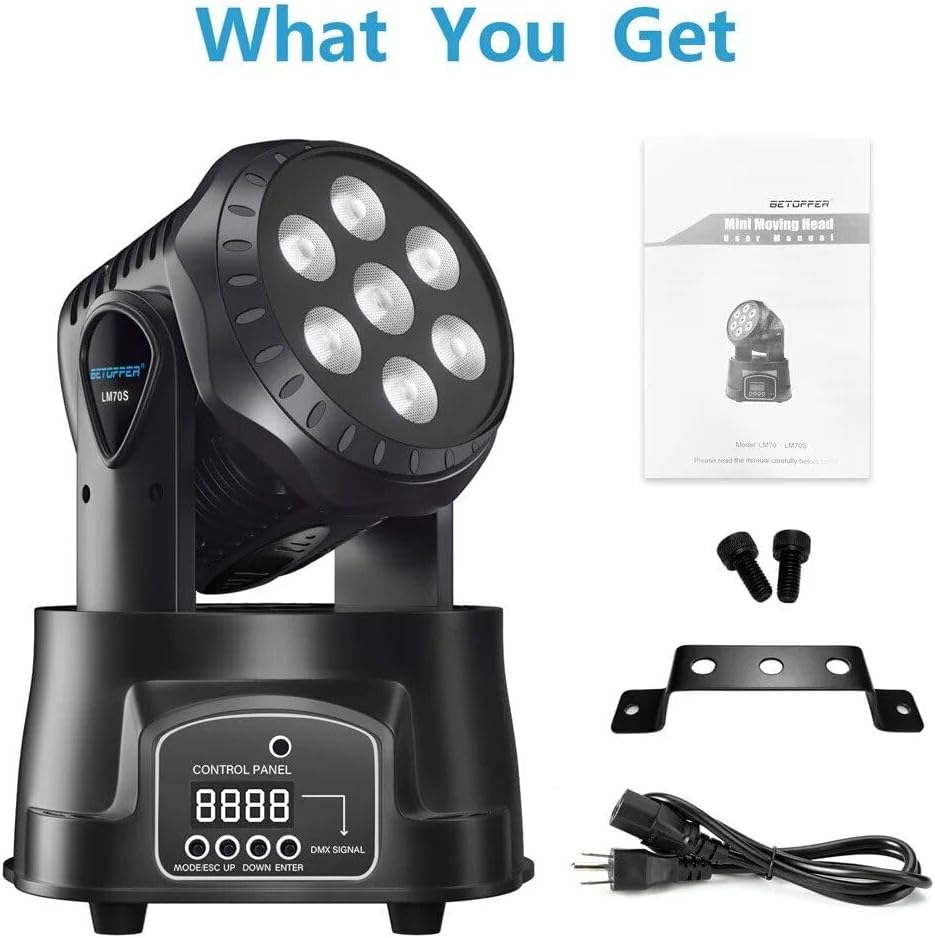
Figure 6: Image showing the moving head light, user manual, mounting bracket, screws, and power cable.
- 1 x RGBW 4in1 LED Moving Head Light
- 1 x Power Cable
- 1 x Mounting Bracket
- 2 x Mounting Screws
- 1 x User Manual
10. Warranty and Support
For warranty information or technical support, please refer to the documentation provided at the time of purchase or contact your seller directly. Keep your purchase receipt as proof of purchase.


