
ZealSound K66DG
ZealSound K66DG Wireless USB Microphone Instruction Manual
Model: K66DG | Brand: ZealSound
Introduction
Thank you for choosing the ZealSound K66DG Wireless USB Microphone. This professional-grade condenser desktop microphone is designed for versatile use across various platforms, including computers, laptops, Windows, Mac OS, PS4, PS5, iPhone, iPad, and Android devices. It offers both 2.4GHz wireless and wired connectivity options, ensuring high-quality audio capture for podcasts, ASMR, gaming, live streaming, YouTube videos, and more. This manual provides detailed instructions to help you set up, operate, and maintain your microphone for optimal performance.
What's in the Box
Your ZealSound K66DG Wireless USB Microphone package includes:
- 1 x Durable, professional-grade K66 Series 2.4GHz Wireless Desktop Microphone
- 1 x Solid Metal Anti-Vibration Stand Base (prevents movement)
- 1 x 70.87-inch USB Audio Cable
- 1 x Type-C Adapter for compatibility with the latest MacBook and other Type-C devices (including iPhone 15/16, tablets, and PCs)
- 1 x USB Adapter for iPhone and iPad
- 1 x USB Dongle Receiver
- 1 x Microphone Foam Windscreen
- 1 x User Manual

Figure 1: ZealSound K66DG Microphone and all included accessories.
Product Overview & Features
The ZealSound K66DG microphone is engineered for superior audio performance and user convenience. Key features include:
- 2.4GHz Wireless Technology: Enjoy effortless, cable-free connectivity with the included USB dongle receiver. Simply plug and play.
- Wired Connectivity: For those who prefer a direct connection, the charging cable can also be used for audio transmission.
- Wide Compatibility: Seamlessly connects to computers, laptops (Windows, Mac OS), PS4, PS5, iPhones (including iPhone 15/16), Type-C phones, iPads, and Android tablets using the provided adapters.
- Precise Mic Gain Control: A professional gain knob allows for precise adjustments to volume and sensitivity, reducing background noise or increasing sensitivity as needed.
- Echo Effect Control: Fine-tune or deactivate the echo effect with its dedicated control.
- Active Noise Cancellation (ANC): Double-click the "MUTE/ANC" button until the small LED indicator turns blue to activate noise cancellation, ideal for noise-free recording environments.
- Superb Sound Quality: This 48kHz condenser microphone provides exceptional audio clarity with a balanced frequency response, capturing every detail without distortion.
- Cardioid Polar Pattern: Minimizes background noise and offers excellent feedback control by primarily picking up sound from the front.
- Zero-Latency Monitoring: Monitor your audio in real-time through the 3.5mm headphone jack, with adjustable monitoring levels.
- Bluetooth for Background Music: The Bluetooth function is solely for connecting a secondary device to play background music (BGM). Audio recording is exclusively via the 2.4G wireless connection.
- Compact and Rechargeable: Features a built-in lithium battery offering up to 16 hours of continuous use on a full charge (approx. 3 hours charging time).

Figure 2: Front view of the ZealSound K66DG Wireless USB Microphone.

Figure 3: The K66DG microphone connecting to various devices including desktop, laptop, PS4/5, smartphone, and tablet.

Figure 4: Illustration of the Cardioid Pickup Pattern, showing optimal sound capture from 6-12 inches in front of the microphone.
Video 1: Official product video showcasing the ZealSound K66DG Wireless Desktop Microphone and its features.
Setup
The ZealSound K66DG microphone offers easy plug-and-play setup for both wireless and wired connections.
Wireless Setup (2.4GHz)
- Ensure the microphone is charged.
- Turn on the microphone by long-pressing the MUTE/ANC button until the green light illuminates.
- Plug the USB dongle receiver into your device's USB port. For Type-C or iPhone ports, use the appropriate adapter provided.
- The microphone will automatically pair with the dongle. A solid blue light on the microphone indicates a successful wireless connection.
- Your device should recognize the microphone as an audio input device. You can now start recording or streaming.
Wired Setup
- Connect the USB Audio Cable to the Type-C port on the bottom of the microphone.
- Plug the other end of the USB cable into your device's USB port. For Type-C or iPhone ports, use the appropriate adapter provided.
- The microphone will be recognized as a wired audio input device.

Figure 5: The microphone supports various devices via wireless dongle, USB-A cable, and included adapters for Type-C and iPhone.
Operating the Microphone
The ZealSound K66DG features intuitive controls for easy audio management.
Controls Overview

Figure 6: Detailed view of the microphone's control panel, including MUTE/ANC button, Mic Volume, Monitor Control, and Echo Control.
- MUTE/ANC Button:
- Long press to power ON/OFF the microphone.
- Single click to MUTE/UNMUTE the microphone (LED indicator changes from green to red when muted).
- Double-click to activate/deactivate Active Noise Cancellation (ANC). The small LED indicator turns blue when ANC is active.
- Mic Volume Control: Rotate the "MIC +" or "MIC -" knob to adjust the microphone's input gain and sensitivity.
- Monitor Control: Rotate the "Headphone +" or "Headphone -" knob to adjust the volume of the 3.5mm headphone monitoring output.
- Echo Control: Rotate the "ECHO +" or "ECHO -" knob to adjust the echo effect level.
Real-Time Monitoring
Plug your headphones into the 3.5mm jack on the bottom of the microphone to monitor your audio input in real-time without latency. Adjust the monitoring volume using the dedicated knob.
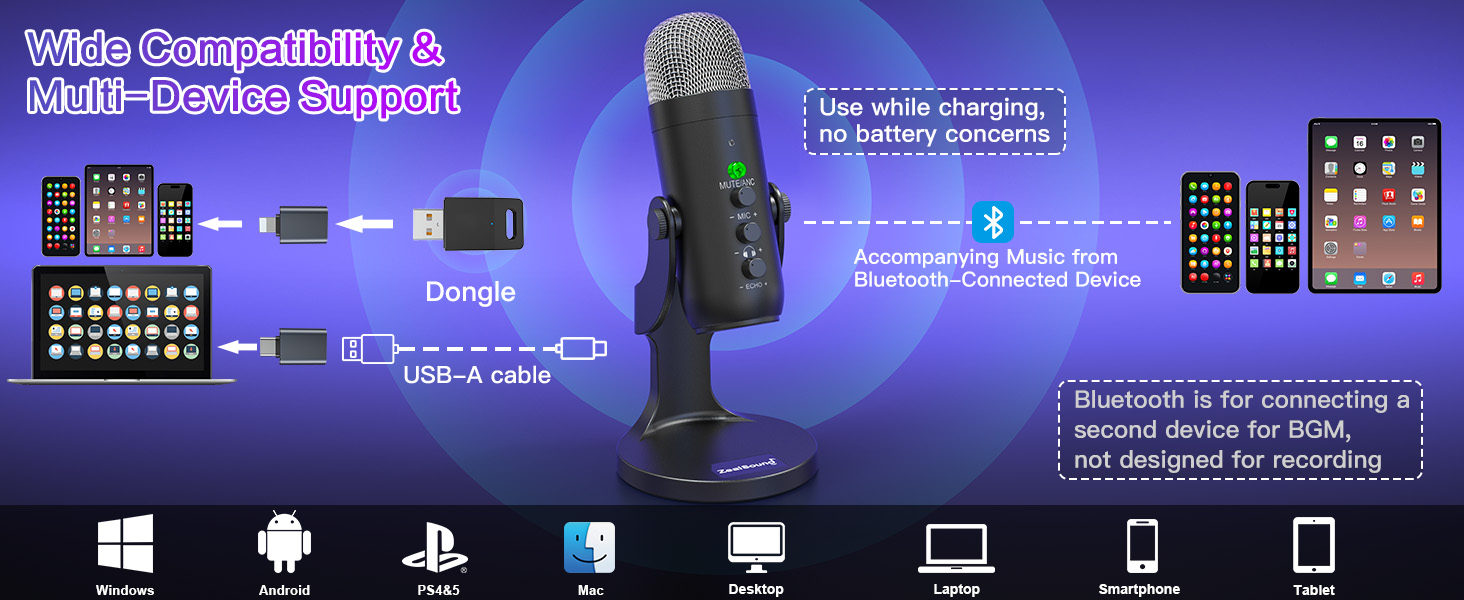
Figure 7: The microphone features a 3.5mm headphone jack for zero-latency monitoring and a USB-C port for charging and wired audio.
Bluetooth for Background Music (BGM)
The microphone's Bluetooth function is exclusively for playing background music from a secondary device. It is not designed for primary audio recording. To connect for BGM:
- Ensure the microphone is powered on.
- Enable Bluetooth on your secondary device (e.g., smartphone, tablet).
- Search for "K66DG" in your device's Bluetooth settings and pair.
- Once paired, you can play background music through the microphone's output, which will mix with your recorded audio.
Maintenance
To ensure the longevity and optimal performance of your ZealSound K66DG microphone, follow these maintenance guidelines:
- Cleaning: Use a soft, dry cloth to clean the microphone's exterior. Avoid using harsh chemicals or abrasive materials.
- Storage: Store the microphone in a cool, dry place away from direct sunlight and extreme temperatures.
- Foam Windscreen: Regularly clean or replace the foam windscreen to maintain hygiene and prevent sound degradation.
- Battery Care: For optimal battery life, fully charge the microphone before initial use and when the battery is low. Avoid prolonged periods of complete discharge.
Troubleshooting
If you encounter issues with your ZealSound K66DG microphone, refer to the following common problems and solutions:
- No Sound Output:
- Ensure the microphone is powered on and not muted (green LED indicates active, red LED indicates muted).
- Check if the USB dongle or cable is securely connected to both the microphone and your device.
- Verify that the correct audio input device is selected in your computer's sound settings.
- Adjust the microphone gain knob to an appropriate level.
- Poor Sound Quality / Background Noise:
- Activate Active Noise Cancellation (ANC) by double-clicking the MUTE/ANC button (blue LED).
- Ensure the microphone is positioned correctly, with the top facing the sound source, and within the optimal range (6-12 inches).
- Reduce the microphone gain if the audio is distorted or picking up too much ambient noise.
- Use the foam windscreen to reduce plosives and wind noise.
- Wireless Connectivity Issues:
- Ensure the USB dongle is properly inserted and the microphone is powered on.
- Confirm that the microphone's battery is sufficiently charged.
- If using Bluetooth for BGM, ensure it's correctly paired and not interfering with the 2.4GHz recording connection.
- Echo Effect Too Strong/Weak:
- Adjust the Echo control knob on the microphone to your desired level.
Specifications
| Specification | Value |
|---|---|
| Model Name | K66DG |
| Brand | ZealSound |
| Connectivity Technology | 2.4 GHz Wireless Connectivity, USB/Type C/iPhone Jack |
| Connector Type | USB Type-C, USB Adapter for iPhone 5 Onwards/iPad 4 Onwards |
| Polar Pattern | Unidirectional (Cardioid) |
| Audio Sensitivity | 125 dB |
| Frequency Response | 80Hz-20KHz (46 KHz sampling rate) |
| Signal-to-Noise Ratio | 85 dB |
| Impedance | 2.2 Kiloohms |
| Noise Level | 66 dB |
| Dynamic Range | 88 dB |
| Power Source | Cordless Electric (Built-in Lithium Battery) |
| Battery Type | Lithium Ion |
| Battery Life | Up to 16 hours (approx. 3 hours charging time) |
| Item Weight | 0.78 Pounds (12.5 ounces) |
| Product Dimensions (L x W x H) | 1.58 x 1.58 x 6.1 inches |
| Material | Acrylonitrile Butadiene Styrene, Sturdy Material |
| Compatible Devices | Type-C Devices, Computer & Laptop & Macbook, Compatible with iPhone & Smartphones & Tablets, PS4&5 |
| Special Features | Active Noise Cancellation, Volume Control, Mute Function, 2.4 GHz Wireless Connectivity, Echo Control, Real-Time Monitor |
Warranty and Support
ZealSound is committed to providing high-quality products and excellent customer service. Your K66DG microphone comes with free technical support for any inquiries or issues you may encounter. Please refer to the contact information in your user manual for assistance.