
SICSOLINK 8 Port 10GB Switch|6 RJ45+2 SFP+
SICSOLINK 8 Port 10GB Unmanaged Switch User Manual
Model: 8 Port 10GB Switch | 6 RJ45 + 2 SFP+
1. Introduction
This manual provides instructions for the SICSOLINK 8 Port 10GB Unmanaged Switch. This device is designed to expand your network connectivity with high-speed 10 Gigabit Ethernet, featuring both RJ45 and SFP+ ports. It is suitable for various applications including NAS, WiFi 7 routers, gaming PCs, and 8K video streaming environments.
The switch offers plug-and-play functionality, requiring no complex configuration. Its robust design ensures stable and efficient network performance.
2. Package Contents
Verify that your package contains the following items:
- SICSOLINK 8 Port 10GB Unmanaged Switch
- Power Adapter
- 1-meter Network Cable
- Rack Mount Hardware (for 19-inch rack installation)
- User Manual (this document)
3. Product Overview
The SICSOLINK 8 Port 10GB Unmanaged Switch provides high-speed network connectivity with a combination of RJ45 and SFP+ ports. It is designed for easy integration into existing network infrastructures.

Figure 3.1: Front Panel Layout. This image displays the front of the SICSOLINK 8 Port 10GB Unmanaged Switch, highlighting the six RJ45 multi-Gigabit ports (10G/5G/2.5G/1G) and two SFP+ fiber ports (10G/2.5G/1G). Each port has corresponding LED indicators for status monitoring.
Key Features:
- 8 Total Ports: 6 RJ45 multi-Gigabit ports (10G/5G/2.5G/1G) and 2 SFP+ fiber ports (10G/2.5G/1G).
- High Performance: 160 Gbit/s switching capacity and 119.04 Mpps packet forwarding rate.
- Unmanaged Operation: Plug and Play, no configuration required.
- Auto-Negotiation: Automatically detects and optimizes link speed.
- Durable Design: Metal casing with 6 KV lightning protection.
- Efficient Cooling: Features a 3200 RPM fan and dual-sided cooling holes for stable operation and minimal noise.
- Flexible Installation: Supports 19-inch rack mount or desktop placement.
4. Setup Instructions
4.1 Desktop Placement
- Choose a stable, flat surface for the switch. Ensure adequate ventilation around the device.
- Connect the power adapter to the switch's power input and then to a power outlet.
- Connect your network devices (e.g., NAS, PC, router) to the RJ45 ports using appropriate Ethernet cables (Cat6A or higher for 10G speeds).
- For SFP+ connections, insert compatible SFP+ modules into the SFP+ ports, then connect fiber optic cables to your SFP+ enabled devices.
- Power on the switch. The LED indicators will illuminate to show connection status.
4.2 Rack Mounting (19-inch)
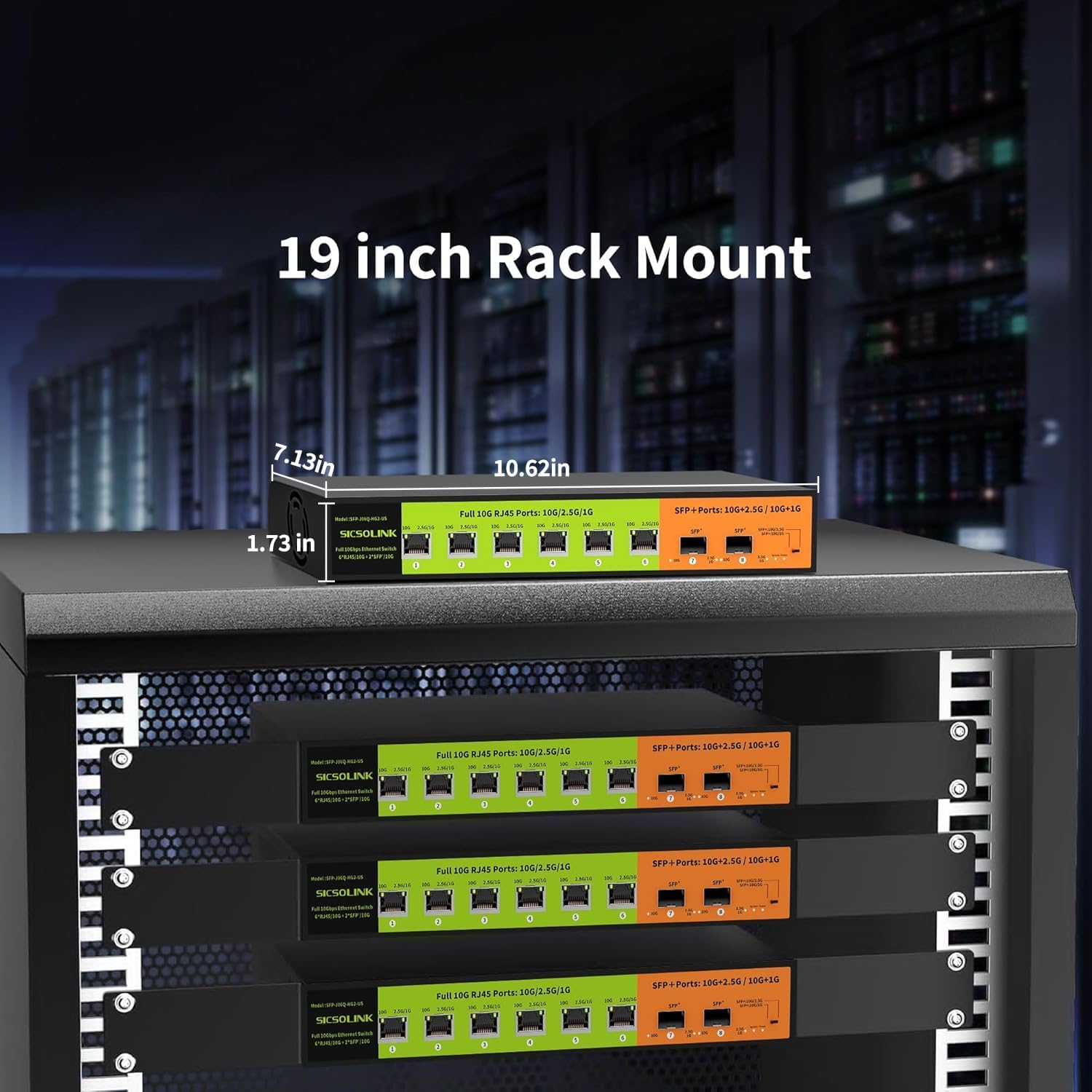
Figure 4.1: Rack Mount Installation. This image illustrates the SICSOLINK 10GB Switch installed within a standard 19-inch server rack, demonstrating its compatibility and physical dimensions for rack integration.
- Attach the provided rack-mount brackets to the sides of the switch using the included screws.
- Secure the switch into a standard 19-inch server rack using appropriate rack screws (not always included, check your rack's hardware).
- Ensure proper airflow within the rack to prevent overheating.
- Proceed with power and network cable connections as described in Section 4.1.
5. Operating the Switch
The SICSOLINK 10GB Unmanaged Switch is designed for simple plug-and-play operation. No software configuration is required.
5.1 LED Indicators
Monitor the LED indicators on the front panel to understand the status of your network connections:
- Power LED: Indicates if the switch is powered on.
- Link/Act LEDs (per port):
- Solid Green: A stable network link is established.
- Flashing Green: Data activity (transmitting or receiving).
- Off: No link or device connected.
- Speed LEDs (per port, if applicable): May indicate the current link speed (e.g., 10G, 5G, 2.5G, 1G). Refer to the specific port labeling for details.
5.2 Network Speed Considerations
To achieve optimal 10 Gigabit speeds, ensure the following:
- RJ45 Ports: Use Cat6A or higher-grade Ethernet cables for 10G connections. Cat5e and Cat6 cables will support lower speeds (e.g., 1G, 2.5G, 5G) depending on cable quality and length.
- SFP+ Ports: Use compatible SFP+ modules and fiber optic cables appropriate for your desired distance and speed. SFP+ ports can transmit data over longer distances (e.g., 5 km or more) compared to RJ45 ports (up to 100 meters).

Figure 5.1: Network Speed Comparison. This image visually represents that 10 Gigabit Ethernet is significantly faster than 1 Gigabit, and highlights the compatibility of the switch with CAT5e, CAT6, and CAT6A cables for different speed tiers.
6. Maintenance
The SICSOLINK 10GB Unmanaged Switch requires minimal maintenance to ensure optimal performance and longevity.
- Cleaning: Periodically clean the exterior of the switch with a soft, dry cloth. Do not use liquid or aerosol cleaners.
- Ventilation: Ensure that the ventilation holes on the switch are not blocked. Proper airflow is crucial for heat dissipation and stable operation.
- Environment: Operate the switch within its specified temperature range (0 to 45 °C). Avoid placing it in direct sunlight or near heat sources.
- Firmware: As an unmanaged switch, firmware updates are generally not required or available.

Figure 6.1: Quiet Operation and Heat Dissipation. This image highlights the switch's quiet design, featuring a 3200 RPM fan and dual-sided cooling holes for effective heat management while maintaining a low noise level.
7. Troubleshooting
If you encounter issues with your SICSOLINK 10GB Unmanaged Switch, refer to the following common problems and solutions:
| Problem | Possible Cause | Solution |
|---|---|---|
| No Power LED indication | Power adapter not connected or faulty; power outlet issue. |
|
| No Link/Act LED for a connected device | Cable issue; device not powered on; incorrect port connection; incompatible SFP+ module. |
|
| Slow network speed | Cable quality; connected device speed limitation; network congestion. |
|
| Intermittent connection | Loose cable connection; faulty cable; environmental interference. |
|
8. Specifications
| Feature | Detail |
|---|---|
| Model Number | 8 Port 10GB Switch|6 RJ45+2 SFP+ |
| Brand | SICSOLINK |
| Total Ports | 8 |
| RJ45 Ports | 6 x Multi-Gigabit (10G/5G/2.5G/1G) |
| SFP+ Ports | 2 x 10G/2.5G/1G |
| Switching Capacity | 160 Gbit/s |
| Packet Forwarding Rate | 119.04 Mpps |
| MAC Address Table Size | 16K |
| Network Standards | IEEE802.3, IEEE802.3u, IEEE802.3x, IEEE802.3ab |
| RJ45 Transmission Distance | Up to 100 meters |
| SFP+ Transmission Distance | 5 km or more (module dependent) |
| Cooling | 3200 RPM fan, dual-sided cooling holes |
| Lightning Protection | 6 KV |
| Operating Temperature | 0 to 45 °C |
| Dimensions (L x W x H) | 33L x 22.9W x 10.2H cm (approx. 13L x 9W x 4H inches) |
| Weight | 3.9 Pounds (approx. 1.77 kg) |
| Voltage | 12 Volts |
| Current Rating | 5 A |
| UPC | 762284657676 |
| ASIN | B0F2MNJCG5 |
9. Warranty and Technical Support
SICSOLINK rigorously tests each switch for reliability, quality, and performance. We commit to ensuring the product functions well for at least one year from the date of purchase.
We provide lifetime technical support for this product. If you encounter any issues or require assistance, please contact us via email. Our technical support team will respond to your inquiries within 24 hours.
For support, please refer to the contact information provided with your product documentation or visit the official SICSOLINK website.
Ask a question about this manual
Ask about setup, troubleshooting, compatibility, parts, safety, or missing instructions. Manuals+ will review the question and use this page’s manual context to help answer it.