
MedMassager MMF08
MedMassager Foot Massager Classic (MMF08) Instruction Manual
Introduction
Welcome to the MedMassager Foot Massager Classic (MMF08) instruction manual. This document provides essential information for the safe and effective operation, maintenance, and care of your new foot massager. The MedMassager Foot Massager Classic is designed to deliver deep tissue massage therapy, aiding in the relief of discomfort and promoting improved circulation.

Figure 1: MedMassager Foot Massager Classic
Safety Information
Important: Please read all safety instructions before using the device.
Do not use the massager on broken skin, open wounds, or areas with inflammation. Consult a healthcare professional if you have any pre-existing medical conditions or concerns before using this product.
Setup
- Unpacking: Carefully remove the MedMassager Foot Massager Classic from its packaging. Ensure all components are present and undamaged.
- Placement: Place the foot massager on a flat, stable surface. Ensure there is enough space around the device for comfortable use.
- Power Connection: Plug the power cord into a standard electrical outlet.
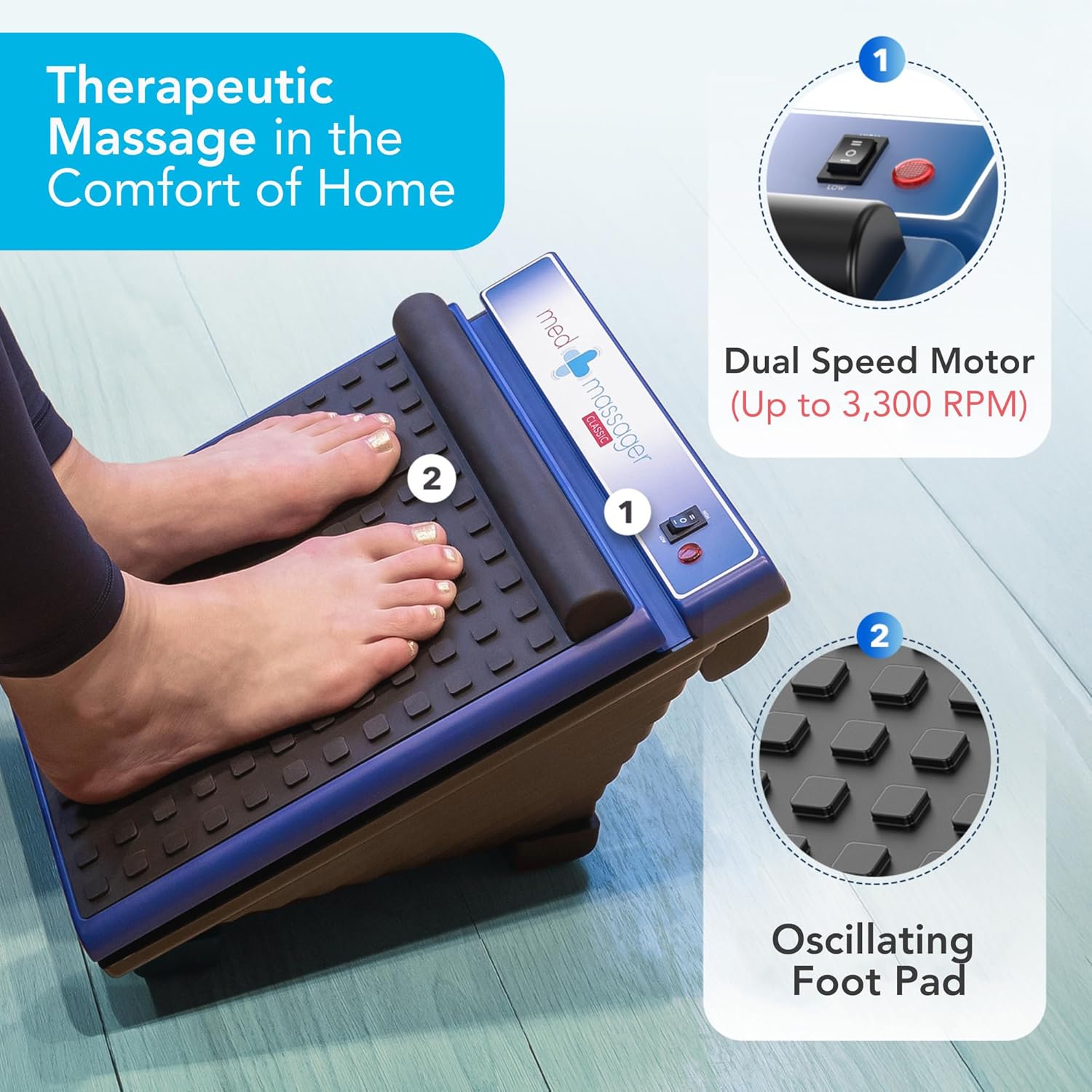
Figure 2: Device with feet on pad, highlighting control panel and oscillating foot pad.
Operating Instructions
- Positioning: Sit comfortably and place your feet on the textured foot pad of the massager.
- Power On: Press the power button on the control panel or the remote control to turn on the device.
- Adjusting Speed: The MedMassager Classic features dual speed settings, offering up to 3,300 RPM. Use the speed controls on the panel or remote to select your desired intensity.
- Heat Function: Activate the heat function for added comfort and relaxation using the dedicated heat button on the control panel or remote.
- Session Duration: The device typically operates for a set duration (e.g., 15-30 minutes) before automatically shutting off. You can restart the session if desired.
- Versatile Use: The massager can be used in various positions to target different areas:
- Foot Massage: Place both feet on the pad for comprehensive foot relaxation.
- Calf & Leg Support: Position the device to support your calves and legs for targeted massage.
- Arch & Heel Relief: Adjust your foot placement to focus on specific arch and heel pressure points.

Figure 3: Examples of versatile positioning for different massage areas.

Figure 4: User enjoying a foot massage on a couch.
Product Video
Video 1: A brief demonstration of the MedMassager Foot Massager Classic in use, showcasing its vibration and design.
Maintenance
- Cleaning: Disconnect the massager from the power outlet before cleaning. Wipe the surface of the device with a soft, damp cloth. Do not use abrasive cleaners or immerse the unit in water.
- Storage: Store the massager in a cool, dry place away from direct sunlight and out of reach of children. Its compact size (15 x 12 x 9.5 inches) allows for easy storage under a desk or in a closet.
- Portability: The unit weighs approximately 10 lb, making it convenient to move between rooms or transport if needed.
Troubleshooting
- Device Not Turning On: Ensure the power cord is securely plugged into both the device and a working electrical outlet. Check if the power button on the device or remote is pressed correctly.
- No Vibration/Heat: Verify that the specific function (vibration or heat) is activated on the control panel or remote. Adjust intensity levels to ensure they are not set to minimum.
- Unusual Noise: If the device makes unusual noises, discontinue use and contact customer support.
Specifications
| Feature | Detail |
|---|---|
| Product Dimensions | 15 x 12 x 9.5 inches |
| Item Model Number | MMF08 |
| Item Weight | 10 Pounds |
| Power Source | Corded Electric |
| Material | Metal |
| Manufacturer | MedMassager |
Warranty and Support
For warranty information, technical support, or any inquiries regarding your MedMassager Foot Massager Classic, please refer to the official MedMassager website or contact their customer service directly. Keep your purchase receipt for warranty claims.
Related documentsMMF08


Ask a question about this manual
Ask about setup, troubleshooting, compatibility, parts, safety, or missing instructions. Manuals+ will review the question and use this page’s manual context to help answer it.