
Introduction
This user manual provides essential information for the safe and efficient operation, installation, and maintenance of your Haier I-Pro Series 7 Plus HW150-BP14986E Washing Machine. Please read this manual thoroughly before using the appliance and keep it for future reference.
The Haier I-Pro Series 7 Plus washing machine is designed for professional washing results, even with large loads, featuring a 15 kg capacity and a 1400 rpm inverter motor. It incorporates advanced technologies such as the Refresh function for steam treatment, Smart Dual Spray for automatic cleaning, and an Anti-Bacterial Treatment (ABT) for enhanced hygiene.

Figure 1: Front view of the Haier I-Pro Series 7 Plus Washing Machine, highlighting its 15 kg XXL capacity and Class A energy efficiency.
Setup and Installation
Proper installation is crucial for the performance and longevity of your washing machine. Ensure the appliance is placed on a stable, level surface.
Unpacking
Carefully remove all packaging materials. Inspect the machine for any damage incurred during transit. Remove all transport bolts from the rear of the machine before operation. Refer to the diagram below for dimensions to ensure adequate space for installation.

Figure 2: Dimensions of the Haier I-Pro Series 7 Plus Washing Machine (Height: 98 cm, Width: 70 cm, Depth: 63 cm).
Water and Electrical Connections
Connect the water inlet hose to a cold water tap and the drain hose to a suitable drain. Ensure all connections are secure to prevent leaks. Plug the power cord into a grounded electrical outlet. Do not use extension cords or adapters.
Leveling the Machine
Adjust the leveling feet at the bottom of the machine to ensure it is perfectly level. This will minimize vibrations and noise during operation.
Operating Instructions
Follow these steps for optimal washing results.
Loading Laundry
Open the door and load laundry into the drum. Do not overload the machine; ensure there is enough space for clothes to tumble freely. The XXL drum is designed for professional washing, even with larger loads.
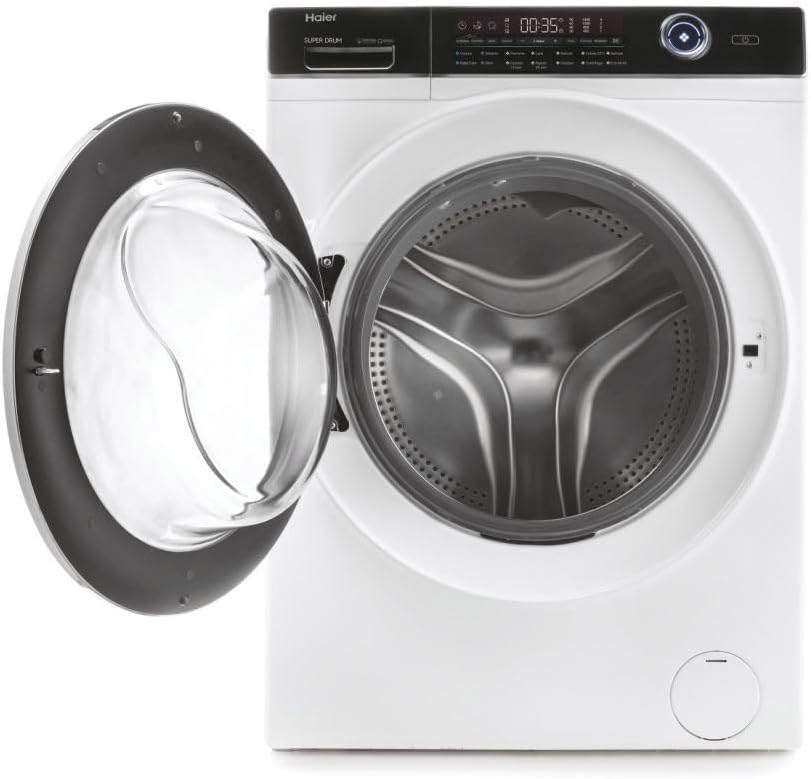
Figure 3: Side view of the washing machine with the door open, revealing the spacious drum.
Adding Detergent
Add the appropriate amount of detergent and fabric softener to the dispenser drawer. Consult your detergent packaging for recommended dosages.
Selecting a Program
Turn the program selector dial or press the corresponding buttons on the control panel to choose your desired wash program. The machine offers various cycles, including a special Night Cycle designed to reduce noise levels for evening use.

Figure 4: User interacting with the control panel to select a wash program.
Special Functions
- Refresh: Utilizes micro-steam to refresh and disinfect clothes, removing odors and reducing wrinkles.
- Smart Dual Spray: An automatic cleaning system that activates at the end of the cycle to ensure hygiene of the porthole and seals, extending the machine's lifespan.
- Pillow Drum: The unique design of the drum ensures gentle care for even delicate fabrics.
Starting the Wash
Press the Start/Pause button to begin the selected wash program. The machine will automatically adjust water levels and cycle times based on the load and program.
Maintenance and Care
Regular maintenance ensures the longevity and optimal performance of your washing machine.
Cleaning the Machine
The Smart Dual Spray feature helps maintain hygiene by cleaning the porthole and seals automatically. Additionally, the Anti-Bacterial Treatment (ABT) on critical components removes 99.9% of bacteria, ensuring a hygienic washing environment.
Periodically wipe the exterior of the machine with a soft, damp cloth. Clean the detergent dispenser drawer regularly to prevent residue buildup.
Filter Cleaning
Locate and clean the drain pump filter periodically to remove lint and small objects that may have accumulated. Refer to the specific instructions in your full product manual for detailed steps on accessing and cleaning the filter.
Troubleshooting
Before contacting customer service, try these common troubleshooting steps.
- Machine not starting: Ensure the power cord is securely plugged in, the door is fully closed, and the water supply is turned on. Check if a program has been selected and the Start button pressed.
- Excessive vibration/noise: Verify that the machine is level and that all transport bolts have been removed. Ensure the load is balanced inside the drum.
- Water not draining: Check if the drain hose is kinked or blocked. Clean the drain pump filter.
- Poor washing results: Ensure you are using the correct amount and type of detergent. Do not overload the machine. Select the appropriate wash program for the fabric type and soil level.
For more complex issues or error codes displayed on the control panel, consult the comprehensive troubleshooting guide in the full product manual or contact Haier customer support.
Specifications
Key technical specifications for the Haier I-Pro Series 7 Plus HW150-BP14986E Washing Machine:
| Feature | Specification |
|---|---|
| Brand | Haier |
| Model Number | HW150-BP14986E (31020156) |
| Capacity | 15 Kilograms |
| Dimensions (HxWxD) | 98 x 70 x 63 cm |
| Weight | Approx. 1.11 g (Note: This weight seems incorrect based on typical washing machine weights, likely a typo in source data. Actual weight would be in kg.) |
| Energy Efficiency Class | A |
| Access Location | Front Loader |
| Color | White |
| Special Features | 15 kg large capacity, Inverter Motor, Refresh Cycle, I-Time Management, Six different stain repellent options |
| First Available Date | July 5, 2024 |
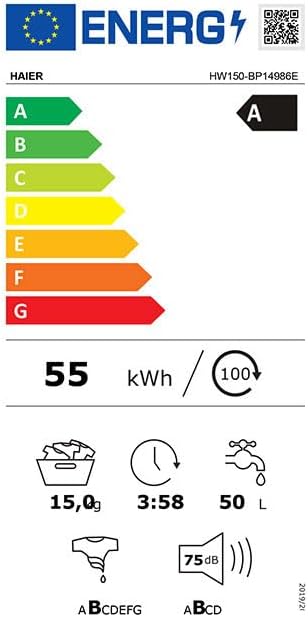
Figure 5: Energy Efficiency Label for the Haier HW150-BP14986E Washing Machine.
Warranty and Support
For detailed warranty information, please refer to the warranty card included with your product or visit the official Haier website. Warranty terms and conditions may vary by region.
Should you require technical assistance, spare parts, or have questions not covered in this manual, please contact Haier customer support. Contact details can typically be found on the manufacturer's website or in the documentation provided with your appliance.
For online resources and frequently asked questions, please visit the official Haier support portal.