
1. Introduction
Thank you for choosing the IRONMAX 2630GPH Bio Pressure Pond Filter. This filter is designed to maintain clear and healthy water in your pond by effectively removing impurities and reducing water pollution. It features a powerful filtration system with built-in filter sponges and a 13W UV lamp, suitable for decorative ponds up to 2600 gallons and fish ponds up to 1300 gallons. This manual provides essential information for the safe and efficient operation and maintenance of your pond filter.
2. Safety Information
Please read all safety instructions carefully before installation and operation. Failure to follow these instructions may result in electric shock, fire, or serious injury.
- Always disconnect the power supply before performing any maintenance or cleaning.
- Ensure the power cord and plug are in good condition and not damaged.
- Do not operate the filter if any part is damaged. Contact customer support for replacement parts.
- Keep children and pets away from the filter during operation and maintenance.
- Install the filter on a stable, level surface to prevent tipping.
- Ensure all electrical connections are waterproof and protected from moisture.
- The UV lamp emits ultraviolet radiation. Do not look directly at the UV lamp when it is on, as it can cause eye damage.
3. Product Overview
The IRONMAX Bio Pressure Pond Filter combines mechanical and biological filtration with a UV clarifier to ensure optimal water quality. Its robust ABS construction ensures durability for outdoor use.
Key Features:
- Powerful Filtration System: Built-in filter sponges and a 13W UV lamp effectively filter sand, impurities, and debris, reducing water pollution.
- High Flow Rate: Maximum flow-through of 10,000 L/H (2630 GPH).
- Durable Construction: Made of ABS material for excellent insulation, heat resistance, and long-term outdoor durability.
- Easy Operation & Cleaning: Features a backflush function for cleaning internal sponges without opening the filter. Includes a turbidimeter to indicate cleaning necessity.
- Versatile Adapters: Comes with four inlet and outlet adapters (3/4'', 1'', 1¼'', 1½'') and a transparent adapter for water flow observation.
- Replaceable Components: Filter sponges and UV lamp tube are replaceable for extended product life.

Figure 1: Integrated Filtration System with UV Lamp and Sponge Cleaning Indicator.
Video 1: Introduction to the Bio Pressure Pond Filter, demonstrating its components and basic functionality.
4. Setup and Installation
Follow these steps to properly set up your IRONMAX pond filter.
4.1 Unpacking and Component Check
- Carefully remove all components from the packaging.
- Verify that all parts listed in the product specifications are present and undamaged.
4.2 Connecting Inlet and Outlet Pipes
- Identify the 'Water inlet', 'Clean water outlet', and 'Sewage exit' ports on the filter head.
- Select the appropriate hose adapters (3/4'', 1'', 1¼'', or 1½'') for your pond pump and return lines.
- Attach the chosen adapters to the respective ports. Ensure a tight, leak-free connection.
- Connect your pond pump's hose to the 'Water inlet' port.
- Connect the clean water return hose to the 'Clean water outlet' port, directing filtered water back to your pond.
- Connect a hose to the 'Sewage exit' port for draining dirty water during backflush.
- Optionally, install the transparent adapter on the clean water outlet to observe water flow.
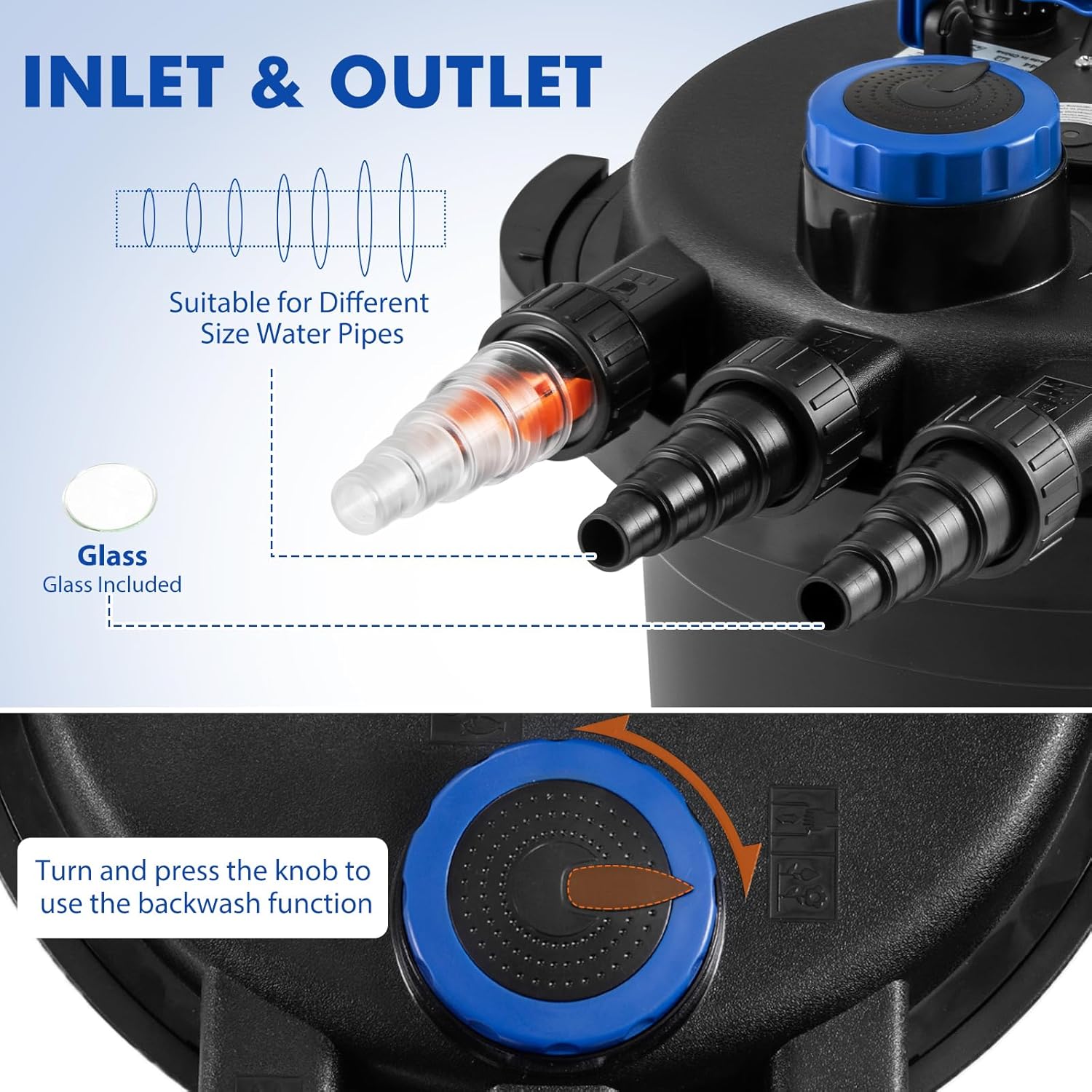
Figure 2: Inlet and Outlet Connections with various adapter sizes.
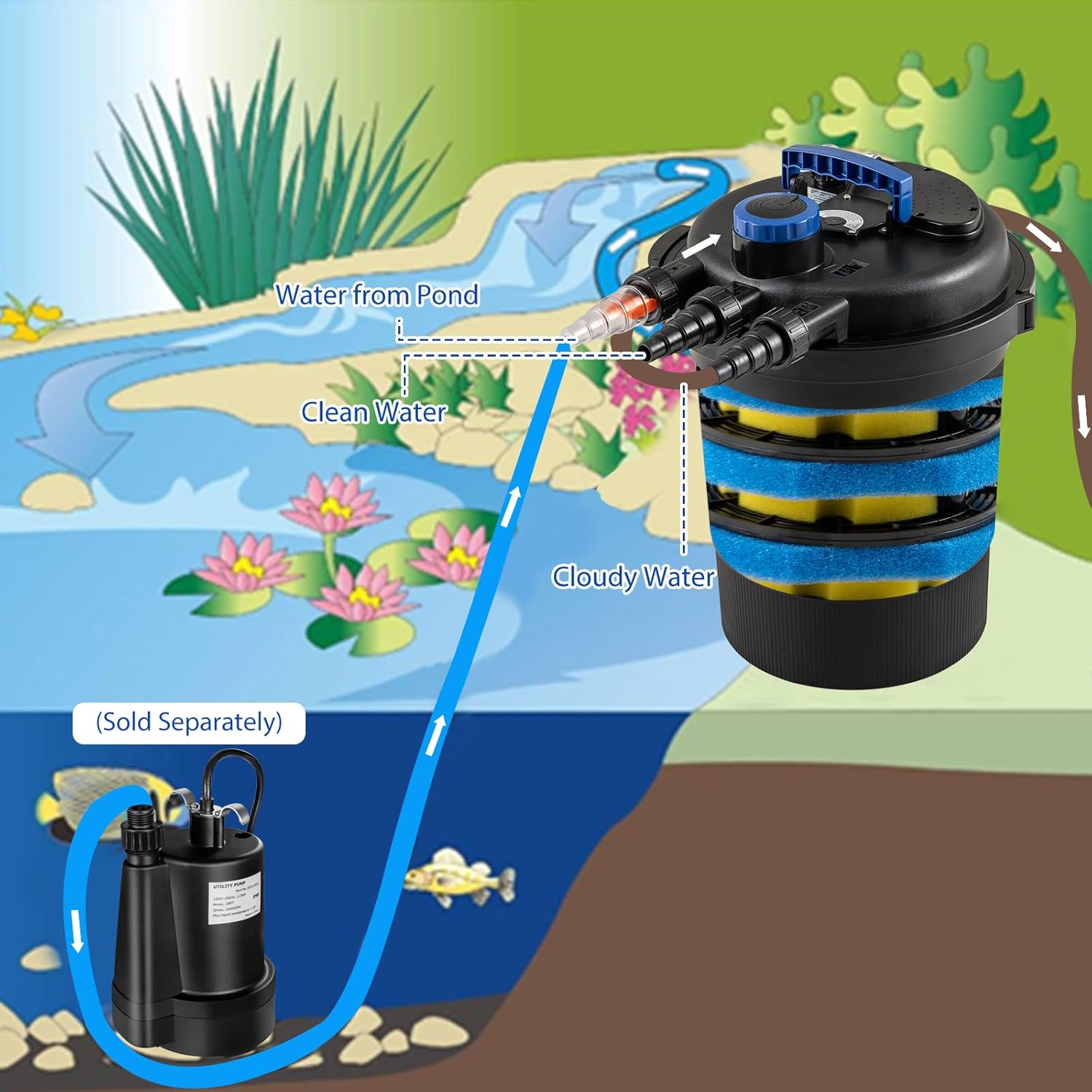
Figure 3: Water Flow Diagram for the Pond Filter System.
4.3 Filter Assembly
The filter comes pre-assembled with sponges and UV lamp. Ensure the lid is securely clamped after any internal access.

Figure 4: Visual Guide for Filter Assembly and Sponge Placement.
5. Operating Instructions
Once installed, the filter is ready for operation. Ensure your pond pump is connected and powered on.
5.1 Initial Start-up
- Ensure all connections are secure and the filter lid is properly clamped.
- Plug in the filter's power cord. The UV lamp will activate.
- Turn on your pond pump. Water will begin to flow through the filter.
- Check for any leaks immediately after starting.
5.2 Filter Mode and Cleaning Indicator
The filter has a function switch to toggle between 'filter' and 'clean' modes. In normal operation, the filter should be in 'filter' mode. The orange turbidimeter on top of the filter indicates when cleaning is needed. When the orange part floats up, it signifies that the sponges are dirty and require cleaning.

Figure 5: Function Switch and Cleaning Indicator.
6. Maintenance
Regular maintenance ensures the longevity and efficiency of your pond filter.
6.1 Backflush Cleaning
The backflush function allows for easy cleaning of the internal sponges without disassembling the filter.
- Ensure the 'Sewage exit' hose is directed to a suitable drainage area.
- Turn the function switch knob to the 'clean' mode.
- Turn the crank handle on the filter head to agitate and clean the sponges.
- Press the switch to release the dirty water through the 'Sewage exit'.
- Continue cranking and flushing until the water running out is clear.
- Return the function switch knob to 'filter' mode after cleaning.
Figure 6: Backflush Cleaning Process.
6.2 Sponge and UV Lamp Replacement
The filter sponges and UV lamp are replaceable components designed for a longer service life. Refer to Figure 4 for visual guidance on accessing internal components.
- Sponge Replacement: When sponges are worn or heavily soiled beyond effective cleaning, they can be removed and replaced. Unclamp the filter lid, lift the internal assembly, and carefully remove the old sponges. Install new blue and yellow sponges of different sizes and densities as shown in the assembly guide.
- UV Lamp Replacement: The UV lamp has an approximate service life of 8000 hours. When the UV lamp observation window no longer shows light, it's time for replacement. Disconnect power, unclamp the filter lid, and carefully replace the 13W UV lamp tube.
7. Troubleshooting
This section addresses common issues you might encounter with your pond filter.
| Problem | Possible Cause | Solution |
|---|---|---|
| Water remains cloudy | Dirty filter sponges; UV lamp not working; Incorrect pond size for filter. | Perform backflush cleaning. Check and replace UV lamp if necessary. Ensure filter capacity matches pond volume. |
| Reduced water flow | Clogged filter sponges; Blocked inlet/outlet pipes; Weak pond pump. | Perform backflush cleaning. Check and clear any blockages in pipes. Inspect pond pump for proper function. |
| UV lamp not illuminating | Lamp burned out; Power issue. | Check power connection. Replace UV lamp. |
| Water leakage | Loose connections; Damaged O-rings/seals; Improperly secured lid. | Tighten all pipe connections. Inspect and replace O-rings/seals if damaged. Ensure filter lid is clamped correctly. |
8. Specifications
Detailed technical specifications for the IRONMAX 2630GPH Bio Pressure Pond Filter.
- Product Dimensions: 16 x 15 x 20 inches
- Item Weight: 14 pounds
- Manufacturer: IRONMAX
- Item Model Number: 21559HY
- Max Flow-through: 10,000 L/H (2630 GPH)
- UV Lamp Power: 13W
- Suitable for Decorative Ponds: Up to 2600 Gallons
- Suitable for Fish Ponds: Up to 1300 Gallons

Figure 7: Pond Filter Specifications and Dimensions.
9. Warranty and Support
For warranty information, technical support, or to purchase replacement parts, please refer to the official IRONMAX website or contact their customer service directly. Keep your purchase receipt for warranty claims.