
NEHOO WLC-02 Remote
NEHOO Remote Control for WLC-02 Cold Therapy System User Manual
Model: WLC-02 Remote
1. Introduction
This manual provides instructions for the proper use and maintenance of your NEHOO Remote Control, designed specifically for the NEHOO Cold Therapy System WLC-02. Please read this manual thoroughly before operating the remote control to ensure safe and effective use of your cold therapy system.
2. Product Overview
The NEHOO Remote Control allows convenient operation of your WLC-02 Cold Therapy System from a distance. It features 15 buttons for controlling various functions of the therapy unit, including power, flow rate, run time, rest time, and lighting.
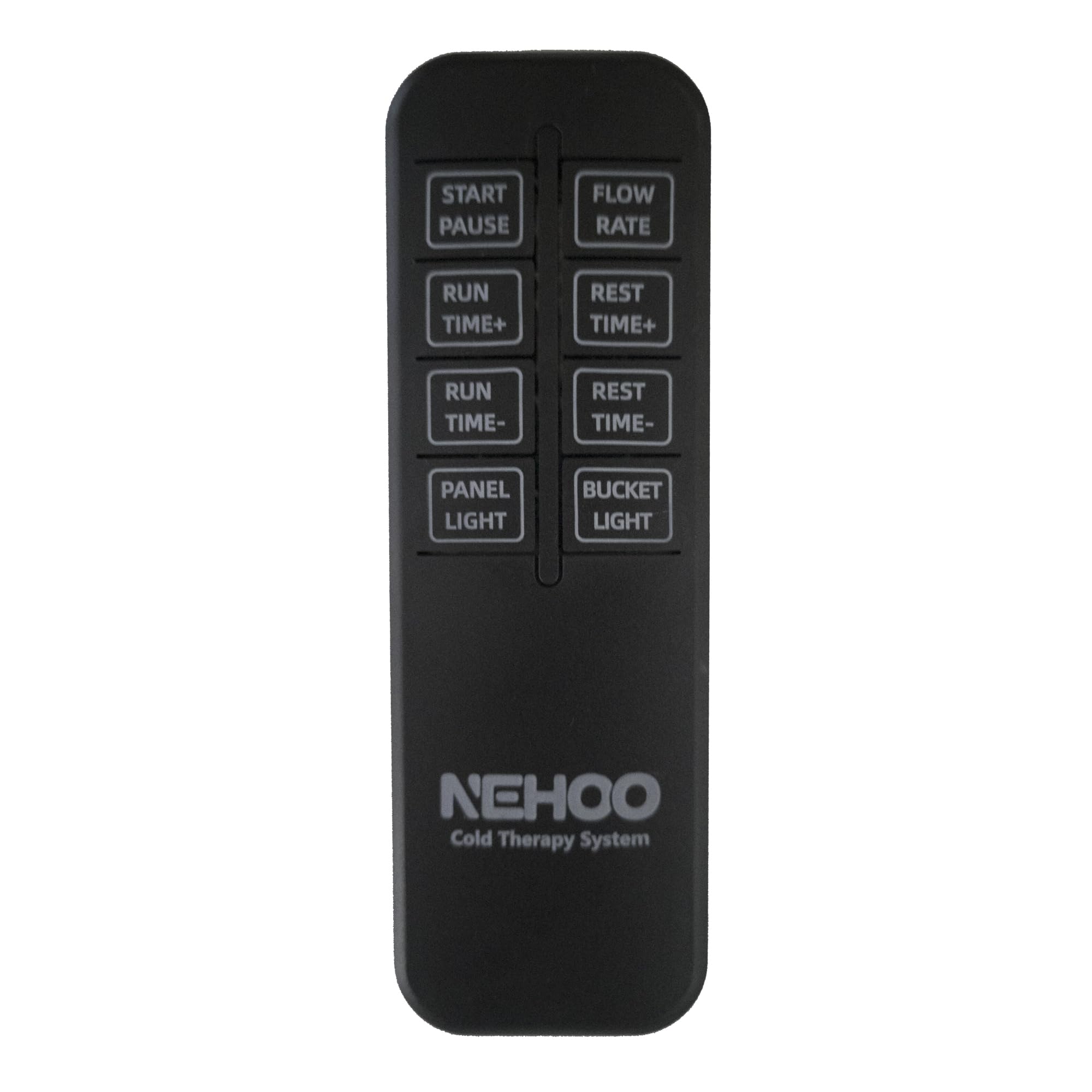
Figure 1: NEHOO Cold Therapy System WLC-02 with its remote control. The image displays the main unit (a grey and clear bucket with a handle, containing ice and water), a grey hose connected to a therapy pad, and the black remote control with its button layout.
Remote Control Layout
The remote control features the following buttons:
- START/PAUSE: Initiates or pauses the therapy cycle.
- FLOW RATE: Adjusts the water flow intensity.
- RUN TIME+: Increases the duration of the active therapy period.
- REST TIME+: Increases the duration of the rest period between therapy cycles.
- RUN TIME-: Decreases the duration of the active therapy period.
- REST TIME-: Decreases the duration of the rest period between therapy cycles.
- PANEL LIGHT: Controls the illumination of the main unit's control panel.
- BUCKET LIGHT: Controls the internal illumination of the water bucket.
3. Setup
3.1 Battery Installation
The remote control requires two AAA batteries (not included). To install:
- Locate the battery compartment cover on the back of the remote control.
- Slide the cover downwards to open.
- Insert two AAA batteries, ensuring the correct polarity (+ and -) as indicated inside the compartment.
- Slide the cover back into place until it clicks securely.
3.2 Initial Use
Once batteries are installed, the remote control is ready for use. Ensure there is a clear line of sight between the remote control and the NEHOO Cold Therapy System WLC-02 unit for optimal infrared signal transmission.
4. Operating Instructions
To operate the NEHOO Cold Therapy System WLC-02 using the remote control, point the remote directly at the main unit's sensor.
- Starting/Pausing Therapy: Press the START/PAUSE button to begin a therapy cycle. Press it again to pause the cycle.
- Adjusting Flow Rate: Press the FLOW RATE button to cycle through available flow intensity levels.
- Setting Run Time: Use the RUN TIME+ and RUN TIME- buttons to increase or decrease the duration of the active therapy period.
- Setting Rest Time: Use the REST TIME+ and REST TIME- buttons to increase or decrease the duration of the rest period between therapy cycles.
- Controlling Panel Light: Press the PANEL LIGHT button to turn the main unit's control panel illumination on or off.
- Controlling Bucket Light: Press the BUCKET LIGHT button to turn the internal water bucket illumination on or off.
Refer to the main NEHOO Cold Therapy System WLC-02 manual for detailed information on therapy settings and system operation.
5. Maintenance
5.1 Battery Replacement
Replace batteries when the remote control's range decreases or it becomes unresponsive. Follow the battery installation steps in Section 3.1. Always use new AAA batteries and dispose of old batteries responsibly according to local regulations.
5.2 Cleaning
Wipe the remote control with a soft, dry cloth. Do not use abrasive cleaners or immerse the remote in water. Keep the remote control dry and away from direct sunlight or extreme temperatures.
6. Troubleshooting
| Problem | Possible Cause | Solution |
|---|---|---|
| Remote control is unresponsive. | Dead or incorrectly installed batteries. | Replace batteries, ensuring correct polarity. |
| Remote control has limited range. | Weak batteries; Obstruction between remote and unit. | Replace batteries. Ensure a clear line of sight to the WLC-02 unit. |
| Specific button not working. | Button malfunction; Remote damage. | Ensure remote is clean. If issue persists, contact customer support. |
7. Specifications
- Model: WLC-02 Remote
- Compatible Device: NEHOO Cold Therapy System WLC-02
- Connectivity Technology: Infrared
- Button Quantity: 15
- Controller Type: Button Control
- Power Source: 2 x AAA Batteries (not included)
- Color: Black
- Item Weight: Approximately 2 Ounces (56 grams)
8. Warranty and Support
For warranty information, technical support, or service inquiries regarding your NEHOO Remote Control for WLC-02 Cold Therapy System, please refer to the documentation included with your main NEHOO Cold Therapy System WLC-02 unit or visit the official NEHOO website. You may also contact NEHOO customer service directly for assistance.
NEHOO Customer Service: Please refer to your product packaging or the main system manual for contact details.
Related Documents - WLC-02 Remote
 |
NEHOO WLC-02 Cold Therapy System User Manual Comprehensive user manual for the NEHOO WLC-02 Cold Therapy System, detailing intended use, safety precautions, operating instructions, maintenance, troubleshooting, product specifications, and warranty information. |
 |
NEHOO WLC-01 Cold Therapy System User Manual Comprehensive user manual for the NEHOO WLC-01 Cold Therapy System, detailing intended use, safety precautions, operating instructions, maintenance, troubleshooting, and product specifications. |
 |
Tilta Nucleus-M II Wireless Lens Control System Quick Start Guide This guide provides essential information for setting up and using the Tilta Nucleus-M II Wireless Lens Control System. It covers installation, connection, maintenance, safety precautions, troubleshooting, and a detailed overview of the system's components and functions, including the FIZ Hand Unit, Motor, and Hand Grips. The document also lists the packing contents for various kits. |
 |
Continental WLC Wireless Power Charger User Manual WLC-CEM02 User manual for the Continental WLC Wireless Power Charger (model WLC-CEM02), detailing system description, technical parameters, vehicle installation, and compliance statements. |
Ask a question about this manual
Ask about setup, troubleshooting, compatibility, parts, safety, or missing instructions. Manuals+ will review the question and use this page’s manual context to help answer it.