
V2-P43ES
Avarro V2-P43ES Pro E Series 43" 4K Ultra HD LED Commercial Display User Manual
Model: V2-P43ES | Brand: Generic
1. Introduction
This user manual provides comprehensive instructions for the setup, operation, and maintenance of your Avarro V2-P43ES Pro E Series 43" 4K Ultra HD LED Commercial Display. Please read this manual thoroughly before using the product to ensure proper functionality and safety.
The Avarro V2-P43ES is designed for commercial environments, offering a vivid 4K Ultra HD resolution and reliable 16/7 operation. Its slim design and powerful picture quality make it ideal for various professional applications.
2. Package Contents
Before proceeding with installation, verify that all items listed below are present in your package:
- Avarro V2-P43ES Commercial Display
- Display Stand
- Power Cord
- Remote Control with Batteries
- Quick Start Guide
- User Manual (this document)
3. Setup
3.1 Unpacking and Placement
Carefully remove the display from its packaging. It is recommended to have two people for handling the display due to its size and weight. Place the display on a stable, flat surface or prepare for VESA wall mounting.

Figure 3.1: Front view of the Avarro V2-P43ES Commercial Display, showcasing its slim bezel and large screen.

Figure 3.2: Side profile of the Avarro V2-P43ES Commercial Display, highlighting its slim design and the included stand.
3.2 Connecting Cables
Connect the power cord to the display and then to a power outlet. Connect your input devices (e.g., computer, media player) to the appropriate ports on the display. The display features multiple input options including HDMI, DisplayPort, and USB.
- HDMI Inputs: 2
- DisplayPorts: 2
- USB Ports: 2 (USB 2.0: 1, USB 3.0: 1)

Figure 3.3: Rear view of the Avarro V2-P43ES Commercial Display, detailing the various input and output ports available for connectivity.
For network connectivity, the display supports both Wi-Fi and Bluetooth.
3.3 Initial Power On
Once all connections are secure, press the power button on the display or the remote control to turn on the unit. Follow any on-screen prompts for initial setup, such as language selection and network configuration.
4. Operating Instructions
4.1 Basic Operation
Use the remote control to navigate the display's menu system. You can select input sources, adjust picture settings (brightness, contrast, color), and configure audio settings.
The display is designed for 16/7 operation, making it suitable for extended use in commercial environments.
4.2 Picture Settings
To optimize your viewing experience, adjust the following picture settings:
- Brightness: Adjusts the overall luminance of the screen. The display has a brightness of 350 Nits.
- Contrast: Controls the difference between the lightest and darkest areas of the image.
- Color: Adjusts the saturation of colors.
- Resolution: The native resolution is 3840 x 2160 (4K UHD) with a 16:9 aspect ratio. Ensure your input source is set to this resolution for optimal clarity.

Figure 4.1: The Avarro V2-P43ES display in use during a business presentation, demonstrating its clarity for data visualization.

Figure 4.2: The Avarro V2-P43ES display functioning as a digital menu board in a commercial food service environment.
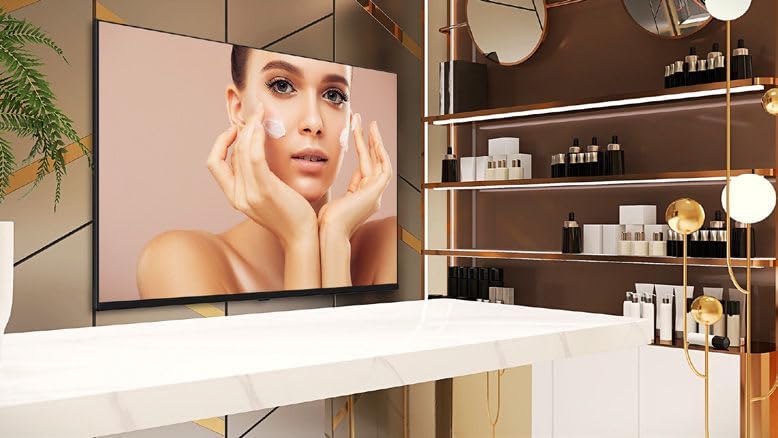
Figure 4.3: The Avarro V2-P43ES display showcasing promotional content within a beauty salon setting.

Figure 4.4: Multiple Avarro V2-P43ES displays showing live sports content in a bar environment, demonstrating multi-screen capability.
5. Maintenance
5.1 Cleaning the Display
To clean the screen, gently wipe it with a soft, lint-free cloth. For stubborn marks, dampen the cloth slightly with water or a non-abrasive screen cleaner. Avoid using harsh chemicals or abrasive materials, as they can damage the screen surface.
5.2 General Care
Ensure adequate ventilation around the display to prevent overheating. Do not block ventilation openings. Keep the display away from direct sunlight, heat sources, and excessive moisture.
6. Troubleshooting
6.1 No Power
- Check if the power cord is securely connected to both the display and the power outlet.
- Verify that the power outlet is functional by plugging in another device.
- Ensure the power button on the display or remote control has been pressed.
6.2 No Image or Poor Picture Quality
- Confirm that the correct input source is selected on the display.
- Check all video cables (HDMI, DisplayPort) for secure connections.
- Ensure the resolution of your input device matches the display's native resolution (3840x2160).
- Adjust picture settings such as brightness, contrast, and color.
6.3 Remote Control Not Working
- Replace the batteries in the remote control.
- Ensure there are no obstructions between the remote control and the display's IR receiver.
7. Specifications
| Feature | Detail |
|---|---|
| Model Number | V2-P43ES |
| Screen Size | 43 Inches (42.5" Diagonal) |
| Display Resolution | 3840 x 2160 (4K UHD) |
| Aspect Ratio | 16:9 |
| Brightness | 350 Nits |
| Operation Hours | 16/7 |
| Backlight Technology | Slim DLED |
| HDMI Inputs | 2 |
| DisplayPorts | 2 |
| USB Ports | Total 2 (1x USB 3.0, 1x USB 2.0) |
| Bluetooth | Yes |
| RAM | 2GB DDR4 |
| SSD Capacity | 16 GB eMMC |
| Processor Speed | 1.5 GHz |
| VESA Mount Standard | 100 x 100 |
| Input Voltage | 100-240 VAC |
| Product Dimensions (HxWxD) | 22 x 37.9 x 2.6 inches |
| Item Weight | 15.4 pounds |
| Color | Black |
8. Warranty and Support
For warranty information and technical support, please refer to the warranty card included with your product or visit the manufacturer's official website. Keep your purchase receipt as proof of purchase for warranty claims.
For additional assistance, you may contact the seller, Sale Stores ✅, through the Amazon platform.