
1. Introduction
This manual provides detailed instructions for the installation, operation, and maintenance of your GOJOHO 9.7-inch Tesla Style Car Stereo. This unit is designed for Toyota Sienna models manufactured between 2004 and 2010. It offers advanced features including GPS navigation, Apple CarPlay, Android Auto, and a high-resolution touchscreen display.
Please read this manual thoroughly before installation and use to ensure proper functionality and to maximize your experience with the product. Keep this manual for future reference.
2. Setup and Installation
The GOJOHO car stereo is designed for a plug-and-play installation in compatible Toyota Sienna models (2004-2010). It supports factory JBL amplifiers and original factory cameras. The unit is compatible with the vehicle's original reversing system; connect directly to the reversing line for installation.
2.1 Package Contents
Before beginning installation, verify that all components are present:
- 1 × ISO Wiring Harness
- 1 × RCA Cable
- 1 × Camera Cable
- 1 × Radio Cable Adapter
- 2 × USB Cable
- 1 × Radio Antenna Cable
- 1 × CANbus Cable
- 1 × GPS Antenna
- 1 × CANbus Box
- 1 × User Manual
2.2 Installation Overview
The included harness is pre-wired for direct connection. This unit supports existing steering wheel controls, factory amplifiers, factory cameras, factory USB ports, radar systems, door information display, and A/C information display.

Image: Comparison of the dashboard before and after installing the GOJOHO car stereo in a Toyota Sienna. The new unit features a large vertical touchscreen display.
3. Operating Instructions
This section details the primary functions and features of your GOJOHO car stereo.
3.1 Display and User Interface
The unit features a 9.7-inch IPS multi-touch screen with a 1280x720 resolution, providing a clear visual experience. The unique UI design simplifies operation and enhances reaction speed.
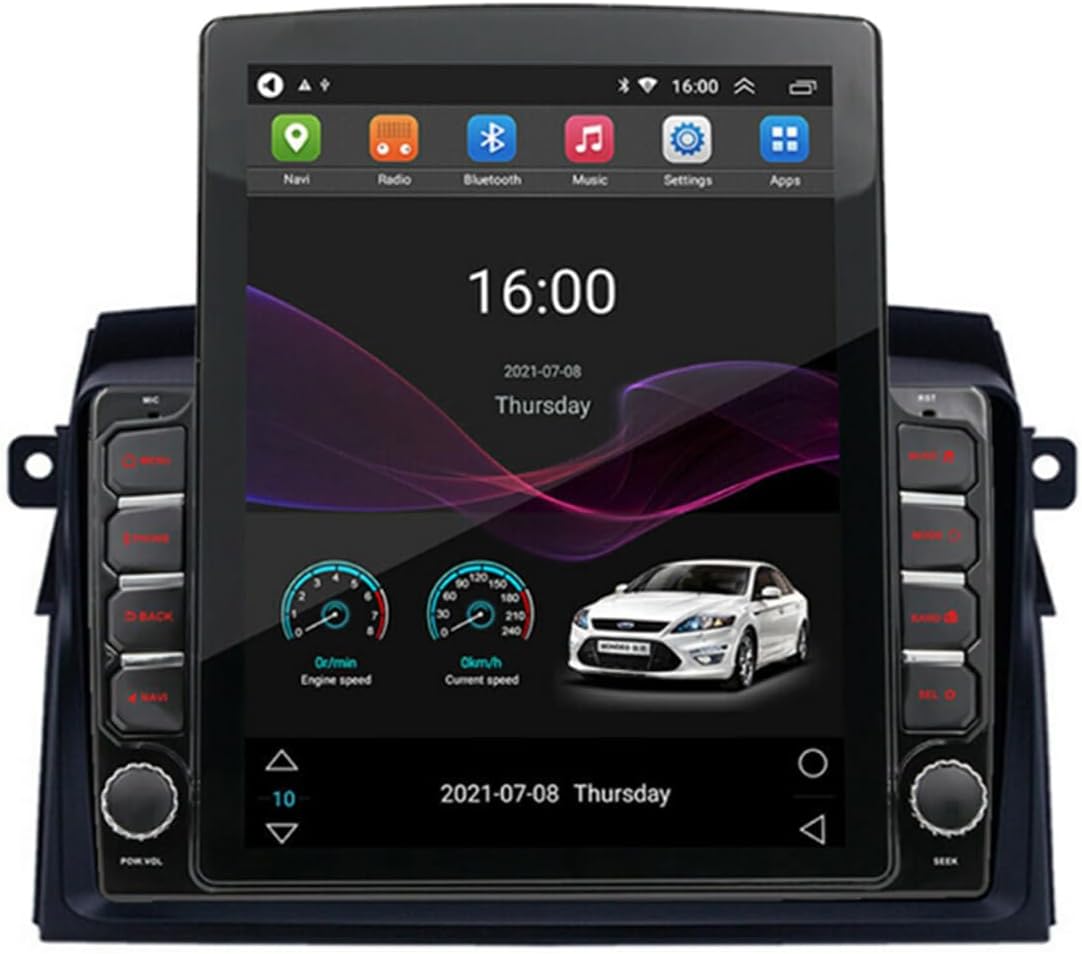
Image: The main screen interface of the GOJOHO car stereo, displaying navigation, radio, Bluetooth, music, settings, and app icons. It also shows a clock, date, and vehicle speed gauges.
3.2 Apple CarPlay and Android Auto
The stereo includes built-in Apple CarPlay and Android Auto functionality via the TLink application. This allows for seamless integration with your smartphone, providing access to navigation, music, messages, and calls directly from the car's display. Both wireless and wired connections are supported, with wired connection recommended for optimal stability.
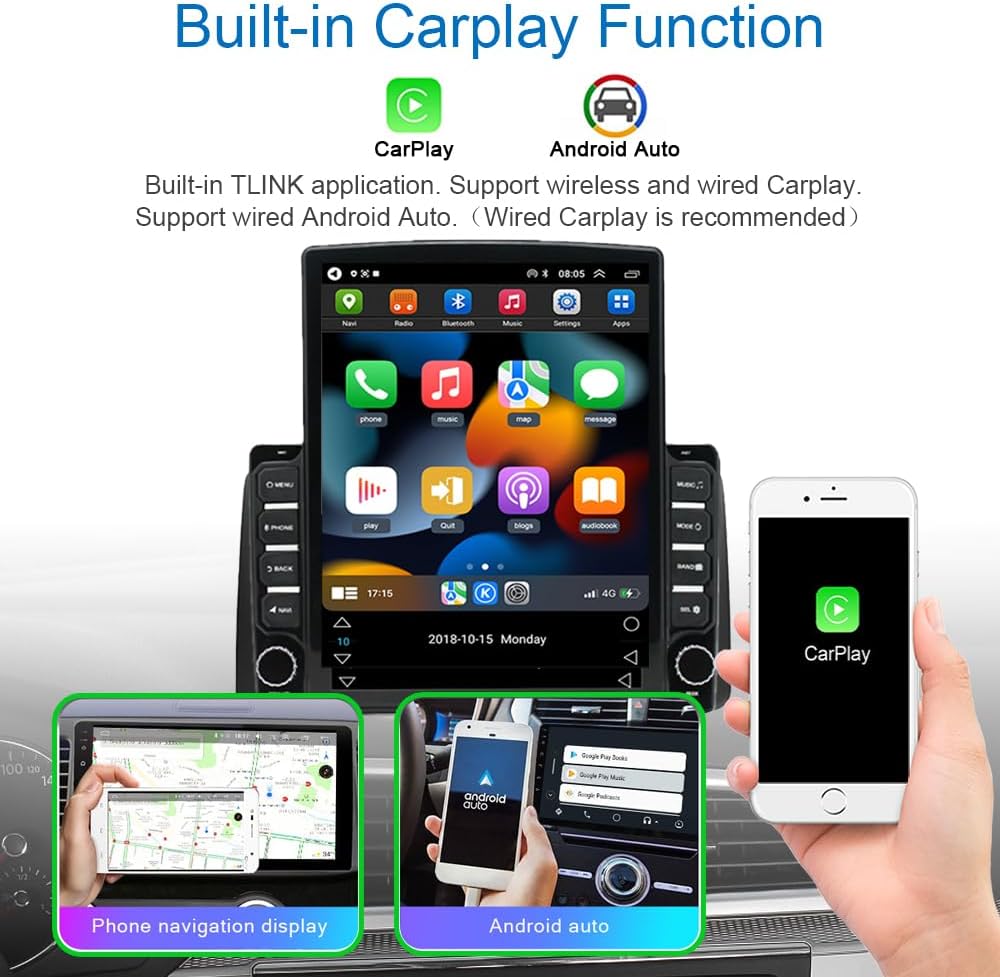
Image: The car stereo screen displaying the CarPlay interface with various app icons. Below, smaller images show a phone navigation display and the Android Auto interface on a smartphone.
3.3 GPS Navigation
The unit features a built-in GPS function. It comes with an offline map pre-installed to ensure navigation even without an internet connection. Online navigation applications such as Google Maps and Waze are also supported when connected to Wi-Fi.
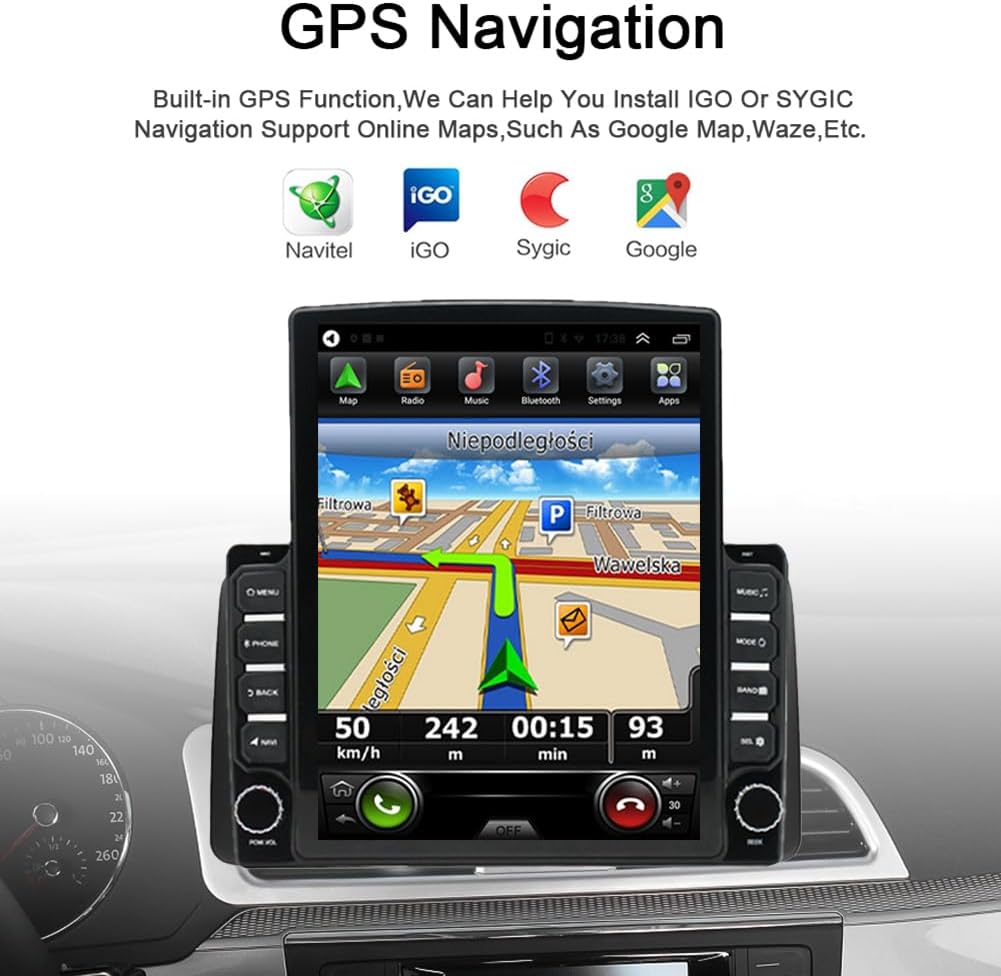
Image: The car stereo screen showing a detailed GPS navigation map with route information, current speed, and estimated time of arrival. Icons for various navigation apps like iGO, Navitel, Sygic, and Google are displayed above.
3.4 Steering Wheel Controls
The system supports the original car's steering wheel controls, allowing you to manage audio playback, calls, and other functions without taking your hands off the wheel. No additional remote steering wheel controller is required.

Image: The car stereo screen displaying the 'Steering Learn' interface, where users can configure the functions of their vehicle's steering wheel buttons. Icons for common controls like 'Listen', 'Hang up', 'Last', 'Next', 'Vol-', and 'Vol+' are shown.
3.5 Bluetooth Connectivity
Utilize Bluetooth for hands-free phone calls and audio streaming. The system supports phonebook access for convenient dialing.
3.6 FM RDS Radio
The built-in FM RDS radio allows you to listen to your favorite stations. You can save preferred radio stations for quick access. DAB+ functionality is supported but requires an additional module.

Image: The car stereo screen showing the FM radio interface, tuned to 99.90 MHz. Options for 'News', 'Affairs', 'Info', 'Sport', and 'Education' are visible. A USB dongle for DAB+ functionality is shown in an inset.
3.7 Audio Features (DSP & EQ)
Experience enhanced audio quality with the built-in Digital Sound Processor (DSP) and 15-band equalizer. Adjust sound settings to your preference with various preset styles (Flat, Rock, Pop, Jazz, Classic) or create custom profiles. The unit includes a built-in 4*50W amplifier and 6-channel audio output converters, supporting subwoofer output.

Image: The car stereo screen displaying the built-in equalizer interface, showing a 15-band frequency spectrum with adjustable sliders. Preset options like 'Metal', 'Custom', 'Classical', 'Jazz', 'Rock', 'Pop', and 'Default' are available.
3.8 Rear View Camera Support
The system supports RVA AV connector type rear view camera signal input. It automatically switches to the parking image when reverse gear is engaged. A standard definition reversing camera is included in the package. The device also supports HD reversing cameras, though an extra HD reverse camera would be optional.
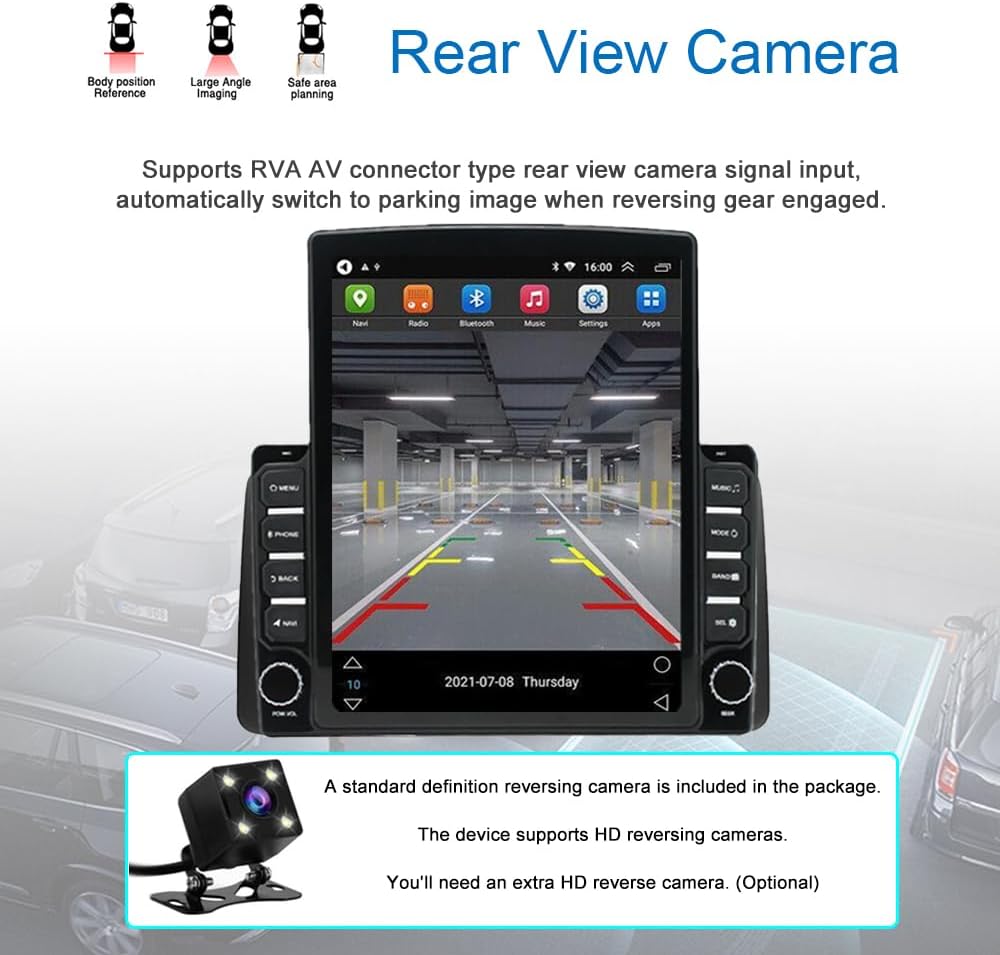
Image: The car stereo screen displaying the view from a rear view camera, showing parking guidelines and the area behind the vehicle. Icons indicating 'Body position Reference', 'Large Angle Imaging', and 'Safe area planning' are shown above.
3.9 Other Functions
- Wi-Fi Hotspot Internet: Connect to Wi-Fi for online services and updates.
- 1080P HD Video Playback: Enjoy high-definition video content.
- Split Screen: Use two applications simultaneously on the display.
- Dual USB Input: Connect USB devices for media playback or charging.
- HDMI Output: Support for car headrest monitors.
4. Maintenance
To ensure the longevity and optimal performance of your car stereo, follow these maintenance guidelines:
- Screen Cleaning: Use a soft, lint-free cloth to gently wipe the touchscreen. For stubborn smudges, slightly dampen the cloth with water or a screen-safe cleaner. Avoid harsh chemicals or abrasive materials.
- Software Updates: Periodically check for software updates to ensure you have the latest features and bug fixes. Updates can typically be found through the system settings or the manufacturer's website.
- Environmental Care: Avoid exposing the unit to extreme temperatures, direct sunlight for prolonged periods, or excessive moisture.
- Connection Checks: Occasionally inspect visible cable connections to ensure they are secure.
5. Troubleshooting
This section addresses common issues you might encounter with your GOJOHO car stereo.
5.1 Common Issues and Solutions
- Unit Does Not Power On:
- Check all power connections to ensure they are securely plugged in.
- Verify the vehicle's fuse for the stereo system is intact.
- No Sound or Poor Audio Quality:
- Ensure speaker wires are correctly connected.
- Check EQ settings; reset to default if necessary.
- If using a factory JBL amplifier, confirm it is properly integrated.
- USB Ports Malfunctioning (Connecting/Disconnecting):
- Inspect USB cable connections for looseness or damage.
- Try different USB devices to rule out device compatibility issues.
- Ensure the system software is up to date.
- Bluetooth Lag or Connectivity Issues:
- Ensure your device is within range and not obstructed.
- Unpair and re-pair the Bluetooth device.
- Restart both the car stereo and your Bluetooth device.
- Backup Camera Not Displaying:
- Verify the camera cable is securely connected to the unit and the camera.
- Ensure the reverse trigger wire is correctly connected to the vehicle's reverse light circuit.
- If using a factory camera, confirm proper integration.
- GPS Signal Loss or Inaccuracy:
- Ensure the GPS antenna is installed in a location with a clear view of the sky.
- Check the GPS antenna connection to the unit.
5.2 System Reset
If the unit becomes unresponsive or exhibits persistent issues, a system reset may resolve the problem. Refer to the device's settings menu for a software reset option, or consult the manufacturer for instructions on a hard reset if needed.
6. Specifications
| Feature | Detail |
|---|---|
| Brand | GOJOHO |
| Model Name | RM (4GB RAM+64GB ROM-XJG variant) |
| Compatible Vehicle Service Type | Toyota Sienna (2004-2010) |
| Display Size | 9.7 Inches |
| Display Resolution | 1280x720 (IPS Multi-Touch) |
| Operating System | Android 13 |
| RAM | 4GB |
| ROM | 64GB |
| Special Features | Bluetooth, DSP, Touchscreen, Apple CarPlay, Android Auto |
| Connectivity Technology | Bluetooth, USB, Wi-Fi |
| Map Type | North America, Worldwide (Offline & Online) |
| Audio Output Mode | Stereo (6-channel output, subwoofer support) |
| Mounting Type | Dashboard Mount |
| Item Weight | 4.24 pounds |
| Package Dimensions | 13.03 x 11.38 x 6.3 inches |
7. Warranty and Support
7.1 Product Warranty
This GOJOHO car stereo comes with a 1-year manufacturer's warranty. Please retain your proof of purchase for warranty claims. The warranty covers defects in materials and workmanship under normal use.
7.2 Customer Support
For technical assistance, troubleshooting, or warranty inquiries, please contact GOJOHO customer support. Refer to the contact information provided with your purchase or visit the official GOJOHO website for support resources.