
GoveeLife H5105, H7143
GoveeLife H5105 Thermometer Hygrometer & H7143 Smart Humidifier User Manual
Models: H5105 (Thermometer Hygrometer), H7143 (Smart Humidifier)
Introduction
This manual provides detailed instructions for the GoveeLife H5105 E-Ink Bluetooth Thermometer Hygrometer and the GoveeLife H7143 Smart Cool & Warm Mist Humidifier. Please read this manual thoroughly before using the devices to ensure proper operation and maintenance. Keep this manual for future reference.

Image: The GoveeLife H5105 E-Ink Bluetooth Thermometer Hygrometer (left) and the GoveeLife H7143 Smart Humidifier (right) shown together.
Product Overview
GoveeLife H5105 E-Ink Bluetooth Thermometer Hygrometer
The H5105 is a compact device designed to monitor temperature and humidity. It features an E-Ink display for clear readability and connects via Bluetooth to the GoveeHome App for data monitoring.
- E-Ink Display: Provides a paper-like reading experience, offering clear and comfortable viewing from wide angles.
- Long Battery Life: Up to 1 year with a replaceable battery (included). Real-time battery display.
- Bluetooth Connectivity: Stable connection to the GoveeHome App for real-time data monitoring within your home range.
- Accuracy: Measures temperature with an accuracy of ±0.54°F and humidity with ±3% RH.

Image: The GoveeLife H5105 E-Ink Bluetooth Thermometer Hygrometer displaying temperature and humidity, alongside a smartphone screen showing the GoveeHome App interface with historical data graphs.

Image: A comparison illustrating the superior nearly 180-degree visual angle, readability in strong light, and farther visual distance of the GoveeLife H5105 E-Ink screen compared to other displays.

Image: The GoveeLife H5105 displaying a comfort indicator (smiley face) for temperature between 64.4-82.4°F and humidity between 30-60% RH, and an uncomfort indicator (frowning face) for values outside this range.

Image: The GoveeLife H5105 placed on a book next to a baby, highlighting its temperature accuracy of ±0.54°F and humidity accuracy of ±3% RH, with readings refreshing immediately upon change.
GoveeLife H7143 Smart Humidifier
The H7143 is a smart humidifier designed for large rooms, offering both cool and warm mist. It integrates with the GoveeHome App and smart assistants for convenient control.
- Large Capacity: 7L water tank for extended runtime, up to 70 hours on the lowest mist mode.
- Smart Control: Remotely control humidity, mist level, set timers, and schedules via the GoveeHome App (2.4G Wi-Fi required).
- Voice Control: Compatible with Amazon Alexa and Google Home for hands-free operation.
- AutoReflect Technology: Can be paired with Govee hygrometers (like H5105) for more accurate ambient humidity data, preventing over-humidification.
- RGB Night Light: Adjustable RGB lighting to create a relaxing atmosphere.

Image: A woman meditating in a room with the GoveeLife H7143 Smart Humidifier, demonstrating hands-free control via voice commands like "Alexa, set smart humidifier to Auto." The image also shows logos for Google Assistant, Alexa, Govee Home App, and Siri.

Image: The GoveeLife H7143 Smart Humidifier operating in a room with plants, illustrating the AutoReflect technology where it pairs with a Govee hygrometer (shown in the background) for stable and accurate humidity control.

Image: The GoveeLife H7143 Smart Humidifier on a bedside table, showcasing its adjustable RGB night light feature with various color modes like Leisurely, Forest, Wetland, Asleep, and Ocean.
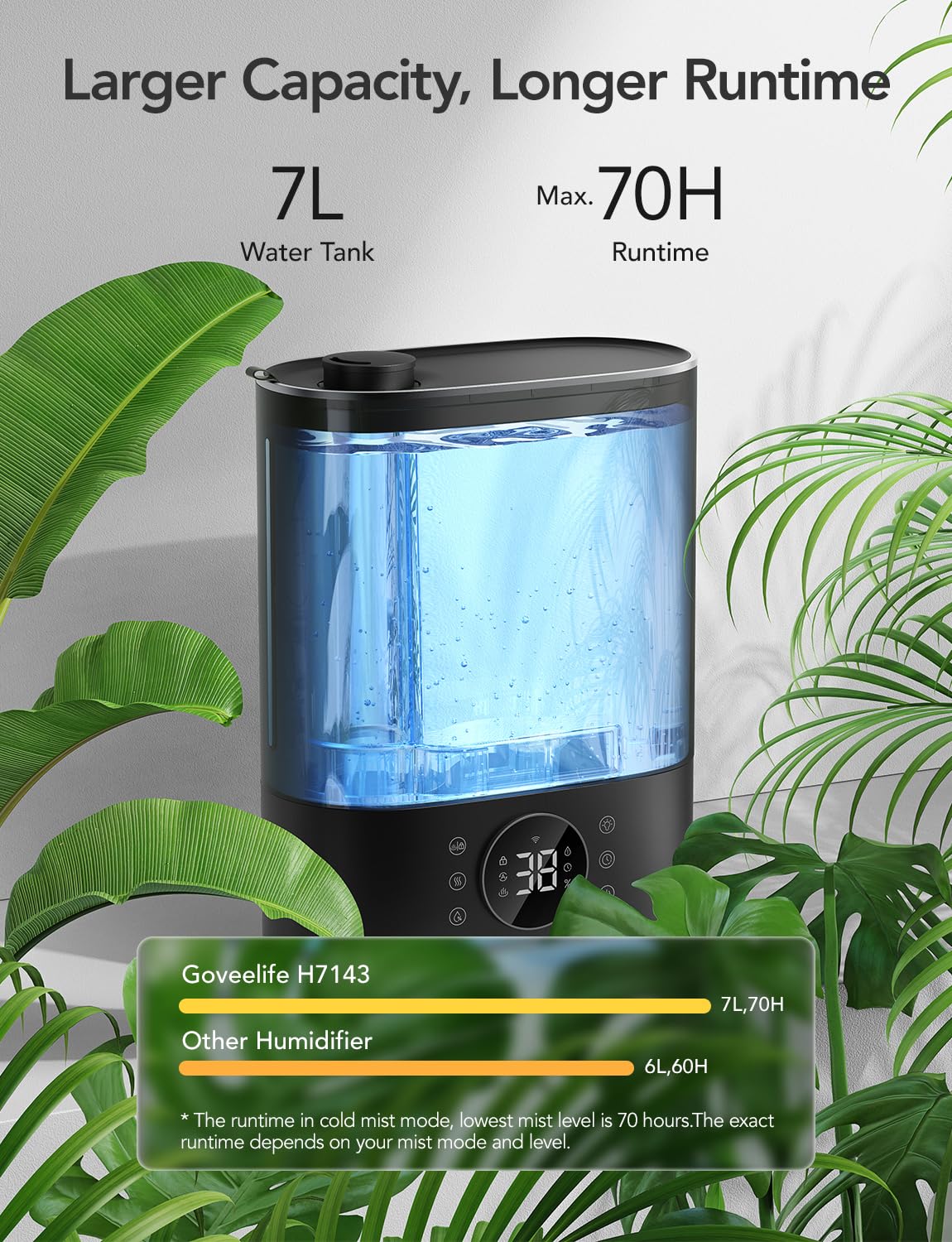
Image: A visual representation highlighting the GoveeLife H7143's 7L water tank capacity and maximum 70-hour runtime, comparing it favorably to other humidifiers with 6L capacity and 60-hour runtime.
Setup
GoveeLife H5105 Thermometer Hygrometer Setup
- Unpack: Carefully remove the H5105 from its packaging.
- Install Battery: The battery is included. Open the battery compartment on the back of the device and insert the battery, ensuring correct polarity.
- Placement: Place the device in the desired location for temperature and humidity monitoring. Ensure it is not exposed to direct sunlight or extreme temperature fluctuations.
- Download GoveeHome App: Download the GoveeHome App from the App Store (iOS) or Google Play Store (Android).
- Pairing:
- Enable Bluetooth on your smartphone.
- Open the GoveeHome App and sign up or log in.
- Tap the "+" icon in the top right corner to add a device.
- Search for "H5105" or select it from the device list.
- Follow the in-app instructions to complete the pairing process.
GoveeLife H7143 Smart Humidifier Setup
- Unpack: Remove the humidifier and all accessories from the packaging.
- Placement: Place the humidifier on a flat, stable, and water-resistant surface. Ensure it is at least 6 inches (15 cm) away from walls and furniture.
- Fill Water Tank:
- Remove the water tank from the base.
- Unscrew the tank cap and fill the tank with clean, cool tap water. Do not exceed the MAX fill line.
- Securely screw the cap back on and place the tank back onto the base.
- Power On: Plug the power cord into a wall outlet. The humidifier will enter standby mode.
- Download GoveeHome App: If you haven't already, download the GoveeHome App from the App Store (iOS) or Google Play Store (Android).
- Pairing:
- Enable Bluetooth and Wi-Fi on your smartphone. Ensure your Wi-Fi network is 2.4GHz.
- Open the GoveeHome App and sign up or log in.
- Tap the "+" icon in the top right corner to add a device.
- Search for "H7143" or select it from the device list.
- Follow the in-app instructions to connect the humidifier to your 2.4GHz Wi-Fi network.
- Optional: Pair with H5105 (AutoReflect Technology):
- Once both devices are connected to the GoveeHome App, navigate to the H7143 settings within the app.
- Look for an option to link or pair with a hygrometer.
- Select your H5105 from the list of available hygrometers to enable AutoReflect technology for enhanced accuracy.
Operation
GoveeLife H5105 Thermometer Hygrometer Operation
- Display Reading: The E-Ink screen continuously displays the current temperature and humidity. A battery icon indicates the remaining battery life.
- GoveeHome App Monitoring: Open the GoveeHome App to view real-time data, historical graphs (hourly, daily, weekly, monthly, yearly), and set temperature/humidity alerts.
- Comfort Indicator: The device displays a comfort icon (smiley or frowning face) based on the temperature and humidity levels, indicating whether the environment is within a comfortable range.
GoveeLife H7143 Smart Humidifier Operation
The H7143 can be operated via its touch panel controls or through the GoveeHome App and voice assistants.
Control Panel Functions:
| Icon/Button | Function |
|---|---|
| Power Button | Turns the humidifier On/Off. |
| Mist Level Button | Adjusts the mist output level (e.g., Low, Medium, High). |
| Mist Mode Button | Switches between Cool Mist and Warm Mist modes. |
| Target Humidity Button | Sets a desired humidity level. The humidifier will automatically adjust output to maintain this level. |
| Timer Button | Sets a timer for automatic shut-off. |
| Night Light Button | Controls the RGB night light, cycling through colors or turning it off. |
GoveeHome App Control:
- Remote Control: Control all humidifier functions from anywhere via the app, as long as the humidifier is connected to Wi-Fi.
- Target Humidity: Precisely set your desired humidity level.
- Mist Level & Mode: Adjust mist output and switch between cool/warm mist.
- Scheduling & Timer: Create custom schedules for the humidifier to turn on/off or adjust settings automatically.
- AutoReflect Integration: If paired with an H5105, the app will use the hygrometer's data for more accurate humidity control.
- Scene Modes: Utilize pre-set or custom scene modes for different environments.
Voice Control (Alexa/Google Home):
- Enable Skill: Enable the "GoveeHome" skill in your Amazon Alexa or Google Home app.
- Discover Devices: Ask your voice assistant to discover new devices.
- Commands: Use commands such as:
- "Alexa, turn on the humidifier."
- "Hey Google, set the humidifier to 50% humidity."
- "Alexa, turn off the humidifier."
- "Hey Google, set the humidifier mist to high."
Maintenance
GoveeLife H5105 Thermometer Hygrometer Maintenance
- Cleaning: Wipe the device with a soft, dry cloth. Do not use abrasive cleaners or immerse in water.
- Battery Replacement: When the battery indicator on the E-Ink screen is low, replace the battery (CR2032, included) by opening the battery compartment on the back.
- Storage: If storing for an extended period, remove the battery.
GoveeLife H7143 Smart Humidifier Maintenance
Regular cleaning is essential to prevent mineral buildup and ensure optimal performance and hygiene.
- Daily Maintenance:
- Empty and rinse the water tank and base daily.
- Refill with fresh, cool tap water.
- Weekly Cleaning:
- Unplug the humidifier and disassemble it.
- Descaling: Fill the water tank with 1 cup (240ml) of white vinegar and let it soak for 30 minutes. For the base, pour vinegar into the water reservoir and let it soak.
- Cleaning: Use a soft brush or cloth to clean the inside of the tank and the base, especially the nebulizer and heating element (if applicable for warm mist).
- Rinse all parts thoroughly with clean water until the smell of vinegar is gone.
- Dry all parts completely before reassembling.
- Storage: If the humidifier will not be used for an extended period, clean it thoroughly, drain all water, and ensure all parts are dry. Store in a cool, dry place.
- Water Quality: Use distilled or demineralized water to minimize mineral buildup, especially in hard water areas.
Troubleshooting
| Problem | Possible Cause | Solution |
|---|---|---|
| H5105 Display is blank. | Battery is dead or incorrectly installed. | Replace the battery (CR2032) or ensure it is inserted with correct polarity. |
| H5105 not connecting to App. | Bluetooth is off; device is out of range; App issue. | Ensure Bluetooth is on. Move device closer to phone. Restart App. Re-pair device. |
| H7143 not producing mist. | No water in tank; tank not seated correctly; mineral buildup; power issue. | Refill water tank. Ensure tank is properly seated. Clean the nebulizer/transducer. Check power connection. |
| H7143 not connecting to Wi-Fi. | Incorrect Wi-Fi password; 5GHz network; out of range. | Verify Wi-Fi password. Ensure you are connecting to a 2.4GHz network. Move humidifier closer to router. Restart router. |
| Humidifier producing strange odor. | Dirty water; mineral buildup; mold/mildew. | Clean the humidifier thoroughly as per maintenance instructions. Use fresh, clean water. |
| Humidifier leaking water. | Water tank cap not secured; tank cracked; base overfilled. | Ensure tank cap is tightly closed. Inspect tank for cracks. Do not overfill the base. |
Specifications
GoveeLife H5105 Thermometer Hygrometer
- Model: H5105
- Display Type: E-Ink
- Connectivity: Bluetooth
- Temperature Accuracy: ±0.54°F (±0.3°C)
- Humidity Accuracy: ±3% RH
- Battery Type: CR2032 (Included)
- Battery Life: Up to 1 year
GoveeLife H7143 Smart Humidifier
- Model: H7143
- Water Tank Capacity: 7 Liters (1.85 Gallons)
- Max Runtime: Up to 70 hours (on lowest mist setting)
- Mist Type: Cool & Warm Mist
- Connectivity: Wi-Fi (2.4GHz only), Bluetooth
- Control: GoveeHome App, Touch Panel, Voice Control (Alexa, Google Home)
- Special Features: AutoReflect Technology, RGB Night Light, Timer, Remote Control
- Color: Black
- Room Type: Bedroom, Nursery, Large Rooms
Warranty and Support
GoveeLife products typically come with a limited warranty. For specific warranty details, product support, or technical assistance, please contact GoveeLife Customer Service or visit the official GoveeLife website.
GoveeLife Official Website: www.govee.com
Please have your model number (H5105 or H7143) and purchase information ready when contacting support.
Related Documents - H5105, H7143
 |
GoveeLife Smart Humidifier Max Troubleshooting Guide Frequently asked questions and troubleshooting tips for the GoveeLife Smart Humidifier Max (H7143), covering issues like white residue, mist problems, dampness, and display errors. |
 |
GoveeLife H5105 Smart Thermo-Hygrometer 2s User Manual User manual for the GoveeLife H5105 Smart Thermo-Hygrometer 2s, detailing its features, specifications, setup, troubleshooting, and customer support. Monitor temperature and humidity accurately with this device. |
 |
GoveeLife Smart Humidifier Max H7143 User Manual Comprehensive user manual for the GoveeLife Smart Humidifier Max (Model H7143), covering safety instructions, setup, operation, maintenance, troubleshooting, and specifications. Learn how to use your humidifier effectively and safely. |
 |
GoveeLife H5171 Portable Thermo-Hygrometer User Manual User manual for the GoveeLife H5171 portable thermo-hygrometer. This IP65 waterproof device features an LCD display, 197ft Bluetooth range, notification alerts, and 2 years of data storage export. Ideal for monitoring temperature and humidity in rooms, patios, greenhouses, and camping. Learn setup, usage, and troubleshooting via the Govee Home app. |
 |
GoveeLife Smart Humidifier Max (H7143) User Manual Comprehensive user manual for the GoveeLife Smart Humidifier Max (Model H7143), covering setup, operation, maintenance, and troubleshooting for optimal home humidity control. |
 |
GoveeLife H5104 Smart Thermo-Hygrometer User Manual User manual for the GoveeLife H5104 Smart Thermo-Hygrometer. Learn how to use the device, connect to the Govee Home app, and troubleshoot common issues. |
Ask a question about this manual
Ask about setup, troubleshooting, compatibility, parts, safety, or missing instructions. Manuals+ will review the question and use this page’s manual context to help answer it.