
1. Product Overview
Thank you for choosing the Gyfimoie 8-Drawer Dresser. This modern storage solution is designed to enhance your living space with ample storage, integrated charging capabilities, and customizable LED lighting. This manual provides essential information for assembly, operation, maintenance, and troubleshooting to ensure safe and efficient use of your new dresser.

Image 1.1: The Gyfimoie 8-Drawer Dresser, featuring its sleek black finish, gold handles, and illuminated top drawers and base.
2. Safety Information
Please read and understand all safety instructions before assembly and use. Failure to follow these instructions may result in injury or damage to the product.
- Anti-Tip Mechanism: This dresser is equipped with an anti-tip mechanism. It is crucial to install this device securely to a wall to prevent the dresser from tipping over, especially in households with children or pets.
- Weight Distribution: Distribute weight evenly across drawers and the top surface. Avoid placing excessively heavy items on top or in a single drawer.
- Assembly: Assemble the dresser on a soft, clean surface to prevent scratches. Ensure all screws and fasteners are tightened securely before use. Periodically check and re-tighten fasteners as needed.
- Electrical Safety: When using the built-in charging station, ensure that connected devices and cables are in good condition. Do not overload the outlets. Keep liquids away from electrical components.
- Children's Safety: Do not allow children to climb on or play with the dresser. Keep small parts and assembly tools out of reach of children.
3. Package Contents
Before beginning assembly, verify that all components and hardware are present. Refer to the included parts list in your assembly guide. Typically, your package should contain:
- Dresser panels (top, bottom, sides, back, drawer fronts)
- 8 Drawer boxes
- Metal drawer slides
- Gold handles
- Built-in charging station unit (2 AC outlets, 2 USB ports)
- RGB LED light strips with controller
- Assembly hardware (screws, dowels, cam locks, etc.)
- Anti-tip kit
- Assembly instructions manual
- Basic assembly tools (e.g., Allen wrench)
4. Assembly Instructions
Assembly of the Gyfimoie 8-Drawer Dresser typically involves 32 steps and may take approximately 3 hours. It is recommended to have two people for assembly. Follow the detailed, step-by-step instructions provided in the separate assembly manual included with your product.
- Preparation: Clear a spacious area and lay out all parts and hardware. Use the included parts list to identify each component.
- Frame Assembly: Begin by assembling the main frame of the dresser according to the diagrams. Ensure all connections are secure.
- Drawer Slide Installation: Attach the metal drawer slides to the dresser frame and to the drawer boxes. Ensure they are aligned correctly for smooth operation.
- Drawer Assembly: Assemble the 8 drawer boxes, including the two top drawers with tempered glass elements. Attach the gold handles.
- Charging Station Installation: Integrate the power outlet unit into the designated slot on the dresser top. Connect the power cord.
- LED Light Installation: Install the RGB LED light strips as indicated in the manual, typically along the top drawers and base. Connect the controller.
- Anti-Tip Kit Installation: Securely attach the anti-tip mechanism to the back of the dresser and to a wall stud using appropriate hardware. This step is critical for safety.
- Final Checks: Verify that all drawers open and close smoothly. Ensure all connections are tight and the dresser is stable.

Image 4.1: Product dimensions, illustrating the overall size and individual drawer depth for planning placement.
5. Operating Instructions
5.1. Built-in Charging Station
The dresser features a convenient power outlet with 2 AC outlets (125V/12A) and 2 USB ports (5V/2A) for charging your electronic devices.
- Power Connection: Plug the dresser's main power cord (4.9 FT) into a standard wall outlet.
- AC Outlets: Use the 2 AC outlets to power devices such as lamps, laptops, or other small appliances.
- USB Ports: Connect your smartphones, tablets, or other USB-powered devices to the 2 USB ports for charging.

Image 5.1: Detail of the integrated charging station, providing convenient power access for various devices.
5.2. RGB LED Lighting System
The dresser is equipped with multi-color RGB LED light strips that can be adjusted to create various ambiances.
- Control Methods: The LED lights can be controlled via a physical button on the light strip controller or through a dedicated mobile application (App).
- Color Adjustment: Select from a wide range of RGB colors to match your mood or room decor.
- Brightness Adjustment: Adjust the intensity of the light to your preference.
- Modes: Explore various lighting modes, which may include static colors, dynamic color changes, music sync mode (reacting to sound), and timing mode (scheduled on/off).
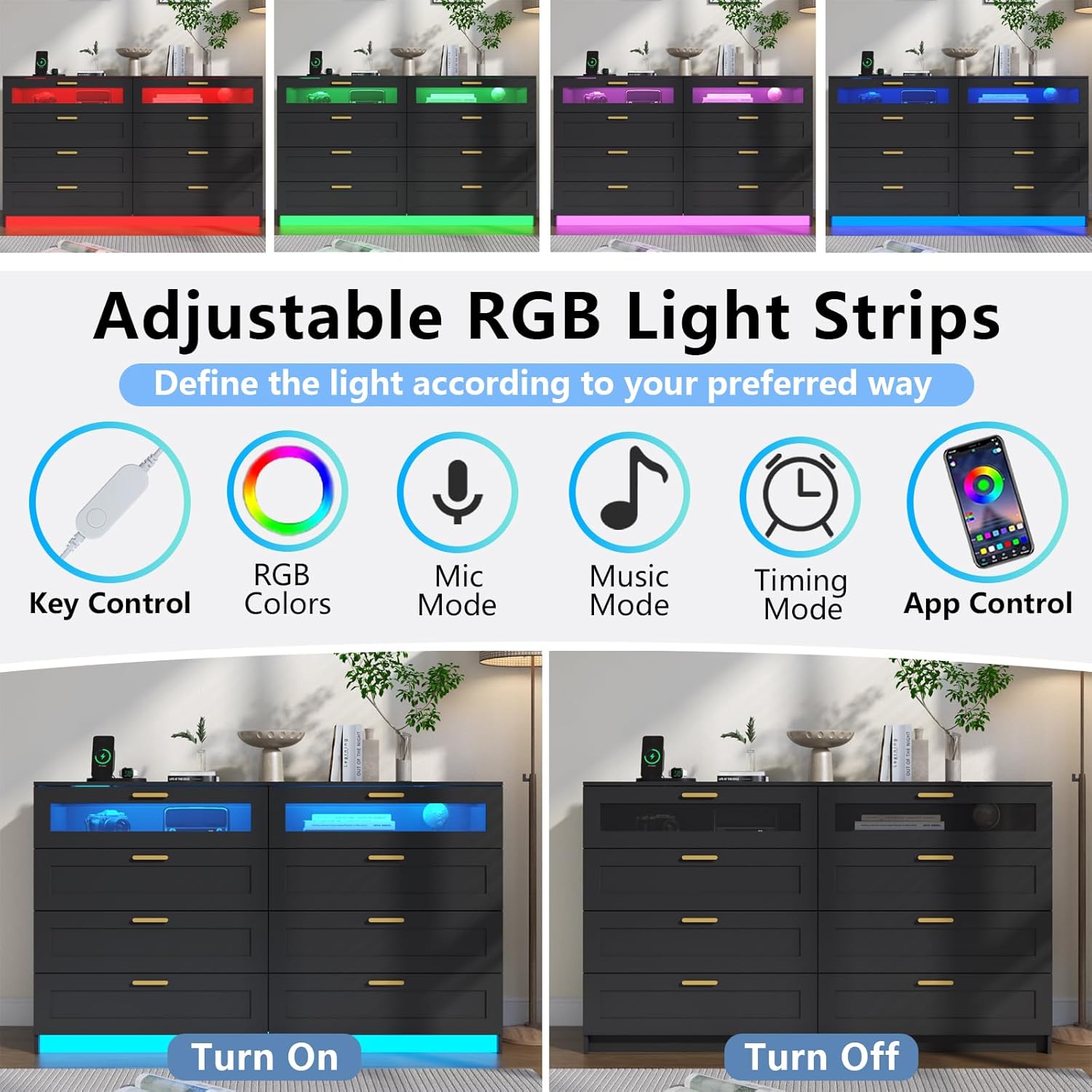
Image 5.2: Overview of the LED light strip features and control options, allowing for personalized lighting effects.
5.3. Drawer Usage
The dresser features 8 large storage drawers designed for smooth operation and efficient organization.
- Smooth Gliding: Drawers are equipped with metal tracks for smooth opening and closing. Avoid forcing drawers if they encounter resistance.
- Tempered Glass Top Drawers: The top two drawers feature tempered glass fronts, ideal for displaying decorative items while keeping them dust-free. The LED lights illuminate these drawers for an enhanced visual effect.
- Storage Capacity: Utilize the drawers for organizing clothes, blankets, accessories, or other personal items. The spacious top surface can also be used for frequently accessed items or decor.

Image 5.3: The dresser with all eight drawers open, demonstrating ample storage space for various items.

Image 5.4: A detailed view of the dresser's internal organization, illustrating how different items can be stored.
6. Maintenance and Care
Proper care will extend the life and appearance of your dresser.
- Cleaning: Wipe the dresser surfaces with a damp cloth. Avoid harsh chemicals or abrasive cleaners, which can damage the finish.
- Spills: Clean up spills immediately to prevent staining or damage to the MDF and tempered glass surfaces.
- Hardware: Periodically check and tighten all screws and fasteners to ensure the dresser remains stable.
- Drawer Slides: If drawers become stiff, a small amount of silicone lubricant can be applied to the metal slides.
7. Troubleshooting
If you encounter issues with your dresser, refer to the following common problems and solutions:
| Problem | Possible Cause | Solution |
|---|---|---|
| Drawers do not slide smoothly. | Misaligned slides, loose screws, obstruction. | Check alignment of drawer slides. Tighten all screws on slides and drawer boxes. Remove any obstructions. |
| LED lights are not working. | Loose connection, power issue, faulty controller. | Ensure all LED strip connections are secure. Verify the dresser's main power cord is plugged in. Check the LED controller for power. |
| Charging station is not providing power. | Dresser not plugged in, faulty outlet/USB port, overloaded circuit. | Confirm the dresser's main power cord is securely plugged into a working wall outlet. Try a different device. Avoid exceeding the rated capacity. |
| Dresser feels unstable or wobbly. | Loose assembly hardware, uneven floor, anti-tip kit not installed. | Re-tighten all assembly screws. Ensure the dresser is on a level surface. Install the anti-tip kit as instructed. |
8. Specifications
Key specifications for the Gyfimoie 8-Drawer Dresser, Model G-1084A:
- Brand: Gyfimoie
- Model Name: 8 Drawer Dresser
- Item Model Number: G-1084A
- Color: Black
- Product Dimensions: 15.75"D x 47.24"W x 32.09"H (40cm D x 120cm W x 81.5cm H)
- Item Weight: 100.8 pounds (45.7 kg)
- Material: High-quality MDF, Tempered Glass (top drawers)
- Drawer Type: Ball Bearing Slide
- Charging Station: 2 AC Outlets (125V/12A), 2 USB Ports (5V/2A), 4.9 FT Power Cord
- LED Lights: Multi-color RGB, controllable via button and App
- Assembly Required: Yes
- Care Instructions: Wipe with Damp Cloth
9. Warranty and Support
For warranty information, missing parts, or technical support, please refer to the contact information provided in your product packaging or reach out to Gyfimoie customer service directly. Keep your purchase receipt for any warranty claims.