
SAMTRA W6361301
SAMTRA Full Size Wooden Bed Frame
Model: W6361301
User Instruction Manual
1. Introduction
Thank you for purchasing the SAMTRA Full Size Wooden Bed Frame with Storage Headboard, Charging Station, and LED Lights. This manual provides essential information for safe assembly, proper operation, and effective maintenance of your new bed frame. Please read all instructions carefully before beginning assembly and retain this manual for future reference.

Image 1.1: The SAMTRA Full Size Wooden Bed Frame, featuring a rustic brown finish, integrated storage headboard, and LED lighting, shown in a bedroom setting.
2. Safety Information
WARNING: Failure to follow these safety instructions may result in injury or damage to the product.
- Do not load the bed frame with more than 1200 lbs (544 kg). Exceeding this weight limit can compromise the structural integrity of the frame.
- Exercise caution around sharp edges during assembly and use to prevent cuts or scrapes.
- Always follow the provided assembly instructions precisely. Incorrect assembly can lead to instability, collapse, and potential injury.
- Ensure all connections are securely tightened before use and periodically check for loose fasteners.
- Keep small parts and packaging materials away from children to prevent choking hazards.
3. Package Contents
Before beginning assembly, verify that all components are present and undamaged. If any parts are missing or damaged, please contact customer support.
- Headboard with integrated charging station and LED lights
- Side Rails (2)
- Footboard
- Center Support Beam(s)
- Wood Slats
- Support Legs
- Hardware Pack (screws, bolts, washers, Allen wrench)
- Remote Control for LED Lights
- Installation Manual (this document)
4. Setup and Assembly
Assembly typically requires two people and approximately 50 minutes. It is recommended to assemble the bed frame in the room where it will be used to avoid moving it after completion.
- Unpack and Identify Parts: Lay out all components on a clean, soft surface (e.g., a rug or blanket) to prevent scratching. Compare parts against the included parts list.
- Assemble the Headboard: Follow the specific instructions for attaching any headboard components, ensuring the charging station and LED light wiring are correctly positioned.
- Attach Side Rails: Connect the side rails to the headboard using the provided hardware. Do not fully tighten screws until all major components are aligned.
- Attach the Footboard: Connect the footboard to the side rails. Ensure all corners are flush and aligned.
- Install Center Support: Secure the center support beam(s) and any associated support legs to the frame.
- Place Wood Slats: Distribute the wood slats evenly across the frame and secure them according to the instructions. This step is crucial for mattress support and noise reduction.
- Final Tightening: Once all components are in place and aligned, systematically tighten all screws and bolts. Do not overtighten.
- Connect Power: Plug the headboard's power cord into a standard wall outlet.

Image 4.1: Visual representation of the bed frame's construction, highlighting sturdy steel connections, the robust wood frame, and the simplified assembly process.
5. Operating Instructions
5.1. Charging Station
The integrated headboard features a convenient charging station with 2 standard plug outlets and 2 USB ports.
- To use, simply plug the bed frame's main power cord into a wall outlet.
- Insert your device's power adapter into one of the standard outlets or connect a USB cable directly to a USB port.
- Ensure devices are compatible with the power output of the charging station.

Image 5.1: A detailed view of the headboard's charging station, illustrating the placement of the USB ports and power outlets, and the illuminated LED light strip.
5.2. LED Light Strip
The bed frame includes an adjustable LED light strip offering 20 static colors and 22 dynamic modes. Control is managed via the included remote control.
- Power On/Off: Press the power button on the remote control.
- Color Selection: Use the color buttons to choose from 20 static colors.
- Mode Selection: Use the mode buttons to cycle through 22 dynamic lighting effects.
- Brightness Adjustment: Use the brightness up/down buttons to increase or decrease the light intensity.
- Speed Adjustment: For dynamic modes, use the speed buttons to adjust the transition speed.
6. Maintenance
Regular maintenance will help preserve the appearance and longevity of your bed frame.
- Cleaning: Wipe the wooden surfaces with a soft, damp cloth. Avoid harsh chemicals or abrasive cleaners that could damage the finish.
- Dusting: Regularly dust the headboard and frame to prevent buildup.
- Fastener Check: Periodically (e.g., every 3-6 months) check all screws and bolts to ensure they remain tight. Retighten as necessary to maintain stability and prevent squeaking.
- LED Lights: If LED lights dim or stop working, check the power connection. If issues persist, contact customer support.
- Charging Station: Ensure the charging station remains free of dust and debris. Do not spill liquids on the outlets or USB ports.
7. Troubleshooting
This section addresses common issues you might encounter with your bed frame.
| Problem | Possible Cause | Solution |
|---|---|---|
| Bed frame is squeaking | Loose fasteners; uneven slat distribution; friction between components. | Tighten all screws and bolts. Ensure slats are evenly spaced and properly secured. Apply felt pads or lubricant to contact points if necessary. |
| LED lights not working | Power cord not plugged in; remote control battery dead; faulty connection. | Ensure the bed frame is plugged into a working outlet. Check remote control battery. Verify all LED strip connections are secure. |
| Charging station not working | Bed frame not plugged in; device not compatible; faulty outlet/USB port. | Confirm the bed frame is plugged in. Test with a different device or cable. If issue persists, contact customer support. |
| Bed frame feels unstable | Loose fasteners; incorrect assembly; uneven floor. | Re-check and tighten all assembly hardware. Ensure the bed frame is on a level surface. Review assembly instructions for any missed steps. |
8. Specifications
| Feature | Detail |
|---|---|
| Model Number | W6361301 |
| Brand | SAMTRA |
| Size | Full |
| Product Dimensions (L x W x H) | 80"L x 54"W x 41"H |
| Item Weight | 76.6 pounds |
| Color | Brown Led |
| Material | Engineering Wood Framework, Wood Slats |
| Finish Type | Lacquered |
| Weight Capacity | Up to 1200 lbs |
| Special Features | Fade Resistant, No Box Spring Needed, Squeak Resistant, Stain Resistant |
| Headboard Features | Storage Shelf, 2 Standard Plug Outlets, 2 USB Ports, Adjustable LED Light Strip (20 static colors, 22 dynamic modes) |
| Ground To Item Distance | 14.2 Inches |
| Assembly Required | Yes |
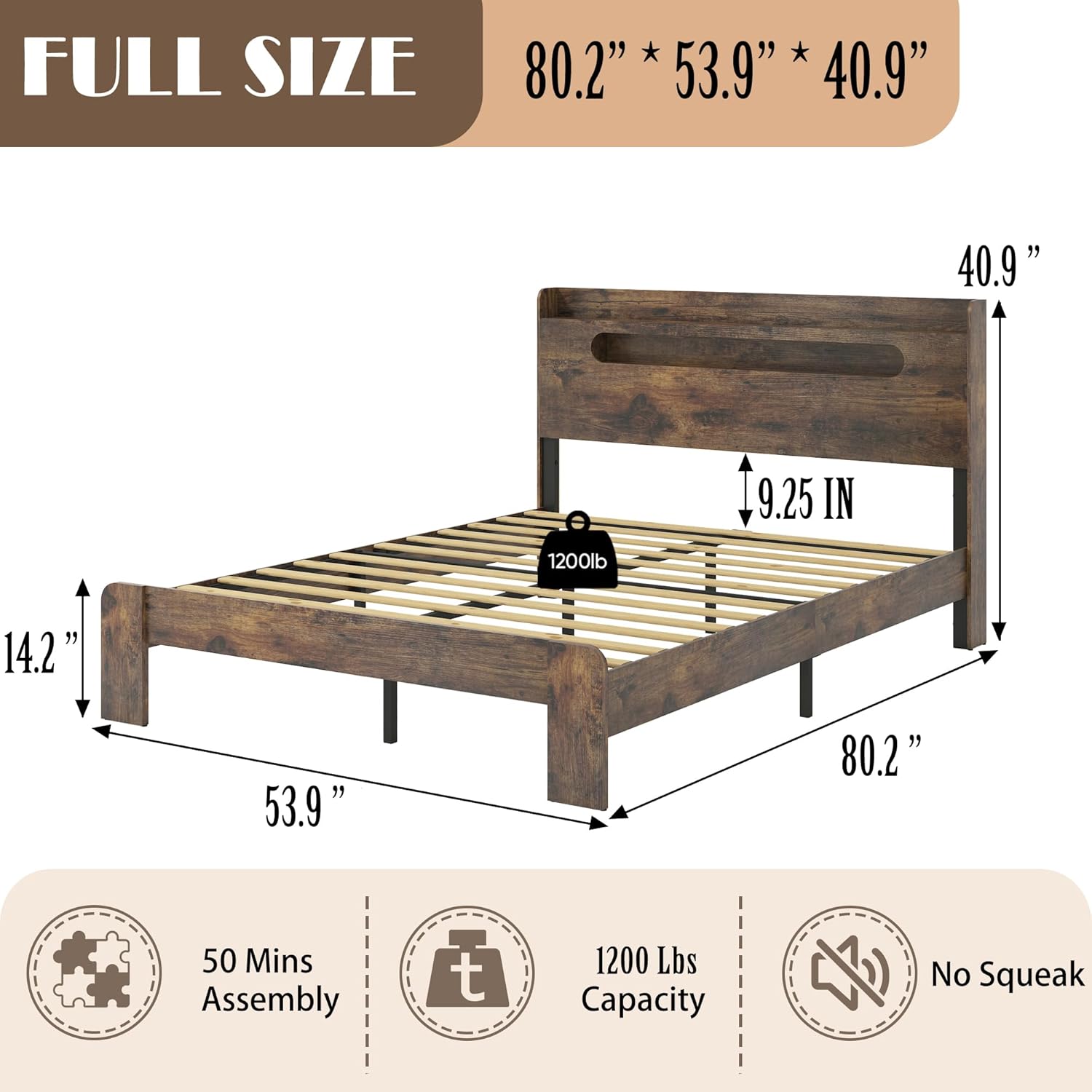
Image 8.1: Detailed dimensional drawing of the Full Size Wooden Bed Frame, including overall length, width, headboard height, and under-bed clearance.
9. Warranty and Support
SAMTRA products are designed for quality and durability. For specific warranty information, please refer to the documentation included with your purchase or contact SAMTRA customer support directly.
If you encounter any issues or have questions regarding your bed frame, please contact our customer support team:
- Website: Visit the SAMTRA Store on Amazon
- Email: Refer to your purchase invoice for contact details.
- Phone: Refer to your purchase invoice for contact details.
Please have your model number (W6361301) and purchase date available when contacting support.
Ask a question about this manual
Ask about setup, troubleshooting, compatibility, parts, safety, or missing instructions. Manuals+ will review the question and use this page’s manual context to help answer it.