
1. Introduction
This manual provides essential information for the installation, operation, maintenance, and troubleshooting of your GAOCHENG Laptop CPU Fan, model NY420-02. This fan is designed to replace the original CPU cooling fan in compatible CEPTER IRIS NY420, NY420-02, and NY42002 17.3-inch laptops, ensuring optimal thermal performance for your system's central processing unit.
Proper cooling is critical for the longevity and stable operation of your laptop's CPU. This fan operates at DC5V and is engineered to meet the cooling requirements of the specified laptop models.
2. Safety Information
Please read and understand all safety instructions before attempting installation or maintenance. Failure to follow these instructions may result in personal injury, damage to the product, or damage to your laptop.
- Power Disconnection: Always disconnect the laptop from its power adapter and remove the battery before opening the laptop case or performing any installation.
- Static Electricity: Electronic components are sensitive to static electricity. Use an anti-static wrist strap or frequently touch a grounded metal object to discharge static electricity before handling the fan or other internal components.
- Professional Installation Recommended: Laptop disassembly and component replacement can be complex. If you are not comfortable with internal computer hardware, seek assistance from a qualified technician.
- Handle with Care: Avoid touching the fan blades or motor directly. Handle the fan by its frame.
- Ventilation: Ensure proper ventilation around your laptop during operation to prevent overheating.
3. Setup and Installation
This section outlines the general steps for replacing a laptop CPU fan. Specific disassembly procedures may vary by laptop model. Refer to your laptop's service manual or a reliable online guide for detailed instructions specific to your CEPTER IRIS NY420 series laptop.
3.1 Pre-installation Checklist
- Ensure the laptop is powered off and disconnected from all power sources.
- Gather necessary tools: small Phillips head screwdrivers, plastic pry tools (spudgers), anti-static wrist strap, thermal paste (if replacing the heatsink assembly).
- Work in a clean, well-lit, and static-free environment.
3.2 Installation Steps (General)
- Disassemble Laptop: Carefully open the laptop case according to your specific laptop model's service manual. This typically involves removing screws from the bottom cover, keyboard, or palm rest.
- Locate Old Fan: Identify the existing CPU fan. It is usually part of the heatsink assembly, connected to the CPU.
- Disconnect Old Fan: Gently disconnect the fan's power cable from the motherboard. Remove any screws securing the fan or heatsink assembly.
- Remove Old Fan: Carefully lift and remove the old fan and heatsink assembly. Clean any old thermal paste from the CPU and heatsink if you are reusing the heatsink.
- Install New Fan: Position the new GAOCHENG CPU fan (NY420-02) in place. If applicable, apply a thin, even layer of new thermal paste to the CPU die before reattaching the heatsink.
- Connect New Fan: Connect the new fan's power cable securely to the corresponding header on the motherboard.
- Reassemble Laptop: Carefully reassemble your laptop, ensuring all cables are properly connected and screws are tightened. Do not overtighten.
- Test: Power on the laptop and verify that the fan spins and the system boots normally. Monitor CPU temperatures to ensure proper cooling.
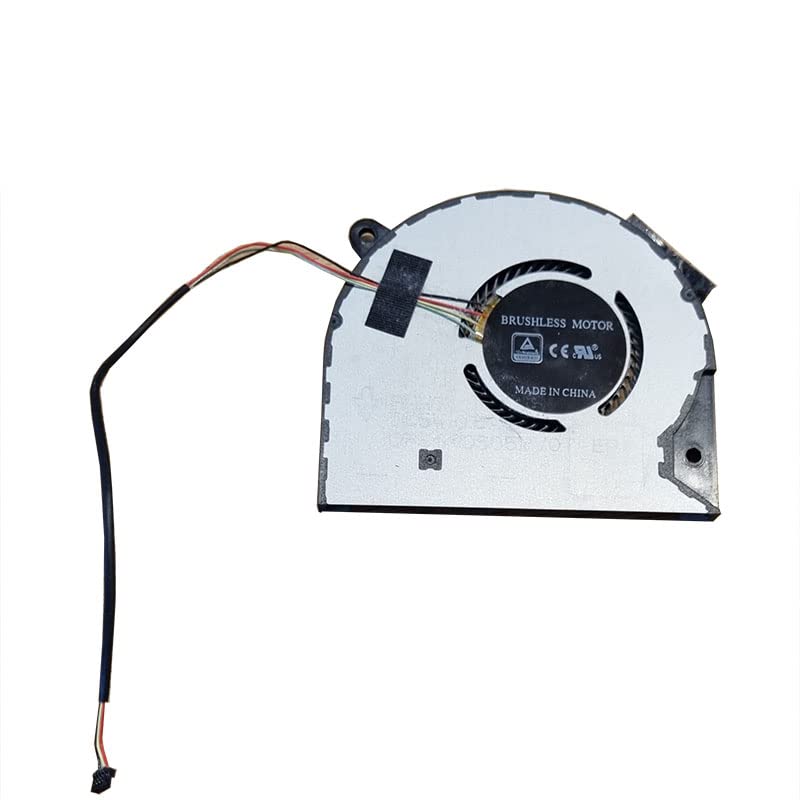
Figure 1: GAOCHENG Laptop CPU fan, model NY420-02. This image displays the fan unit with its brushless motor, indicating "MADE IN CHINA", and the attached wire harness with a connector.
4. Operating Instructions
The GAOCHENG Laptop CPU Fan (NY420-02) operates automatically. Once installed and connected, the fan's speed is controlled by the laptop's BIOS/UEFI and operating system based on the CPU's temperature. It will spin faster as the CPU temperature rises to dissipate heat and slow down when the CPU cools down.
- Ensure your laptop's vents are clear and unobstructed to allow for proper airflow.
- Avoid operating the laptop on soft surfaces (e.g., beds, couches) that can block ventilation.
5. Maintenance
Regular maintenance helps ensure the longevity and efficiency of your CPU fan and laptop cooling system.
- Dust Removal: Periodically (every 3-6 months, depending on environment) use compressed air to clear dust from the laptop's vents and fan blades. Do this with the laptop powered off.
- Internal Cleaning: If dust accumulation is severe, or if you notice reduced cooling performance, consider opening the laptop (following safety guidelines) to thoroughly clean the fan and heatsink fins.
- Thermal Paste: The thermal paste between the CPU and heatsink should last for several years. If you experience persistent overheating issues not resolved by cleaning, consider reapplying thermal paste. This requires disassembling the heatsink assembly.
6. Troubleshooting
If you encounter issues with your CPU fan, refer to the following common problems and solutions:
| Problem | Possible Cause | Solution |
|---|---|---|
| Fan not spinning / Laptop overheating |
|
|
| Fan making unusual noise |
|
|
| Laptop still overheating after fan replacement |
|
|
7. Specifications
| Feature | Detail |
|---|---|
| Model Number | NY420-02 |
| Compatibility | CEPTER IRIS NY420, NY420-02, NY42002 17.3-inch Laptops |
| Voltage | DC5V |
| Product Dimensions | 11.81 x 7.87 x 3.94 inches |
| Item Weight | 1.32 Pounds |
| Manufacturer | GAOCHENG |
| Date First Available | July 3, 2024 |
8. Warranty and Support
For warranty information and technical support, please refer to the specific terms provided by your retailer or contact GAOCHENG directly. Keep your purchase receipt as proof of purchase for any warranty claims.
For further assistance, you may visit the GAOCHENG official website or contact their customer service department. Contact details are typically found on the product packaging or the manufacturer's website.