
Introduction
The Desiontal PH-30A Phone Camera Grip is designed to enhance mobile photography and videography by providing a stable, ergonomic grip for smartphones. It features a detachable wireless shutter remote control and versatile mounting options, making it suitable for various shooting scenarios including vlogging, live streaming, and selfies.
Key features include:
- One-Hand Grip Design: Provides a stable, camera-like hold to reduce shake during photo and video capture. The handle is silicone-wrapped for improved grip.
- Detachable Wireless Shutter: A remote control for convenient shooting from up to 15 meters away. Compatible with most iOS and Android smartphones.
- Versatile Shooting: Supports both horizontal and vertical phone orientations with 360-degree rotation. Includes desktop support for stable placement.
- Expanded Connectivity: Features a 1/4-inch standard thread for tripod mounting and a hidden cold shoe mount for accessories like microphones or LED lights.
- Wide Compatibility: Adjustable phone clip accommodates most smartphones from 2.2 inches (5.5 cm) to 3 inches (7.6 cm) in width.
Setup
1. Battery Installation for Wireless Shutter
The wireless shutter remote uses a replaceable CR2032 button cell battery. This battery type offers energy efficiency and does not require frequent recharging.

Figure 1: CR2032 button cell battery included. The image displays the remote shutter with its battery compartment open, showing a CR2032 battery ready for insertion. This battery provides long-lasting power without the need for frequent recharging.
- Locate the battery compartment on the wireless shutter remote.
- Open the compartment cover.
- Insert the CR2032 battery with the positive (+) side facing up.
- Close the battery compartment cover securely.
2. Attaching Your Smartphone
The phone clip features anti-slip silicone patches to securely hold your device.

Figure 2: Pull out phone clip with anti-slip silicone patch at the bottom. This image illustrates the adjustable phone clip being extended, highlighting the silicone pads designed to protect and secure the smartphone.
- Gently pull out the spring-loaded phone clip to expand its width.
- Carefully place your smartphone into the clip, ensuring it is centered and securely held by the silicone patches.
- The clip supports phones from 2.2 inches (5.5 cm) to 3 inches (7.6 cm) wide.
3. Bluetooth Pairing Steps
Pair the wireless shutter remote with your smartphone for remote control functionality.
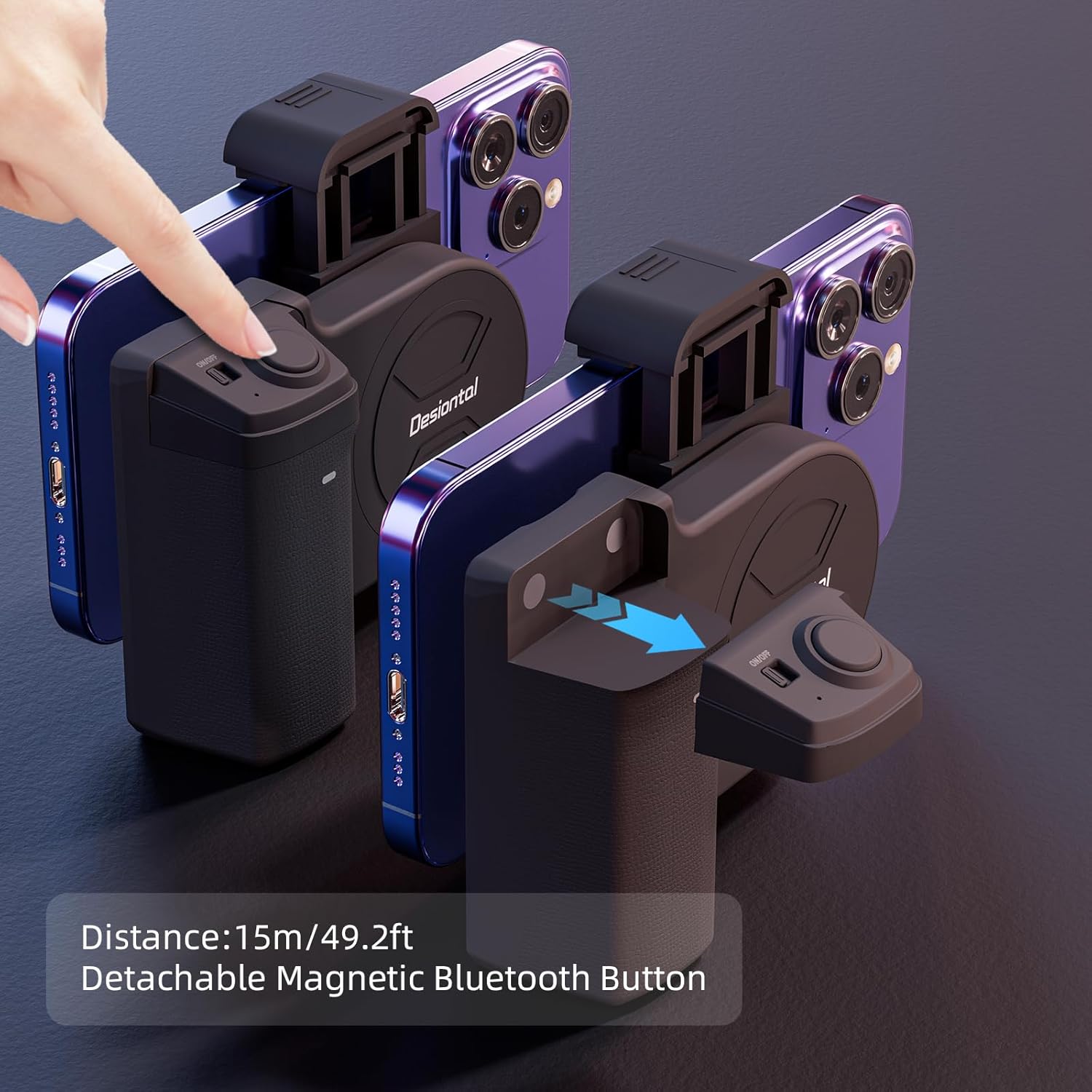
Figure 3: Detachable Magnetic Bluetooth Button. This image shows the wireless remote control detached from the grip, indicating a maximum operating distance of 15 meters (49.2 feet).
- Toggle the power switch on the wireless shutter remote. The indicator light will flash, indicating it is in pairing mode.
- On your smartphone, open the Bluetooth settings and enter the search page for new devices.
- In the list of available devices, locate and select "PH-30 photo" to initiate pairing.
- Once successfully paired, the indicator light on the remote will stop flashing. You can now open your smartphone's camera application and use the remote to capture photos or start/stop video recording.
Operating Instructions
1. Basic Photography and Videography
Once your smartphone is securely attached and the Bluetooth shutter is paired, you can begin shooting.
- Hold the grip firmly with one hand. The ergonomic design and silicone wrap provide a comfortable and stable hold.
- Use the paired wireless shutter remote to trigger your smartphone's camera. Press the button once to take a photo or to start/stop video recording, depending on your camera app's settings.
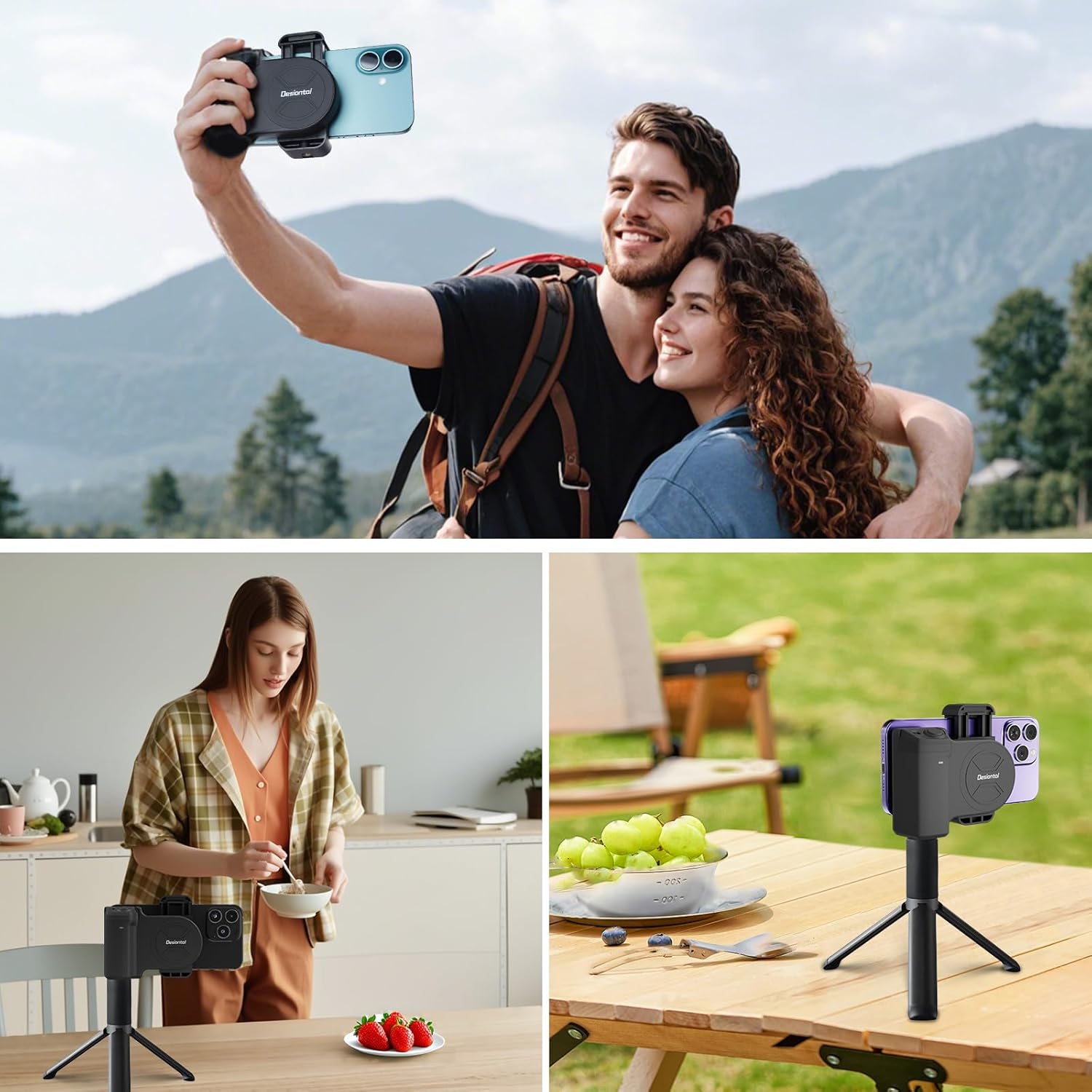
Figure 4: Usage scenarios. This image collage demonstrates the versatility of the grip, showing it used for taking selfies, as a desktop stand, and mounted on a tripod for stable shots.
2. Adjusting Phone Orientation (360-degree Rotation)
The phone clip allows for flexible orientation adjustments.

Figure 5: Can rotate 360°. This image highlights the rotational mechanism of the phone clip, allowing seamless switching between horizontal and vertical shooting modes.
- To switch between horizontal (landscape) and vertical (portrait) shooting modes, gently rotate the phone clip while your phone is attached. The grip supports 360-degree rotation.
3. Using with a Tripod or Stand
The grip offers multiple mounting points for tripods and stands.
- Bottom of Handle: A 1/4-inch standard thread is located at the bottom of the grip handle. This allows you to mount the entire grip onto a tripod or monopod for increased stability.
- Bottom of Clip: An additional 1/4-inch standard thread is present at the bottom of the phone clip itself. This allows for mounting the phone directly to a tripod, useful for specific angles or time-lapse photography.
4. Attaching External Accessories
Enhance your setup with external accessories.
- Cold Shoe Mount: The top of the phone clip features a hidden cold shoe mount. This allows you to attach accessories such as external microphones or LED lights to improve audio and lighting quality.
Maintenance
- Cleaning: Wipe the grip and remote with a soft, dry cloth. Avoid using harsh chemicals or abrasive materials.
- Storage: Store the device in a cool, dry place away from direct sunlight and extreme temperatures.
- Battery Replacement: Replace the CR2032 battery in the wireless shutter remote when its performance diminishes. Dispose of used batteries responsibly.
- Avoid Water: The product is not water-resistant. Avoid exposure to water or high humidity.
Troubleshooting
- Remote Shutter Not Connecting:
- Ensure the remote's power switch is ON and the indicator light is flashing.
- Check if the CR2032 battery is correctly installed and has sufficient charge. Replace if necessary.
- Make sure Bluetooth is enabled on your smartphone.
- Forget "PH-30 photo" from your smartphone's Bluetooth device list and attempt to re-pair.
- Ensure the remote is within the 15-meter operating range of your smartphone.
- Phone Not Secure in Clip:
- Verify that your phone's width is within the supported range of 2.2 to 3 inches (5.5 to 7.6 cm).
- Ensure the phone is properly centered and the spring-loaded mechanism is fully engaged.
- Check the silicone pads for any damage or debris that might affect grip.
- Unstable Shots:
- Ensure your grip on the handle is firm.
- For maximum stability, especially in low light or for longer exposures, consider mounting the grip onto a tripod using the 1/4-inch thread.
Specifications
| Brand | Desiontal |
| Model Name | Snap Grip (PH-30A) |
| Colour | Black |
| Compatible Devices | Cellphones (iPhone, Samsung Galaxy, Google Pixel, OnePlus, Motorola Series, etc.) |
| Phone Clip Width | 2.2 inches (5.5 cm) to 3 inches (7.6 cm) |
| Product Dimensions (D x W x H) | 11D x 8.8W x 5.5H Centimeters (4.33 x 3.46 x 2.17 inches) |
| Wireless Shutter Battery | CR2032 Button Cell (Included) |
| Wireless Shutter Range | Up to 15 meters (49.2 feet) |
| Tripod Mount | 1/4-inch Standard Thread (on handle and clip) |
| Accessory Mount | Cold Shoe Mount (on clip) |
| Box Contents | 1 set of mobile phone shooting controllers |
| Water Resistance Level | Not Water Resistant |

Figure 6: Product dimensions. This image provides a visual representation of the grip's measurements: 11cm (4.33in) length, 8.8cm (3.46in) height, and 5.5cm (2.17in) width.
Warranty
Specific warranty information is not provided in the product details. Please refer to your purchase documentation or contact the retailer for details regarding warranty coverage and terms.
The EU Spare Part Availability Duration is listed as 7 Years, which may indicate long-term support for components within the European Union.
Support
For further assistance, technical support, or inquiries regarding your Desiontal PH-30A Phone Camera Grip, please refer to the following:
- Retailer Support: Contact the store or online platform where you purchased the product.
- Manufacturer Website: Visit the official Desiontal website for potential support resources, FAQs, or contact information.
- Product Documentation: Keep your original packaging and any included documentation, as it may contain additional support details.