
Maclean MCE241 B
Maclean MCE241 B PIR Motion Sensor User Manual
Model: MCE241 B
1. Introduction
This manual provides comprehensive instructions for the installation, operation, and maintenance of the Maclean MCE241 B PIR Motion Sensor. This device is designed to detect motion using infrared technology and can control connected lighting or other electrical loads. It features remote control functionality and adjustable settings for light sensitivity and time delay.

Image: The Maclean MCE241 B PIR Motion Sensor in black, shown alongside its remote control. The sensor features a white detection lens and a sleek black housing.
2. Safety Information
Please read all safety warnings and instructions carefully before installing or operating this device. Failure to follow these instructions may result in electric shock, fire, or serious injury.
- Installation should only be performed by a qualified electrician in accordance with local electrical codes and regulations.
- Ensure power is disconnected at the circuit breaker before installation, maintenance, or troubleshooting.
- Do not exceed the maximum load ratings: 1200W for incandescent lamps and 300W for LED lamps.
- This device is rated IP65, indicating protection against dust and low-pressure water jets. However, avoid direct exposure to heavy rain or submersion.
- Keep the device away from flammable materials and heat sources.
3. Product Components
The Maclean MCE241 B PIR Motion Sensor package includes the following items:
- Maclean MCE241 B PIR Motion Sensor unit
- Remote control
- Mounting screws and wall plugs (may vary)
- User Manual (this document)
4. Setup and Installation
Follow these steps for proper installation of your motion sensor:
- Choose a Location: Select a mounting location that provides the desired detection area. Consider factors such as direct sunlight, heat sources, and moving objects (e.g., trees, traffic) that might cause false triggers. The sensor can be mounted on a wall or ceiling.
- Power Disconnection: Before beginning any electrical work, ensure the main power supply to the installation area is switched off at the circuit breaker.
- Mounting:
- Mark the drilling points on the wall or ceiling using the sensor's base as a template.
- Drill holes and insert wall plugs if necessary.
- Secure the sensor's base to the mounting surface using the provided screws.
- Wiring: Connect the electrical wires according to the wiring diagram provided with the product. Ensure all connections are secure and insulated.
Note: This device requires a 220V power supply.
- Adjusting Sensor Angle: The sensor head can be adjusted horizontally by +/- 180 degrees and vertically by +/- 90 degrees to optimize the detection area.

Image: Diagram illustrating the adjustable angles of the Maclean MCE241 B PIR Motion Sensor. It shows horizontal rotation of +/- 180 degrees and vertical tilt of +/- 90 degrees.
- Power Restoration: Once installation is complete and all connections are secure, restore power at the circuit breaker.
5. Operating Instructions
The Maclean MCE241 B PIR Motion Sensor can be configured using the integrated dials and the included remote control.
5.1. Manual Adjustments (Dials)
The sensor features two adjustable dials, typically located on the underside or side of the unit:

Image: Close-up view of the LUX and TIME adjustment dials on the Maclean MCE241 B PIR Motion Sensor. The LUX dial ranges from 3 to 300, and the TIME dial from 10 seconds to 30 minutes.
- LUX (Light Sensitivity): This dial controls the ambient light level at which the sensor will activate.
- Turn towards the "sun" symbol (high LUX value) for activation only in bright conditions (e.g., daytime).
- Turn towards the "moon" symbol (low LUX value) for activation in darker conditions (e.g., dusk or night).
- The range is typically from 3 LUX (dark) to 300 LUX (bright).
- TIME (Time Delay): This dial sets how long the connected light or device remains on after motion is no longer detected.
- Adjust from 10 seconds to 30 minutes.
- If motion is detected again before the set time expires, the timer will reset and restart from the moment the new motion signal is registered.
5.2. Remote Control Functions
The included remote control provides convenient adjustment of various settings without needing to access the sensor unit directly.
| Button | Function |
|---|---|
| ON | Turns the connected light/device ON permanently. |
| OFF | Turns the connected light/device OFF permanently. |
| AUTO | Activates automatic motion detection mode. The sensor will operate based on LUX and TIME settings. |
| Detection Range (25%, 50%, 75%, 100%) | Adjusts the sensitivity of the motion detection, influencing the maximum detection distance. |
| Daylight Sensor (10LUX, 50LUX, 200LUX, 2000LUX) | Sets the LUX threshold for activation. Higher values mean the sensor will activate in brighter conditions. |
| Hold Time (10S, 1MIN, 3MIN, 7MIN, 15MIN, 30MIN) | Sets the duration the light remains on after motion detection. |
| TEST | Puts the sensor into test mode for easy setup and aiming. In test mode, the light will turn on for a short period (e.g., 5-10 seconds) with each detection, regardless of LUX settings. |
| RESET | Resets all remote-controlled settings to factory defaults. |
6. Maintenance
The Maclean MCE241 B PIR Motion Sensor requires minimal maintenance.
- Cleaning: Periodically wipe the sensor lens and housing with a soft, damp cloth to remove dust and dirt. Do not use abrasive cleaners or solvents.
- Inspection: Regularly check the mounting and wiring for any signs of wear, damage, or loose connections.
- Lens Obstruction: Ensure the sensor lens is not obstructed by dirt, spiderwebs, or vegetation, as this can impair its detection capabilities.
Always disconnect power before performing any maintenance.
7. Troubleshooting
If you experience issues with your Maclean MCE241 B PIR Motion Sensor, refer to the following troubleshooting guide:
| Problem | Possible Cause | Solution |
|---|---|---|
| Light does not turn on when motion is detected. |
|
|
| Light stays on continuously. |
|
|
| Light turns on randomly (false triggers). |
|
|
8. Specifications
| Feature | Detail |
|---|---|
| Model Number | MCE241 B |
| Power Source | Corded Electric |
| Voltage | 220 Volts |
| Max. Load (Incandescent) | 1200W |
| Max. Load (LED) | 300W |
| IP Rating | IP65 |
| Detection Range | Up to 12 Metres |
| Detection Angle | Not explicitly stated, but typical for PIR sensors (e.g., 180 degrees). Adjustable +/- 180 degrees horizontally, +/- 90 degrees vertically. |
| Time Delay Adjustment | 10 seconds to 30 minutes |
| LUX Adjustment | 3 LUX to 300 LUX (approximate) |
| Product Dimensions | 11.9 x 8 x 5.1 cm |
| Item Weight | 230 g |
| Included Components | PIR Motion Sensor, Remote Control |
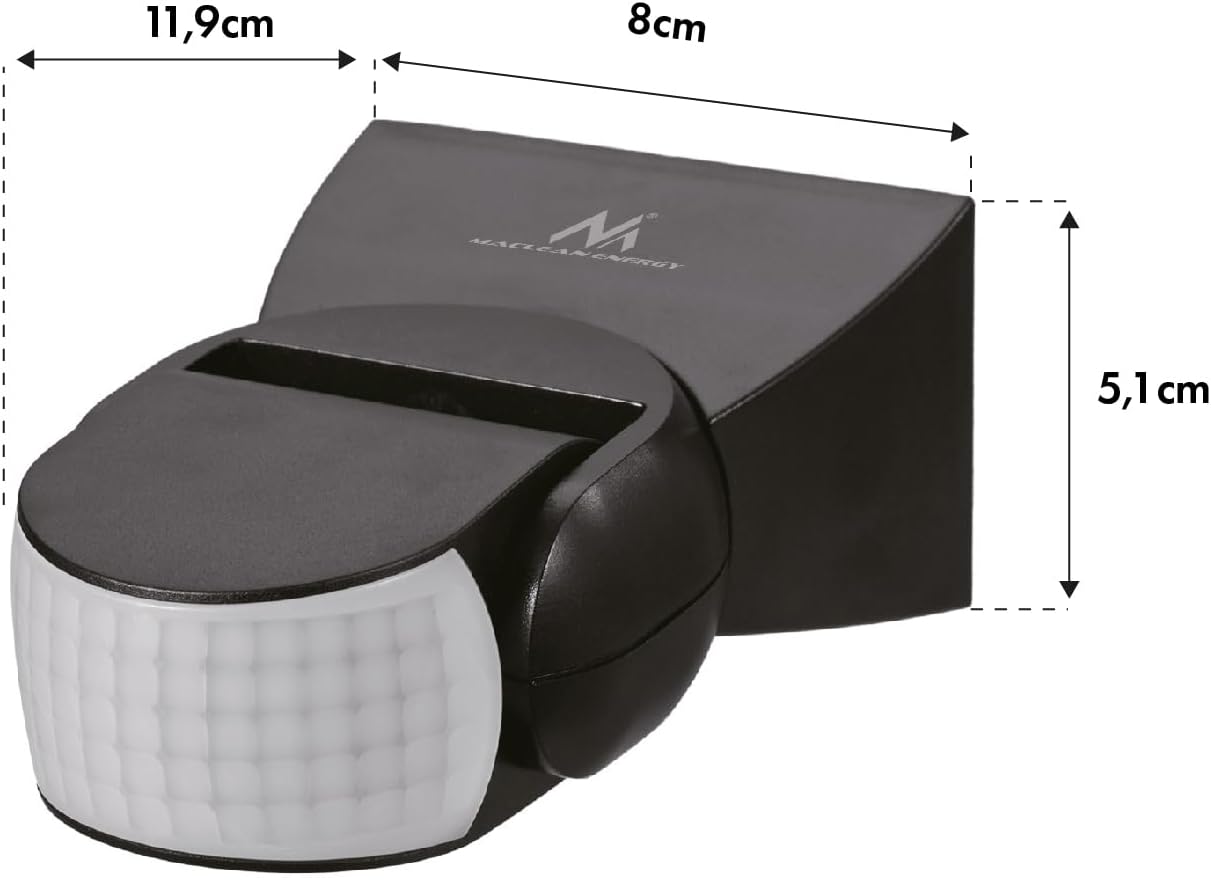
Image: Diagram showing the dimensions of the Maclean MCE241 B PIR Motion Sensor: 11.9 cm length, 8 cm width, and 5.1 cm height.
9. Warranty and Support
For warranty information and technical support, please refer to the purchase documentation or contact Maclean customer service directly. Keep your proof of purchase for warranty claims.
Manufacturer: Maclean
Contact Information: Please visit the official Maclean website or refer to the contact details provided with your product packaging for support.
Related Documents - MCE241 B
 |
Maclean MCE25 Infrared Wall Motion Sensor - Installation & User Manual Comprehensive guide for the Maclean MCE25 Infrared Wall Motion Sensor, covering installation, specifications, functions, testing, and troubleshooting. Learn how to set up and use your motion sensor for optimal lighting control and security. |
 |
Tecnoswitch SE318AN Infrared Motion Sensor - Technical Specifications and Installation Guide Comprehensive guide for the Tecnoswitch SE318AN infrared motion sensor, detailing technical specifications, installation tips, and troubleshooting. Features include adjustable time delay, lux sensitivity, and load capacity for various lighting types. |
 |
Infrared Motion Sensor User Manual User manual and technical specifications for the 360° Infrared PIR Motion Sensor. Includes installation guide, wiring, and adjustment settings for time and lux. |
 |
IS15 Infrared Motion Sensor Installation and Operation Manual Comprehensive guide for the IS15 Infrared Motion Sensor, covering specifications, installation, functions, testing, and troubleshooting for optimal performance. Learn how to set up and use your motion detector effectively. |
 |
DSC PowerSeries Neo PowerG Device ERP Quick Reference Guide Quick reference guide for DSC PowerSeries Neo compatible PowerG devices, detailing 915MHz frequency, power variability, and transmission power (ERP) in dBm for various detectors, sirens, keys, and repeaters. |
 |
Long-Range Infrared Detector Instruction Manual - HAOZEE SN9880 Instruction manual for the HAOZEE Long-Range Infrared Detector (Model SN9880). This solar-powered, outdoor motion sensor offers up to 1000m transmission range, adjustable sensitivity, and a 140° detection angle for home security. |
Ask a question about this manual
Ask about setup, troubleshooting, compatibility, parts, safety, or missing instructions. Manuals+ will review the question and use this page’s manual context to help answer it.