
YX27
User Manual: Noise Cancellation Bluetooth 4.0 Wireless Earbuds
Model: YX27 | Brand: Generic
1. Introduction
These Noise Cancellation Bluetooth 4.0 Wireless Earbuds provide a seamless audio experience with integrated noise cancellation and a built-in microphone for clear communication. Designed for comfort and portability, they feature a sleek gold finish and offer up to 6 hours of playtime on a single charge. The compact design makes them ideal for on-the-go use.
The charging case features an intuitive LCD touchable screen for easy control and monitoring of settings.

Figure 1.1: Gold Wireless Earbuds and Charging Case.
2. Safety Information
- Do not expose the earbuds or charging case to extreme temperatures, direct sunlight, or high humidity.
- Avoid dropping or subjecting the device to strong impacts.
- Keep out of reach of children and pets.
- Do not attempt to disassemble or modify the device. This will void the warranty and may cause damage.
- Use only the provided charging cable or a certified equivalent.
- Prolonged exposure to loud sounds may cause hearing damage. Adjust volume to a safe level.
- Exercise caution when using earbuds in situations requiring awareness of surroundings, such as driving or walking in traffic.
3. What's in the Box
Please check the contents of your package:
- Wireless Earbuds (Left and Right)
- Wireless Charging Case
- USB Charging Cable (Type-C)
- User Manual (This document)
- Multiple Ear Tips
4. Setup
4.1 Charging the Earbuds and Case
Before first use, fully charge the earbuds and the charging case. Place the earbuds into the charging case. Connect the USB charging cable to the Type-C port on the back of the charging case and plug the other end into a USB power adapter (not included) or a computer's USB port. The LCD screen on the case will indicate the charging status and battery levels.
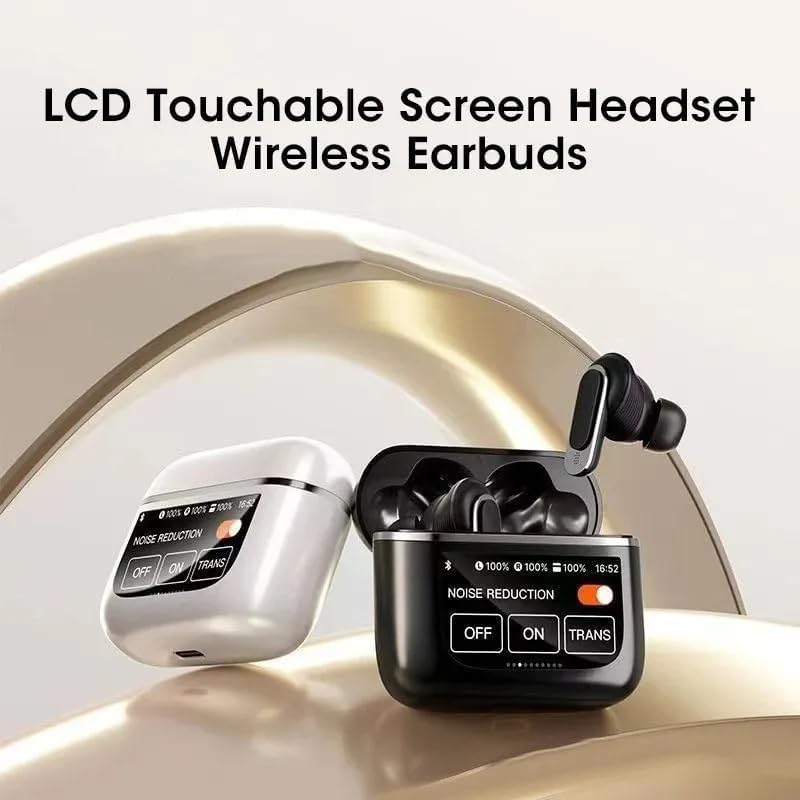
Figure 4.1: Earbud placement for charging within the case.
4.2 Bluetooth Pairing
- Ensure the earbuds are charged. Open the charging case. The earbuds will automatically enter pairing mode, indicated by a flashing light on the earbuds (specific light pattern not provided, general instruction).
- On your device (smartphone, tablet, etc.), enable Bluetooth.
- Search for available Bluetooth devices. You should see "YX27 Pro Tour" or a similar name appear in the list.
- Select "YX27 Pro Tour" to connect. Once connected, the earbuds will indicate successful pairing (e.g., a voice prompt or solid light).
- The earbuds will automatically reconnect to the last paired device when taken out of the case, if Bluetooth is enabled on the device.
4.3 Wearing the Earbuds
Select the ear tips that provide the most comfortable and secure fit for optimal sound quality and noise cancellation. Gently insert each earbud into your ear canal and twist slightly to secure them in place. The ergonomic design ensures a comfortable fit for extended wear.
5. Operating Instructions
5.1 Power On/Off
- Power On: Open the charging case, and the earbuds will automatically power on.
- Power Off: Place the earbuds back into the charging case and close the lid. They will automatically power off and begin charging.
5.2 Media Control
The earbuds feature touch controls for media playback. Specific touch gestures are typically managed via the LCD screen or predefined taps:
- Play/Pause: Single tap on either earbud.
- Next Track: Double tap on the right earbud.
- Previous Track: Double tap on the left earbud.
- Volume Up: Triple tap on the right earbud.
- Volume Down: Triple tap on the left earbud.
5.3 Call Management
- Answer/End Call: Single tap on either earbud.
- Reject Call: Press and hold either earbud for 2 seconds.
- Activate Voice Assistant: Press and hold either earbud for 3 seconds (e.g., Siri, Google Assistant).
5.4 Noise Control (ANC/Transparency) via LCD Screen
The charging case features an LCD touchable screen that allows you to manage noise control settings, battery levels, and potentially other functions. Based on the visual information, you can switch between different modes:

Figure 5.1: LCD Touchable Screen Interface for Noise Control.
- Noise Reduction ON: Activates Active Noise Cancellation (ANC) to minimize ambient sounds.
- Noise Reduction OFF: Disables noise cancellation.
- TRANS (Transparency Mode): Allows you to hear your surroundings while still enjoying your audio, useful for awareness.
Tap the corresponding option on the LCD screen to switch between these modes. The screen also displays the battery percentage for both the left and right earbuds, and the charging case.
6. Maintenance
6.1 Cleaning
- Gently wipe the earbuds and charging case with a soft, dry, lint-free cloth.
- Do not use harsh chemicals, cleaning solvents, or strong detergents.
- Remove ear tips and clean them separately with mild soap and water if necessary, ensuring they are completely dry before reattaching.
- Keep charging contacts on both earbuds and case clean and free of debris.
6.2 Storage
When not in use, store the earbuds in their charging case to protect them and keep them charged. Store the case in a cool, dry place away from direct sunlight and extreme temperatures.
7. Troubleshooting
| Problem | Possible Solution |
|---|---|
| Earbuds not pairing. |
|
| No sound or low volume. |
|
| Earbuds not charging. |
|
| Noise cancellation not working effectively. |
|
8. Specifications
| Feature | Detail |
|---|---|
| Model Name | YX27 Pro Tour |
| Connectivity Technology | Wireless (Bluetooth 4.0) |
| Noise Control | Active Noise Cancellation |
| Battery Life (Earbuds) | Up to 6 Hours |
| Bluetooth Range | 10 Meters (approx. 33 feet) |
| Frequency Range | 20 Hz - 20,000 Hz |
| Material | Silicone, Plastic |
| Color | Gold |
| Water Resistance Level | Waterproof |
| Control Type | Media Control (Touch) |
| Included Components | Wireless Charging Case |
| Item Weight | 4 ounces |
| Manufacturer | YX27 |
Note: Specifications are subject to change without notice.
9. Warranty and Support
Specific warranty information and customer support contact details are not provided in the available product data. Please refer to the product packaging or the retailer's website for warranty terms and support options.
Related documentsYX27


Ask a question about this manual
Ask about setup, troubleshooting, compatibility, parts, safety, or missing instructions. Manuals+ will review the question and use this page’s manual context to help answer it.