
Gyfimoie 745-dresser
Gyfimoie 9 Drawer Dresser with Power Outlet and LED Light
Model: 745-dresser
Product Overview
The Gyfimoie 9 Drawer Dresser is a modern storage solution designed for bedrooms and living rooms. It features integrated power outlets and USB ports for convenient device charging, along with multi-color RGB LED lighting to enhance room ambiance. This dresser offers ample storage with nine spacious drawers and additional open cubbies, all built with durable materials and smooth-gliding drawer slides for reliable daily use. An anti-tipping device is included for enhanced safety.
Setup and Assembly
Assembly of the Gyfimoie 9 Drawer Dresser is required. Please follow the detailed installation instructions provided in the packaging. All parts and accessories are conveniently coded to simplify the assembly process. Precisely aligned holes ensure accurate and efficient installation.
Key Components and Features

Figure 1: Front view of the Gyfimoie 9 Drawer Dresser in white, showcasing its sleek design, integrated LED lighting in the open cubbies, and items placed on its top surface, including a lamp, decorative objects, and a charging phone.

Figure 2: Dimensional diagram illustrating the overall measurements of the dresser (15.75"D x 62.99"W x 31.5"H) and the internal dimensions of a drawer (20.87"L x 12.80"W x 6.89"H), along with the top cubby dimensions.

Figure 3: Close-up view of the integrated charging station on the dresser's top surface, featuring two 125V/12A AC outlets and two 5V/2A USB ports, with a 4.6-foot power cord for convenient access.

Figure 4: A composite image highlighting key structural and functional aspects: a stable base design, organized storage space within the drawers, and the smooth operation of the drawers due to high-quality metal slide rails.
Ensure all components are present before beginning assembly. Refer to the numbered parts in the instruction manual for correct identification. It is recommended to assemble the dresser on a soft, clean surface to prevent scratches.
Operating Instructions
Using the Power Outlet and USB Ports
The dresser is equipped with a built-in charging station. To use it:
- Plug the dresser's main power cord into a standard wall outlet.
- Connect your electronic devices to the two 125V/12A AC outlets or the two 5V/2A USB ports located on the top surface of the dresser.
- Ensure devices are properly seated for charging.
This feature allows for convenient charging of phones, tablets, lamps, or other small electronics directly from the dresser.
Controlling the LED Lights
The integrated RGB LED lights can be controlled via a remote or a dedicated mobile application. These lights offer 16 million colors, adjustable brightness, and various dynamic modes (Flashing, Jump, Fade, etc.) at different speeds.

Figure 5: Illustration of the dresser with LED lights in both "OFF" and "ON" status, demonstrating the visual impact. A smartphone screen shows the smart app control interface for the RGB lights, highlighting options for dynamic modes, adjustable brightness, and music sync.

Figure 6: The dresser positioned beneath a wall-mounted television, with its LED lights illuminated, demonstrating its use as a media console or accent furniture in a living space.
Refer to the LED light kit's specific instructions for pairing the remote or downloading the mobile application.
Drawer Usage and Storage
The dresser features nine spacious drawers and two open storage spaces at the top. The drawers are designed with high-quality metal slide rails for smooth and quiet operation.
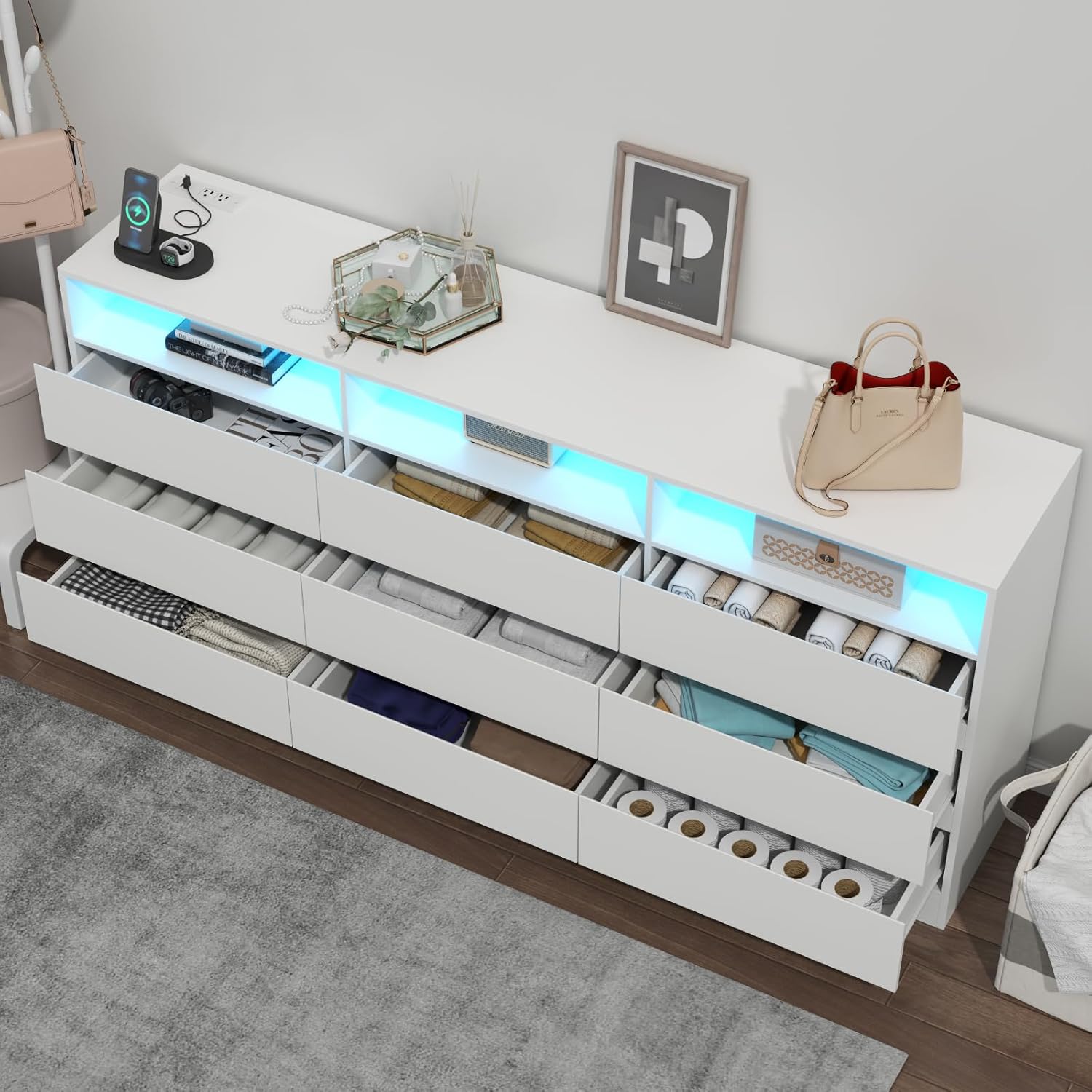
Figure 7: An aerial view of the dresser with multiple drawers pulled open, revealing neatly folded clothes and other personal items, illustrating the ample storage capacity and organizational potential.

Figure 8: The dresser integrated into a bedroom setting, positioned below a large mirror. The image highlights the functional top surface with a charging phone, decorative items, and the illuminated LED cubbies, demonstrating its versatility.
To open a drawer, gently pull it outwards. To close, push it inwards until it is fully seated. Avoid forcing drawers if they feel stiff; ensure they are properly aligned on their tracks.
Maintenance
To maintain the appearance and longevity of your Gyfimoie 9 Drawer Dresser, follow these care instructions:
- Cleaning: Wipe the dresser surfaces with a dry, soft cloth. For stubborn marks, a slightly damp cloth followed immediately by a dry cloth can be used. Avoid abrasive cleaners or harsh chemicals, as these can damage the finish.
- Spills: Immediately wipe up any spills to prevent staining or damage to the wood finish.
- Sunlight Exposure: Avoid prolonged exposure to direct sunlight, which can cause fading or discoloration over time.
- Heat and Moisture: Do not place hot items directly on the surface. Use coasters or protective pads. Keep the dresser away from excessive moisture or humidity.
- Drawer Slides: Periodically check the drawer slides for smooth operation. If they become stiff, a small amount of silicone lubricant can be applied to the tracks.
Troubleshooting
This section addresses common issues you might encounter with your dresser.
| Problem | Possible Cause | Solution |
|---|---|---|
| Drawers are stiff or do not close smoothly. | Misaligned drawer slides; debris in tracks; overloaded drawer. |
|
| LED lights are not working. | Power cord not plugged in; loose connection; remote battery dead; app not connected. |
|
| Power outlets/USB ports are not providing power. | Dresser not plugged in; circuit breaker tripped; device issue. |
|
Specifications
| Attribute | Detail |
|---|---|
| Brand | Gyfimoie |
| Model Name | 745-dresser |
| Product Dimensions | 15.75"D x 62.99"W x 31.5"H |
| Color | White |
| Item Weight | 128 Pounds |
| Number of Drawers | 9 |
| Power Outlets | 2 AC outlets (125V/12A) |
| USB Ports | 2 USB ports (5V/2A) |
| LED Lighting | Multi-color RGB with remote/APP control |
| Assembly Required | Yes |
| Special Features | Scratch Resistant, Anti-tip Device, Handle-free Design |
Official Product Video
Video 1: An official product video showcasing the Gyfimoie 9 Drawer Dresser. This video highlights key features such as the spacious dresser top, integrated AC outlets and USB ports, three storage cubbies, nine spacious drawers for various storage needs, smooth drawer slides, elegant handle-free design, reinforced base, anti-tipping kits, and customizable RGB lighting options. It also demonstrates the dresser's versatility in complementing different home styles and its availability in three colors.
Warranty and Support
For any questions or concerns regarding your Gyfimoie 9 Drawer Dresser, please do not hesitate to reach out to the manufacturer. Detailed installation instructions are provided with the product, and all parts and accessories are coded for easy identification during assembly. For further assistance, please contact Gyfimoie Direct through the platform where the product was purchased.
While specific warranty details are not provided in this manual, please refer to your purchase documentation or contact the seller directly for information on warranty coverage and claims.
Ask a question about this manual
Ask about setup, troubleshooting, compatibility, parts, safety, or missing instructions. Manuals+ will review the question and use this page’s manual context to help answer it.